The Wiert Corner – irregular stream of stuff

Jeroen W. Pluimers on .NET, C#, Delphi, databases, and personal interests

  • My badges

  • Twitter Updates

  • My Flickr Stream

  • Pages

  • All categories

  • Enter your email address to subscribe to this blog and receive notifications of new posts by email.

    Join 1,861 other subscribers

Archive for April, 2016

Team Explorer: undocking “Pending Changes” and “Build” views – via: Team Explorer Everywhere 2013 is Available – Brian Harry’s blog – Site Home – MSDN Blogs

Posted by jpluimers on 2016/04/13

Cool, wish I had known this a few years ago (:

You can now undock the Pending Changes and Builds views and position them anywhere within the workbench window.  Both views also now appear under Window > Show View, which makes it possible to add these views to another perspective.

–jeroen

via Team Explorer Everywhere 2013 is Available – Brian Harry’s blog – Site Home – MSDN Blogs.

Posted in .NET, Development, Software Development, Visual Studio 2013, Visual Studio 2014, Visual Studio and tools | Leave a Comment »

Programming is Gardening, not Engineering

Posted by jpluimers on 2016/04/12

Wow, I wish I had read this a long time ago, like in 2003 when it was written:

Pragmatic Programmers Andy Hunt and Dave Thomas talk with Bill Venners about a gardening metaphor for software development, the reasons coding is not mechanical,and the stratification of development jobs.

–jeroen

Source: Programming is Gardening, not Engineering

Posted in Agile, Development, Software Development | Leave a Comment »

MegaRAID “Mark Drive as Missing” and “Make Drive Offline” do not always work: your bay needs to be a hotplug one.

Posted by jpluimers on 2016/04/12

Had a hard time finding out what to do to remove a failing drive as the MegaRAID “Mark Drive as Missing” and “Make Drive Offline” didn’t give any results.

So I did as Kirus did: just pull out the from the RAID enclosure drive. Apparently the Sharkoon QuickPort Intern 3-bay isn’t a hotplug one.

–jeroen

Posted in Power User, RAID | Leave a Comment »

Windows 10 1511 update broke the Hyper-V networking – Fix network connection issues

Posted by jpluimers on 2016/04/11

After updating a Windows 8.1 machine that had Hyper-V running, none of the VMs could access any networking: Windows 10 build 1511 completely broke the vSwitch infrastructure.

This is what I had to do:

  1. Reinstall network devices using netcfg –d command (Source: Fix network connection issues – Windows Help)
  2. Reboot host
  3. Create a new vSwitch in Hyper-V (as the old one was gone)
  4. Remove the network adapters of the VMs (they were in a limbo state)
  5. Add new network adapters to the VMs connecting them to the correct vSwitch.

This was the umpteenth time Hyper-V let me down, so in the future I’m back to VMware or Virtual Box.

Windows 10 also broke Everything Search Engine and UBCD4Win. I could not get UBCD4Win to work again, but a reinstall of Everything made it to work again.

And Windows 10 moved a lot of things away from the Control Panel, which means that things that basically worked for more than a decade are now gone. For instance, Windows updates now must be run with a shortcut like this:

%LocalAppData%\Packages\windows.immersivecontrolpanel_cw5n1h2txyewy\LocalState\Indexed\Settings\nl-NL\AAA_SystemSettings_MusUpdate_UpdateActionButton.settingcontent-ms

Note that’s for a DUTCH system. For a US-English system of course the shortcut is different:

%LocalAppData%\Packages\windows.immersivecontrolpanel_cw5n1h2txyewy\LocalState\Indexed\Settings\en-US\AAA_SystemSettings_MusUpdate_UpdateActionButton.settingcontent-ms

This feels like “1998 wants its VBA translated languages back”.

Of course I could get around this by building a table translatingto a text language code from the numeric language code* from the below command, but that’s not the point: Windows 10 makes life harder.

reg query “hklm\system\controlset001\control\nls\language” /v Installlanguage
returns codes like 0407, 0409, 040D, 0413, etc.

–jeroen

*: Heck if Microsoft cannot even update their 2002 Table of Language Culture Names, Codes, and ISO Values Method [C++] and has trouble keeping the various .NET version pages updated**, how could I?

**: these are the only .NET versions the table is documented

Posted in Everything by VoidTools, Hyper-V, Power User, Virtualization, Windows | 1 Comment »

DVCS for your Linux etc configuration

Posted by jpluimers on 2016/04/11

Manually you can do it like this: How To Use Git to Manage your User Configuration Files on a Linux VPS | DigitalOcean.

But there is also etckeeper. There is even a set of manual installation steps for opensuse: backup – etckeeper for opensuse – bash script install and configure – Unix & Linux Stack Exchange.

Three important etckeeper gotchas with powerful scripts like pre-commit /etc/etckeeper/pre-commit.d:

  • Ensure you give them executable permissions like chmod 755.
  • Ensure they are valid sh scripts.
  • Do not give them the .sh extension:
    • fails: /etc/etckeeper/pre-commit.d/10rsync-var-lib-named-master
    • works: /etc/etckeeper/pre-commit.d/10rsync-var-lib-named-master.sh

–jeroen

via:

Posted in *nix, *nix-tools, etckeeper, Linux, openSuSE, Power User, SuSE Linux | Leave a Comment »

On Nintendo’s choice of the 6502 for the Famicom, later to be the NES, and the BCD patent.

Posted by jpluimers on 2016/04/10

Very cool This week, a look at Nintendo’s choice of the 6502 for the Famicom, later to be the NES.

It skims on the BCD patent, which they covered before in more depth.

–jeroen

Posted in 6502, History | Leave a Comment »

Het verbond van verzekeraars vind de MobielSchadeMelden.nl een waardige vervanging voor een niet installerende/werkende App

Posted by jpluimers on 2016/04/08

De MobielSchadeMelden App op Android is niet echt koek en ei. Voor sommige mensen werkt het niet omdat de app denkt dat er geen internet verbindingen is, voor anderen installeert het niet eens.

De suggestie: gebruik de MobielSchadeMelden.nl site (die eigenlijk begint op https://www.mobielschademelden.nl/#/forms/gettingstarted of voor de demo-site https://demo.abzportal.nl/flusso//#/landingspagina en https://demo.abzportal.nl/flusso//#/forms/gettingstarted)

Als die site zo goed is, waarom dan geld van verzekerden uitgeven om een App te bouwen?

–jeroen

Read the rest of this entry »

Posted in Android Devices, Power User | Leave a Comment »

SATA controller links for ZFS and ESXi

Posted by jpluimers on 2016/04/08

Some useful links:

M1015 is still used a lot, but there are many choices for SATA/SAS HBAs that are compatible with ESXi and ZFS.

SATA passthrough for many things seem to have stopped with ESXi 5.5 (5.1 and below should work). Some links related to that:

IDE and USB passthrough of CD/DVD devices seem to be fine though:

OEM adapters:

There are many SFF-8088 to SFF-8087 adapters.

–jeroen

via

Posted in ESXi5, ESXi5.1, ESXi5.5, Power User, Virtualization, VMware, VMware ESXi | Leave a Comment »

License for MICROSOFT VISUAL STUDIO COMMUNITY 2015 (which includes Xamarin use)

Posted by jpluimers on 2016/04/07

Wow, Microsoft has come a long way:

MICROSOFT VISUAL STUDIO COMMUNITY 2015


These license terms are an agreement between Microsoft Corporation (or based on where you live, one of its affiliates) and you. They apply to the software named above. The terms also apply to any Microsoft services or updates for the software, except to the extent those have different terms.


IF YOU COMPLY WITH THESE LICENSE TERMS, YOU HAVE THE RIGHTS BELOW.

  1. INSTALLATION AND USE RIGHTS.
    1. Individual license. If you are an individual working on your own applications to sell or for any other purpose, you may use the software to develop and test those applications.
    2. Organization licenses. If you are an organization, your users may use the software as follows:
      • Any number of your users may use the software to develop and test your applications released under Open Source Initiative (OSI) approved open source software licenses.
      • Any number of your users may use the software to develop and test extensions to Visual Studio.
      • Any number of your users may use the software to develop and test your applications as part of online or in person classroom training and education, or for performing academic research.
      • If none of the above apply, and you are also not an enterprise (defined below), then up to 5 of your individual users can use the software concurrently to develop and test your applications.
      • If you are an enterprise, your employees and contractors may not use the software to develop or test your applications, except for open source and education purposes as permitted above. An “enterprise” is any organization and its affiliates who collectively have either (a) more than 250 PCs or users or (b) more than one million US dollars (or the equivalent in other currencies) in annual revenues, and “affiliates” means those entities that control (via majority ownership), are controlled by, or are under common control with an organization.
    3. Demo use. The uses permitted above include use of the software in demonstrating your applications.

The license continues, but the above are the most important aspect to verify if you can use Visual Studio 2015 under that license.

Source: MICROSOFT VISUAL STUDIO COMMUNITY 2015

Via Danial Rail and Mason Wheeler in this thread.

–jeroen

Posted in .NET, C#, Development, Software Development, VB.NET, Visual Studio 2015, Visual Studio and tools | 1 Comment »

The Simple, Elegant Algorithm That Makes Google Maps Possible | Motherboard

Posted by jpluimers on 2016/04/07

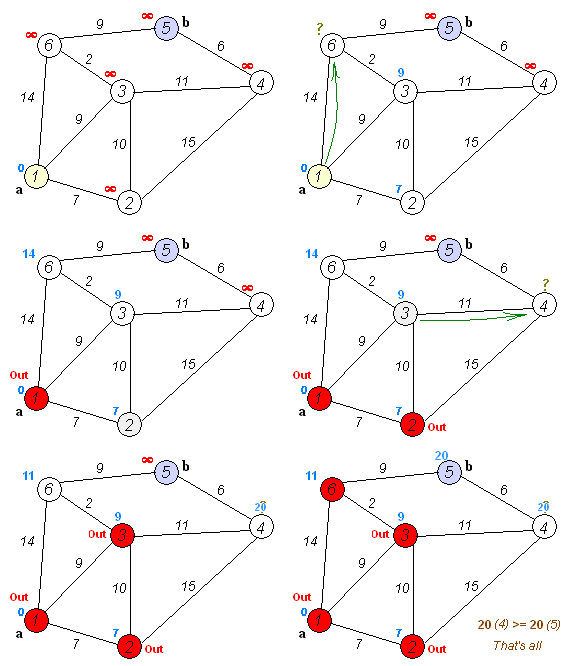
Very interesting read and nice GIF showing how the algorithm works: The Simple, Elegant Algorithm That Makes Google Maps Possible | Motherboard.

Dijkstra_Animation.gif   

Second image: ​Sub83/Wiki

–jeroen

Posted in Algorithms, Development, Software Development | 1 Comment »