


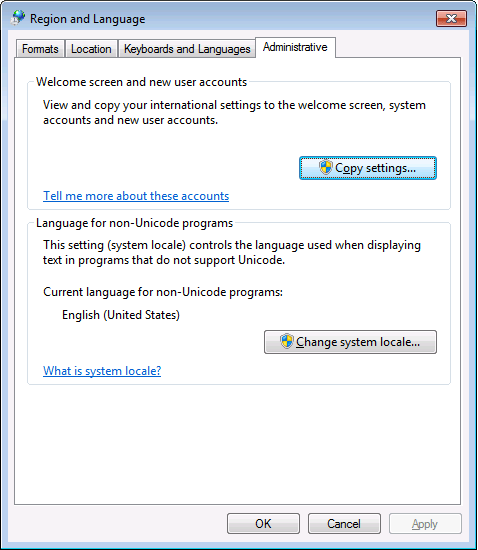
PowerShell 4.0 is madly in love with “English (United States)”
A long time ago I started writing up my blog post like this in March 2015 when I bumped into this the first time when upgrading from PowerShell 2 to PowerShell 4:
It seems there is no real workaround:
- [No wayback: Microsoft Connect got ditched] Powershell 4 console font issue | Microsoft Connect.
- [Wayback] Cannot change powershell default font to Lucida Console – Super User.
- [No wayback: Microsoft Connect got ditched] Console host does not allow font adjustment in V3 | Microsoft Connect.
Good and not so good news: after reading the below linked posts, this is what works:
- PowerShell 4 and up works fine with any [Wayback] Lucida Console size (including 12) and boldness
- only when the “Language for non-Unicode programs” is set to “English (United States)”.
- PowerShell 4 works fine with [Wayback] Consolas on any size and boldness
- for any “Language for non-Unicode programs”
So if you’re like me and switch between “Dutch (Netherlands)” and “English (Ireland)” a lot (both use the EURO as currency, but have distinct enough other locale settings to cover a lot of European stuff) then you need to get used to the Consolas font.
Source:
- [Wayback] Setting the font of a PowerShell console to Lucida Console won’t work | Emil’s Lost & Found Archive
- [Wayback] Unable to set the default PowerShell font to Lucida Console – markwilson.it
Edit 20210930: a possible solution
I need to fire up some old systems having PowerShell v3 or v4 on them to test the below possible solution.


 The Wiert Corner - irregular stream of stuff