The Wiert Corner – irregular stream of stuff

Jeroen W. Pluimers on .NET, C#, Delphi, databases, and personal interests

  • My badges

  • Twitter Updates

  • My Flickr Stream

  • Pages

  • All categories

  • Enter your email address to subscribe to this blog and receive notifications of new posts by email.

    Join 1,862 other subscribers

Archive for 2016

Blast from the past Windows 2003 Service Pack 1..2 era hotpatching

Posted by jpluimers on 2016/02/12

For a short while (from Windows 2003 Service Pack 1 till Windows 2003 service pack 2) some updates used Windows Hotpatching.

Some links on the how/why and how to abuse it:

All because of this little post:

Hier ein Einblick in die Denkweise von Leuten, die Software auf CD-ROM verteilen und bei denen Release Zyklen in Monaten und nicht Minuten gemessen werd… – Kristian Köhntopp – Google+

–jeroen


Posted in C, Development, History, Software Development, The Old New Thing, Windows Development | Leave a Comment »

Inkscape Bezier Tutorial 1 and 2 – YouTube

Posted by jpluimers on 2016/02/12

Interesting Inkscape tutorials:

–jeroen

Posted in Power User | Leave a Comment »

Het Achterhuis (Anne Frank) – Wikisource – wayback machine

Posted by jpluimers on 2016/02/12

Wayback machine copy of Het Achterhuis (Anne Frank) – Wikisource

Posted in Uncategorized | Leave a Comment »

The Famous Photo of Chernobyl’s Most Dangerous Radioactive Material Was a Selfie | Atlas Obscura

Posted by jpluimers on 2016/02/11

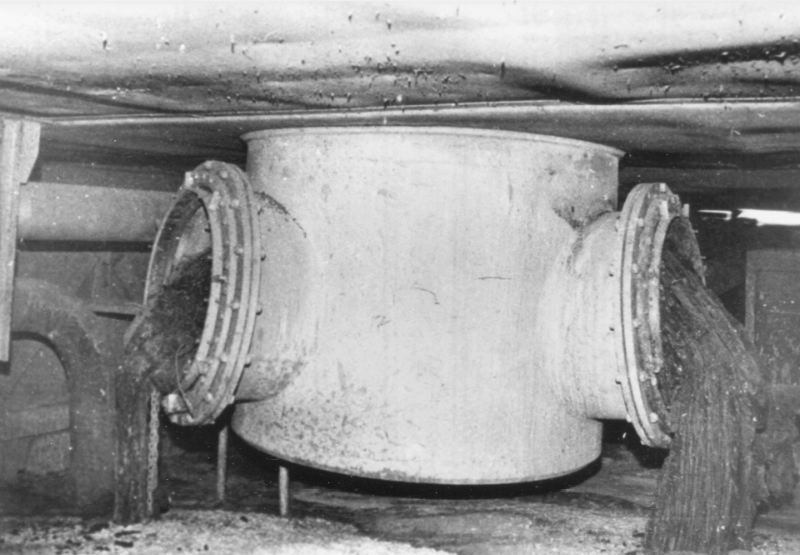
Photos from source: The Famous Photo of Chernobyl’s Most Dangerous Radioactive Material Was a Selfie | Atlas Obscura

Corium elephant foot selfie:

Posted in History | Leave a Comment »

Translation Memory Tools Tried and Found Wanting – Oli’s Blog

Posted by jpluimers on 2016/02/11

Thanks Oliver for sumarising this: Translation Memory Tools Tried and Found Wanting – Oli’s Blog

His conclusion support why I see all my clients building their own translation tooling: no 3rd party tool really supports the full process well, especially not the translation memory parts.

–jeroen

Posted in Development, internatiolanization (i18n) and localization (l10), Software Development | Leave a Comment »

You find a lot of stuff when you are reorganizing your office #TP6 Library…

Posted by jpluimers on 2016/02/11

You find a lot of stuff when you are reorganizing your office #TP6  Library….

I must clean out my closets as well. I think I have similar stuff lying around.

–jeroen

Posted in Delphi, Development, History, Software Development, Turbo Pascal | Leave a Comment »

Fix for Visual Studio – Resharper Alt Enter not working – Stack Overflow

Posted by jpluimers on 2016/02/10

Thanks User Josh Close – Stack Overflow. for answering the below on Stack Overflow: it got my Resharper Alt-Enter key workign again.

Re-apply Visual Studio keyboard scheme:

  • (VS2013 latest ReSharper)
    • ReSharper > Options > Environment > Keyboard & Menus > ReSharper Platform keyboard scheme: Visual Studio > Apply Scheme > Save.
    • This will reset the shortcut keys for ReSharper.
  • (older versions)
    • ReSharper > Options > Environment > General > Visual Studio Integration > Apply

–jeroen

via: visual studio – Resharper Alt Enter not working – Stack Overflow.

Posted in .NET, C#, Development, Keyboards and Keyboard Shortcuts, Power User, Software Development, Visual Studio 2013, Visual Studio and tools | Leave a Comment »

Orthogonality and the DRY Principle

Posted by jpluimers on 2016/02/09

Interview with by Andrew Hunt and David Thomas, the authors of The Pragmatic Programmer: From Journeyman to Master.

Many interesting quotes including:

Most people take DRY to mean you shouldn’t duplicate code. That’s not its intention. The idea behind DRY is far grander than that.

–jeroen

via Orthogonality and the DRY Principle.

Posted in Agile, Development, DRY, Software Development | Leave a Comment »

Ensure DeployIT can execute commands on your Windows machine

Posted by jpluimers on 2016/02/08

DeployIT (now XL-Deploy) uses a Remote Plugin to connect to other systems. When conncting to Windows systems, it requires WinRM to be configured on the target.

You can either run winrm qc or winrm quickconfig (they are equivalent), then answer y to the question.

C:\temp>winrm quickconfig
WinRM already is set up to receive requests on this machine.
WinRM is not set up to allow remote access to this machine for management.
The following changes must be made:

Create a WinRM listener on HTTP://* to accept WS-Man requests to any IP on this
machine.

Make these changes [y/n]? y

WinRM has been updated for remote management.

Created a WinRM listener on HTTP://* to accept WS-Man requests to any IP on this
 machine.

More detailed instructions are in the overthere/README.md.

–jeroen

via:

Posted in Console (command prompt window), Power User, Windows | 2 Comments »

v1.7.1.177 | Continua CI

Posted by jpluimers on 2016/02/07

Continua CI 1.7.1 Version History

v1.7.1.177

January 28th, 2016

Changes

  • Update: NUnit Action now includes option to install command line via NuGet.
  • Update: Set Variable action now to allows setting build variables copied from project and application variables.
  • Update: Now including Inconclusive and “Not Run” tests in the unit tests tool tip on Configuration view.
  • Update: PlasticSCM repository updated to deal with changes to the command line in recent versions.
  • Fix: Ensure that XUnit unit test failures always include a message even when test result type is missing.
  • Fix: Issue where unit test totals would be calculated incorrectly when there was more than one unit test action in a stage, some tests were shelved and the second unit test action included more than 1000 tests.
  • Fix: Issue with missing TFS assembly when using the 2005 client version for a TFS repository.
  • Fix: Issue where Stop button was displayed on some pages when user did not have Build.Stop permissions.
  • Update: Now suppressing warning message when unit test name is truncated.

Note : You will need to update your agents after installing this build

Source: Version 1.7.1 History | Continua CI

Posted in Uncategorized | Leave a Comment »