The Wiert Corner – irregular stream of stuff

Jeroen W. Pluimers on .NET, C#, Delphi, databases, and personal interests

  • My badges

  • Twitter Updates

  • My Flickr Stream

  • Pages

  • All categories

  • Enter your email address to subscribe to this blog and receive notifications of new posts by email.

    Join 1,860 other subscribers

Archive for June, 2018

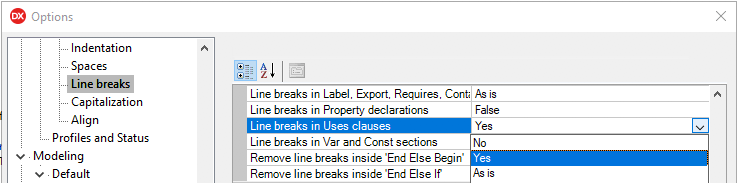
Delphi: formatting uses lists to each unit is on a separate line

Posted by jpluimers on 2018/06/29

Delphi formatter setting, so I can manually arrange uses lists:

–jeroen

Uwe Raabe commented on G+:

Also available in MMX Code Explorer in the settings dialog: Pascal -Sorting – Format unit uses clauses – “Each unit on a new line”.
If you prefer the standard setting and spare the other for special purpose, there is “Format Uses – Alternate” in the context menu. Perhaps give it a decent shortcut for quick access.

Bernd Ott in the same thread:

Important because scm. Less merge trouble. Only the last semicolon in last row is always stupid.

https://plus.google.com/+JeroenPluimers/posts/RfrCkDAd95G

Posted in Conference Topics, Conferences, Delphi, Development, Event, Software Development | 4 Comments »

VM disk sizes

Posted by jpluimers on 2018/06/29

I forgot to schedule the post below. It is still relevant if you create a machine with lots of Delphi versions on it.

Read the rest of this entry »

Posted in .NET, .NET 2.0, .NET 3.0, .NET 3.5, Database Development, Delphi, Delphi 2007, Delphi XE, Delphi XE2, Delphi XE3, Delphi XE4, Delphi XE5, Development, Firebird, InterBase, Power User, Software Development, Windows, Windows 8 | 2 Comments »

When you cannot RDP to a target because of “CredSSP-encryption Oracle remediation”: apply your target security patches.

Posted by jpluimers on 2018/06/29

If you get the below error, then your RDP target server needs to be patched.

You can choose to stay vulnerable and modify your policy or registry settings as explained in the first linked article below: that is a temporary “workaround” which I do not recommend. Please update your RDP target servers in stead.

English:

[Window Title]
Remote Desktop Connection

[Content]
An authentication error has occurred.
The function requested is not supported

Remote computer: rdp.example.org
This could be due to CredSSP-encryption Oracle remediation.
For more information, see https://go.microsoft.com/fwlink/?linkid=866660

[OK]

Read the rest of this entry »

Posted in Power User, Windows, Windows 10, Windows 7, Windows 8, Windows 8.1, Windows 9, Windows Server 2008, Windows Server 2008 R2, Windows Server 2012, Windows Server 2012 R2, Windows Server 2016 | Leave a Comment »

Wer kann mir erklären: Warum braucht ein Windows10-Update heute immer noch me…

Posted by jpluimers on 2018/06/29

Some historic perspective (although on Windows since quite a long time, you can rename files before replacing them: that works very well):

[WayBack] Wer kann mir erklären: Warum braucht ein Windows10-Update heute immer noch mehrere Reboots? – Kristian Köhntopp – Google+

Zu MS-DOS Zeiten gab es kein Netz und kein Multiprocessing. Als Netz und Fileshares dann dazu kamen, funktionierten viele Anwendungen nicht korrekt.

Zu dieser Zeit hat Microsoft die Entscheidung getroffen, vom Betriebssystem aus Mandatory File Locking für geöffnete Dateien zu implementieren, es sei denn, ein Prozeß stellt das von sich aus anders ein.

Mandatory File Locking heißt in diesem Fall, daß nix und niemand eine Datei anfassen kann, die offen ist, Ein laufendes Executeable, eine DLL oder ein Logfile sind aber immer offen.

Daher gibt es einen Reboot Hook, mit dem ein Updater Dateiersetzungen für einen System Neustart hinterlegen kann. Beim Reboot werden die Dateien dann schnell ausgetauscht bevor sie geöffnet werden.

–jeroen

Posted in History, Power User, Windows | Leave a Comment »

Solving “HHC6003: Error: The file Itircl.dll has not been registered correctly” – “Microsoft HTML Help Compiler 4.74.8702”

Posted by jpluimers on 2018/06/29

When generating the Spring4D documentation at https://spring4d.4delphi.com/ using Documentation Insight by DevJet, I got this error:

HHC6003: Error: The file Itircl.dll has not been registered correctly.
Microsoft HTML Help Compiler 4.74.8702

Solving it turned out easy:

regsvr32 "%ProgramFiles(x86)%\Documentation Insight 3\Compilers\CHM\itcc.dll"

I got there via [WayBackHTML Help FAQ – Wiki.HelpMVP.com:

“HHC6003: The file itircl.dll has not been registered correctly”


This error effects only a small number of users. A HH component (c:\windows\system\itcc.dll) did not get installed or registered correctly. If not installed get the DLL from another PC containing Workshop. To register the DLL run
regsvr32 c:\windows\system\itcc.dll (this path may be different for your PC – eg. c:\winnnt\system32).

This fix was originally reported by MVP David Liske: [WayBackhttp://www.mvps.org/htmlhelpcenter/itircl.htm

–jeroen

Posted in Power User, Windows | Leave a Comment »

Delphi still doesn’t raise overflow exception on Int64 multiplication…

Posted by jpluimers on 2018/06/28

Thanks to Stefan Glienke for pointing me at the below patch for [WayBack] Why doesn’t raise overflow exception on multiplication example or how to detect in this case?{$RANGECHECKS ON} {$OVERFLOWCHECKS ON}varvalue: Int64;… – Rafael Dipold – Google+.

It’s basically an issue in __llmulo that has been documented but not solved since “forever”:

some people “some while ago” reported this and even posted a solution: [WayBackhttp://qc.embarcadero.com/wc/qcmain.aspx?d=34049

And there it is again: [WayBackhttp://qc.embarcadero.com/wc/qcmain.aspx?d=119146

And most recently: https://quality.embarcadero.com/browse/RSP-16617

FWIW here is a runtime patch that corrects this (using the version posted in QC#119146): https://pastebin.com/jzLgYeqm

The bug tracking of the Delphi team is so bad, that some of the reports actually mark this issue “As Designed” like in [WayBackhttp://qc.embarcadero.com/wc/qcmain.aspx?d=118287

The below patch requires rights to call [WayBackWriteProcessMemory as documented in [WayBackHow to Read and Write Other Process Memory.

–jeroen

Patch at [WayBack] https://pastebin.com/jzLgYeqm

Read the rest of this entry »

Posted in Delphi, Development, QC, Software Development | 3 Comments »

Some notes on what errors you get when using a gds32.dll not matching your Firebird or InterBase

Posted by jpluimers on 2018/06/28

These were some of the errors and error fragments I got when I had the wrong gds32.dll or wrong Database engine:

  • file C:\PROGRAMDATA\EMBARCADERO\INTERBASE\GDS_DB\EXAMPLES\DATABASE\EMPLOYEE.GDB is not a valid database
  • I/O error during "CreateFile (open)" operation for file "C:\PROGRAMDATA\EMBARCADERO\INTERBASE\GDS_DB\EXAMPLES\DATABASE\EMPLOYEE.GDB"
  • connection rejected by remote interface

Since I used IBX, they were all inside EInterbaseError  exception instances.

The bad thing: with IBX you cannot specify your gds32.dll: you have to ensure the right version/architecture is loaded by your executable.

–jeroen

via: Source: Delphi, IBX and the Turkish I problem

Posted in Database Development, Development, Firebird, InterBase | Leave a Comment »

Database Identifiers | Microsoft Docs

Posted by jpluimers on 2018/06/27

As I needed to know which other characters besides $ are allowed in MSSQL identifiers: [WayBackDatabase Identifiers | Microsoft Docs

The 2017 specs:

There are two classes of identifiers:

Regular identifiers
Comply with the rules for the format of identifiers. Regular identifiers are not delimited when they are used in Transact-SQL statements.

SELECT *  
FROM TableX  
WHERE KeyCol = 124  

Delimited identifiers
Are enclosed in double quotation marks (“) or brackets ([ ]). Identifiers that comply with the rules for the format of identifiers might not be delimited. For example:

SELECT *  
FROM [TableX]         --Delimiter is optional.  
WHERE [KeyCol] = 124  --Delimiter is optional.  

Identifiers that do not comply with all the rules for identifiers must be delimited in a Transact-SQL statement. For example:

SELECT *  
FROM [My Table]      --Identifier contains a space and uses a reserved keyword.  
WHERE [order] = 10   --Identifier is a reserved keyword.  

Both regular and delimited identifiers must contain from 1 through 128 characters. For local temporary tables, the identifier can have a maximum of 116 characters.

Rules for Regular Identifiers

The names of variables, functions, and stored procedures must comply with the following rules for Transact-SQL identifiers.

  1. The first character must be one of the following:
    • A letter as defined by the Unicode Standard 3.2. The Unicode definition of letters includes Latin characters from a through z, from A through Z, and also letter characters from other languages.
    • The underscore (_), at sign (@), or number sign (#).Certain symbols at the beginning of an identifier have special meaning in SQL Server. A regular identifier that starts with the at sign always denotes a local variable or parameter and cannot be used as the name of any other type of object. An identifier that starts with a number sign denotes a temporary table or procedure. An identifier that starts with double number signs (##) denotes a global temporary object. Although the number sign or double number sign characters can be used to begin the names of other types of objects, we do not recommend this practice.

      Some Transact-SQL functions have names that start with double at signs (@@). To avoid confusion with these functions, you should not use names that start with @@.

  2. Subsequent characters can include the following:
    • Letters as defined in the Unicode Standard 3.2.
    • Decimal numbers from either Basic Latin or other national scripts.
    • The at sign, dollar sign ($), number sign, or underscore.
  3. The identifier must not be a Transact-SQL reserved word. SQL Server reserves both the uppercase and lowercase versions of reserved words. When identifiers are used in Transact-SQL statements, the identifiers that do not comply with these rules must be delimited by double quotation marks or brackets. The words that are reserved depend on the database compatibility level. This level can be set by using the ALTER DATABASE statement.
  4. Embedded spaces or special characters are not allowed.
  5. Supplementary characters are not allowed.When identifiers are used in Transact-SQL statements, the identifiers that do not comply with these rules must be delimited by double quotation marks or brackets.

Note

Some rules for the format of regular identifiers depend on the database compatibility level. This level can be set by using ALTER DATABASE.

Related: [WayBack] ALTER DATABASE Compatibility Level (Transact-SQL) | Microsoft Docs

–jeroen

Posted in Database Development, Development, SQL Server | Leave a Comment »

MySQL – there now seem to be replication mechanisms that work

Posted by jpluimers on 2018/06/27

Reminder to self, as yet another client insisted this was possible, but in the past it wasn’t reliably possible, some links from Kristian Köhntopp:

–jeroen

Posted in Database Development, Development, MySQL | 2 Comments »

Stop Delphi generating .res files for unit test applications

Posted by jpluimers on 2018/06/27

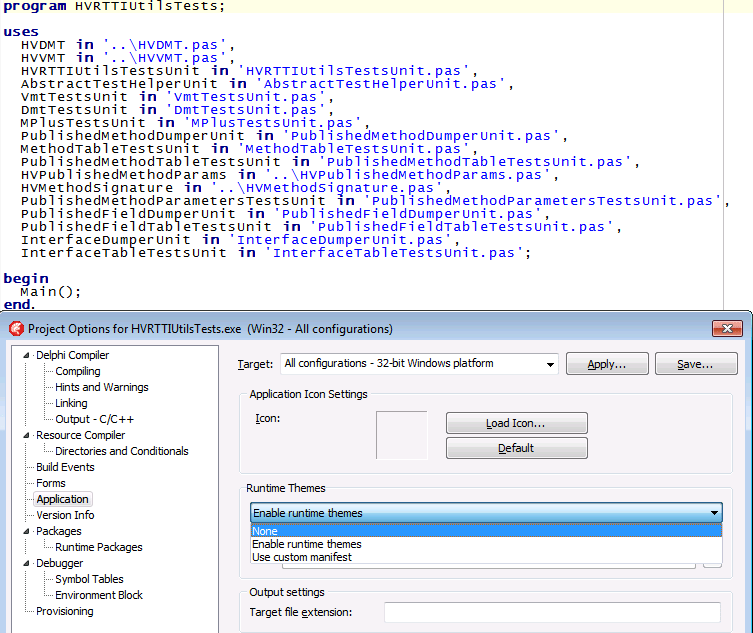
By default, Delphi always generates .res resource files when compiling a project.

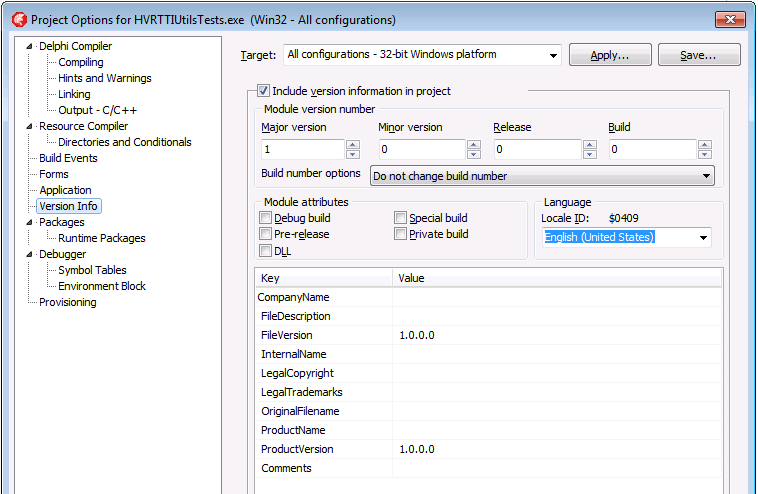
There are two things you need to change to turn this off; the first is on by default, the second could be your own change:

  1. Remove the {$R *.res} from your .dpr file and turn “Runtime Themes” to “None” from the default “Enable runtime themes” under “Target” settings “All configurations – 32-bit Windows platform” and “All configurations – 64-bit Windows platform”
  2. Disable “Include version information in project” under “Target” settings “All configurations – 32-bit Windows platform” and “All configurations – 64-bit Windows platform”

Read the rest of this entry »

Posted in Delphi, Development, Software Development | 1 Comment »