The Wiert Corner – irregular stream of stuff

Jeroen W. Pluimers on .NET, C#, Delphi, databases, and personal interests

  • My badges

  • Twitter Updates

  • My Flickr Stream

  • Pages

  • All categories

  • Enter your email address to subscribe to this blog and receive notifications of new posts by email.

    Join 1,860 other subscribers

Archive for May, 2019

Some links on ShellNew: a user local place (registry and file system) to have Visual Studio templates for Blank Solution files

Posted by jpluimers on 2019/05/14

Some systems to not have a %windir%\ShellNew directory, so here are some links and observations on ShellNew entries in the registry.

Originally, I needed this for Creating a blank Visual Studio solution without a directory, and sln Format Version numbers but found a default installation did not have a %windir%\ShellNew directory.

A similar Windows 8.1 system had these files there:

  • EXCEL12.XLSX
  • MSPUB.PUB

On the Windows 10 system, these files were in C:\Program Files (x86)\Microsoft Office\root\vfs\Windows\SHELLNEW, so apparently, Windows 10 has moved more into a Virtual File System structure.

Machine wide registered extensions

The key HKEY_CLASSES_ROOT\.zip\CompressedFolder\ShellNew on both systems has the below values, indicating you do not need a file template: a binary template in the registry suffices:

  • Data having REG_BINARY content of a 22-byte empty .zip file
  • ItemName having a REG_EXPAND_SZ content pointing to @%SystemRoot%\system32\zipfldr.dll,-10194

The key HKEY_CLASSES_ROOT\.rtf\ShellNew on both systems has the below values, indicating you do not need a file template: a text template in the registry suffices:

  • Data having REG_SZ content of a 7 character file content {\rtf1}
  • ItemName having a REG_EXPAND_SZ content pointing to @%ProgramFiles%\Windows NT\Accessories\WORDPAD.EXE,-213

The key HKEY_CLASSES_ROOT\.bmp\ShellNew on both systems has the below values, indicating you do not need a file template: a zero byte template in the registry suffices:

  • NullFile having an empty REG_SZ
  • ItemName having a REG_EXPAND_SZ content pointing to @%systemroot%\system32\mspaint.exe,-59414

User wide registered extensions

At HKEY_CURRENT_USER\Software\Microsoft\Windows\CurrentVersion\Explorer\Shell Folders, is a value named Templates having an absolute path which can be expanded from %AppData%\Microsoft\Windows\Templates.

That directory was empty, but it is connected to the HKEY_CURRENT_USER\Software\Classes counterpart of HKEY_CLASSES_ROOT (the latter is an alias for HKEY_LOCAL_MACHINE\SOFTWARE\Classes).

So in stead of putting template files in %WinDir%\ShellNew plus registering them underHKEY_CLASSES_ROOT, you can put them in %AppData%\Microsoft\Windows\Templates and register them under HKEY_CURRENT_USER\Software\Classes.

Empty Visual Studio solution files for the current user

Since people have requested empty solution files to be created without creating a directory for a long time ([WayBack] create solution without folder – Visual Studio) and Visual Studio still does not allow you to do that, I have amended the %WinDir%\ShellNew based solution I created some 7 years ago at  Creating a blank Visual Studio solution without a directory, and sln Format Version numbers, to a current user based one:

[WayBack] jeroenp / wiert.me / commit / 01e4430712a6 — Bitbucket:

Amend empty Visual Studio templates to support%AppData%\Microsoft\Windows\Templates referenced from HKEY_CURRENT_USER\Software\Classes

Future

I might be able to morph this into a registry-only solution by using REG_MULTI_SZtyped values containing the actual .sln template content as multi-line strings separated by zero bytes. Some starting links on this for future reading:

Related

–jeroen

Posted in Power User, Windows, Windows Explorer / Windows Shell | Leave a Comment »

On the Effectiveness of Static Typing in Detecting Public Bugs

Posted by jpluimers on 2019/05/14

Cool research paper from a while back but still soo relevant:

The project page for an ICSE’17 paper, To Type or Not to Type: Quantifying Detectable Bugs for JavaScript

JavaScript is also a dynamically typed language for which static type systems, notably Facebook’s Flow and Microsoft’s TypeScript, have been written. What benefits do these static type systems provide?

Source: [Archive.isOn the Effectiveness of Static Typing in Detecting Public Bugs


Other saved links:

–jeroen

via: [WayBack/Archive.is] Slashdot drew my attention to this ressearch … http://ttendency.cs.ucl.ac.uk/projects/type_study/ An argument for languages like Delphi. – Roland Kossow – Google+

Posted in Development, JavaScript/ECMAScript, Scripting, Software Development, TypeScript | Leave a Comment »

if statement – How to ask for batch file user input with a timeout – Stack Overflow

Posted by jpluimers on 2019/05/14

The trick is to use the choice command; see [WayBackif statement – How to ask for batch file user input with a timeout – Stack Overflow

–jeroen

Posted in Batch-Files, Development, Microsoft Surface on Windows 7, Power User, Scripting, Software Development, Windows, Windows 10, Windows 7, Windows 8, Windows 8.1, Windows 9, Windows Server 2000, Windows Server 2003, Windows Server 2003 R2, Windows Server 2008, Windows Server 2008 R2, Windows Server 2012, Windows Server 2012 R2, Windows Server 2016, Windows Vista, Windows XP | Leave a Comment »

Where is the Chrome settings file? – Super User

Posted by jpluimers on 2019/05/13

[WayBack] Where is the Chrome settings file? – Super User, on various platforms as a folder named Default under:

In Windows%LocalAppData%\Google\Chrome\User Data\
In OS X~/Library/Application Support/Google/Chrome/
In Linux~/.config/google-chrome/

The easiest way to find out the actual location is by browsing to chrome://version/ as per [WayBack] google chrome – Disabling “Sign In ” tab on startup – Super User. There the entry Profile Path will show the actual profile location.

Inside that path is a JSON file called preferences which you can edit if Chrome is closed (since Chrome will overwrite it regularly when active).

A few entries I saw are interesting:

  • Restoring the session on startup:
        "session": {
          "restore_on_startup": 1
        },
  • While running
        "exit_type": "Crashed",
        "exited_cleanly": true,
  • After closing
        "exit_type": "Normal",
        "exited_cleanly": true,
    

A trick to restore the session after you quite Chrome is to replace "exited_cleanly":true with "exited_cleanly":false in the Preferences file.

–jeroen

Posted in Chrome, Google, Power User | Leave a Comment »

Fashion – AGREEorDIE – How to tie a necktie not

Posted by jpluimers on 2019/05/13

Dozens of variations with links to youtube videos by Alex Krasny on how to tie them: [WayBackFashion – AGREEorDIE: How to tie a necktie not

–jeroen

Posted in LifeHacker, Power User | Leave a Comment »

command line – How to access a usb flash drive from the terminal? – Ask Ubuntu

Posted by jpluimers on 2019/05/13

Based on [WayBackcommand line – How to access a usb flash drive from the terminal? – Ask Ubuntu

Figure out the device:

  • lsblk
  • sudo blkid
  • sudo fdisk -l

Mount the device (assuming it is /dev/sdb1):

  • sudo mount /dev/sdb1 /media/usb
  • pmount /dev/sdb1
  • udisksctl mount -b /dev/sdb1

Unmounting and eject is in [WayBack] Linux (Ubuntu): safely remove USB flash disk via command line – Stack Overflow

–jeroen

Posted in *nix, *nix-tools, Linux, Power User | Leave a Comment »

When Ctrl-Click in a Windows VMware Fusion VM does right-click, when you thought you turned that off

Posted by jpluimers on 2019/05/10

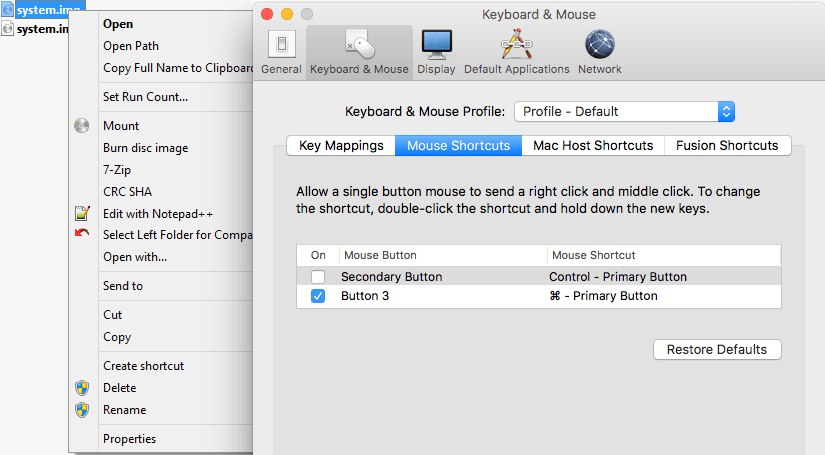
A while ago, I was surprised that in a Windows VM running under VMware Fusion, the Ctrl-Click performed a right click, despite me having changed the configuration:

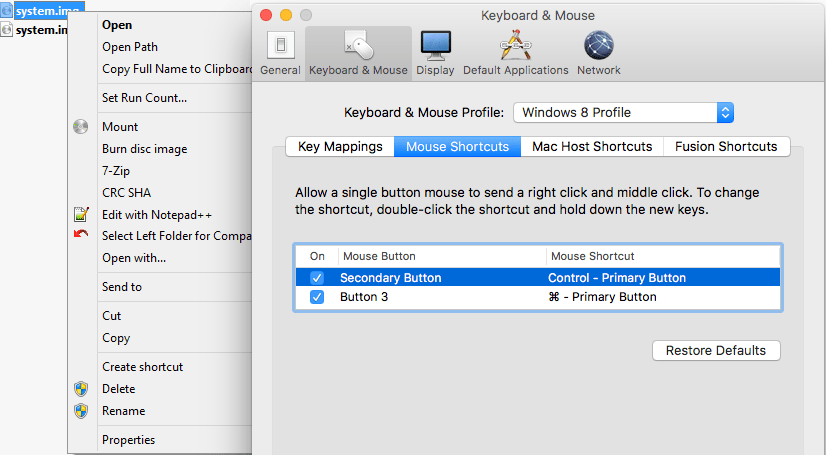
I was wrong, as I had forgotten I assigned the “Windows 8 Profile” tot hat VM (as it was running Windows 8.1), which had the Secondary Button still mapped to the Control+Primary Button:

Related:

–jeroen

Posted in Fusion, Power User, Virtualization, VMware, Windows | Leave a Comment »

Top Open Source Licenses | Black Duck Software

Posted by jpluimers on 2019/05/10

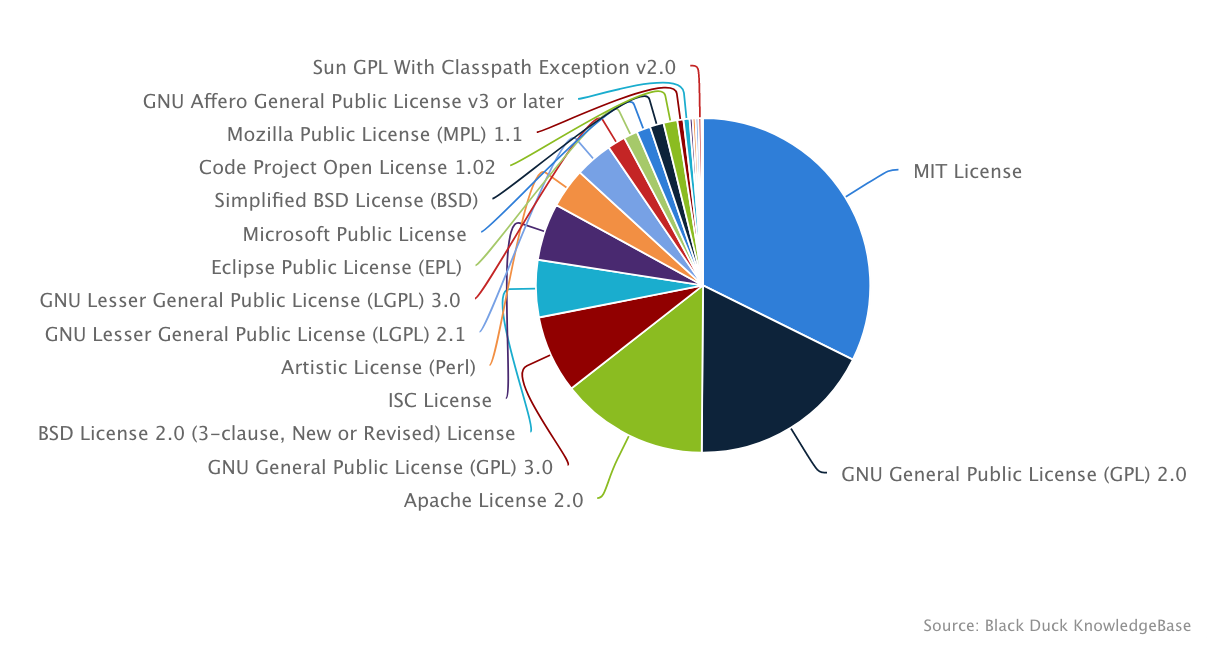
About a year and a half ago, I came across the pie chart far below.

Luckily, the WayBack machine keeps historic copies of that page, so I could deduct the below table over time indicating the historic popularity of each license.

My deduction so far:

  1. The top 5 has the same ranking, but different percentages
  2. The rise of the MIT license popularity comes almost entirely out of the other top 5 entries
  3. Below the top 5, it’s about percentage points that differ

I wonder how this evolves further over time.

Oh: and I need to improve my graphing skills to show this table in a nice graph better than the one on the right which has rank over time for reach license from 2016 until 2017.

This is the data extracted from the historic WayBack links:

License Rank20170824 %20170824 Rank20161006 %20161006 Rank20160510 %20160510
MIT License 1 32% 1 28% 1 26%
GNU General Public License (GPL 2.0) 2 18% 2 20% 2 21%
Apache License 2.0 3 14% 3 16% 3 16%
GNU General Public License (GNU) 3.0 4 7% 4 8% 4 9%
BSD License 2.0 (3-clause, New or Revised) License 5 6% 5 6% 5 6%
ISC License 6 5% 8 4% 9 2%
Artistic License (Perl) 7 4% 6 4% 7 4%
GNU Lesser General Public License (LGPL) 2.1 8 4% 7 4% 6 4%
GNU Lesser General Public License (LGPL) 3.0 9 2% 9 2% 8 2%
Eclipse Public License (EPL) 10 1% 11 2% 11 2%
Microsoft Public License 11 1% 10 2% 10 2%
Simplified BSD License (BSD) 12 1% 12 1% 14 < 1%
Code Project Open License 1.02 13 1% 13 1% 12 1%
Mozilla Public License (MPL) 1.1 14 < 1% 14 < 1% 13 < 1%
GNU Affero General Public License v3 or later 15 < 1% 16 < 1% 16 < 1%
Common Development and Distribution License (CDDL) 16 < 1% 15 < 1% 15 < 1%
DO WHAT THE FUCK YOU WANT TO PUBLIC LICENSE 17 < 1% 18 < 1% 19 < 1%
Microsoft Reciprocal License 18 < 1% 17 < 1% 17 < 1%
Sun GPL with Classpath Exception v2.0 19 < 1% 19 < 1% 18 < 1%
zlib/libpng License 20 < 1%
CDDL-1.1 20 < 1% 20 < 1%

–jeroen

Source: Top Open Source Licenses | Black Duck Software

Posted in Development, Licensing, Software Development | Leave a Comment »

vmware Fusion/Workstation/ – How can you boot from CD? – Super User

Posted by jpluimers on 2019/05/10

Basically the boot delay during startup is so short that usually you cannot even choose the boot device.

Solution: edit the .vmx configuration file for the Virtual Machine, then change this value:

bios.bootDelay = "15000"

Source:

–jeroen

Posted in Fusion, Power User, Virtualization, VMware | Leave a Comment »

Microsoft Visual Studio – Wikipedia

Posted by jpluimers on 2019/05/09

Like there was never an Office 13.0, there was no Visual Studio 13.0: see the below table from Microsoft Visual Studio – Wikipedia: History

This influences tooling that searches for specific versions of Visual Studio or MSBuild (which has been available since Visual Studio 8.0 and up: MSBuild – Wikipedia: History).

Product name Codename Version
number
Supported .NET
Framework versions
Supported .NET
Core versions
Release date
Visual Studio 2019 Unknown 16.0 To be announced To be announced To be announced
Visual Studio 2017 Dev15 15.0 3.5 – 4.7 1.0-1.1, 2.0 March 7, 2017
Visual Studio 2015 Dev14 14.0 2.0 – 4.6 1.0 July 20, 2015
Visual Studio 2013 Dev12 12.0 2.0 – 4.5.2 N/A October 17, 2013
Visual Studio 2012 Dev11 11.0 2.0 – 4.5.2 N/A September 12, 2012
Visual Studio 2010 Dev10Rosario 10.0 2.0 – 4.0 N/A April 12, 2010
Visual Studio 2008 Orcas 9.0 2.0, 3.0, 3.5 N/A November 19, 2007
Visual Studio 2005 Whidbey 8.0 2.0, 3.0 N/A November 7, 2005
Visual Studio .NET 2003 Everett 7.1 1.1 N/A April 24, 2003
Visual Studio .NET (2002) Rainier 7.0 1.0 N/A February 13, 2002
Visual Studio 6.0 Aspen 6.0 N/A N/A June 1998
Visual Studio 97 Boston 5.0 N/A N/A February 1997

–jeroen

Posted in .NET, Continuous Integration, Development, msbuild, Software Development, Visual Studio and tools | Leave a Comment »