The Wiert Corner – irregular stream of stuff

Jeroen W. Pluimers on .NET, C#, Delphi, databases, and personal interests

  • My badges

  • Twitter Updates

  • My Flickr Stream

  • Pages

  • All categories

  • Enter your email address to subscribe to this blog and receive notifications of new posts by email.

    Join 1,860 other subscribers

Archive for August, 2019

Powershell: what kind of data type is [string[]] and when would you use it?

Posted by jpluimers on 2019/08/13

[WayBackIn Powershell, what kind of data type is [string[]] and when would you use it? (thanks cignul9 and arco444!): basically it forces an array of string.

It defines an array of strings. Consider the following ways of initialising an array:

[PS] > [string[]]$s1 = "foo","bar","one","two",3,4
[PS] > $s2 = "foo","bar","one","two",3,4

[PS] > $s1.gettype()

IsPublic IsSerial Name                                     BaseType
-------- -------- ----                                     --------
True     True     String[]                                 System.Array

[PS] > $s2.gettype()

IsPublic IsSerial Name                                     BaseType
-------- -------- ----                                     --------
True     True     Object[]                                 System.Array

By default, a powershell array is an array of objects that it will cast to a particular type if necessary. Look at how it’s decided what types the 5th element of each of these are:

[PS] > $s1[4].gettype()

IsPublic IsSerial Name                                     BaseType
-------- -------- ----                                     --------
True     True     String                                   System.Object


[PS] > $s2[4].gettype()

IsPublic IsSerial Name                                     BaseType
-------- -------- ----                                     --------
True     True     Int32                                    System.ValueType


[PS] > $s1[4]
3
[PS] > $s2[4]
3

The use of [string[]] when creating $s1 has meant that a raw 3 passed to the array has been converted to a String type in contrast to an Int32 when stored in an Object array.

–jeroen

Posted in CommandLine, Development, PowerShell, PowerShell, Scripting, Software Development | Leave a Comment »

(53) Introducing the “Lab in a Box” Concept – Patrick Titiano & Kevin Hilman, BayLibre – YouTube

Posted by jpluimers on 2019/08/13

Related: Introducing The “Lab in a Box” Concept (ELC-E-2017-Prague).pdf

Via:

–jeroen

Read the rest of this entry »

Posted in Development, Hardware, Hardware Development, Hardware Interfacing, Power User, Raspberry Pi, Software Development | Leave a Comment »

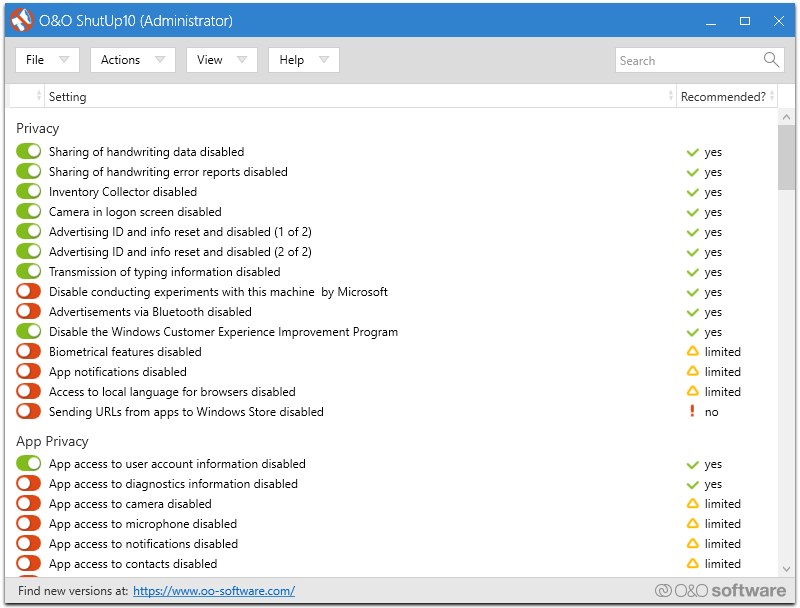
O&O ShutUp10

Posted by jpluimers on 2019/08/12

Interesting: free and portable (no install required: just unzip and go): [WayBack] O&O ShutUp10.

Via [WayBack] Jeroen Wiert Pluimers – Google+ (which I think I got via Twitter)

–jeroen

Posted in Power User, Windows, Windows 10 | Leave a Comment »

Zabbix agent and long running scripts: Timeout parameter in zabbix_agentd.conf

Posted by jpluimers on 2019/08/12

The [WayBack] stock zabbix_agentd.conf is about 10k and the documentation quite a bit larger, so it can take a while to figure out a setting.

I needed one to ensure that scripts could take longer to execute than the default.

Searching for a per-script setting on the server side revealed no solution, so I had to solve it on the agent side. There, a per-script setting is also impossible: there is only the global Timeout (one word, no PascalCase like TimeOut) setting in zabbix_agentd.conf which is the same for Unix and Windows based Zabbix installations:

Unix: [WayBack] Zabbix Documentation 3.0 – 3 Zabbix agent (UNIX)

Parameter Mandatory Range Default Description
Timeout no 130 3 Spend no more than Timeout seconds on processing

Windows: [WayBack] Zabbix Documentation 3.0 – 9.4 Zabbix agent (Windows)

Parameter Mandatory Range Default Description
Timeout no 130 3 Spend no more than Timeout seconds on processing

In my case it was for a PowerShell script that ran twice a day to verify how recent the installations on a particular machine were. The Timeout value needed to be at least 15 for that:

### Option: Timeout
# Spend no more than Timeout seconds on processing.
#
# Mandatory: no
# Range: 1-30
# Default:
# Timeout=3
Timeout=15

–jeroen

Read the rest of this entry »

Posted in *nix, Monitoring, Power User, Zabbix | Leave a Comment »

When an installer errors out with “Please re-run this installer as a normal user instead of”…

Posted by jpluimers on 2019/08/12

Via [WayBack] Anyone with a hint on how to work around this: … “Please re-run this installer as a normal user instead of”… – Jeroen Wiert Pluimers – Google+

This happened for instance when trying to install Source Tree 2.x on Windows (1.9.x works fine):

[Window Title]
SourceTreeSetup-2.3.1.0.exe

[Main Instruction]
Installation has failed

[Content]
Please re-run this installer as a normal user instead of “Run as Administrator”.

[Close]

The problem was by accident the machine got in a state to run commands without UAC approval, so the run dialog would already look have “This task will be created with administrative privileges”:

It was odd, as the machine didn’t have it enabled in the security policy (secpo.msc):

So I did a bit more digging, bumped into [WayBack] Why does my Run dialog say that tasks will created with administrative privileges? – The Old New Thing and had one of those #facepalm moments: Explorer had crashed, and I had started it from Process Explorer, forgetting Process Explorer had an UAC token.

The solution is easy:

  1. Logoff / Logon
  2. Verify the Windows-R shows a “normal” run:

Then you can just run the installer:

–jeroen

Posted in Batch-Files, Console (command prompt window), Development, Power User, Scripting, Software Development, The Old New Thing, Windows, Windows Development | Leave a Comment »

PlasticSCM console

Posted by jpluimers on 2019/08/09

The cm.exe by default is not on the path, even though it is a useful tool.

Some links on it:

Slow

One drawback: the cm.exe is slow in startup, likely because it is a .NET executable needing quite a few assemblies to load:

"C:\Program Files (x86)\Microsoft SDKs\Windows\v10.0A\bin\NETFX 4.7.1 Tools\CorFlags.exe" "C:\Program Files\PlasticSCM5\client\cm.exe"
Microsoft (R) .NET Framework CorFlags Conversion Tool. Version 4.7.2558.0
Copyright (c) Microsoft Corporation. All rights reserved.

Version : v4.0.30319
CLR Header: 2.5
PE : PE32
CorFlags : 0x1
ILONLY : 1
32BITREQ : 0
32BITPREF : 0
Signed : 0

Finding stuff

I get a feeling that there is quite a bit of cm functionality either undocumented, or hardly documented.

For instance, copying a title from the PlasticSCM GUI does not mean it will work as a cm command.

Despite the documentation indicating

When you run queries using comparison operators (>, <, >=, <=) from the command line, remember that the shell considers these operators as IO redirections, so you will need to enclose the queries with quotation marks:
cm find "branches where owner='pablo' and changesets >= '2013/03/01'"

you have to be really careful where to put the starting double quote: it has to be after the find command:

  1. Example 1
    • Title
      User query: find changeset where branch='/main/test/My Branch Name' on repository 'Projects@ssl://plastic.example.org:8088' (22 Items - 0 selected)
    • Failure
      "C:\Program Files\PlasticSCM5\client\cm.exe" "find changeset where branch='/main/test/My Branch Name' on repository 'Projects@ssl://plastic.example.org:8088'"
      Command 'find changeset where branch='/main/test/My Branch Name' on repository 'Projects@ssl://plastic.example.org:8088'' not found. Type cm showcommands to get a command list.
    • Success
      "C:\Program Files\PlasticSCM5\client\cm.exe" find "changeset where branch='/main/test/My Branch Name' on repository 'Projects@ssl://plastic.example.org:8088'"
  2. Example 2
    • Title
      Changesets /main/test/My Branch Name@Projects@ssl://plastic.example.org:8088 (4 Items - 1 selected)
    • Failure
      "C:\Program Files\PlasticSCM5\client\cm.exe" find "Changesets /main/test/My Branch Name@Projects@ssl://plastic.example.org:8088"
      Error: unexpected char: '@'
    • Success
      "C:\Program Files\PlasticSCM5\client\cm.exe" find "Changesets where branch='/main/test/My Branch Name' on repository 'Projects@ssl://plastic.example.org:8088'"

This means that changeset can be Changesets: it is case insensitive and has multiple aliases. It looks similar to commands I used in my days of using Rational ClearCase – Wikipedia

I need to find out how to translate a non-query title into a query one. That will make it a lot easier to go from PlasticSCM GUI to the cm.

No XML documentation

The cm find command has a cool parameter --xml, which dumps the output in an XML tree.

My original goal was to see if I could turn the XML into something like Markdown or RST, using an XSLT transform like these:

For those transforms, you have to know how the input XML is structured. However, this information is undocumented.

When asked, PlasticSCM indicated there is no XSD for it claiming it was “super simple export to XML”:

[WayBack] Plastic SCM on Twitter: “No XSD, I’m afraid. Just super simple export to XML.… “

https://twitter.com/plasticscm/status/1039842761304940544

I hoped the elements were just uppercase versions of the output below, but they are not. Bummer.

–jeroen

Read the rest of this entry »

Posted in Development, PlasticSCM, Power User, Source Code Management | Leave a Comment »

Periodic Table of Motion

Posted by jpluimers on 2019/08/09

Cool [WayBack] motiontable showcasing many graphical transformation motions in a way similar to the Periodic Table of Elements.

More in depth information (in Japanese, but Google Translate performs a great job) at:

  • [WayBack] About (also explaining the similarity of both tables, for instance on how columns and rows are organised)
  • [WayBack] Work List showing the effects of many transformations applied to various graphic designs

Via [WayBack] Motion Periodic Table http://foxcodex.html.xdomain.jp/index.html #gamedev – Adrian Marius Popa – Google+

–jeroen

Posted in Graphic Design, Power User | Leave a Comment »

Dean Bubley’s Disruptive Wireless: Debunking the Network QoS myth

Posted by jpluimers on 2019/08/09

QoS doesn’t work, except for one specific scenario:

Where QoS works is where one organisation controls both ends of a connection AND also tightly-defines and controls the applications:

  • A fixed-broadband provider can protect IP telephony & IPTV on home broadband between central office & the home gateway.An enterprise can build a private network & prioritise its most important application(s), plus maybe a connection to a public cloud or UCaaS service.
  • Mobile operators can tune a 4G network to prioritise VoLTE.
  • Telco core and transport networks can apply differential QoS to particular wholesale customers, or to their own various retail requirements (eg enterprise users’ data vs. low-end consumers, or cell-site timing signals and backhaul vs. user data).
  • Industrial process & control systems use a variety of special realtime connection protocols and networks. Vendors of “OT” (operational technology) tend to view IT/telecoms and TCP/IP as quaint. The IT/OT boundary is the real “edge”.

Source: [WayBackDean Bubley’s Disruptive Wireless: Debunking the Network QoS myth

Via: [WayBack] This is not news, but it’s worthwhile repeating… – Kristian Köhntopp – Google+:

This is not news, but it’s worthwhile repeating: it is actually cheaper to build a network that can carry the traffic than building a network that keeps quality promises on a backbone that is undersized or close to capacity. Overprovisioning works, everything else does not, economically as well as technically.

–jeroen

Posted in Network-and-equipment, Power User, QoS | Leave a Comment »

NativeInt / NativeUInt type in various Delphi versions – twm’s blog

Posted by jpluimers on 2019/08/08

Reminder to Self (and note that Delphi <= 2007 does not reference NativeInt/NativeUInt in System.pas): [WayBack] NativeInt / NativeUInt type in various Delphi versions – twm’s blog

Just in case you are maintaining Delphi code for several older versions of Delphi: Be aware that the declarations of NativeInt and NativeUInt are wrong in some of them.

Delphi version SizeOf(Native(U)Int) Win32 SizeOf(Native(U)Int) Win64
1 to 6 not available not available
7 to 2007
8 ← this is wrong
not available
2009 to XE 4 not available
XE2 to XE8 4 8
10.x 4 8

Relevant GExperts commit: [WayBack] GExperts / Code / Commit [r2399]

Via  [WayBack] Just in case you are maintaining Delphi code for several older versions of Delphi: Be aware that the declarations of NativeInt and NativeUInt are wrong … – Thomas Mueller (dummzeuch) – Google+

–jeroen

Posted in Delphi, Development, Software Development | Leave a Comment »

Using PE Flags in Delphi – twm’s blog

Posted by jpluimers on 2019/08/08

For my link archive: [WayBackUsing PE Flags in Delphi – twm’s blog with information about and links to:

The flags themselves are documented at [WayBack] IMAGE_FILE_HEADER structure (Windows)

–jeroen

Via: [WayBack] There was a discussion about using the PE flag IMAGE_FILE_LARGE_ADDRESS_AWARE… – Thomas Mueller (dummzeuch) – Google+

Posted in Delphi, Development, Software Development, Windows Development | Leave a Comment »