The Wiert Corner – irregular stream of stuff

Jeroen W. Pluimers on .NET, C#, Delphi, databases, and personal interests

  • My badges

  • Twitter Updates

  • My Flickr Stream

  • Pages

  • All categories

  • Enter your email address to subscribe to this blog and receive notifications of new posts by email.

    Join 1,860 other subscribers

Archive for September, 2019

python multithreading wait till all threads finished

Posted by jpluimers on 2019/09/04

A great tip from [WayBack] python multithreading wait till all threads finished:

ou need to use join method of Thread object in the end of the script.

t1 = Thread(target=call_script, args=(scriptA + argumentsA))
t2 = Thread(target=call_script, args=(scriptA + argumentsB))
t3 = Thread(target=call_script, args=(scriptA + argumentsC))

t1.start()
t2.start()
t3.start()

t1.join()
t2.join()
t3.join()

Thus the main thread will wait till t1t2 and t3 finish execution.

I’ve used a similar construct that’s used by the multi-threading code I posted a few ways ago (on Passing multiple parameters to a Python method: the * tag) in the ThreadManager class below.

But first some of the other links that helped me getting that code as it is now:

Example:

class ThreadManager:
    def __init__(self):
        self.threads = []

    def append(self, *threads):
        for thread in threads:
            self.threads.append(thread)

    def runAllToCompletion(self):
        ## The loops are the easiest way to run one methods on all entries in a list; see https://stackoverflow.com/questions/2682012/how-to-call-same-method-for-a-list-of-objects
        # First ensure everything runs in parallel:
        for thread in self.threads:
            thread.start()
        # Then wait until all monitoring work has finished:
        for thread in self.threads:
            thread.join()
        # here all threads have finished

def main():
    ## ...
    threadManager.append(
        UrlMonitorThread(monitor, "http://%s" % targetHost),
        SmtpMonitorThread(monitor, targetHost, 25),
        SmtpMonitorThread(monitor, targetHost, 587),
        SshMonitorThread(monitor, targetHost, 22),
        SshMonitorThread(monitor, targetHost, 10022),
        SshMonitorThread(monitor, targetHost, 20022))

    threadManager.runAllToCompletion()

–jeroen

Posted in Development, Python, Scripting, Software Development | Leave a Comment »

“Functional programmer: (noun) One who names variables ‘x’, names functions ‘f’, and names code patterns ‘zygohistomorphic prepromorphism.'” — James Iry on Twitter

Posted by jpluimers on 2019/09/04

“Functional programmer: (noun) One who names variables ‘x’, names functions ‘f’, and names code patterns ‘zygohistomorphic prepromorphism.'” — James Iry

–jeroen

Read the rest of this entry »

Posted in Development, Fun, Functional Programming, Quotes, Software Development, T-Shirt quotes | Leave a Comment »

How to Install Node.js and NPM on a Mac

Posted by jpluimers on 2019/09/03

Link archival: [WayBack] How to Install Node.js and NPM on a Mac:

In this article, I’ll take you through the process of installing Node.js and NPM on a Mac using Homebrew.

TL;DR

  1. Ensure you have installed homebrew.
  2. Run brew install node.

–jeroen


Posted in Apple, Development, Mac OS X / OS X / MacOS, Power User, Software Development | Leave a Comment »

how to filter name/value pairs under a registry key by name and value in PowerShell?

Posted by jpluimers on 2019/09/03

A very concise way for [WayBackhow to filter name/value pairs under a registry key by name and value in PowerShell?:

$path = 'hkcu:\Software\Microsoft\Windows\CurrentVersion\Extensions'
(Get-ItemProperty $path).PSObject.Properties |
  Where-Object { $_.Name -match '^xls' ` -or $_.Value -match 'msaccess.exe$' } |
  Select-Object Name, Value

Thanks montonero for getting me on that path and pointing me to the hidden PSObject property which by itself has Properties, and making me find these links with background information:

More in-depth information:

  • [WayBack] Get-Member (Microsoft.PowerShell.Utility)
    • The Get-Member cmdlet gets the members, the properties and methods, of objects. To specify the object, use the InputObject parameter or pipe an object to Get-Member. To get information about static members, the members of the class, not of the instance, use the Static parameter. To get only certain types of members, such as NoteProperties, use the MemberType parameter.
    • -Force

      Adds the intrinsic members (PSBase, PSAdapted, PSObject, PSTypeNames) and the compiler-generated get_ and set_ methods to the display. By default, Get-Member gets these properties in all views other than Base and Adapted, but it does not display them.

      The following list describes the properties that are added when you use the Force parameter:

      • PSBase: The original properties of the .NET Framework object without extension or adaptation. These are the properties defined for the object class and listed in MSDN.
      • PSAdapted. The properties and methods defined in the Windows PowerShell extended type system.
      • PSExtended. The properties and methods that were added in the Types.ps1xml files or by using the Add-Member cmdlet.
      • PSObject. The adapter that converts the base object to a Windows PowerShell PSObject object.
      • PSTypeNames. A list of object types that describe the object, in order of specificity. When formatting the object, Windows PowerShell searches for the types in the Format.ps1xml files in the Windows PowerShell installation directory ($pshome). It uses the formatting definition for the first type that it finds.
  • [WayBack] PSObject Class (System.Management.Automation)
    • Wraps an object providing alternate views of the available members and ways to extend them. Members can be methods, properties, parameterized properties, etc.
  • [WayBack] PSObject.Properties Property (System.Management.Automation)
    • Gets the Property collection, or the members that are actually properties.
      Is of type PSMemberInfoCollection<PSPropertyInfo>
  • [WayBack] PSMemberInfoCollection<T> Class
    • Serves as the collection of members in an PSObject or MemberSet
  • [WayBack] PSPropertyInfo Class (System.Management.Automation)
    • Serves as a base class for all members that behave like properties.
  • [WayBack] Difference between PSObject, Hashtable and PSCustomObject
  • [WayBack] Combining Objects Efficiently – Use a Hash Table to Index a Collection of Objects
    • With objects objects everywhere it may not seem apparent, but hash tables are still needed.  When the PowerShell mind sets to work it can be very easy to use where and selects everywhere to get you…
  • [Archive.isCustom objects default display in PowerShell 3.0
  • [WayBack] Using PSObject to store data in PowerShell | 9to5IT
    • PowerShell’s PSObject is a powerful tool which is used to store, retrieve, sort and export data. Here is how to use PSObject to store data in PowerShell.

–jeroen

Posted in CommandLine, Development, PowerShell, PowerShell, Scripting, Software Development | Leave a Comment »

Python: variables in the class scope are class, not instance

Posted by jpluimers on 2019/09/03

A very subtle thing that keeps biting me as my background is from languages where by default, identifiers on the class scope are instance level, not class level:

In Python, variables on class level are class variables.

If you need instance variables, initialise them in your constructor with a self.variable = value.

The example in the Python 3 docs [WayBackClasses – A First Look at Classes – Class and Instance Variables is the same as in the Python 2 docs [WayBackClasses – A First Look at Classes – Class and Instance Variables:

Generally speaking, instance variables are for data unique to each instance and class variables are for attributes and methods shared by all instances of the class:

class Dog:

    kind = 'canine'         # class variable shared by all instances

    def __init__(self, name):
        self.name = name    # instance variable unique to each instance

>>> d = Dog('Fido')
>>> e = Dog('Buddy')
>>> d.kind                  # shared by all dogs
'canine'
>>> e.kind                  # shared by all dogs
'canine'
>>> d.name                  # unique to d
'Fido'
>>> e.name                  # unique to e
'Buddy'

For people new at Python: the __init__ is a constructor; see these links for more explanation:

Of course, the __init__() method may have arguments for greater flexibility. In that case, arguments given to the class instantiation operator are passed on to __init__(). For example,

>>> class Complex:
...     def __init__(self, realpart, imagpart):
...         self.r = realpart
...         self.i = imagpart
...
>>> x = Complex(3.0, -4.5)
>>> x.r, x.i
(3.0, -4.5)

–jeroen

Posted in Development, Python, Scripting, Software Development | Leave a Comment »

CSS flex-box layout – Wikipedia

Posted by jpluimers on 2019/09/02

Being a back-end and library person by heart, I am always late in the web-UI game, so this is on my list of things to try: CSS flex-box layout – Wikipedia.

I saw it being used by [WayBack] markdownlint demo: Demo for markdownlint, a Node.js style checker and lint tool for Markdown/CommonMark files.

Some links that should me help further:

–jeroen

Read the rest of this entry »

Posted in CSS, Development, HTML, HTML5, Software Development, Web Development | Leave a Comment »

Your Yearly Reminder That You Can DIY a Cheap, Easy Window De-Icer

Posted by jpluimers on 2019/09/02

Many regions in the Northern Hemisphere turn colder over the next weeks..months, so: [Archive.isYour Yearly Reminder That You Can DIY a Cheap, Easy Window De-Icer:

  1. Mix these
    • 2/3 of Isopropyl alcohol (often called rubbing alcohol in the USA, but outside there it’s better known as 2-propanol, propan-2-ol or isopropanol)
    • 1/3 of water
  2. Put in two spray bottles: one in your car, one in your house

–jeroen

Posted in LifeHacker, Power User | Leave a Comment »

Exploring Line Lengths in Python Packages

Posted by jpluimers on 2019/09/02

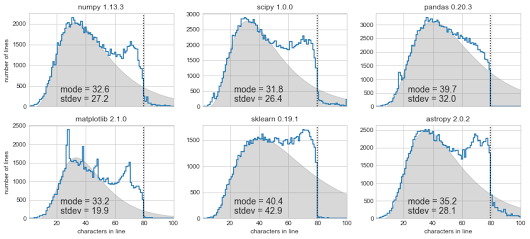
[Archive.is] Exploring Line Lengths in Python Packages is an interesting read.

It explores the relation between actual and “maximum” line lengths in Python in related to the prior 140 Twitter character limit.

via [Archive.is] Exploring Line Lengths in Python Packages – ThisIsWhyICode – Google+

–jeroen

Read the rest of this entry »

Posted in Development, Python, Scripting, Software Development, Static Code Analysis | Leave a Comment »