


Despite the year, this page still got updates long after the initial edit [WayBack] 19 Best Git clients for Windows as of 2018 – Slant.
–jeroen
Posted by jpluimers on 2020/09/08
Despite the year, this page still got updates long after the initial edit [WayBack] 19 Best Git clients for Windows as of 2018 – Slant.
–jeroen

Posted in Development, DVCS - Distributed Version Control, git, Software Development | Leave a Comment »
Posted by jpluimers on 2020/09/08
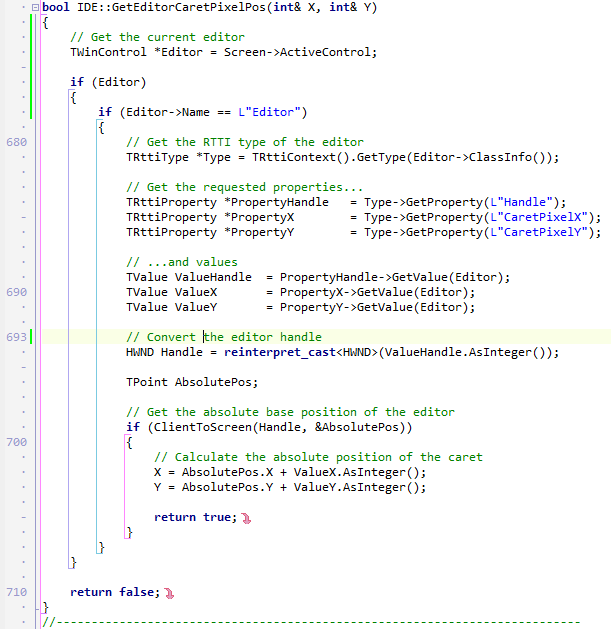
Since WayBack cannot save G+ photos, here is one from [WayBack] So, now I’m in front of a problem similar to a former one: I need to get the pixel position of the current editor cursor position for my OTA wizard. I’… – Fl Ko – Google+:
Related:
–jeroen

Posted in C++, C++ Builder, Delphi, Development, Software Development | Leave a Comment »
Posted by jpluimers on 2020/09/07
It looks like I need to learn about IPP and driverless based on [WayBack] TIL that your Linux desktop can probably use your somewhat recently made printer, efficiently, with all major features exposed, without needing to download a ton of vendor shitware, without needing to find a PPD file in the depths of hell, without needing to pay extra for explicit PostScript 3 support, and without needing to accept that it will do 0.2 instead of 20 pages per minute because the in-printer PostScript rasterizer runs on a Z80…. – Maik Zumstrull – Google+.
So here are some links:
Via: [WayBack] TIL that your Linux desktop can probably use your somewhat recently made prin… – Kristian Köhntopp – G+
When adding my printer in the Chrome tool, it can properly detect it:
OKI MC342
http://192.168.71.52:631Printer informationPrinter make/model: OKI-MC342-36855D
Printer state: idle
Accepting jobs: true
IPP server version: 1.1
Supports PDF natively: true
Supports PWG raster: false
Supports Postscript: true
Supports Unirast: true
Supports application/octet-stream: true
CUPS server: No
Compatability report: PASS Printer should be compatible – try printing
–jeroen

Posted in *nix, *nix-tools, Hardware, OKI C332, OKI Printers, Power User, Printers | 2 Comments »
Posted by jpluimers on 2020/09/07
For a simple comma separated list (no quotes), I was expecting a sed script (and indeed it is possible), but tr is more elegant:
Use
trto change , into newlines:
tr , "\n" < list.txt
Source: [WayBack] bash – convert comma separated values into a list of values using shell script – Stack Overflow.
–jeroen
Posted in *nix, *nix-tools, bash, bash, Development, Power User, Scripting, Software Development | Leave a Comment »
Posted by jpluimers on 2020/09/07
In addition to ESXi: shrinking a Windows disk, you can shrink any ESXi thin provisioned disk by first exploding it with zero content, then shrinking it like described by [WayBack] How to Shrink a Thin VMDK on ESXi 5.0 | Boerlowie’s Blog.
It comes down to using this command:
vmkfstools --punchzero myVirtualMachineDisk.vmdkYou can replace
--punchzerowith-Kif you like more cryptic arguments.
This works because thin provisioned vmdk disk files are sparse files where zero content can be non-allocated.
The trick requires all empty space to be zeroed out (which usually comes down using a tool like sdelete on Windows or shred on Linux), hence the “exploding” in the post title.
For a good explanation on thin, versus thick versus eagerlyZeroedThick, read [WayBack] Thin Provisioning – What’s the scoop? – VMware vSphere Blog.
A few remarks:
du command will show the actual storage size (including the savings from think provisioned disks)ls command will show then “virtual” storage size (excluding any thin provisioning gains)ls and du output is the thin provisioning gain–jeroen
Posted in Power User, Virtualization, VMware, VMware ESXi | Leave a Comment »
Posted by jpluimers on 2020/09/04
Somehow, every now and then, a 2015 Retina MacBook Pro will eject the SD Card during sleep.
I’m not sure about the cause, just about the message that a drive got unmounted in an unexpected way.
This fails to rescan for the drive on Mac OS Sierra:
sudo kextunload -b com.apple.driver.AppleSDXC

sudo kextload -b com.apple.driver.AppleSDXC
As per [WayBack] external disk – Problem with kextunload SD card remount – Ask Different, I tried the kextstat below, however, before the unload/load statements, kextstat | grep -e SDXC returns nothing.
After them, it returns something like
156 0 0xffffff7f841f3000 0x12000 0x12000 com.apple.driver.AppleSDXC (1.7.6) 0F6F5025-A1C4-3E77-9ECD-4D4410E684C5 <16 15 12 5 4 3 1>
When it happens again, I will likely need to read these:
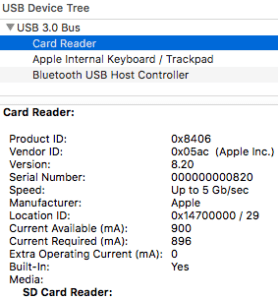
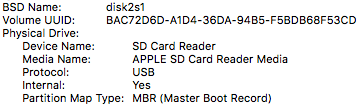
It might be that somewhere along the line, SDSX is not started by default any more or not applicable to MicroSD to SDXC card converters. These screenshots at least show that this disk is connected via a USB path:
The screenshots are from the stock “System Information.app” tool, and I really wish it showed the kext drivers used for each device. That would make debugging these issues a lot easier!
A solution then could be as easy as this:
Unmount all USB connected devices (for instance with a command like
diskutil eject disk1);
sudo kextunload -b com.apple.driver.AppleUSBCardReader

sudo kextload -b com.apple.driver.AppleUSBCardReader
However my first try got me an error similar to the one result [WayBack] External USB disk sometimes requires a reboot to be recognized after eject – Ars Technica OpenForum I found after searching for “class com_apple_driver_AppleUSBCardReaderDriverNub has” “instances.”:
7/28/16 10:05:54.000 AM kernel[0]: Can't unload kext com.apple.driver.AppleUSBCardReader; classes have instances:

7/28/16 10:05:54.000 AM kernel[0]: Kext com.apple.driver.AppleUSBCardReader class com_apple_driver_AppleUSBCardReaderDriverNub has 2 instances.
–jeroen

Posted in Apple, Mac, MacBook, MacBook Retina, Power User | Leave a Comment »
Posted by jpluimers on 2020/09/04
I had to shrink down a Windows disk of an ESXi based Virtual Machine from 240 Gibibyte to about 140 gigabyte.
In this case, it was Windows 7 on ESXi 6.5, but the actual versions do not really matter.
The only way to decrease ESXi .vmdk files is by fiddling with disk sector counts in the text based .vmdk files (not the binaries .vmdk files!) of a diskname.vmdk / diskname-flat.vmdk text/binary pair. This is described for instance in these two articles:
# Extent description

RW 52428800 VMFS "foo-flat.vmdk"
The value between
RWandVMFSis the size of disk in sectors.After changing the value, you can use
vmkfstoolsto clone this disk.
Notes:
- This article presumes you already shrunk your NTFS partition (for instance as described in Consolidating NTFS free space).
- If you only have a binary .vmdk file, then you can use
vmkfstoolsto create a text/binary pair for you, for instance by using these commands:
vmkfstools --clonevirtualdisk Windows7.vmdk Windows7.thick.vmdk
vmkfstools --clonevirtualdisk Windows7.vmdk Windows7.thin.vmdk --diskformat thin- You cannot workaround 2. as the
--geometryfunctionality ofvmkfstoolsonly displays existing geometry, see
ESXi has .vmdk files that count disk sizes in sectors, but the tooling that ship with Windows to not show partition sizes in sectors, especially not the partition ending sector.
All permutations of tooling like DISKPART, PowerShell, WMIC and terms partition, ending sector, cylinder, head, etc failed me to return built-in tools.
Luckily, “powershell” “partition” “ending sector” found the documentation for [WayBack] Test Disk | File System | Data Management titled “TestDisk Documentation, Release 7.1, Christophe GRENIER” which lead to:
[WayBack] TestDisk Download – CGSecurity
Download TestDisk & PhotoRec. TestDisk is a free and open source data recovery software tool designed to recover lost partition and unerase deleted files. PhotoRec is a file carver data recovery software tool.
It is available for many platforms, including Windows x86 (fully featured) and x64 (limited features):
There was also the much more convoluted PowerForensics which is also more difficult to install:
- [WayBack] Invoke-IR | PowerShell Digital Forensics and Incident Response: On the Forensic Trail – Master Boot Record (MBR)
- [WayBack] GitHub – Invoke-IR/PowerForensics: PowerForensics provides an all in one platform for live disk forensic analysis
- [WayBack] Invoke-IR | PowerShell Digital Forensics and Incident Response: Installing PowerForensics
As a check (because the calculations by hand are too cumbersome to trust on a first trey), I also downloaded the ISO image of gparted:
Let’s get started for real!

Posted in Power User, Virtualization, VMware, VMware ESXi, Windows, Windows 7 | Leave a Comment »
Posted by jpluimers on 2020/09/04
Some tips on using the certbot for Let’s Encrypt and the support for wildcard certificates through DNS updates: [WayBack] SSL certificates – not optional | Open Query Pty Ltd
–jeroen
Posted in Encryption, HTTPS/TLS security, Let's Encrypt (letsencrypt/certbot), Power User, Security | Leave a Comment »
Posted by jpluimers on 2020/09/03
git diff --no-prefix @~
Via various sources:
@~ syntax to get the previous commit
--no-prefix to make the patch svn compatible
–jeroen
Posted in Development, DVCS - Distributed Version Control, git, Software Development, Source Code Management, Subversion/SVN | Leave a Comment »
Posted by jpluimers on 2020/09/03
Some links for my research (when writing this a few years back, I had not done a lot of SQL Server BLOB work for a while, so I missed a lot of interesting progress).
As of SQL Server 2008, one can use FileStream, which SQL Server installs on an NTFS file system local to the SQL Server instance, but is accessible over the SQL Server API. It benefits from a lot of SQL Server features (including transactional and backup related).
As of SQL Server 2012, FileTable has extended FileStream, which makes it even easier to access the files from Windows applications.
Over the years, FileStream and FileTable has improved a lot.
Some links to get a feel:
–jeroen
Posted in Database Development, Development, SQL Server, SQL Server 2008, SQL Server 2008 R2, SQL Server 2012, SQL Server 2014 | Leave a Comment »


 The Wiert Corner - irregular stream of stuff