The Wiert Corner – irregular stream of stuff

Jeroen W. Pluimers on .NET, C#, Delphi, databases, and personal interests

  • My badges

  • Twitter Updates

  • My Flickr Stream

  • Pages

  • All categories

  • Enter your email address to subscribe to this blog and receive notifications of new posts by email.

    Join 1,860 other subscribers

Archive for May, 2021

msbuild build events can inherit, but not add in addition to inherited build events (so projects in Visual Studio, Delphi and others cannot do that either)

Posted by jpluimers on 2021/05/26

Bummer: I tried to inherit the build events from a base configuration, then add some extra steps for some of the inheriting configurations.

Those configurations just executed the extra steps, not the inherited steps.

This affects Visual Studio, Delphi and any other tool based on msbuild, as this is an ms-build thing:

–jeroen

Posted in .NET, Continuous Integration, Delphi, Development, msbuild, Software Development, Visual Studio and tools | Leave a Comment »

Figure out access violation in Dsmtoolwindow.GetPreferences

Posted by jpluimers on 2021/05/26

Access violation when loading the Delphi IDE

Got the below error on Delphi 10.2 Tokyo with ODAC trial from DevArt at Delphi startup time (Error: Access violation at address 188F3528 in module 'DataSetManager250.bpl'. Read of address 00000000.).

My guess it is some configuration prerequisite which – when not existing – is handled very ungracefully.

This might have to do with my installation being a non-administrator Delphi user, but the ODAC installation requiring UAC elevation to administrative level.

In short this means the installing user is different from the user that runs Delphi.

Related (indicating it was fixed years ago, but apparently isn’t) via dsmtoolwindow.getpreferences – Google Search:

Workaround is to unregister the DataSetManager250.bpl package, though I have to figure out what functionality that disables.

[188F3528]{DataSetManager250.bpl} Dsmtoolwindow.GetPreferences + $18
[23CA524D]{Jcl240.bpl  } Jclhookexcept. + $0
[50060B13]{rtl250.bpl  } System.@HandleAnyException (Line 19991, "System.pas" + 13) + $0
[211B3A05]{designide250.bpl} DockForm.TDockableForm.FormCreate (Line 258, "DockForm.pas" + 11) + $1B
[188F2DEA]{DataSetManager250.bpl} Dsmtoolwindow.TDsmToolWindow.FormCreate + $4E
[50C06BC1]{vcl250.bpl  } Vcl.Forms.TCustomForm.DoCreate (Line 3788, "Vcl.Forms.pas" + 3) + $C
[50C067DD]{vcl250.bpl  } Vcl.Forms.TCustomForm.AfterConstruction (Line 3671, "Vcl.Forms.pas" + 1) + $D
[50060039]{rtl250.bpl  } System.@AfterConstruction (Line 18301, "System.pas" + 2) + $5
[188EBE9B]{DataSetManager250.bpl} Dsmtoolwindow.TDsmToolWindow + $43B
[188EA93D]{DataSetManager250.bpl} Dsmtoolwindow.TDsmToolWindow.CreateForm + $19
[188F7C81]{DataSetManager250.bpl} Dsmexpert.initialization + $31
[50061276]{rtl250.bpl  } System.InitUnits (Line 22833, "System.pas" + 21) + $0
[500612E6]{rtl250.bpl  } System.@PackageLoad (Line 22861, "System.pas" + 8) + $0
[188A1A09]{DataSetManager250.bpl} __dbk_fcall_wrapper + $195
[188F6DA1]{DataSetManager250.bpl} Initialize + $5
[500A0377]{rtl250.bpl  } System.SysUtils.InitializePackage (Line 25779, "System.SysUtils.pas" + 4) + $0
[500A04D1]{rtl250.bpl  } System.SysUtils.LoadPackage (Line 25830, "System.SysUtils.pas" + 18) + $5
[21E1AFAF]{delphicoreide250.bpl} PasCppPakMgr.TIDEDesignPackage.ClearModules (Line 2189, "PasCppPakMgr.pas" + 14) + $10
[204E9A94]{coreide250.bpl} PakLoad.TPackage.DoLoadPackage (Line 146, "PakLoad.pas" + 0) + $8
[204E9C09]{coreide250.bpl} PakLoad.TPackage.Load (Line 220, "PakLoad.pas" + 7) + $7
[204EC425]{coreide250.bpl} PakMgr.TDesignPackage.Load (Line 591, "PakMgr.pas" + 2) + $2
[21E1B2CB]{delphicoreide250.bpl} PasCppPakMgr.TIDEDesignPackage.Load (Line 2292, "PasCppPakMgr.pas" + 4) + $3
[50060039]{rtl250.bpl  } System.@AfterConstruction (Line 18301, "System.pas" + 2) + $5
[21E1B0DF]{delphicoreide250.bpl} PasCppPakMgr.TIDEDesignPackage.DelayLoad (Line 2217, "PasCppPakMgr.pas" + 11) + $4
[21E1572A]{delphicoreide250.bpl} PasCppPakMgr.LoadDesignPackage (Line 463, "PasCppPakMgr.pas" + 10) + $5
[0B6A0F84]{IDEFixPack.dll} SplashProgress2005p.HookedLoadDesignPackage (Line 277, "SplashProgress2005p.pas" + 3) + $3
[21E15A33]{delphicoreide250.bpl} PasCppPakMgr.LoadProjectPackages (Line 534, "PasCppPakMgr.pas" + 52) + $11
[21F20DBF]{delphicoreide250.bpl} BasePasProjOpts.TProjOptsManager.DoLoadPackages (Line 1604, "BasePasProjOpts.pas" + 22) + $6
[21F21BB4]{delphicoreide250.bpl} BasePasProjOpts.TProjOptsManager.LoadPackages (Line 1839, "BasePasProjOpts.pas" + 0) + $0
[21F22BD5]{delphicoreide250.bpl} BasePasProjOpts.TProjectOptions.LoadPackages (Line 2419, "BasePasProjOpts.pas" + 0) + $5
[22585BF3]{delphide250.bpl} DelphiProject.TDelphiProjectCreationTrait.LoadDefaultLibraries (Line 256, "DelphiProject.pas" + 1) + $1F
[2058A109]{coreide250.bpl} ProjectGroup.TDefaultProjectWrapper.LoadDefaultLibraries (Line 3544, "ProjectGroup.pas" + 5) + $31
[206DB2B9]{coreide250.bpl} Desktop.LoadDefaultDesktopState (Line 966, "Desktop.pas" + 3) + $9
[206DC0D5]{coreide250.bpl} Desktop.LoadDesktop (Line 1223, "Desktop.pas" + 73) + $0
[0049FBA8]{bds.exe     } AppMain.PostCreateInit (Line 2154, "AppMain.pas" + 57) + $0
[004A00B6]{bds.exe     } AppMain.TAppBuilder.CMPostCreateInit (Line 2257, "AppMain.pas" + 4) + $1
[50AC4C16]{vcl250.bpl  } Vcl.Controls.TControl.WndProc (Line 7326, "Vcl.Controls.pas" + 91) + $6
[50C110C3]{vcl250.bpl  } Vcl.Forms.TApplication.WndProc (Line 10270, "Vcl.Forms.pas" + 194) + $1
[50AC97FB]{vcl250.bpl  } Vcl.Controls.TWinControl.WndProc (Line 10197, "Vcl.Controls.pas" + 166) + $6
[50C080B5]{vcl250.bpl  } Vcl.Forms.TCustomForm.WndProc (Line 4546, "Vcl.Forms.pas" + 209) + $5
[50AC8DC8]{vcl250.bpl  } Vcl.Controls.TWinControl.MainWndProc (Line 9896, "Vcl.Controls.pas" + 3) + $6
[5016EBC4]{rtl250.bpl  } System.Classes.StdWndProc (Line 17406, "System.Classes.pas" + 9) + $2
[50C11A6F]{vcl250.bpl  } Vcl.Forms.TApplication.ProcessMessage (Line 10613, "Vcl.Forms.pas" + 23) + $1
[50C11AB2]{vcl250.bpl  } Vcl.Forms.TApplication.HandleMessage (Line 10643, "Vcl.Forms.pas" + 1) + $4
[50C11DE5]{vcl250.bpl  } Vcl.Forms.TApplication.Run (Line 10781, "Vcl.Forms.pas" + 26) + $3
[005088E2]{bds.exe     } bds.bds (Line 212, "" + 7) + $7

Solved the access violation

Notes:

  • %APPDATA% points to %USERPROFILE%\AppData\Roaming (where usually %USERPROFILE% is on the %HOMEDRIVE%)

Fix script (the double backslash \\ is needed, otherwise the final double quote " becomes part of the path name):

setlocal
:: 19.0 is the version for Delphi 10.2 Tokyo 
set ProductVersion=19.0
reg add "HKEY_CURRENT_USER\Software\Devart\DataSetManager\BDS\%ProductVersion%" /v "ConfigFilePath" /f /t REG_SZ /d "%APPDATA%\Embarcadero\BDS\%ProductVersion%\\"
endlocal

This allows for an XML file named DataSetManager.cfg to be created in the ConfigFilePath directory.

Even though Process Monitor will show access to the below keys, there is no need to add any values there:

  • KEY_CURRENT_USER\Software\Devart\DBMonitor
  • KEY_CURRENT_USER\SOFTWARE\Devart\ODAC
  • HKLM\Software\WOW6432Node\Devart\ODAC
  • HKLM\Software\WOW6432Node\Devart\Odac

Deploy enough BPLs

Another thing when running ODAC trial and licensed applications

---------------------------
ODAC
---------------------------
%1 is not a valid Win32 application
ODAC Trial version needs additional "bpl" files to be present on the user PC.
If you build your project without run-time packages you need:
  dac250.bpl
  odac250.bpl
---------------------------
OK   
---------------------------

This message is incomplete; what it should say is that any BPL dependencies must be deployed. One way to find out about those is to use I wanted to know the loaded DLLs in a process like Process Explorer shows, but from the console: Sysinternals ListDLLs to the rescue.

Another way is to use TDUMP (see [WayBack] TDUMP.EXE, the File Dumping Utility) and search for the import tables. I did just that for the 10.2 trial; below is the full list.

There is way better documentation at Devart ODAC Deployment: Deploying Windows applications built without run-time packages which fails to properly archive in the WayBack machine (it gets into a redirect loop) so I quote it in full:

Deploying Windows applications built without run-time packages

You do not need to deploy any files with ODAC-based applications built without run-time packages, provided you are using a registered version of ODAC.

You can check your application does not require run-time packages by making sure the “Build with runtime packages” check box is not selected in the Project Options dialog box.

Trial Limitation Warning

If you are evaluating deploying Windows applications with ODAC Trial Edition, you will need to deploy the following DAC BPL files:

dacXX.bpl always
odacXX.bpl always

and their dependencies (required IDE BPL files) with your application, even if it is built without run-time packages:

rtlXX.bpl always
dbrtlXX.bpl always
vcldbXXX.bpl always

Deploying Windows applications built with run-time packages

You can set your application to be built with run-time packages by selecting the “Build with runtime packages” check box in the Project Options dialog box before compiling your application.

In this case, you will also need to deploy the following BPL files with your Windows application:

dacXX.bpl always
odacXX.bpl always
dacvclXX.bpl if your application uses the OdacVcl unit
odacvclXX.bpl if your application uses the OdacVcl unit
crcontrolsXX.bpl if your application uses the CRDBGrid component

From those posts and the below full list, you also need to deploy the bold dependencies:

  • dac250.bpl
    • rtl250.bpl
    • dbrtl250.bpl
  • odac250.bpl
    • rtl250.bpl
    • dbrtl250.bpl
    • dac250.bpl

Enabling your projects to use ODAC packages

To get around errors like "E2202 Required package 'odac' not found", you need to ensure the correct .dcp files for ODAC are referenced.

Unlike Delphi, the ODAC .dcp files contain a version number, so in your required packages list, ensure you add them not like rtl;dbrtl, but like dac250;odac250.

List of various ODAC BPL dependencies

dac250.bpl
Imports from kernel32.dll
Imports from rtl250.bpl
Imports from wsock32.dll
Imports from dbrtl250.bpl
Imports from ole32.dll
Imports from user32.dll

dacfmx250.bpl
Imports from kernel32.dll
Imports from rtl250.bpl
Imports from dbrtl250.bpl
Imports from user32.dll
Imports from fmx250.bpl
Imports from dac250.bpl

dacvcl250.bpl
Imports from kernel32.dll
Imports from rtl250.bpl
Imports from dbrtl250.bpl
Imports from user32.dll
Imports from dac250.bpl
Imports from vcl250.bpl

dcldac250.bpl
Imports from vclactnband250.bpl
Imports from wininet.dll
Imports from shell32.dll
Imports from user32.dll
Imports from version.dll
Imports from oleaut32.dll
Imports from dac250.bpl
Imports from dacvcl250.bpl
Imports from vcldb250.bpl
Imports from dcldb250.bpl
Imports from xmlrtl250.bpl
Imports from kernel32.dll
Imports from rtl250.bpl
Imports from designide250.bpl
Imports from ole32.dll
Imports from dbrtl250.bpl
Imports from gdi32.dll
Imports from vcl250.bpl

odac250.bpl
Imports from kernel32.dll
Imports from rtl250.bpl
Imports from dbrtl250.bpl
Imports from version.dll
Imports from user32.dll
Imports from dac250.bpl
Imports from advapi32.dll

odacvcl250.bpl
Imports from kernel32.dll
Imports from odac250.bpl
Imports from rtl250.bpl
Imports from dbrtl250.bpl
Imports from dac250.bpl
Imports from dacvcl250.bpl
Imports from vcl250.bpl

dclodac250.bpl
Imports from vclactnband250.bpl
Imports from odac250.bpl
Imports from dcldac250.bpl
Imports from odacvcl250.bpl
Imports from shell32.dll
Imports from user32.dll
Imports from dac250.bpl
Imports from dcldb250.bpl
Imports from vcldb250.bpl
Imports from dacvcl250.bpl
Imports from vclimg250.bpl
Imports from kernel32.dll
Imports from xmlrtl250.bpl
Imports from rtl250.bpl
Imports from designide250.bpl
Imports from dbrtl250.bpl
Imports from vcl250.bpl

odacfmx250.bpl
Imports from kernel32.dll
Imports from odac250.bpl
Imports from rtl250.bpl
Imports from dacfmx250.bpl
Imports from dbrtl250.bpl
Imports from fmx250.bpl
Imports from dac250.bpl

dclodacfmx250.bpl
Imports from kernel32.dll
Imports from odac250.bpl
Imports from odacfmx250.bpl
Imports from rtl250.bpl
Imports from dacfmx250.bpl
Imports from dbrtl250.bpl
Imports from fmx250.bpl
Imports from dac250.bpl

oraprov250.bpl
Imports from kernel32.dll
Imports from odac250.bpl
Imports from dsnap250.bpl
Imports from rtl250.bpl
Imports from dbrtl250.bpl
Imports from dac250.bpl

dcloraprov250.bpl
Imports from kernel32.dll
Imports from odac250.bpl
Imports from dsnap250.bpl
Imports from rtl250.bpl
Imports from dbrtl250.bpl
Imports from oraprov250.bpl
Imports from dac250.bpl

datasetmanager250.bpl
Imports from vclactnband250.bpl
Imports from dcldac250.bpl
Imports from comctl32.dll
Imports from user32.dll
Imports from dac250.bpl
Imports from vclx250.bpl
Imports from dacvcl250.bpl
Imports from dcldb250.bpl
Imports from vcldb250.bpl
Imports from kernel32.dll
Imports from xmlrtl250.bpl
Imports from rtl250.bpl
Imports from designide250.bpl
Imports from dbrtl250.bpl
Imports from gdi32.dll
Imports from vcl250.bpl

crcontrols250.bpl
Imports from kernel32.dll
Imports from rtl250.bpl
Imports from dbrtl250.bpl
Imports from user32.dll
Imports from dac250.bpl
Imports from vcldb250.bpl
Imports from vcl250.bpl
Imports from gdi32.dll

dclcrcontrols250.bpl
Imports from kernel32.dll
Imports from rtl250.bpl
Imports from dbrtl250.bpl
Imports from crcontrols250.bpl
Imports from dac250.bpl
Imports from vcldb250.bpl
Imports from vcl250.bpl

oramigwizard250.dll
Imports from vclactnband250.bpl
Imports from odac250.bpl
Imports from odacvcl250.bpl
Imports from dcldac250.bpl
Imports from shell32.dll
Imports from user32.dll
Imports from dac250.bpl
Imports from vclx250.bpl
Imports from dcldb250.bpl
Imports from vcldb250.bpl
Imports from dacvcl250.bpl
Imports from vclimg250.bpl
Imports from kernel32.dll
Imports from xmlrtl250.bpl
Imports from dclodac250.bpl
Imports from rtl250.bpl
Imports from designide250.bpl
Imports from dbrtl250.bpl
Imports from vcl250.bpl

packagewizard250.dll
Imports from vclactnband250.bpl
Imports from odac250.bpl
Imports from odacvcl250.bpl
Imports from dcldac250.bpl
Imports from dac250.bpl
Imports from vclx250.bpl
Imports from dacvcl250.bpl
Imports from vcldb250.bpl
Imports from dcldb250.bpl
Imports from vclimg250.bpl
Imports from kernel32.dll
Imports from xmlrtl250.bpl
Imports from dclodac250.bpl
Imports from rtl250.bpl
Imports from designide250.bpl
Imports from dbrtl250.bpl
Imports from vcl250.bpl

–jeroen

Posted in Delphi, Delphi 10.2 Tokyo (Godzilla), Development, Software Development | Leave a Comment »

Happy Towel Day: today is the 42nd towel day in remembrance of a truly remarkable author.

Posted by jpluimers on 2021/05/25

Happy Towel Day!

Today is the 42nd towel day in remembrance of a truly remarkable author.

jeroen

Posted in About, Comics, Fun, Opinions, Personal | Leave a Comment »

How to do tnsping? | Oracle Community

Posted by jpluimers on 2021/05/25

Since How to do tnsping? | Oracle Community refuses to be archived in the WayBack archive and Archive.is, here a quote of the most important part in the thread:

EdStevensGrand Titan

Boopathy Vasagam wrote:
How to do tnsping?
I am new to databse.
i am using Oracle 10.2 database in windows XP. How to do ‘tnsping’ in that?

Others are helping you with how to run a command. In anticipation of what your next question will be ….

Assume you have the following in your tnsnames.ora:

larry =
  (DESCRIPTION =
    (ADDRESS_LIST =
      (ADDRESS = (PROTOCOL = TCP)(HOST = myhost)(PORT = 1521))
    )
    (CONNECT_DATA =
      (SERVICE_NAME = curley)
    )
  )

Now, when you issue a connect, say like this:

$> sqlplus scott/tiger@larry

tns will look in your tnsnames.ora for an entry called ‘larry’. Next, tns sends a request to (PORT = 1521) on (HOST = myhost) using (PROTOCOL = TCP), asking for a connection to (SERVICE_NAME = curley).

Where is (HOST = myhost) on the network? When the request gets passed from tns to the next layer in the network stack, the name ‘myhost’ will get resolved to an IP address, either via a local ‘hosts’ file, via DNS, or possibly other less used mechanisms. You can also hard-code the ip address (HOST = 123.456.789.101) in the tnsnames.ora.

Next, the request arrives at port 1521 on myhost. Hopefully, there is a listener on myhost configured to listen on port 1521, and that listener knows about SERVICE_NAME = curley. If so, you’ll be connected.

A couple of important points.

First, the listener is a server side only process. It’s entire purpose in life is the receive requests for connections to databases and set up those connections. Once the connection is established, the listener is out of the picture. It creates the connection. It doesn’t sustain the connection. One listener, running from one oracle home, listening on a single port, will serve multiple database instances of multiple versions running from multiple homes. It is an unnecessary complexity to try to have multiple listeners. That would be like the telephone company building a separate switchboard for each customer.

Second, the tnsnames.ora file is a client side issue. It’s purpose is for addressess resolution – the tns equivelent of the ‘hosts’ file further down the network stack. The only reason it exists on a host machine is because that machine can also run client processes.

What can go wrong?

First, there may not be an entry for ‘larry’ in your tnsnames. In that case you get “ORA-12154: TNS:could not resolve the connect identifier specified” No need to go looking for a problem on the host, with the listener, etc. If you can’t place a telephone call because you don’t know the number (can’t find your telephone directory (tnsnames.ora) or can’t find the party you are looking for listed in it (no entry for larry)) you don’t look for problems at the telephone switchboard.

Maybe the entry for larry was found, but myhost couldn’t be resolved to an IP address (say there was no entry for myhost in the local hosts file). This will result in “ORA-12545: Connect failed because target host or object does not exist”

Maybe there was an entry for myserver in the local hosts file, but it specified a bad IP address. This will result in “ORA-12545: Connect failed because target host or object does not exist”

Maybe the IP was good, but there is no listener running: “ORA-12541: TNS:no listener”

Maybe the IP was good, there is a listener at myhost, but it is listening on a different port. “ORA-12560: TNS:protocol adapter error”

Maybe the IP was good, there is a listener at myhost, it is listening on the specified port, but doesn’t know about SERVICE_NAME = curley. “ORA-12514: TNS:listener does not currently know of service requested in connect descriptor”

Also, please be aware that tnsping goes no further than to verify there is a listener at the specified host/port. It DOES NOT prove anything regarding the status of the listener’s knowledge of any particular database instance.

–jeroen

Posted in Database Development, Development, OracleDB, Software Development | Leave a Comment »

Some VMS and DCL history links

Posted by jpluimers on 2021/05/25

Last week, I wrote about a bit of my command-line and scripting history at I wanted to know the loaded DLLs in a process like Process Explorer shows, but from the console: Sysinternals ListDLLs to the rescue.

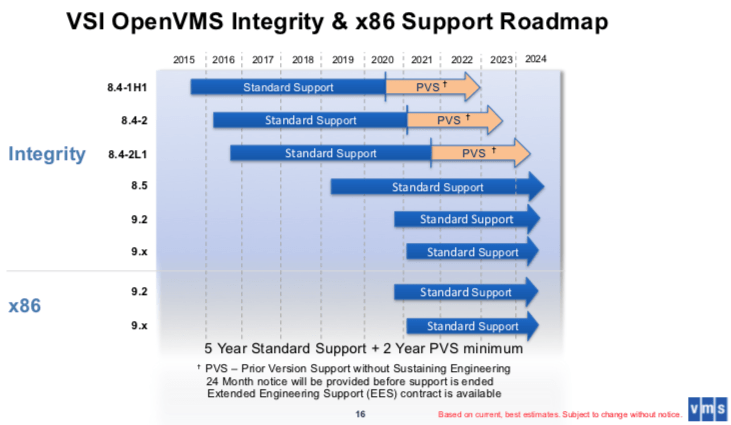
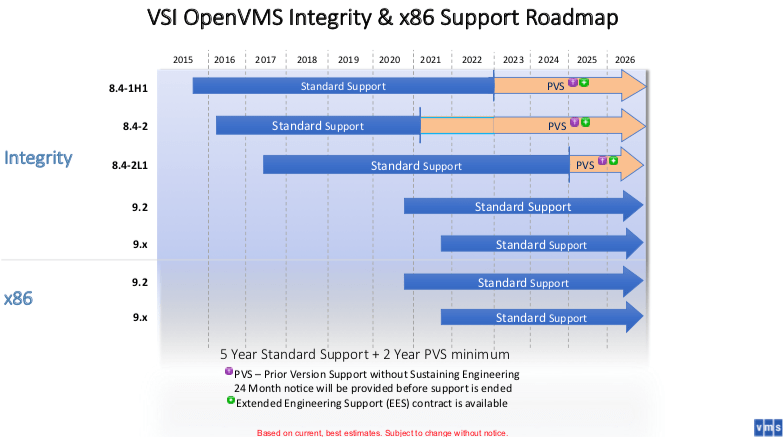
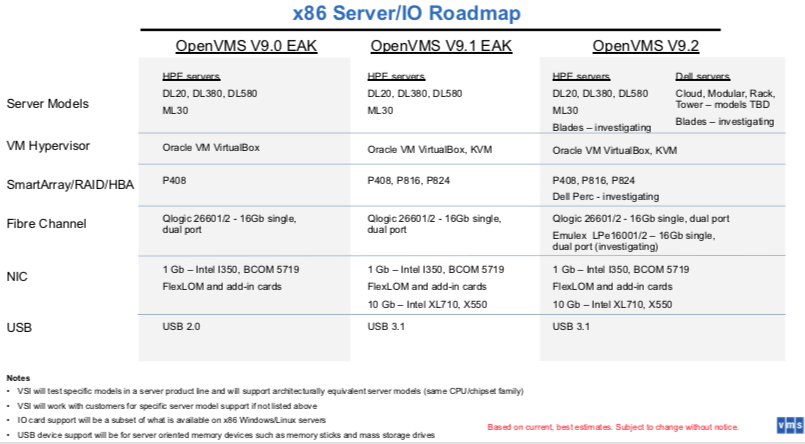
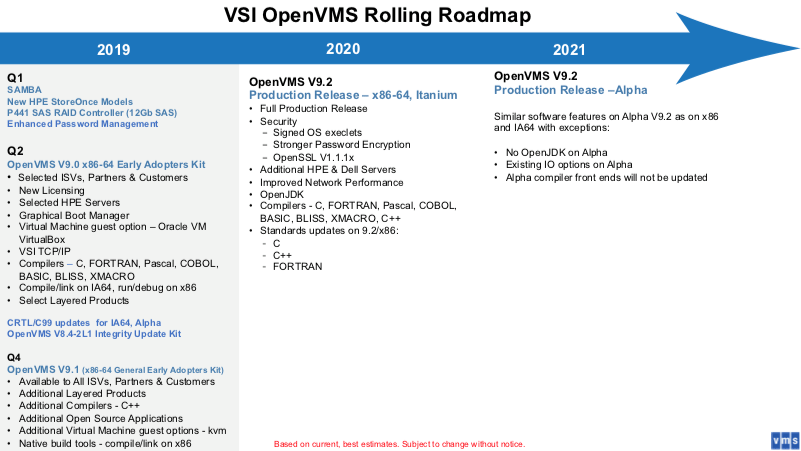
Since information about VMS and DCL is harder to find nowadays, I saved some information in the wayback machine:

By now, there should be a good x86_64 version of OpenVMS, so this is also a reminder to self to see if that can run as a VM and is affordable enough to do some experimentation with.

–jeroen

Posted in Development, History, Scripting, Software Development | Leave a Comment »

Delphi: creating copies of installed components to repositories for portability across use cases

Posted by jpluimers on 2021/05/25

Often it is useful to have 3rd party components part of a repository so it is easier to increase portability.

For instance when you want to include or exclude some of them in certain projects by installing/deinstalling them to/from the IDE.

This can be useful for cases where components bite each other, or you want to vary the components in use by version without spinning up new VMs (Delphi registration counts can be a pain for new VMs; you need to be very careful as you can never decrease your registration count).

I usually do this by having 3 batch files:

  1. copy from an installed 3rd party library to a repository in a relative way
  2. register any needed relative files into the IDE
  3. unregister any needed relative files in from the IDE

If successful, I can uninstall the library.

I especially take this approach with 3rd party libraries that stuff to global places (inside the Delphi installation directory, or worse, inside the Windows directories).

That way, I can try to ensure that compilation of running only uses files from the repository, making my options for portability larger.

Examples I did this for are for instance QuickReports and ODAC.

Some bits are tricky to get right, especially loading dependencies.

It helps to understand that for executable files Windows also searches for dependencies in the directory of the executable file.

For libraries, that does not happen. Which means that if a BPL has dependencies, they either have to be explicitly loaded before (for instance by being in the Known Packages registry entries), or on the search PATH.

Delphi has the %BDSCOMMONDIR% directory in the search PATH. It usually points to “%PUBLIC%\Documents\Embarcadero\Studio\%ProductVersion%\Bpl” (where ProductVersion=19.0 for Delphi 10.2 Tokyo).

There might be a away around this using manifests, but this means modifying the BPL files, which is beyond the point of having these copy scripts.

More on those environment variables in a later blog post.

Related:

–jeroen

Read the rest of this entry »

Posted in Conference Topics, Conferences, Delphi, Delphi 10.2 Tokyo (Godzilla), Development, Event, Software Development | Leave a Comment »

2 x Speakers surround replacement – Designed for Apple G4 Cube M7963 | eBay

Posted by jpluimers on 2021/05/24

For my link archive: [Wayback/Archive.is] 2 x Speakers surround replacement – Designed for Apple G4 Cube M7963 | eBay

2 x Speakers surround replacement - Designed for Apple G4 Cube M7963

Via: [Archive.is] Power Macintosh G4 Cube Owners Group : Hi Guys. Just for you to be aware, this is my product, specifically designed and produced by me to repair the Apple G4 Cube speakers | Facebook

–jeroen

Posted in Apple, Mac, Power Mac, Power Mac G4 Cube, Power User | Leave a Comment »

Forgot the ESXi root password? No problems, here are 4 ways to reset it! – VMWARE BLOG

Posted by jpluimers on 2021/05/24

I only needed one of the standalone ways for the many ways in [WayBack] Forgot the ESXi root password? No problems, here are 4 ways to reset it! – VMWARE BLOG

Passwords are the things people tend to forget. Well, ESXi root passwords are not an exception either! Without the root password, you lose control over your hosts, so it’s good to know how to reset it. Well, resetting an ESXi host password is the thing I gonna talk about in this article.

Resetting root password on the standalone ESXi hosts

Now, as we know how to reset the password with vCenter, let’s look at some tough cases. Let’s say, you don’t have vCenter installed on the host. Once again, I do not want to re-install the server OS as VMware says. Seriously, that’s not fun! Let’s look at something more interesting instead. Well, let’s say, what about changing the password right on the node itself?

Before I start, I’d like to mention that you won’t be able to trick ESXi security and change the root password on the node without shutting it down. This means that you, like it or not, do need to shut down each VM from the inside! If you screw things up, you won’t be able to start VMs without ESXi re-installation.

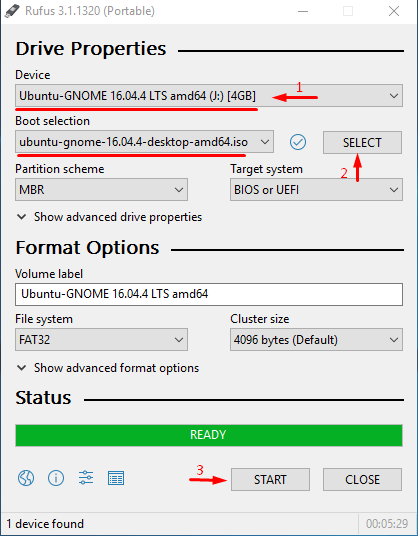
Also, you need the boot the CD image. I used Ubuntu GNOME in this article. Find out how to create a boot CD and download Ubuntu GNOME here. You also need Rufus to write the boot CD image on the flash drive.
C:\21a983d22b51938355d6c52e7f69741e

So, you need to boot from the flash disk, mount the required ESXi datastore, unpack the archive, and edit the file with passwords. Next, you upload the file back into the initial directory, and, after rebooting the host, you can access the it without the password.

Editing the “shadow” file

What’s “shadow” is?

For safety concerns, ESXi keeps passwords encrypted in some file… whatever, here’s how you still can reset the password. According to some unofficial sources, this file is called “shadow”. You can find it in one of those booting volumes in the /etc directory. Before the host boots, /etc is in the local.tgz archive. Here’s the path: /etc => local.tgz => state.tgz. You can find it in one of those booting volumes in the /etcdirectory. Before the host boots, /etc is in the local.tgz archive. Here’s the path: state.tgz => local.tgz => /etc.

Here’s how the disk is formatted in ESXi 6.0 or higher:

Volume name What it is for? Volume size in my case
/dev/sda1 Starts the system 4 MB
/dev/sda2: /scratch: System volume that is created while installing ESXi on the over-5 GB disk. 4 GB
/dev/sda3: VMFS datastore: Represents all the remaining disk space
/dev/sda5: /bootbank: The ESXi image 250 MB
/dev/sda6: /altrbootbank: The older system version image. You’ll see it as an empty volume if you have never updated the system 250 MB
/dev/sda7: vmkDiagnostic (the first volume) Keeps the core dump 110 MB
/dev/sda8: /store VMware Tools image 286 MB
/dev/sda9: vmkDiagnostic (the second volume) Keeps all the information connected with vSAN diagnostics. You can observe this volume only in over-8 GB datastores 2.5 GB

Among of all those volumes, we need only the /bootbank one as it keeps the ESXi archive. In this way, “shadow” should be somewhere there.

Chasing the “shadow”

So, let’s boot the host from the flash disk first and start the terminal.

Run the following cmdlet to acquire root privileges:

# sudo su

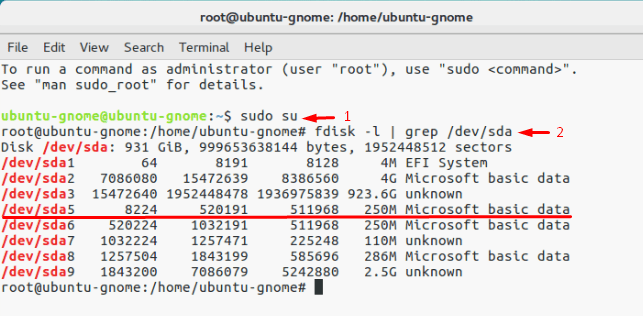
Next, deploy the command below to look through the sda directory.

# fdisk –l | grep /dev/sda*
C:\c7eb70e4332b280e897bc91da2843eb5

Well, it seems that we need that 250 MB /dev/sda5 directory. Create the mnt directory.

# mkdir /mnt/sda5

Create the directory for the temporary files now.

# mkdir /temp

And, mount the /dev/sda5 directory using the cmdlet below.

# mount /dev/sda5 /mnt/sda5

Now, look for that state.tgz archive I was talking above.

# ls -l /mnt/sda5/state.tgz

Extract both state.tgz and local.tgz. Here are the commands you can use for that purpose:

# tar -xf /mnt/sda5/state.tgz –C /temp/

# tar -xf /temp/local.tgz –C /temp/

Once you are done with unpacking, get rid of those old archives with the cmdlet below:

# rm /temp/local.tgz

Now, you are ready to do some magic with “shadow”. Open the file, edit it, and close it. As simple as it! To double-check the changes, open the file one more time.

# vi /temp/etc/shadow

Actually, here’s how “shadow” looks like inside. See, it contains all users’ passwords.
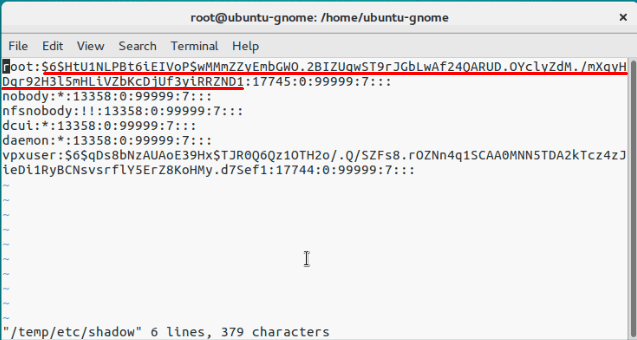
C:\5cfa53db6df27f3419c38304e61a1937

To reset the password, just delete everything between the double colons. Remember, everything is encrypted? That’s why passwords look that weird.
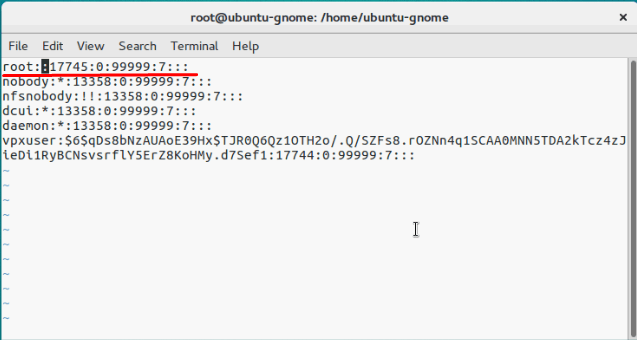
C:\569ce0a0bd6088cfe538f3b76c1872b3

# vi /temp/etc/shadow

Next, go to the work directory.

# cd /temp

Now, add the “shadow” back to the archive.

# tar -czf local.tgz etc

# tar -czf state.tgz local.tgz

Move the new archive to the initial directory.

# mv state.tgz /mnt/sda5/

Unmount the /sda5 disk with the cmdlet below:

# umount /mnt/sda5

And, eventually reboot the host.

# reboot

Well, to make the stuff I’ve just written above more reader-friendly, here’re all commands you need to deploy step-by-step.
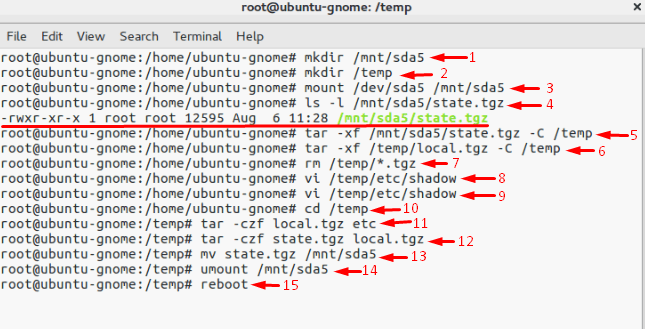
C:\786a70bf9387ec447bd86ea06e01bd12

Well, you are almost there. Reboot the server now, and try accessing the host without any password. Well, check out what I’ve got.
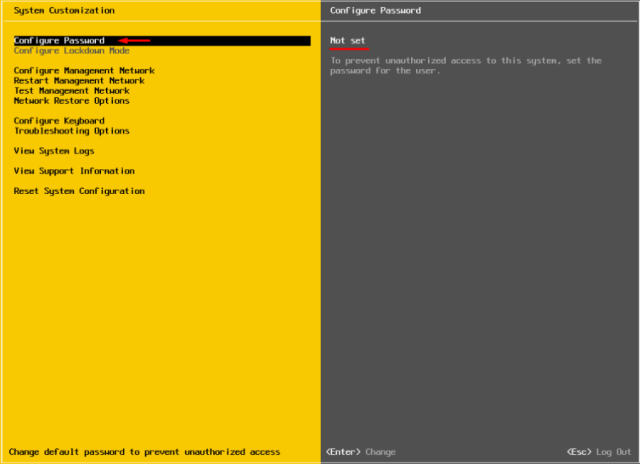
C:\67ddfd5b95a9399d71561e4f7e82fe71

Now, select Configure Password, and type a new password in the self-titled field.
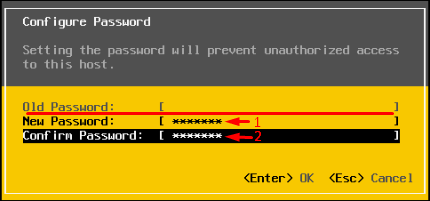
C:\659a2f378848ab4f9e11135e321968d9

Ok, this time, please write the root password, or just try no to forget it!

Replace one “shadow” with another

There’s another way to reset the ESXi root password using “shadow”. Actually, that’s nothing more than a variation of the method I described above.

So, another thing you can do to reset the ESXi password is just using another host “shadow” file! Yes, you can just copy the “shadow” file from another host with the known root password to the one more flask disk. To get the file with passwords from another host, you need WinSCP. The utility is available here. The nice thing is that you can retrieve that file from the host with the unknown ESXi root password without even shutting it down.
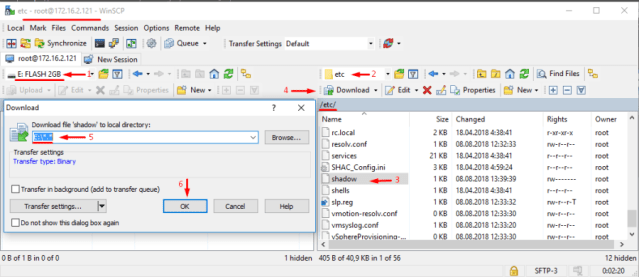
C:\c538c5686ddc4ba551ea1f5237280e1b

Next, call the terminal with the Ubuntu GNOME and reset the password.

Update user privileges to root first. You can run the following command for that purpose:

# sudo su

Now, let’s see what you have on the disk.

# fdisk –l | grep sd 

Create two temporary volumes afterward.

# mkdir /mnt/sda5

# mkdir /mnt/sdb1

Mount the ESXi disk and flash disk where the “shadow” resides using the following cmdlet.

# mount /dev/sda5 /mnt/sda5

# mount /dev/sdb1 /mnt/sdb1

Now, create the temporary volume for further work with archives.

# mkdir /temp

Create the volume where you are going to keep the state.tgz copy just in case something goes wrong.

# mkdir /mnt/sdb1/save

Find the necessary file in the archive.

# ls -l /mnt/sda5/state.tgz

Copy the archive.

# cp /mnt/sda5/state.tgz /mnt/sdb1/save

Run the following command to double-check whether the file has been copied:

# ls -l /mnt/sdb1/save

Extract state.tgz using the cmdlet below:

# tar -xf /mnt/sda5/state.tgz –C /temp/

Find the temp file.

# ls –l /temp

Extract local.tgz.

# tar -xf /temp/local.tgz –C /temp/

Make sure that you extracted the /etc directory.

# ls –l /temp
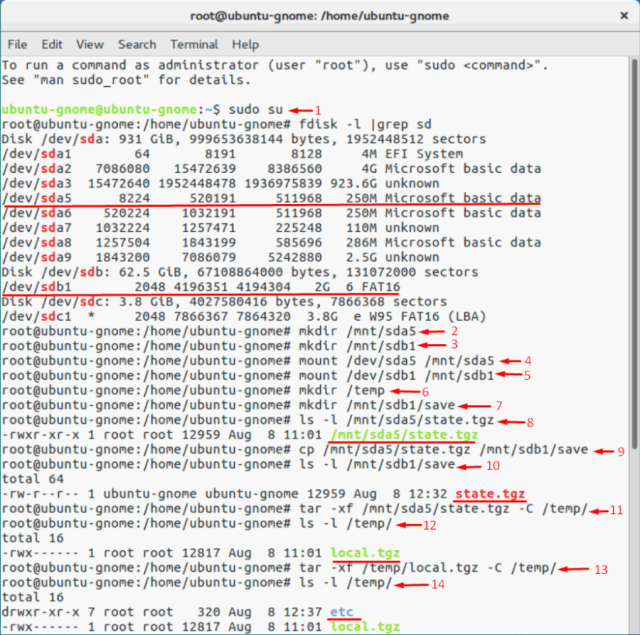
C:\8b102fd08f266e9fca099d664a77e2c6

Now, delete the local.tgz volume to ensure that it won’t be included into the new archive by accident.

# rm /temp/local.tgz

Find “shadow” in the /etc directory.

# ls -l /temp/etc

Replace the original “shadow” with the one from the host with known root password. Type the following cmdlet:

# cp /mnt/sdb1/shadow /temp/etc
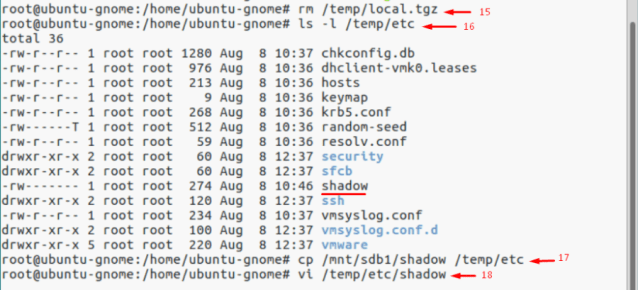
C:\8045c097389c9a0cbc8a78ed1e5805fe

Now, deploy the following command to open the file and look through the saved credentials.

# vi /temp/etc/shadow

If you do not want some users to access the host, go ahead and just remove them from the listing! Here, I removed Test from the users that can access the host. Wait, why did I delete only Test? At this point, I’d like to warn you against deleting any users you are not familiar with. In my case, all users except Test are system ones. If you delete any of those guys, you may destabilize the OS!
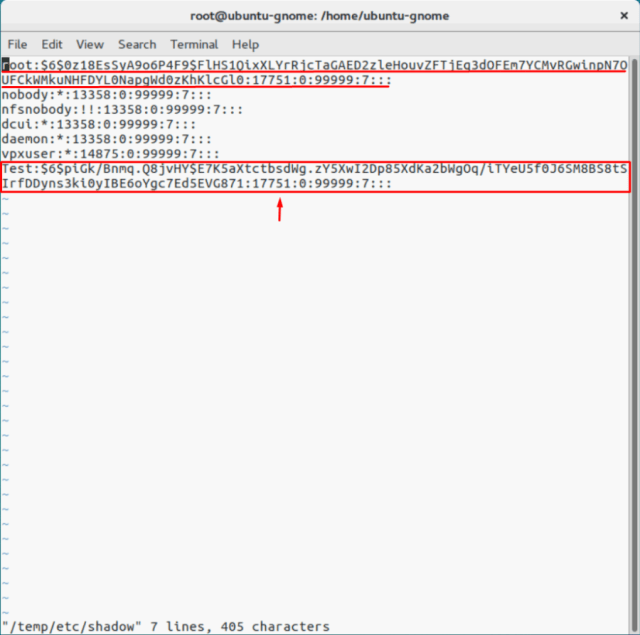
C:\91a5a7a5552948a084c9c8bbbd4c4d1c

Here’s how the “shadow”: file looks like once the unnecessary user.
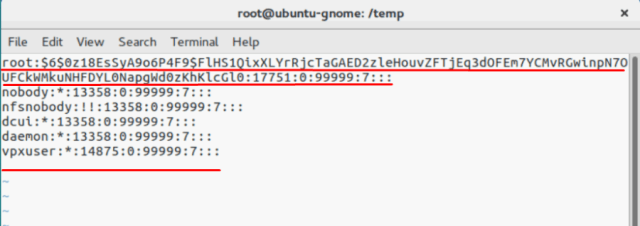
C:\601a3512f8477b298365221f92dcfed7

Check whether all changes have been applied.

# vi /temp/etc/shadow

Type the following line to navigate to the /temp directory.

# cd /temp

Archive the /etc directory.

# tar -czf local.tgz etc

Check whether archiving has run smoothly.

# ls -l /temp/

Now, create the state.tgz volume.

# tar -czf state.tgz local.tgz

Again, check whether the volume has been created.

# ls -l /temp/

Move the archive to the working ESXi directory.

# mv state.tgz /mnt/sda5/

Check the result one more time.

# ls -l /mnt/sda5/

Unmount the sda5 directory.

# umount /mnt/sda5

Eventually, reboot the host.

# reboot

Enjoy! If everything is done right, you can access the host with the known password. Well, to make everything more or less convenient here’s the entire set of commands I used for this method.
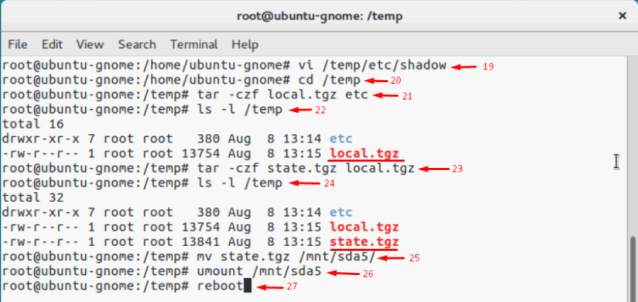
C:\aa3e81917d7434ea1863f161d7985514

If the host starts acting weird after reboot, there’s still a copy of the initial state.tgz. Well, it should be. You can mount both /sda5 and /sdb1 and retrieve the original state.tgz using the following cmdlet… and try again!

# cp /mnt/sdb1/save/state.tgz /mnt/sda5/

–jeroen

Posted in Power User, Virtualization, VMware, VMware ESXi | Leave a Comment »

SuperMicro iKVM and IPMI: not able to initiate “Virtual Media” -> “Virtual Storage”

Posted by jpluimers on 2021/05/24

I had something odd on one SuperMicro systeem:

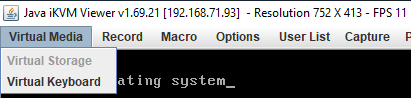
The “Virtual Storage” menu item under “Virtual Media” was marked grey (gray?) as being unavailable.

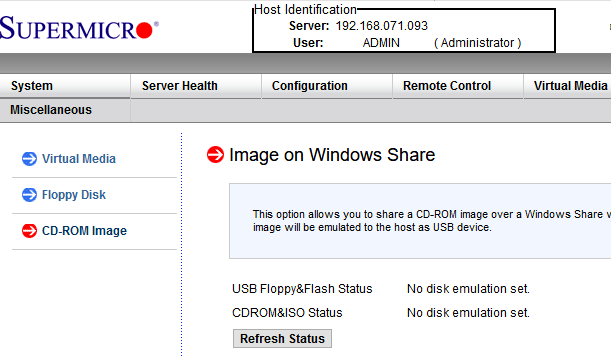
Despite that, no disk image was shown mounted according to the web interface at menu path “Virtual Media” -> “CD-ROM Image“:

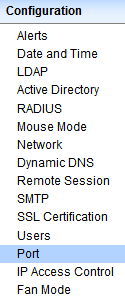
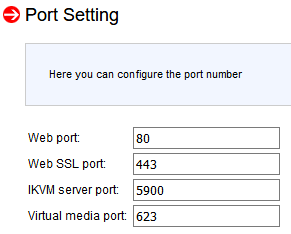
Port settings were good though as seen in menu path “Configuration” -> “Port“:

Even nmap did not show significant differences between the various systems (partial dump here; full dump below)

Discovered open port 443/tcp on 192.168.71.96
Discovered open port 5900/tcp on 192.168.71.96
Discovered open port 80/tcp on 192.168.71.96
Discovered open port 22/tcp on 192.168.71.96
Discovered open port 5985/tcp on 192.168.71.96
Discovered open port 623/tcp on 192.168.71.96

I use alias alias nmap-fingerprint_host_all-ports-even-if-ping-fails='sudo nmap -O -v -A -p- -Pn' here as it usually gives best results for port scans on a single machine.

“Secret” setting

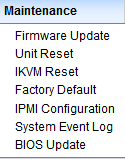
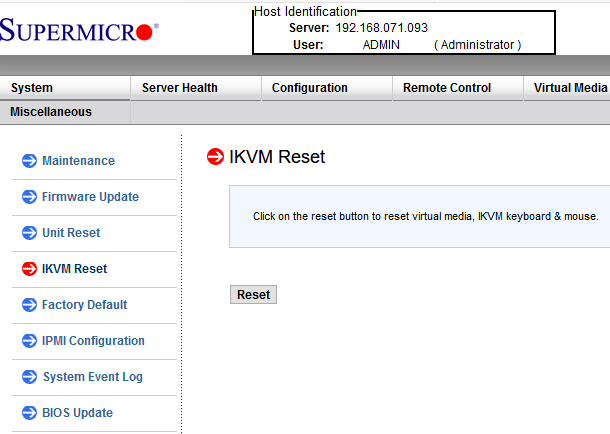
The secret is in a different menu entry under menu path “Maintenance” -> “IKVM reset“:

After pressing the Reset button, then restarting the iKVM client, “Virtual Media” -> “Virtual Storage” is nog grey any more, and just works:

Read the rest of this entry »

Posted in Hardware, IPMI, Mainboards, Power User, SuperMicro, X9SRi-F | Leave a Comment »

MacOS: when “Command-Tab” does not work (no visual response, no application switching) you need to restart the Dock

Posted by jpluimers on 2021/05/21

Based on [WayBack] Command-Tab Not working….. – Apple Community

If you go to Activity monitor and search for dock, doubleclick on it, choose Force quit.
It will restart the Dock app and now it should work.

I wrote this alias which restarts Dock (including Dashboard and Spaces as they are served by the same process).

alias restart-dock-dashboard-spaces='killall -KILL Dock'

Related: my 2013 post Mac: Restarting the Mac OS X Dock, Finder, Spaces or Menubar | Stefan Ernst.

–jeroen

Posted in Apple, iMac, Mac, Mac OS X / OS X / MacOS, MacBook, MacBook Retina, MacBook-Air, MacBook-Pro, MacMini, macOS 10.12 Sierra, macOS 10.13 High Sierra, OS X 10.10 Yosemite, Power User | Leave a Comment »