The Wiert Corner – irregular stream of stuff

Jeroen W. Pluimers on .NET, C#, Delphi, databases, and personal interests

  • My badges

  • Twitter Updates

  • My Flickr Stream

  • Pages

  • All categories

  • Enter your email address to subscribe to this blog and receive notifications of new posts by email.

    Join 1,860 other subscribers

Archive for May, 2021

JclRTTI: type has not type info

Posted by jpluimers on 2021/05/18

[WayBack] Any idea why we get this error, or even better, how to fix it : [dcc32 Error] JclRTTI.pas(663): E2134 Type ‘<void>’ has no type info We compile same c… – Tommi Prami – Google+

So the JCL needs to have the compiler setting Emit runtime type information set to true (which is the default for projects, but can be turned off).

Thanks Stefan Glienke for reporting the fix.

–jeroen

Posted in Delphi, Development, Software Development | Leave a Comment »

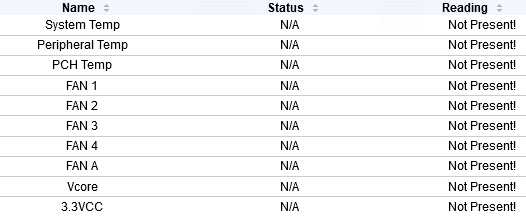
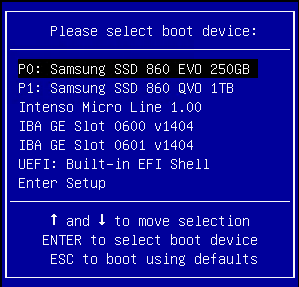
When all your SuperMicro X9/X10/X11 IPMI sensors show N/A: the system is in a BIOS or boot selection screen

Posted by jpluimers on 2021/05/17

I have seen this happen on various Supermicro X9/X10/X11 systems including X9SRi-F/X9SRi-3F/X10SRH-CF/X11SPM-F boards:


I found this via:

  • [WayBack] IPMI no sensor readings and already reset | iXsystems Community
  • [WayBack] Supermicro X10 and X11 motherboard FAQ | iXsystems Community

    All the sensors read N/A 

    First of all, make sure you’re not in the BIOS setup menu. IPMI monitoring of sensors isn’t available there.

    If that is not the case, the procedures listed under “The CPU/PCH temperatures read N/A” may help.

    The CPU/PCH temperatures read N/A

    While the exact cause is unknown, the BMC may enter a faulty state, requiring a reset.

    The following options were recommended to me by Supermicro:

    • Start by power cycling the IPMI. This can be done from the web interface.
    • If that doesn’t work, reset it to factory defaults via the web interface and power cycle it (it will not work until it is properly power cycled).

–jeroen

Posted in Hardware, IPMI, Power User, SuperMicro | Leave a Comment »

ESXi 6.x download URL

Posted by jpluimers on 2021/05/17

Many of the ESXi download URLs get you to my-vmware in places that indicate you do not have a license.

This seems to be the only link that consistently gets you the license and downloads: my.vmware.com/en/group/vmware/evalcenter?p=free-esxi6.

For instance, the ones below with

–jeroen

Posted in ESXi6, ESXi6.5, ESXi6.7, Power User, Virtualization, VMware, VMware ESXi | Leave a Comment »

Chocolatey: vcredist 2005/2008/2010 updates succeeding again after Microsoft rebuilt the installers multiple times causing new hashes each time

Posted by jpluimers on 2021/05/17

Follow-up in my blog post Chocolatey: vcredist 2005/2008/2010 updates failing as Microsoft rebuilt the installers multiple times causing new hashes each time last Friday.

The chocolatey packages have been updated this weekend and work again. Hopefully Microsoft is done and no new updates are needed (:

New versions thanks to [Wayback/Archive.is] Chocolatey Software | jberezanski!:

–jeroen

Posted in Chocolatey, Power User, Windows | Leave a Comment »

ESXi: wrong IPv4 address after moving the ESXi boot USB stick and SSD devices to an identical motherboard with different MAC addresses

Posted by jpluimers on 2021/05/17

A while ago, I wanted to move the ESXi USB stick and SSD devices to another machine with identical motherboard as it had a larger physical case more suited for expansion.

To my surprise, the management network stayed at the same IPv4 address, despite it being being from a DHCP pool, and the new MAC addresses having different IPv4 addresses assigned in the pool (I run a kind of static dynamic address system where the DHCP server has the correct mapping between MAC and IPv4 addresses).

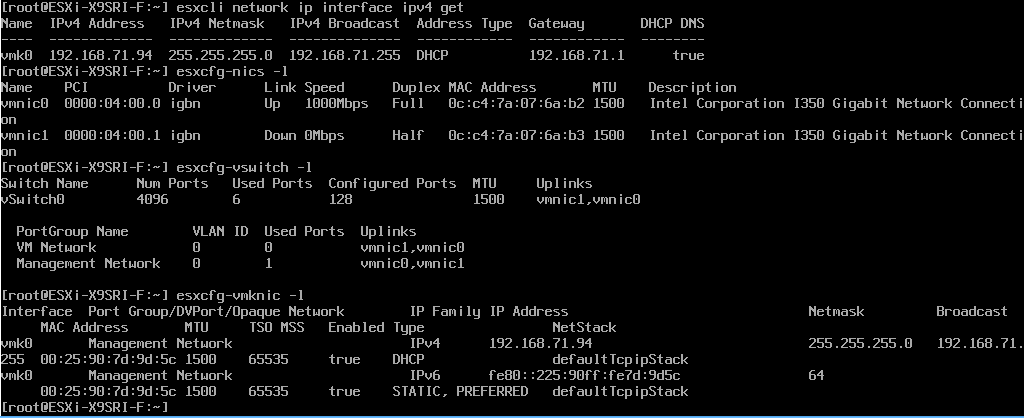
This appears to be a known issue: by default, ESXi copies the MAC address to the vmknic of the management network instead of following hardware changes. You can see this in the screenshot showing the right physical MAC, but the wrong virtual MAC:

The fix is actually quite simple:

After this, you have to perform a reboot for the new setting to take effect.

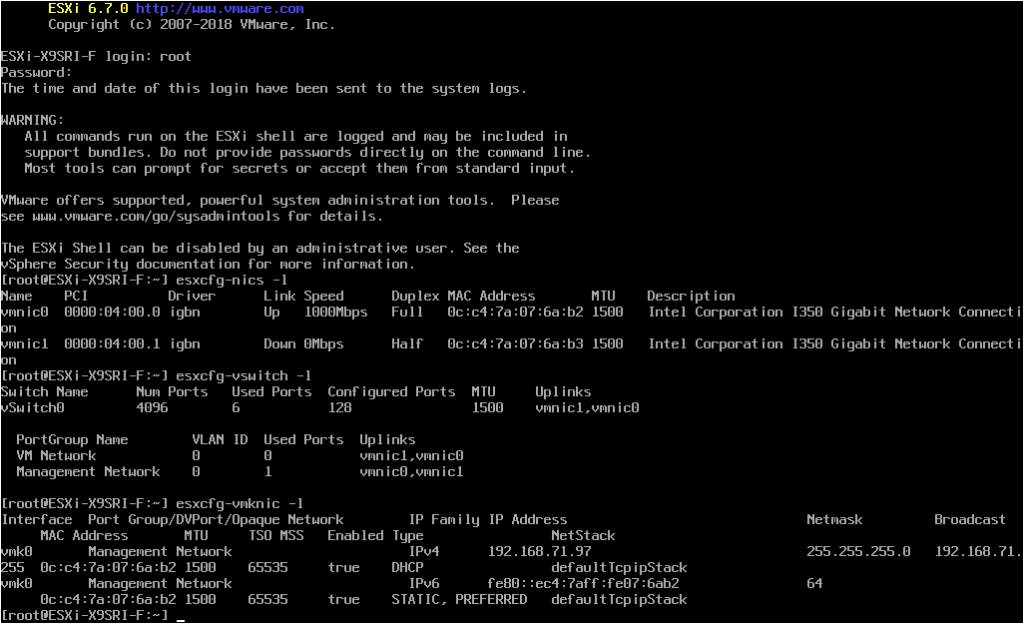
When booting is done, the virtual MAC has been copied from the physical MAC:

Note I did not have to fiddle with /etc/vmware/esx.conf as VirtuallyVTrue had to.

For more information, see these links (I copied the content of the final link below the footer as it cannot be saved in the WayBack or Archive.is archives):

–jeroen

Read the rest of this entry »

Posted in ESXi6.5, ESXi6.7, Power User, Virtualization, VMware, VMware ESXi | Leave a Comment »

Chocolatey: vcredist 2005/2008/2010 updates failing as Microsoft rebuilt the installers multiple times causing new hashes each time

Posted by jpluimers on 2021/05/14

The Microsoft rebuilt move affects these Chocolatey Microsoft Visual C++ Redistributable packages, usually multiple times:

You get error messages like this:

ERROR: Checksum for 'C:\Users\saroot\AppData\Local\Temp\chocolatey\vcredist2010\10.0.40219.2\vcredist_x86.exe' did not meet '66B797B3B4F99488F53C2B676610DFE9868984C779536891A8D8F73EE214BC4B' for checksum type 'sha256'. Consider passing the actual checksums through with --checksum --checksum64 once you validate the checksums are appropriate. A less secure option is to pass --ignore-checksums if necessary

The cause is [Archive.is] vcredist-all fails to install due to broken checksum of vcredist2005, vcredist2008 and vcredist2010 · Issue #105 · jberezanski/ChocolateyPackages

jberezanskicommented

Great, Microsoft is apparently on an in-place installer update spree.

Actually, this is not a problem with vcredist-all, but rather with those specific packages and should be reported to maintainers of those packages. It so happens, however, that I’m also one of the maintainers of vcredist2008 and vcredist2010 (which live in https://github.com/chocolatey-community/chocolatey-coreteampackages/tree/master/manual). I’ve already prepared a fix for 2010 and I guess I’ll do 2008 tomorrow.

As for 2005, I can see that it has the same maintainer as vcredist2010 had until very recently – when we took over that package because the maintainer did not respond. So we probably should take over 2005, too.

Progress

The vcredist2010 package has been modified two times for this:

Hopefully the vcredist2008 and vcredist2005 packages will follow soon.

–jeroen

Posted in C++, Chocolatey, Development, Power User, Software Development, Visual Studio C++, Windows | Leave a Comment »

VMware Standalone Converter: more recent versions do not support older operating systems

Posted by jpluimers on 2021/05/14

It pays to keep several versions of VMware Standalone Converter at hand as newer supporters do support newer operating systems and ESXi versions, but do not support older operating systems.

Hopefully the free StarWind V2V converter that does also support P2V has a broader support for older versions.

Some relevant links:

–jeroen

[WayBack] Free Tools VMware VMware vSphere goodies and freebies. VMware Monitoring tools, backup. Those tools are Free to use in production environment, no time limit

[WayBack] Cool Free VPN Server Software SoftEther VPN | ESX Virtualization

Posted in Power User, Virtualization, VMware, VMware Converter, VMware ESXi | Leave a Comment »

NFS server on Windows

Posted by jpluimers on 2021/05/14

One way to access files from ESXi is over NFS shares.

Out of the box, Windows Server is the only edition that provides NFS server capability, but desktop editions only have an NFS client.

There are some commercial and open sources implementations though, of which [WayBack] GitHub – winnfsd/winnfsd seems the best maintained open source one.

In case I ever need NFS server support, I need to check out these links:

–jeroen

Posted in *nix, Power User, Virtualization, VMware, VMware ESXi, Windows | Leave a Comment »

How to calculate bitmap size? – Stack Overflow

Posted by jpluimers on 2021/05/13

A while ago I needed an estimate for [WayBack] How to calculate bitmap size? – Stack Overflow, which does an accurate calculation for the size of the pixel storage (i.e. without headers):

pixelStorageSize = (( width*bitsPerPixel + 31) / 32) * 4 * height

Here:

  • 4 is the number of bytes per quad-byte as bitmaps are stored with pixel lines aligned on quad-byte boundaries
  • 32 is the bits per quad-byte
  • 31 helps to round up to the quad-word boundary

It was derived from [WayBack] Capturing an Image – Windows applications | Microsoft Docs and shorthand for what is explained at [WayBack] BMP file format: Pixel storage – Wikipedia

The bits representing the bitmap pixels are packed in rows. The size of each row is rounded up to a multiple of 4 bytes (a 32-bit DWORD) by padding.

For images with height above 1, multiple padded rows are stored consecutively, forming a Pixel Array.

The total number of bytes necessary to store one row of pixels can be calculated as:

{\displaystyle {\text{RowSize}}=\left\lceil {\frac {{\text{BitsPerPixel}}\cdot {\text{ImageWidth}}}{32}}\right\rceil \cdot 4=\left\lfloor {\frac {{\text{BitsPerPixel}}\cdot {\text{ImageWidth}}+31}{32}}\right\rfloor \cdot 4,}
ImageWidth is expressed in pixels, note the special parentheses.

The total amount of bytes necessary to store an array of pixels in an n bits per pixel (bpp) image, with 2ncolors, can be calculated by accounting for the effect of rounding up the size of each row to a multiple of 4 bytes, as follows:

PixelArraySize = RowSize · |ImageHeight|
ImageHeight is expressed in pixels. The absolute value is necessary because ImageHeight can be negative.

I think I needed this to estimate how many bitmaps would fit in

[WayBack] Virtual address space – Wikipedia, which on 32-bit Windows by default is limited to 2 GiB, and can be extended to 3 GIB by enabling the IMAGE_FILE_LARGE_ADDRESS_AWARE executable header flag.

This flag imposes the risk of many libraries and DLLs to fail because they do not get the pointer math right. You often do not have control of future versions of DLLs being loaded in your process space and their risks, so do not ever use that flag.

–jeroen

Posted in Algorithms, Development, Software Development | 1 Comment »

Chocolatey: installing Oracle SQL Developer and updating the chocolatey package

Posted by jpluimers on 2021/05/13

Sometimes an install is not just as simple as C:\>choco install --yes oracle-sql-developer.

Edit 20210514:

Note that most of the below pain will be moot in the future as per [Archive.is] Jeff Smith 🍻 on Twitter: “we’re working on removing the SSO requirement, it’s already done for @oraclesqlcl – see here … “ referring to [Wayback] SQLcl now under the Oracle Free Use Terms and Conditions license | Oracle Database Insider Blog

SQLcl, the modern command-line interface for the Oracle Database, can now be downloaded directly from the web without any click-through license agreement.

It means the Oracle acount restriction will be lifted, and downloads will be a lot simpler.

I started with the below failing command, tried a lot of things, then finally almost gave up: Oracle stuff does not want to be automated, which means I should try to less of their stuff.

First of all you need an Oracle account (I dislike companies doing that for free product installs; I’m looking at Embarcadero too) by going to profile.oracle.com:

[WayBack] Chocolatey Gallery | Oracle SQL Developer 18.4.0 (also: gist.github.com/search?l=XML&q=oracle-sql-developer)

Notes

  • This version supports both 32bit and 64bit and subsequently does not have a JDK bundled with it. It has a
    dependency on the jdk8 package to meet the application’s JDK requirement.
  • An Oracle account is required to download this package. See the “Package Parameters” section below for
    details on how to provide your Oracle credentials to the installer. If you don’t have an existing account, you can
    create one for free here: https://profile.oracle.com/myprofile/account/create-account.jspx

Package Parameters

The following package parameters are required:

* /Username: – Oracle username
* /Password: – Oracle password

(e.g. choco install oracle-sql-developer --params "'/Username:MyUsername /Password:MyPassword'")

To have choco remember parameters on upgrade, be sure to set choco feature enable -n=useRememberedArgumentsForUpgrades.

Then the installation failed fail again: ERROR: The response content cannot be parsed because the Internet Explorer engine is not available, or Internet Explorer's first-launch configuration is not complete. Specify the UseBasicParsing parameter and try again.

The trick is to RUN IEXPLORE.EXE AS ADMINISTRATOR ONCE BEFORE INSTALLING FROM CHOCOLATEY. Who would believe that.

The reason is that the package uses Invoke-WebRequest which requires Internet Explorer and PowerShell 3. Chocolatey packages however need to be able to run on just PowerShell 2 without Invoke-WebRequest.

Maybe using cURL can remedy that; adding a dependency to is is possible, as cURL can be installed via chocolatey: [WayBack] How to Install cURL on Windows – I Don’t Know, Read The Manual. Another alternative might be [WayBack] Replace Invoke-RestMethod in PowerShell 2.0 to use [WayBack] WebRequest Class (System.Net) | Microsoft Docs.

Read the rest of this entry »

Posted in CertUtil, Chocolatey, CommandLine, Database Development, Development, DVCS - Distributed Version Control, git, Hashing, OracleDB, Power User, PowerShell, Security, SHA, SHA-1, Software Development, Source Code Management, Windows, XML, XML/XSD | Leave a Comment »