The Wiert Corner – irregular stream of stuff

Jeroen W. Pluimers on .NET, C#, Delphi, databases, and personal interests

  • My badges

  • Twitter Updates

  • My Flickr Stream

  • Pages

  • All categories

  • Enter your email address to subscribe to this blog and receive notifications of new posts by email.

    Join 1,860 other subscribers

Archive for August, 2021

Digging Through Event Log Hell (finding user logon & logoff) – Ars Technica OpenForum

Posted by jpluimers on 2021/08/31

This helped me big time finding failed logon attempts: [WayBack] Event Log Hell (finding user logon & logoff) – Ars Technica OpenForum

Alternatively, you can use the XPath query mechanism included in the Windows 7 event viewer. In the event viewer, select “Filter Current Log…”, choose the XML tab, tick “Edit query manually”, then copy the following to the textbox:

Code:
<QueryList>
  <Query Id="0" Path="Security">
    <Select Path="Security">*[System[EventID=4624] and EventData[Data[@Name='TargetUserName'] = 'USERNAME']]</Select>
  </Query>
</QueryList>

This selects all events from the Security log with EventID 4624 where the EventData contains a Data node with a Name value of TargetUserName that is equal to USERNAME. Remember to replace USERNAME with the name of the user you’re looking for.

If you need to be even more specific, you can use additional XPath querying – have a look at the detail view of an event and select the XML view to see the data that you are querying into.

Thanks user Hamstro!

Notes:

Related:

–jeroen

Posted in Development, Microsoft Surface on Windows 7, Power User, Software Development, Windows, Windows 10, Windows 7, Windows 8, Windows 8.1, Windows 9, Windows Vista, Windows XP, XML/XSD | Leave a Comment »

When Samsung TV’s fail, check the capacitors on the power board

Posted by jpluimers on 2021/08/31

[WayBackNick_Craver on Twitter: Plus Another mini-project: let’s see if we can’t figure out what’s wrong with this little guy. Symptoms: constant LCD on (briefly) and restart loop immediately when plugged in.

–jeroen

Read the rest of this entry »

Posted in Development, Displays, Hardware, Hardware Development, LifeHacker, Power User | Leave a Comment »

Some links that might help use SonarQube with Delphi

Posted by jpluimers on 2021/08/31

For my link archive:

--jeroen

Posted in Delphi, Development, Software Development, SonarQube, Static Code Analysis | 2 Comments »

“fixing” ESXi “rsync error: error allocating core memory buffers (code 22) at util2.c(106) [sender=3.1.2]”

Posted by jpluimers on 2021/08/30

Reminder to self: create a static ESXi binary for a recent rsync release.

Quite a few people have bumped into rsync erroring out with “large” sets of files (where large can be as low as ~1000), like for instance Tj commenting on my post “ESXi 5.1 and rsync – damiendebin.net.”:

ERROR: out of memory in receive_sums [sender] │······
rsync error: error allocating core memory buffers (code 22) at util2.c(102) [sender=3.1.1] │······
rsync: [generator] write error: Broken pipe (32) │······

I bumped into this myself as well, even when updating from rsync 3.1.0 to 3.1.2.

There are various static rsync for ESXi around. Just a few of them for completeness:

There is also 3.0.9 (via [Wayback] VMware ESXi 5.1 rsync 3.0.9 statically linked binary erstellen – bachmann-lan.de), but it has a VMFS bug ([Wayback] 8177 – Problems with big sparsed files) as per [Wayback] ESXi 5.1 and rsync – damiendebin.net.)

The good news is that it is fixed in 3.2.2 as a user-configurable setting, but since there is no ESXi build yet (see reminder above)…

Anyway: [Wayback] 12769 – error allocating core memory buffers (code 22) depending on source file system

Wayne Davison 2020-06-26 03:56:35 UTC
I fixed the allocation args to be size_t values (and improved a bunch of allocation error checking while I was at it).

I then added an option that lets you override this allocation sanity-check value. The default is still 1G per allocation, but you can now specify a much larger value (up to "--max-alloc=8192P-1").

If you want to make a larger value the default for your copies, export RSYNC_MAX_ALLOC in the environment with the size value of your choice.

Committed for release in 3.2.2.

This is what happens with 3.1.2 and 3.1.3:

time rsync -aiv --info=progress2 --progress --partial --existing --inplace /vmfs/volumes/Samsung850-2TB-S3D4NX0HA01043L/ Samsung850-2TB-S3D4NX0HA01043L/
sending incremental file list
              0   0%    0.00kB/s    0:00:00 (xfr#0, ir-chk=1000/1259)
ERROR: out of memory in flist_expand [sender]
rsync error: error allocating core memory buffers (code 22) at util2.c(106) [sender=3.1.2]
Command exited with non-zero status 22
real    0m 0.87s
user    0m 0.10s
sys 0m 0.00s
time rsync -aiv --info=progress2 --progress --partial --ignore-existing --sparse /vmfs/volumes/Samsung850-2TB-S3D4NX0HA01043L/ Samsung850-2TB-S3D4NX0HA01043L/
sending incremental file list
              0   0%    0.00kB/s    0:00:00 (xfr#0, ir-chk=1000/1259)
ERROR: out of memory in flist_expand [sender]
rsync error: error allocating core memory buffers (code 22) at util2.c(106) [sender=3.1.2]
Command exited with non-zero status 22
real    0m 0.28s
user    0m 0.12s
sys 0m 0.00s
Finished

I was lucky that [Wayback] “rsync error: error allocating core memory buffers” protocol version “3.1.2” – Google Search got me a result so quickly: add a --protocol-29 and you are set.

The first result (Wayback has the results reversed from what got) didn’t fix it. The second did.

  1. [Wayback] 225761 – net/rsync long path causes buffer overflow (update to 3.1.3)
  2. [Wayback/Archive.is] AIX Open Source – IBM Power Systems Community: rsync out of memory

    As a work around, I added “--protocol=29” to one of our servers that was consistently failing with “ERROR: out of memory in flist_expand [receiver]” “rsync error: error allocating core memory buffers (code 22) at util2.c(105) [receiver=3.1.3]” in rsync-3.1.3-2.ppc

    I read the man page and started experimenting with the protocol version until I lowered it enough to get it to work consistently.

The problem might be that running on the ESXi gives you limited memory, but then some 10k files should not use more than like half a megabyte of memory.

Sometime I will dig deeper into the protocol version differences, for now a list of files I think will be relevant for that (mainly look for protocol_version):

Some web pages mentioning the --protocol option and might give me more insight in the protocol differences:

With --protocol=29, time estimation is way off, but there are no errors:

time rsync -aiv --info=progress2 --progress --partial --existing --inplace --protocol=29 /vmfs/volumes/Samsung850-2TB-S3D4NX0HA01043L/ Samsung850-2TB-S3D4NX0HA01043L/
building file list ... 
9059 files to consider
.d..t...... isos/
         27,593   0%    0.00kB/s    0:00:06 (xfr#1, to-chk=0/9059)   

sent 212,594 bytes  received 268 bytes  20,272.57 bytes/sec
total size is 3,055,677,645,398  speedup is 14,355,204.99
real    0m 13.31s
user    0m 1.35s
sys 0m 0.00s

time /vmfs/volumes/5791a3e1-0b9368de-4965-0cc47aaa9742/local-bin/rsync -aiv --info=progress2 --progress --partial --ignore-existing --sparse --protocol=29 /vmfs/volumes/Samsung850-2TB-S3D4NX0HA01043L/ Samsung850-2TB-S3D4NX0HA01043L/
building file list ... 
9059 files to consider
>f+++++++++ isos/EN-Windows-XP-SP3-VL.iso
...
cd+++++++++ ESXi65.filesystem-root/usr/share/
216,868,164,639   7%   40.64MB/s    1:24:48 (xfr#2571, to-chk=0/9059)   

sent 216,894,938,870 bytes  received 57,858 bytes  42,582,702.80 bytes/sec
total size is 3,055,677,645,398  speedup is 14.09
real    1h 24m 58s
user    34m 5.59s
sys 0m 0.00s
Finished

Even not on ESXi, there were just a few people bumping into this, so I wonder why there are so few matches on [Wayback] “ERROR: out of memory in flist_expand [sender]” “sender=3.1” – Google Search:

–jeroen

Posted in *nix, *nix-tools, ash/dash development, Development, ESXi5, ESXi5.1, ESXi5.5, ESXi6, ESXi6.5, ESXi6.7, ESXi7, Power User, rsync, Scripting, Software Development, Virtualization, VMware, VMware ESXi | Leave a Comment »

LEGO Car Chassis Instructions 8860, Technic

Posted by jpluimers on 2021/08/30

My first big LEGO Technic car: [WayBack] LEGO Car Chassis Instructions 8860, Technic.

These are the instructions for building the LEGO Technic Car Chassis that was released in 1980.

The scanned images are OK, so no PDF needed.

–jeroen

Read the rest of this entry »

Posted in About, LifeHacker, Personal, Power User | Leave a Comment »

Afschermen gegevens in BRP (voormalig GBA)

Posted by jpluimers on 2021/08/30

Interessant draadje over iemand die zijn gegevens probeerde af te schermen, maar die in een rechtzaak toch gebruikt mochten worden: [WayBack] Verkoper illegale e-books moet 1421 euro aan Stichting Brein betalen – IT Pro – Nieuws – Tweakers.

–jeroen

Posted in LifeHacker, Power User | Leave a Comment »

Windows on VMware ESXi: fixing “Unknown USB Device” or “The USB device returned an invalid USB device descriptor”

Posted by jpluimers on 2021/08/27

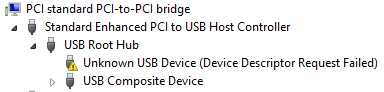
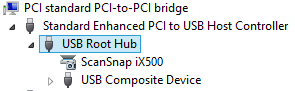
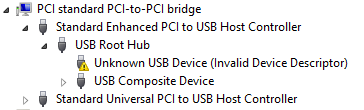
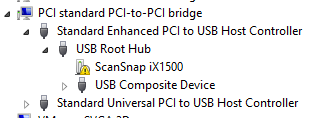
Sometimes, the Windows device manager shows any of the below errots for an USB 3.x device that is physically connected to the ESXi host and passes through a VM (via a virtual USB controller and virtual USB device).

This solution usually works: use a USB 2.0 cable instead of a USB 3.x cable.

If it doesn’t work, then the solutions are the same as when this happens in a pure physical solution:

In my case, I needed a USB connection, because it is the only way to reset a Fujitsu ScanSnap scanner to correct WiFi settings after it gets confused (which happens a few times per year).

Sreenshots

The difference for devices with a known driver:

  • USB 3 cable 
  • USB 2 cable 

The difference for devices with an unknown driver:

  •  USB 3 cable 
  • USB 2 cable 

Related information

This happened with me on both a ScanSnap iX500 and iX1500, and this did not help (as I was on a more recent Windows version): [WayBack] When setting up your scanner 502: My computer does not recognize ScanSnap iX500 with a USB 3.0 port. – Fujitsu Global.

More on USB passthrough:

More on USB virtualisation:

–jeroen

Posted in ESXi5.5, ESXi6, ESXi6.5, Fujitsu ScanSnap, Hardware, ix500, Power User, Scanners, Virtualization, VMware, VMware ESXi | Leave a Comment »

How to: Reset C by GE Light Bulbs – turning things off and on again, and again, and again…

Posted by jpluimers on 2021/08/27

You know the old helpdesk joke about “turning it off and on”, right?

GE did that on steroids for their C light bulbs.

It is an off, on, off, on, off, on sequence that depends on the firmware version which nobody knows.

Both procedures:

  1. start with the light bulb being on for at least 5 seconds
  2. have a sequence of off (for 8 seconds) and on (for 2 seconds)
  3. ends with the bulb to flash on/off 3 times (apparently it ends in the “off” position)

Do not mix up the off and on times, or you have to restart again.

So step 2 becomes this:

  • for firmware 2.8 or later: turn off and on 5 times.
  • for firmware 2.7 or earlier: turn off and on 6 times.

The recommend counting using Mississippi seconds (am I the only one having to check the spelling of that 3 times?).

No counting mechanism beats using a watch or clock.

They even made a video about it lasting 3+ minutes.

The video has a great comment thread.

Via: [WayBack] Alexander BITCOIN ADS ZIJN NEP Klöpping on Twitter: “Als ik ooit zomergast ben laat ik dit fragment integraal zien https://t.co/iHuclGuddu”

–jeroen

Read the rest of this entry »

Posted in Hardware, LifeHacker, Power User | Leave a Comment »

keyboard – How can I type unicode characters without using the mouse? – Ask Different

Posted by jpluimers on 2021/08/27

[WayBack] keyboard – How can I type unicode characters without using the mouse? – Ask Different (thanks [WayBack] malte):

  1. Press ⌃ Control+⌘ Command+ ␣ space to bring up the characters popover.
  2. Then type in the code point and press the down arrow to select the symbol. (Use U+#### as code point)
  3. Then simply press ENTER and you are done.

This also works with the names of the symbols (e.g. arrow).

Additional information

Note the icon in the top right of the character popover. It changes the popover to the full Character Viewer, which cannot be navigated by the keyboard. Click the icon in the top right of the Character Viewer to return to the popover. Many thanks to @Tom Gewecke for this information.

–jeroen

Posted in Apple, Mac OS X / OS X / MacOS, Power User | Leave a Comment »

ESXi: finding unmounted VMFS volumes

Posted by jpluimers on 2021/08/26

Sometimes, especially when ESXi thinks a volume is bad, but the ESXi S.M.A.R.T. logging does not indicate so, it boots without mounting some of the VMFS volumes as datastores.

It took me a while to find the right command to list those, but I’m glad I found it:

Read the rest of this entry »

Posted in ESXi6, ESXi6.5, ESXi6.7, Power User, PowerCLI, Virtualization, VMware, VMware ESXi | Leave a Comment »