


[Archive.is] I Am Devloper on Twitter: “> why did you become a programmer? me: because I read code better than I can read social clues”
–jeroen
Posted by jpluimers on 2022/03/28
[Archive.is] I Am Devloper on Twitter: “> why did you become a programmer? me: because I read code better than I can read social clues”
–jeroen

Posted in About, Autistic Spectrum/Autism, Conference Topics, Conferences, Event, Personal | Leave a Comment »
Posted by jpluimers on 2022/03/25
I wish mstsc.exe had a command-line parameter for this, but you have to either change it server-wide, or for each client using a .rdp file as per [Wayback] Increase audio quality in Remote Desktop Connections – Increase audio quality in Remote Desktop Connections
I really dislike fuzzy/tinny audio. Sometimes RDP connections with RDC clients results in laggy and/or poor quality audio. A two step tip that you can use to try and solve these problem in Windows7:
#1 on the server (the machine you are connecting to)
Using the Group Policy editor, Go to
Computer Configuration:Administrative Templates:Windows Components:Remote Desktop Session Host:Device and Resource Redirection. Set “Limit audio playback quality.” to “Enabled,” and set “Audio Quality” option “toHigh”.#2 on the client (the machine you are connecting FROM) save and edit the RDP file for the connection and add
set audioqualitymode:i:2to the file (you can use Notepad or a similar text editor to do this)
I got there via [Wayback] Remote Desktop software that works with audio (Windows) – Software Recommendations Stack Exchange which also taught me this (thanks [Wayback] Basj):
- Windows 7’s built-in RDP / “Remote Desktop Connection” tool => works with audio, but there are crackles/pops, even with this trick and this one.
- UltraVNC => no audio support
- TightVNC => no audio support
- RealVNC Enterprise => very good audio support, no lag / no crackle, high quality ; but not free
The last one is backed up by [Wayback] Audio FAQ – RealVNC Help Center
What can and can’t I do with audio?
Audio is available for [Wayback] Professional and Enterprise users, and allows the user to play audio on the Server and hear it on the Viewer. Now, in addition to seeing what is displayed on the Viewer and controlling the remote computer as though you were sitting in front of it, you can also hear what is playing on its speakers.
…
How do I turn the audio feature on or off?
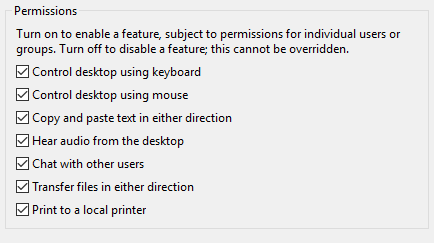
The audio feature can be controlled from both the Server and the Viewer and must be activated on both for sound to work. On the Server, you can allow connected Viewer users to hear audio using “Global Permissions” in Options > Users & Permissions. (You can also set audio on a per-user basis.)
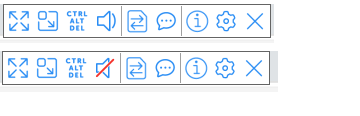
The audio permissions can be controlled per connected user account via the Server options page. On the Viewer, there is a mute/unmute setting to tick.
From [Wayback] audio – How can I forward sound over VNC? – Unix & Linux Stack Exchange, I learned that on Linux, PulseAudio might help, but requires SSH access:
You can use PulseAudio to move sound over SSH, though, which may be better than nothing for you.
Check out this post: [Wayback] https://razor.occams.info/blog/2009/02/11/pulseaudio-sound-forwarding-across-a-network/
–jeroen

Posted in Power User, Remote Desktop Protocol/MSTSC/Terminal Services, Windows | Leave a Comment »
Posted by jpluimers on 2022/03/25
Helaas gaf [Wayback/Archive] excel inkomstenbelasting 2021 – Google Search niet de directe link naar de downloadpagina.
Gelukkig [Wayback/Archive] belastingaangifte 2022 site:www.computeridee.nl – Google Search wel:
Posted in Excel, LifeHacker, Power User | Leave a Comment »
Posted by jpluimers on 2022/03/25
[Wayback/Archive] Jan-Pieter Cornet on Twitter: “@rckjnsn @KarinSpaink @jpluimers @Jan_WdeVries @JeroenFrijters @xs4all @corbosman Zodra je lijn gemigreerd is naar KPN, werken de xs4all.nl DNS entries niet meer. Zie punt I3 op …”
met verwijzing naar [Wayback/Archive] Overzicht – XS4ALL:
Posted in Internet, ISP, KPN, Power User, xs4all | Leave a Comment »
Posted by jpluimers on 2022/03/24
Last week finally there was the stable [Wayback/Archive] Release version 1.0.0 · chocolatey/choco · GitHub.
So I fixed the Wikipedia page
It was a few days after the 11th birthday “Celebration”: [Wayback/Archive] Chocolatey Software Blog | This One Goes To 11! Celebrating 11 Years Of Chocolatey. Not a really festive post, though it does have a really nice overview of 11 years of Chocolatey history and clearly showing the momentum of it has been a few years behind us.
The thing is: hardly anybody noticed the celebration nor the 1.0.0 release. Being at various 0.* versions for like a decade makes people not follow sudden version bumps closely. I only noticed when updating a bunch of testing VMs of which one had a problem, so I inspected the logs and saw the 1.0.0 version.
So these recent tweets did not gain much attention:
Anyway: the release notes indicate a few things scheduled for 2.0.0. Given the sudden 0.12.0 -> 1.0.0 bump, I have no clue far (or near!) in the future that will be.
It is kind of both a saddening and relieved feeling: like for instance Stack Overflow/Stack Exchange (both in the same age cohort as Chocolatey), Chocolatey is just there and mostly works.
–jeroen
Posted in .NET, Batch-Files, C#, Chocolatey, CommandLine, Development, Power User, PowerShell, PowerShell, Scripting, Software Development, Windows | Leave a Comment »
Posted by jpluimers on 2022/03/24
For my link archive: [Wayback] MSI Z77A-G43 support and downloads
Note that Windows 10 does not seem to need additional drivers, even Wake-on-LAN works with the stock Windows 10 drivers (but does require two BIOS settings and three Windows driver settings, see [Wayback] Wake-on-LAN (WoL) | MSI HQ User-to-User FAQ.
Max processor information based on the below links.
- Max processor that supports VT-d (for virtualisation), but no manual overclocking: i7 3770.
- Max processor that supports manual overclocking, but not VT-d: i7 3770K
From:
- All models support: MMX, SSE, SSE2, SSE3, SSSE3, SSE4.1, SSE4.2, AVX, F16C, Enhanced Intel SpeedStep Technology (EIST), Intel 64, XD bit (an NX bit implementation), Intel VT-x, Hyper-threading, Turbo Boost 2.0, AES-NI, Smart Cache, Intel Insider,
- Support for up to 4 DIMMS of DDR3-1600 memory.
- All models except the K processors additionally support Intel TXT, Intel VT-d and vPro.
- S processors feature lower-than-normal TDP (65 W on 4-core models).
- T processors are power optimized
- K processors have unlocked turbo multiplier but do not support Intel TXT, Intel VT-d[6] or vPro. Non-K processors will have limited turbo overclocking.
- Transistors: 1.4 billion
- Die size: 160 mm²
[Wayback] UserBenchmark: Intel Core i7-3770 vs i7-3770K
Specifications IntelBX80637I73770K Intel i7 3770K
IntelBX80637I73770 Intel i7 3770
Series
CPU ArchitectureIvy Bridge Ivy Bridge Socket
Motherboard SocketFCLGA1155 FCLGA1155 Graphics
Integrated GraphicsHD 4000 HD 4000 Embedded Options Available
Embedded Options AvailableNo Yes Recommended Price
Recommended Customer Price$332.00 – $342.00 $283.00 – $305.00 Virtualization for Directed I/O (VT-d)
Intel® Virtualization Technology for Directed I/O (VT-d) ‡No Yes vPro Tech
Intel® vPro™ Technology ‡No Yes Trusted Execution Tech
Intel® Trusted Execution Technology ‡No Yes
3770 has
- intel SIPP
- intel vPRO tech
- intel VT-d
- intel TXT
while the 3770k does not
Via: [Wayback] MSI Z77A-G43 – Kenmerken – Tweakers
–jeroen
Posted in Hardware, Mainboards, MSI, Power User, Z77A-G43 | Leave a Comment »
Posted by jpluimers on 2022/03/24
Earlier this month, I posted How to make a full backup of your Windows 10 PC | Windows Central.
That solution describes how to backup to and restore from a (different) local drive using the Windows 7/8.x tools ([Wayback] “Create a system image”) that still ship with Windows 10.
Soon, I need to be able to store a backup on a network location (and restore from it), so here are some links that hopefully solve this with the same tools (all via [Wayback] windows 10 restore image from network folder – Google Search):
SERVERNAME\username to authenticate to the network share as opposed to just a username and avoiding bitlocker. Reminder to self: figure out how to do this with bitlocker.–jeroen
Posted in Power User, Windows, Windows 10 | Leave a Comment »
Posted by jpluimers on 2022/03/23
[Wayback] msi hq user-to-user faq: wake on lan (wol) by Author Ruudt Swaanen on 3 May, 2017, paraphrased by me:
Disabling this function will keep the LAN port enabled when the system is put to Sleep (S3) or in Shutdown (S5) mode.
Enabling this function will use less power (see [Wayback] What is EuP 2013? | Overclock.net)
control.exe) with an Administrator elevation token):
powercfg.cpl), under “Choose what the power buttons do”, disable the option “Turn on fast startup (recommended)”.On many MSI based machines, the option “Turn on fast startup (recommended)” interferes with Wake-on-LAN.
devmgmt.msc), under your network adapter change these options (the naming slightly differs per vendor/model; below is for generic Realtek PCIe GBE):
Now test in these global Power States:
This worked well for S3 and S5 (but not S4) on my MSI Z77A-G43 based Windows 10 PC and only required stock network driver for the “Realtek PCIe GBE Family Controller” shown in the Device Manager (devmgmt.msc) and you can find on [Wayback] Microsoft Update Catalog: Realtek PCIe GBE Family Controller Driver.
For more Wake on LAN blog posts, including how to initiate a Wake-on-LAN request, see the category Wake-on-LAN (WoL).
–jeroen
Posted in Hardware, Mainboards, MSI, Power User | Leave a Comment »
Posted by jpluimers on 2022/03/23
For my link archive (especially because when disconnecting USB devices, the path value needs to be uber-correct, while for connecting, the path value only needs to be a partial match):
Commands applicable:
lsusb/var/log/vmkernel.log file filtered on usb (in a case insensitive way)vim-cmd vmsvc/device.getdevicesvim-cmd vmsvc/device.connusbdevvim-cmd vmsvc/device.disconnusbdev–jeroen
Posted in ESXi6, ESXi6.5, ESXi6.7, Power User, Virtualization, VMware, VMware ESXi | Leave a Comment »
Posted by jpluimers on 2022/03/23
“Using Tailscale on Windows to network more easily with WSL2 and Visual Studio Code”
Points to [Wayback] Using Tailscale on Windows to network more easily with WSL2 and Visual Studio Code – Scott Hanselman’s Blog
Related:
–jeroen
Posted in Hardware, Network-and-equipment, Power User, Tailscale, VPN, Wireguard | Leave a Comment »
 The Wiert Corner - irregular stream of stuff