The Wiert Corner – irregular stream of stuff

Jeroen W. Pluimers on .NET, C#, Delphi, databases, and personal interests

  • My badges

  • Twitter Updates

  • My Flickr Stream

  • Pages

  • All categories

  • Enter your email address to subscribe to this blog and receive notifications of new posts by email.

    Join 1,860 other subscribers

Archive for the ‘Chocolatey’ Category

Chocolatey: installing Oracle SQL Developer and updating the chocolatey package

Posted by jpluimers on 2021/05/13

Sometimes an install is not just as simple as C:\>choco install --yes oracle-sql-developer.

Edit 20210514:

Note that most of the below pain will be moot in the future as per [Archive.is] Jeff Smith 🍻 on Twitter: “we’re working on removing the SSO requirement, it’s already done for @oraclesqlcl – see here … “ referring to [Wayback] SQLcl now under the Oracle Free Use Terms and Conditions license | Oracle Database Insider Blog

SQLcl, the modern command-line interface for the Oracle Database, can now be downloaded directly from the web without any click-through license agreement.

It means the Oracle acount restriction will be lifted, and downloads will be a lot simpler.

I started with the below failing command, tried a lot of things, then finally almost gave up: Oracle stuff does not want to be automated, which means I should try to less of their stuff.

First of all you need an Oracle account (I dislike companies doing that for free product installs; I’m looking at Embarcadero too) by going to profile.oracle.com:

[WayBack] Chocolatey Gallery | Oracle SQL Developer 18.4.0 (also: gist.github.com/search?l=XML&q=oracle-sql-developer)

Notes

  • This version supports both 32bit and 64bit and subsequently does not have a JDK bundled with it. It has a
    dependency on the jdk8 package to meet the application’s JDK requirement.
  • An Oracle account is required to download this package. See the “Package Parameters” section below for
    details on how to provide your Oracle credentials to the installer. If you don’t have an existing account, you can
    create one for free here: https://profile.oracle.com/myprofile/account/create-account.jspx

Package Parameters

The following package parameters are required:

/Username: – Oracle username
/Password: – Oracle password

(e.g. choco install oracle-sql-developer --params "'/Username:MyUsername /Password:MyPassword'")

To have choco remember parameters on upgrade, be sure to set choco feature enable -n=useRememberedArgumentsForUpgrades.

Then the installation failed fail again: ERROR: The response content cannot be parsed because the Internet Explorer engine is not available, or Internet Explorer's first-launch configuration is not complete. Specify the UseBasicParsing parameter and try again.

The trick is to RUN IEXPLORE.EXE AS ADMINISTRATOR ONCE BEFORE INSTALLING FROM CHOCOLATEY. Who would believe that.

The reason is that the package uses Invoke-WebRequest which requires Internet Explorer and PowerShell 3. Chocolatey packages however need to be able to run on just PowerShell 2 without Invoke-WebRequest.

Maybe using cURL can remedy that; adding a dependency to is is possible, as cURL can be installed via chocolatey: [WayBack] How to Install cURL on Windows – I Don’t Know, Read The Manual. Another alternative might be [WayBack] Replace Invoke-RestMethod in PowerShell 2.0 to use [WayBack] WebRequest Class (System.Net) | Microsoft Docs.


Read the rest of this entry »

Posted in CertUtil, Chocolatey, CommandLine, Database Development, Development, DVCS - Distributed Version Control, git, Hashing, OracleDB, Power User, PowerShell, Security, SHA, SHA-1, Software Development, Source Code Management, Windows, XML, XML/XSD | Leave a Comment »

Chocolatey: I favor ‘choco upgrade’ over ‘choco install’

Posted by jpluimers on 2021/05/06

A while ago I found out that choco upgrade will install a package when it is not installed, and that choco upgrade all will upgrade all installed packages.

So I looked up the documentation of both choco install and choco upgrade (and choco update which will be deprecated) where I bolded parts of the upgrade command:

Given that upgrade can do both an upgrade and an install, I have switched all my install scripts to use upgrade in steaf of install.

Not all of the above commands accept the same set of [Wayback] Chocolatey Software Docs | Commands: Default Options and Switches

-?, --help, -h
     Prints out the help menu.

 -d, --debug
     Debug - Show debug messaging.

 -v, --verbose
     Verbose - Show verbose messaging. Very verbose messaging, avoid using 
       under normal circumstances.

     --trace
     Trace - Show trace messaging. Very, very verbose trace messaging. Avoid 
       except when needing super low-level .NET Framework debugging. Available 
       in 0.10.4+.

     --nocolor, --no-color
     No Color - Do not show colorization in logging output. This overrides 
       the feature 'logWithoutColor', set to 'False'. Available in 0.10.9+.

     --acceptlicense, --accept-license
     AcceptLicense - Accept license dialogs automatically. Reserved for 
       future use.

 -y, --yes, --confirm
     Confirm all prompts - Chooses affirmative answer instead of prompting. 
       Implies --accept-license

 -f, --force
     Force - force the behavior. Do not use force during normal operation - 
       it subverts some of the smart behavior for commands.

     --noop, --whatif, --what-if
     NoOp / WhatIf - Don't actually do anything.

 -r, --limitoutput, --limit-output
     LimitOutput - Limit the output to essential information

     --timeout, --execution-timeout=VALUE
     CommandExecutionTimeout (in seconds) - The time to allow a command to 
       finish before timing out. Overrides the default execution timeout in the 
       configuration of 2700 seconds. '0' for infinite starting in 0.10.4.

 -c, --cache, --cachelocation, --cache-location=VALUE
     CacheLocation - Location for download cache, defaults to %TEMP% or value 
       in chocolatey.config file.

     --allowunofficial, --allow-unofficial, --allowunofficialbuild, --allow-unofficial-build
     AllowUnofficialBuild - When not using the official build you must set 
       this flag for choco to continue.

     --failstderr, --failonstderr, --fail-on-stderr, --fail-on-standard-error, --fail-on-error-output
     FailOnStandardError - Fail on standard error output (stderr), typically 
       received when running external commands during install providers. This 
       overrides the feature failOnStandardError.

     --use-system-powershell
     UseSystemPowerShell - Execute PowerShell using an external process 
       instead of the built-in PowerShell host. Should only be used when 
       internal host is failing. Available in 0.9.10+.

     --no-progress
     Do Not Show Progress - Do not show download progress percentages. 
       Available in 0.10.4+.

     --proxy=VALUE
     Proxy Location - Explicit proxy location. Overrides the default proxy 
       location of ''. Available for config settings in 0.9.9.9+, this CLI 
       option available in 0.10.4+.

     --proxy-user=VALUE
     Proxy User Name - Explicit proxy user (optional). Requires explicit 
       proxy (`--proxy` or config setting). Overrides the default proxy user of 
       ''. Available for config settings in 0.9.9.9+, this CLI option available 
       in 0.10.4+.

     --proxy-password=VALUE
     Proxy Password - Explicit proxy password (optional) to be used with 
       username. Requires explicit proxy (`--proxy` or config setting) and 
       user name.  Overrides the default proxy password (encrypted in settings 
       if set). Available for config settings in 0.9.9.9+, this CLI option 
       available in 0.10.4+.

     --proxy-bypass-list=VALUE
     ProxyBypassList - Comma separated list of regex locations to bypass on 
       proxy. Requires explicit proxy (`--proxy` or config setting). Overrides 
       the default proxy bypass list of ''. Available in 0.10.4+.

     --proxy-bypass-on-local
     Proxy Bypass On Local - Bypass proxy for local connections. Requires 
       explicit proxy (`--proxy` or config setting). Overrides the default 
       proxy bypass on local setting of 'True'. Available in 0.10.4+.

     --log-file=VALUE
     Log File to output to in addition to regular loggers. Available in 0.1-
       0.8+.

–jeroen

Posted in Batch-Files, Chocolatey, Development, Power User, Scripting, Software Development, Windows | Leave a Comment »

Updating chocolatey itself

Posted by jpluimers on 2021/04/28

I wondered how to update (ore actually choco upgrade as choco update will command will eventually be deprecated) Chocolatey itself.

It appeared my stock upgrade batch file choco upgrade all --exit-when-reboot-detected --yes was already doing it as the magic all will upgrade all packages.

To upgrade just [Wayback] chocolatey itself, remember it is a package, so choco upgrade chocolatey --exit-when-reboot-detected --yes will work fine.

–jeroen

Posted in Chocolatey, Power User, Windows | Leave a Comment »

Need to research: Nirlauncher v1.23.42 to 1.23.43 upgrade through Chocolatey fails with “Operation did not complete successfully because the file contains a virus or potentially unwanted software.”

Posted by jpluimers on 2021/04/23

I had a curious error despite the build not having any failures on VirusTotal:

You have nirlauncher v1.23.42 installed. Version 1.23.43 is available based on your source(s).
nirlauncher not upgraded. An error occurred during installation:
 Operation did not complete successfully because the file contains a virus or potentially unwanted software.

nirlauncher package files upgrade completed. Performing other installation steps.
The upgrade of nirlauncher was NOT successful.
nirlauncher not upgraded. An error occurred during installation:
 Operation did not complete successfully because the file contains a virus or potentially unwanted software.
choco upgrade throwing virus error during nirsoft 1.23.43 update

choco upgrade throwing virus error during nirsoft 1.23.43 update

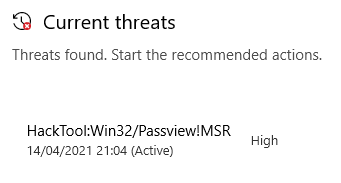
When upgrading, this briefly is visible in the Windows Security view “Virus & thread protection”:

So I need to figure out a few things before I can upgrade Nirsoft:

  1. Where choco upgrade downloads temporary files
  2. Where these temporary files store their intermediate and final files during installation
  3. How to temporarily exclude the locations of 1. and 2 in Microsoft Defender.

–jeroen

Posted in Chocolatey, Power User, Windows, Windows 10 | Leave a Comment »

Why I love choco-cleaner for chocolatey

Posted by jpluimers on 2021/04/05

A while ago, I wrote about Installing Windows software with Chocolatey: a few notes and A choco install list, mentioned choco-cleaner in both (see first quote below) but forgot to show where this excels.

This is what I wrote:

since there is no choco cleanup yet [WayBack] you need to either:

If you want to clean cruft:

choco install --yes choco-cleaner

It helps a lot for situations where chocolatey updates a package, but you still have the old software running. In that case, the old version will be in %ProgramData%\chocolatey\lib-bkp, potentially taking up a lot of disk space.

This happed to me for instance when still having Process Explorer open while upgrading.

This is what happened:

 ShimGen has successfully created a shim for ZoomIt.exe
This is try 1/3. Retrying after 300 milliseconds.
 Error converted to warning:
 Toegang tot het pad procexp.exe is geweigerd.
This is try 2/3. Retrying after 400 milliseconds.
 Error converted to warning:
 Toegang tot het pad procexp.exe is geweigerd.
Maximum tries of 3 reached. Throwing error.
Attempted to remove 'C:\ProgramData\chocolatey\lib-bkp\sysinternals' but had an error::
 Toegang tot het pad procexp.exe is geweigerd.
 The upgrade of sysinternals was successful.
  Software installed to 'C:\ProgramData\chocolatey\lib\sysinternals\tools'

Chocolatey upgraded 1/21 packages.
 See the log for details (C:\ProgramData\chocolatey\logs\chocolatey.log).

Upgraded:
 - sysinternals v2019.3.18

C:\>C:\ProgramData\chocolatey\lib\choco-cleaner\tools\choco-cleaner-manual.bat
Choco-Cleaner.ps1 v0.0.5.2 (01/09/2019) - deletes unnecessary residual Chocolatey files to free up disk space
Copyleft 2017-2019 Bill Curran (bcurran3@yahoo.com) - free for personal and commercial use
Choco-Cleaner Summary:
  **  Deleting unnecessary Chocolatey _processed.txt (WTF?) file...
  **  Deleting unnecessary Chocolatey .ignore files...
  **  Deleting unnecessary Chocolatey .old files...
  **  Deleting unnecessary Chocolatey cache files...
  **  Deleting unnecessary Chocolatey config backup files...
  **  Deleting unnecessary Chocolatey lib-bad package files...
  **  Deleting unnecessary Chocolatey lib-bkp package files...
  **  Deleting unnecessary Chocolatey extracted file logs...
  **  Deleting unnecessary Chocolatey log files...
  **  Deleting unnecessary Chocolatey package embedded archive files in toolsDir...
  **  Deleting unnecessary Chocolatey package embedded archives and executables in .nupkg files...
  **  Deleting unnecessary Chocolatey package embedded license files...
  **  Deleting unnecessary Chocolatey package embedded Microsoft installers...
  **  Deleting unnecessary Chocolatey package embedded various read me files...
  **  Deleting unnecessary Nuget cache files...
Choco-Cleaner finished deleting unnecessary Chocolatey files and saved you 85.008 KB!
Found Choco-Cleaner.ps1 useful?
Buy me a beer at https://www.paypal.me/bcurran3donations
Become a patron at https://www.patreon.com/bcurran3

–jeroen

Posted in Chocolatey, Power User, Windows | Leave a Comment »

Chocolatey: installing Forticlient

Posted by jpluimers on 2021/03/26

I needed Forticlient on a machine one day, so this is how to install the most recent Forticlient 6 using chocolatey:

choco install --yes forticlient --source https://www.myget.org/F/public-choco/api/v2

This ensures you can automatically update from Chocolatey instead of manually from the Forticlient GUI.

The update command is slightly different as a choco update will complain it cannot find the source for forticlient; you need this in stead:

choco update forticlient --source https://www.myget.org/F/public-choco/api/v2

Based on [WayBack] public-choco – forticlient 6.0.4.0182 | MyGet.

–jeroen

Posted in Chocolatey, Power User, Windows | Leave a Comment »

A choco install list

Posted by jpluimers on 2021/02/03

Sometimes I forget the choco install mnemonics for various tools, so here is a small list below.

Of course you have to start with an administrative command prompt, and have a basic Chocolatey Installation in place.

If you want to clean cruft:

choco install --yes choco-cleaner

Basic install:

choco install --yes 7zip
choco install --yes everything
choco install --yes notepadplusplus
choco install --yes beyondcompare
choco install --yes git.install --params "/GitAndUnixToolsOnPath /NoGitLfs /SChannel /NoAutoCrlf /WindowsTerminal"
choco install --yes hg
choco install --yes sourcetree
choco install --yes sysinternals

For VMs (pic one):

choco install --yes vmware-tools
choco install --yes virtio-drivers

For browsing (not sure yet about Chrome as that one has a non-admin installer as well):

choco install --yes firefox

For file transfer (though be aware that some versions of Filezilla contained adware):

choco install --yes filezilla
choco install --yes winscp

For coding:

choco install --yes vscode
choco install --yes atom

For SQL server:

choco install --yes sql-server-management-studio

For web development / power user:

choco install --yes fiddler

For SOAP and REST:

choco install --yes soapui

If you don’t like manually downloading SequoiaView at gist.github.com/jpluimers/b0df9c2dba49010454ca6df406bc5f3d (e8efd031d667de8a1808d6ea73548d77949e7864.zip):

choco install --yes windirstat

For drawing, image manipulation (paint.net last, as it needs a UI action):

choco install --yes gimp
choco install --yes imagemagick
choco install --yes paint.net

For ISO image mounting in pre Windows 10:

choco install --yes wincdemu

For hard disk management:

choco install --yes hdtune
choco install --yes seatools
choco install --yes speedfan

For Fujitsu ScanSnap scanners (not sure yet this includes PDF support):

choco install --yes scansnapmanager

–jeroen

Posted in 7zip, atom editor, Beyond Compare, Chocolatey, Compression, Database Development, Development, DVCS - Distributed Version Control, Everything by VoidTools, Fiddler, Firefox, Fujitsu ScanSnap, git, Hardware, Mercurial/Hg, Power User, Scanners, SOAP/WebServices, Software Development, Source Code Management, SQL Server, SSMS SQL Server Management Studio, SysInternals, Text Editors, Versioning, Virtualization, VMware, VMware ESXi, vscode Visual Studio Code, Web Browsers, Web Development, Windows | Leave a Comment »

Installing Windows software with Chocolatey: a few notes

Posted by jpluimers on 2020/10/28

I will limit myself to software that needs Administrative elevation in order to be installed. This is the default use-case for Chocolatey. It is way way easier than installing software all by hand, but there are a few things you need to know, hence these notes.

Administrative elevation

Since the default use case is installing software that requires Administrative elevation during install, Chocolatey needs to run with Administrative privileges in order to perform these installs.

If you were hoping for a way around this (for instance by having a client/service architecture), then just stop here.

Even though such a structure could technically be created, getting it stable and working it correctly with a truckload of software to be installed (much of which not available as packages during Chocolatey development in the first place) is a task too big.

Think of the size of the Windows Installer team at Microsoft to get installers working in the first place, the extra effort needed by Chocolatey volunteers to get the installers working from the console, then another much more complex layer of getting them running from inside a service and communicating everything back and forth to a non-elevated command prompt would be a nightmare.

I won’t even mention the security steps involved to ensure the non-elevated command prompt has enough rights to send installation instructions to the elevated service.

So the first step is to have an elevated command prompt for Chocolatey.

Being elevated, and Chocolatey needing to download installers requires a local temporary place for them.

By default, that place is %Temp%\chocolatey of the administrative user that elevated the Chocolatey command prompt.

This directory can grow quite big, so dir, so – since there is no choco cleanup yet [WayBack] you need to either:

Install Chocolatey itself

Either the direct one below, or the more secure one (so you can inspect the intermediate [WayBackinstall.ps1) at [WayBack] Installation using PowerShell from cmd.exe:

@echo off
SET DIR=%~dp0%
::download install.ps1
%systemroot%\System32\WindowsPowerShell\v1.0\powershell.exe -NoProfile -ExecutionPolicy Bypass -Command "((new-object net.webclient).DownloadFile('https://chocolatey.org/install.ps1','%DIR%install.ps1'))"
::run installer
%systemroot%\System32\WindowsPowerShell\v1.0\powershell.exe -NoProfile -ExecutionPolicy Bypass -Command "& '%DIR%install.ps1' %*"

If you want to get rid of it, use [WayBack] Uninstallation.

Besides the one above and below, there are many more [WayBack] Installation: more install options

Output of direct install as Administrator (disclaimers apply):

C:\WINDOWS\system32>powershell -NoProfile -ExecutionPolicy Bypass -Command "[System.Net.WebRequest]::DefaultWebProxy.Credentials = [System.Net.CredentialCache]::DefaultCredentials; iex ((New-Object System.Net.WebClient).DownloadString('https://chocolatey.org/install.ps1'))" && SET PATH="%PATH%;%ALLUSERSPROFILE%\chocolatey\bin"
Getting latest version of the Chocolatey package for download.
Getting Chocolatey from https://chocolatey.org/api/v2/package/chocolatey/0.10.11.
Downloading 7-Zip commandline tool prior to extraction.
Extracting C:\Users\JEROEN~1\AppData\Local\Temp\chocolatey\chocInstall\chocolatey.zip to C:\Users\JEROEN~1\AppData\Local\Temp\chocolatey\chocInstall...
Installing chocolatey on this machine
Creating ChocolateyInstall as an environment variable (targeting 'Machine')
  Setting ChocolateyInstall to 'C:\ProgramData\chocolatey'
WARNING: It's very likely you will need to close and reopen your shell
  before you can use choco.
Restricting write permissions to Administrators
We are setting up the Chocolatey package repository.
The packages themselves go to 'C:\ProgramData\chocolatey\lib'
  (i.e. C:\ProgramData\chocolatey\lib\yourPackageName).
A shim file for the command line goes to 'C:\ProgramData\chocolatey\bin'
  and points to an executable in 'C:\ProgramData\chocolatey\lib\yourPackageName'.

Creating Chocolatey folders if they do not already exist.

WARNING: You can safely ignore errors related to missing log files when
  upgrading from a version of Chocolatey less than 0.9.9.
  'Batch file could not be found' is also safe to ignore.
  'The system cannot find the file specified' - also safe.
chocolatey.nupkg file not installed in lib.
 Attempting to locate it from bootstrapper.
PATH environment variable does not have C:\ProgramData\chocolatey\bin in it. Adding...
WARNING: Not setting tab completion: Profile file does not exist at 'C:\Users\jeroenAdministrator\Documents\WindowsPowerShell\Microsoft.PowerShell_profile.ps1'.
Chocolatey (choco.exe) is now ready.
You can call choco from anywhere, command line or powershell by typing choco.
Run choco /? for a list of functions.
You may need to shut down and restart powershell and/or consoles
 first prior to using choco.
Ensuring chocolatey commands are on the path
Ensuring chocolatey.nupkg is in the lib folder

Installing packages

Compressing

If you run out of SSD or VM disk space, you can try compress using compact /c /s *.* in these directories:

  • C:\ProgramData\Package Cache
  • C:\ProgramData\Microsoft\VisualStudio\Packages
  • C:\ProgramData\Microsoft\ClickToRun\ProductReleases

Further reading

–jeroen

PS: always watch the output and logs!

Read the rest of this entry »

Posted in Chocolatey, CommandLine, Conference Topics, Conferences, Development, Event, Power User, PowerShell, PowerShell, Scripting, Software Development, Windows | Leave a Comment »

Chocolatey and TLS since early 2020

Posted by jpluimers on 2020/03/19

I was upgrading a few older systems that had been off-line for quite a while.

When installing Chocolatey, I bumped into this error:

C:\bin>"%SystemRoot%\System32\WindowsPowerShell\v1.0\powershell.exe" -NoProfile -InputFormat None -ExecutionPolicy Bypass -Command "iex ((New-Object System.Net.WebClient).DownloadString('https://chocolatey.org/install.ps1'))" && SET "PATH=%PATH%;%ALLUSERSPROFILE%\chocolatey\bin"
Exception calling "DownloadString" with "1" argument(s): "The request was aborted: Could not create SSL/TLS secure channel."
At line:1 char:1
+ iex ((New-Object System.Net.WebClient).DownloadString('https://chocol ...
+ ~~~~~~~~~~~~~~~~~~~~~~~~~~~~~~~~~~~~~~~~~~~~~~~~~~~~~~~~~~~~~~~~~~~~~
    + CategoryInfo          : NotSpecified: (:) [], MethodInvocationException
    + FullyQualifiedErrorId : WebException

So I tried [WayBack] chocolatey “The request was aborted: Could not create SSL/TLS secure channel.” – Google Search

Results indicated TLS 1.1 support was removed early February 2020 from Chocolatey because of security reasons, which impacts the installation on older systems:

Note [WayBack] Chocolatey install Error: The request was aborted: Could not create SSL/TLS secure channel – Stack Overflow with a temporary workaround for Microsoft Windows Server 2016:

Looks like the security protocol changed:

Set-ExecutionPolicy Bypass -Scope Process -Force; [System.Net.ServicePointManager]::SecurityProtocol = [System.Net.ServicePointManager]::SecurityProtocol -bor 3072; iex ((New-Object System.Net.WebClient).DownloadString('https://chocolatey.org/install.ps1'))

–jeroen

Posted in Chocolatey, Power User, Windows, Windows 10, Windows 7, Windows 8, Windows 8.1, Windows Server 2016 | Leave a Comment »