


For my link archive: [WayBack] Encode/Decode Quoted Printable – Webatic.
It did a splendid job at decoding email files in MIME format Quoted-printable.
–jeroen
Posted by jpluimers on 2021/03/26
For my link archive: [WayBack] Encode/Decode Quoted Printable – Webatic.
It did a splendid job at decoding email files in MIME format Quoted-printable.
–jeroen

Posted in *nix, *nix-tools, Communications Development, Development, eMail, Encoding, Internet, Internet protocol suite, Power User, sendmail, SMTP, SocialMedia, Software Development | Leave a Comment »
Posted by jpluimers on 2021/03/25
A great way for testing REST JSON calls is using the [WayBack] JSONPlaceholder – Fake online REST API for developers:
Fake Online REST API for Testing and Prototyping
Serving ~200M requests per month
Powered by JSON Server [WayBack] + LowDB [WayBack]
It is like [WayBack] Placeholder.com: Placeholder Images Done For You [JPG, GIF & PNG] but for JSON and supports both CORS and JSON-P for cross domain requests.
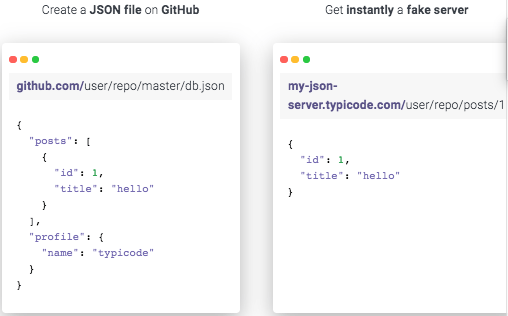
You can either use that site (which has a predefined set of REST calls) or the basic [WayBack] My JSON Server – Fake online REST server for teams that allows you to respond it to a db.json file from github:
Fake Online REST server for teams
Create a JSON file on GitHub
github.com/user/repo/master/db.json{ "posts": [ { "id": 1, "title": "hello" } ], "profile": { "name": "typicode" } }Get instantly a fake server
my-json-server.typicode.com/user/repo/posts/1{ "id": 1, "title": "hello" }
There is basic documentation at the repository [WayBack] GitHub – typicode/jsonplaceholder: A simple online fake REST API server:

Posted in Communications Development, Development, HTTP, Internet protocol suite, JavaScript/ECMAScript, JSON, REST, Scripting, Software Development, TCP | Leave a Comment »
Posted by jpluimers on 2021/02/25
For my link archive:
Topics covered in this section:
- Server-side certificate and private key configuration
- Server-side forward-secrecy configuration
- Server-side TLS activity logging
- Enabling TLS in the Postfix SMTP server
- Client certificate verification
- Supporting AUTH over TLS only
- Server-side TLS session cache
- Server access control
- Server-side cipher controls
- Miscellaneous server controls
In this post I will show how I setup a smtp server running Postfix with TLS encryption and with the correct cyphers. So that email between smtp servers where possible is using strong email encryption.
–jeroen
Posted in *nix, *nix-tools, Communications Development, Development, Internet protocol suite, postfix, Power User, SMTP | Leave a Comment »
Posted by jpluimers on 2021/02/16
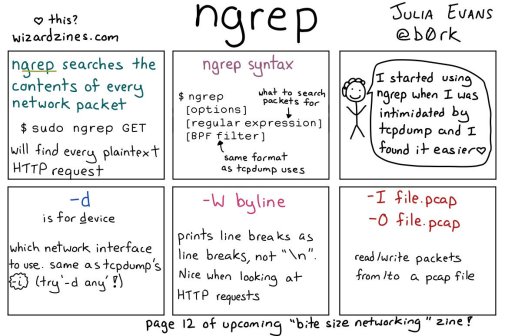
[WayBack] 🔎Julia Evans🔍 on Twitter: “ngrep: grep your network!… “
So this taught me a new tool and other new things:

Posted in *nix, *nix-tools, Communications Development, Development, Internet protocol suite, Power User, Software Development, Wireshark | Leave a Comment »
Posted by jpluimers on 2021/01/08
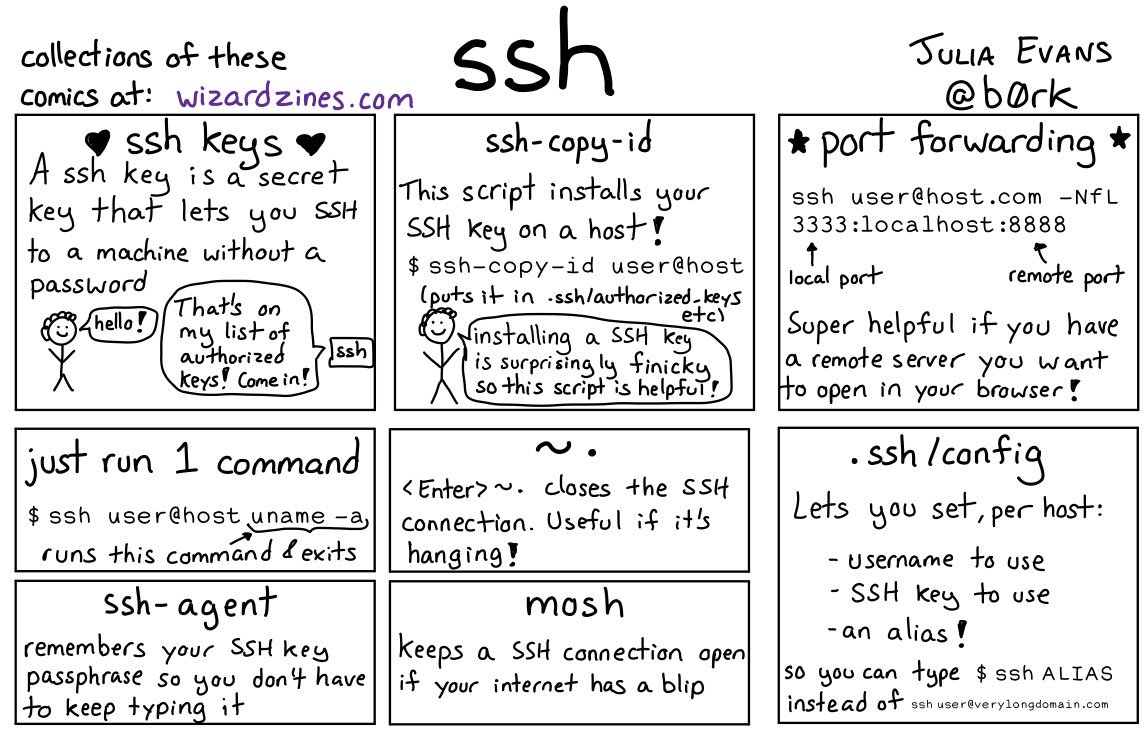
Great work by [WayBack] 🔎Julia Evans🔍 on Twitter: “ssh tips… “
Via:
Some more tips:

Posted in *nix, *nix-tools, Communications Development, Development, Internet protocol suite, Power User, SSH, ssh/sshd | Leave a Comment »
Posted by jpluimers on 2020/12/17
Indy is great, but not well documented so: [WayBack] Indy10, TIdSMTP, how to get protocol log? I try to get log from SMTP communication, like this (copy from wiki): {code} S: 220 smtp.example.com ESMTP P… – Jacek Laskowski – Google+
Indy10,
TIdSMTP, how to get protocol log?I try to get log from SMTP communication, like this (copy from wiki):
{code}
S: 220 smtp.example.com ESMTP Postfix
C: HELO relay.example.com
S: 250 smtp.example.com, I am glad to meet you
C: MAIL FROM:<bob@example.com>
S: 250 Ok
C: RCPT TO:<alice@example.com>
S: 250 Ok
C: RCPT TO:<theboss@example.com>
S: 250 Ok
C: DATA
S: 354 End data with <CR><LF>.<CR><LF>
C: From: "Bob Example" <bob@example.com>
C: To: Alice Example <alice@example.com>
C: Cc: theboss@example.com
C: Date: Tue, 15 January 2008 16:02:43 -0500
C: Subject: Test message
{code}but without success :-(
I try use many events from
TIdSMTP, TIdLogEvent,TIdSSLIOHandlerSocketOpenSSLbut result is low level like bytes, status etc. not true SMTP log.How to do it?

Did you try using TIdLogFile like it is shown here? (It is the first hit in Google) For me it created readable logfiles. rajapet.com – How to log the TIDSmtp component
try
try
IdLogFile.Active := true;
fsmtp.IOHandler := TIdIOHandler.MakeDefaultIOHandler(fsmtp);
fsmtp.IOHandler.Intercept := IdLogFile;
fsmtp.IOHandler.OnStatus := fsmtp.OnStatus;
fSMTP.Connect;
fSMTP.Send(fMessage);
except
on e: exception do begin
MessageDlg(‘Error sending message: ‘ + e.Message, mtError, [mbOK], 0);
end;
end;
finally
if fSMTP.Connected then
fSMTP.Disconnect(true);
IdLogFile.Active := false;
end;
- [Archive.is] Internet Direct (Indy): TIdSMTP Class
- [Archive.is] Internet Direct (Indy): TIdLogFile Class
- [Archive.is] Internet Direct (Indy): TIdIOHandler Class
- [Archive.is] Internet Direct (Indy): TIdIOHandler.Intercept Property
- [WayBack] Ruminated Rumblings
- [WayBack] SMTP Mail and Indy (again) | Ruminated Rumblings
 +Rik van Kekem Thanks! I need to set
LogEvent.Active: = True! ;-)
Sending stuff still might be tough, so you might want to consider alternatives too: [WayBack] I need to add to the REST server the ability to send emails with attachments of different types. Which library is best to use? Indy or maybe ICS? Of cou… – Jacek Laskowski – Google+
I need to add to the REST server the ability to send emails with attachments of different types. Which library is best to use? Indy or maybe ICS? Of course with SSL/TLS support.
+Balázs Szakály, YES! Synapse. Let’s get people using it more. You can give it some criticism surely, but consider the pro’s:It is straight-forwardly-written so when you hit a wall you can read the code easily (compared to other solutions),
You can inherit, extend and extrapolate, re-use and tweak,
Very Delphi-ish (TMimeMessages = TStringList or some such, not at at devmachine atm)
Compact and free!
Quite stable too.
–jeroen
Posted in Communications Development, Delphi, Development, Indy, Internet protocol suite, SMTP, Software Development | Leave a Comment »
Posted by jpluimers on 2020/10/15
Postfix has documentation on primary MX and secondary MX, but not on tertiary MX.
If the primary MX is down, you have a series of secondary MX and tertiary MX that configured the same way, MX DNS priority for primary, the series of secondary MX and tertiary MX have increasing numbers, and the primary MX goes down, then senders can get “too many hops” as secondary and tertiary MX are looping.
I had a hard time finding a good and easy solution as these queries do not return many meaningful results:
Here are some links that helped getting this solved:
Short answer: this message means that mail is probably looping. If you see this after you turned on Postfix content filtering, then you have made a mistake that causes mail to be filtered repeatedly. This is cured by appropriate use of content_filter=, header_checks=, and body_checks=.
Long answer: the message has too many
Received:message headers. A received header is added whenever Postfix (or any MTA) receives a message. A large number ofReceived:message headers is an indication that mail is looping around.Side comment: email uses the opposite of the technique that is used to avoid IP forwarding loops. With IP, the sender sets a TTL (time to live) field in the IP header. The field is decremented by each router. When the TTL reaches zero the packet is discarded and an ICMP error message is returned to the sender.
In case you or anyone else was/is wondering about the
mydestination = localhostthing, the reason it has to be set to just localhost is because MIAB uses Postfix’s “virtual domain hosting” (http://www.postfix.org/VIRTUAL_README.html) support. Per the documentation formydestinationat http://www.postfix.org/postconf.5.html#mydestination:Do not specify the names of virtual domains – those domains are specified elsewhere. See VIRTUAL_README for more information.
(in the context of MIAB every domain is a virtual domain).
In my case a series of these:
Received: from mwgp.xs4all.nl (mwgp.xs4all.nl [80.101.239.92])
    by fiber24315337242.heldenvannu.net (Postfix) with ESMTP id 26395200FE
    for <jeroen@pluimers.com>; Fri, 29 Jun 2018 11:01:02 +0200 (CEST)
Received: from fiber24315337242.heldenvannu.net (unknown [37.153.243.246])
    by mwgp.xs4all.nl (Postfix) with ESMTP id 077A5E937
    for <jeroen@pluimers.com>; Fri, 29 Jun 2018 11:01:02 +0200 (CEST)
Specifying the transport will likely help me solve this problem:
This all came down to editing /etc/postfix/transport adding lines for each relayed domain like this one:
example.org smtp:[mx-a-record.example.org]
Lines like it direct to use the smtp transport and use a specific host (normally, the relay transport is being used).
After this:
# postmap /etc/postfix/transport

# rcpostfix reload
I choose not to configure [WayBack] Postfix Configuration Parameters: relay_recipient_maps, but might if I had an automated way of replicating lists of valid (and invalid) users.
Another option was confirmed at [WayBack] Software-update: Postfix 3.4.0 / 3.3.3 / 3.2.8 / 3.1.11 / 3.0.15 – Computer – Downloads – Tweakers by [WayBack] menocchio. Thanks!
Dat is volgens mij eenvoudig op te lossen met relay_transport of transport_maps. Zie ook: Postfix transport table format.
Daarmee dwing je de secondary servers de mail altijd af te willen leveren bij de primary server (en dus niet bij een andere secondary). En als de primary niet online is, dan wacht ie netjes tot dat wel het geval is :-)
Bijvoorbeeld:
relay_transport = smtp:[primarymx.domain.tld]
Likely relevant: [WayBack] The Book of Postfix
Maybe relevant in the future:
mydestination
relay_domains and relayhost
The second part of this document presents additional configurations for hosts in specific environments.
Found on my hunt for the above:
Create a file named
transportin /etc/postfix and add the following text,gmail.com smtp:smtp.yourisp.com:25
googlemail.com smtp:smtp.yourisp.com:25Remember to swap “smtp.yourisp.com” for the address of your ISP’s smtp relay server.
Now we need to compile this file using the postmap command,
postmap /etc/postfix/transport
Edit /etc/postfix/main.cf and add this line at the bottom,
transport_maps = hash:/etc/postfix/transport
Restart postfix and you should find all mail addressed to @gmail.com or @googlemail.com will be redirected to your smtp relay.
Optional list of relay hosts for SMTP destinations that can’t be found or that are unreachable. With Postfix 2.3 this parameter is renamed to smtp_fallback_relay.
Optional list of relay hosts for SMTP destinations that can’t be found or that are unreachable. With Postfix 2.2 and earlier this parameter is called fallback_relay.
Try not to make typo’s: [WayBack] postfix appears not finding MX records or host names from DNS
Interesting thought, but not sure how smart SPAM bots are now: [Archive.is] Spam relaying through secondary MX… – Google Groups
To archive this:
–jeroen
Posted in *nix, Communications Development, Development, DevOps, DNS, etckeeper, Infrastructure, Internet, Internet protocol suite, Linux, Power User, SMTP | Leave a Comment »
Posted by jpluimers on 2020/08/20
 Today it’s the 40th birthday of UDP. Or more precise: 40 years after [WayBack] RFC 768 – User Datagram Protocol got submitted.
It is still used a lot today, so be sure to read more background on [WayBack] User Datagram Protocol – Wikipedia.
And of course on a birthday, it is nice to have few good jokes. So here we go:
[WayBack] “I would tell you a joke about UDP, but you probably wouldn’t get it.” | Hacker News
[WayBack] I would tell you a joke about UDP, but you probably wouldn’t get it. So here’s a TCP joke | reddit.
[Archive.is]:
- UDP packet bar walks into
- The best thing about UDP jokes is that I don’t care if you get it. #sysadmin #networking #IT
You can generate more yourself: udpjoke.py
–jeroen

Posted in Communications Development, Conference Topics, Conferences, Development, Event, History, Internet protocol suite, UDP | Leave a Comment »
Posted by jpluimers on 2020/08/10
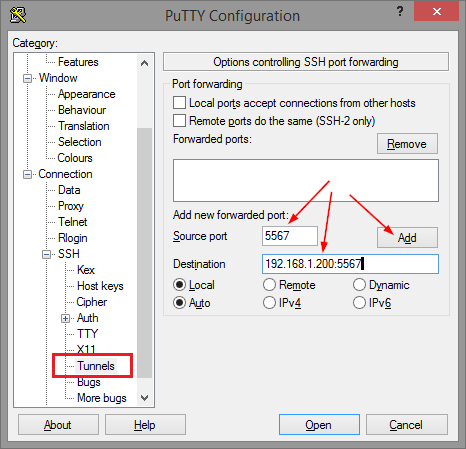
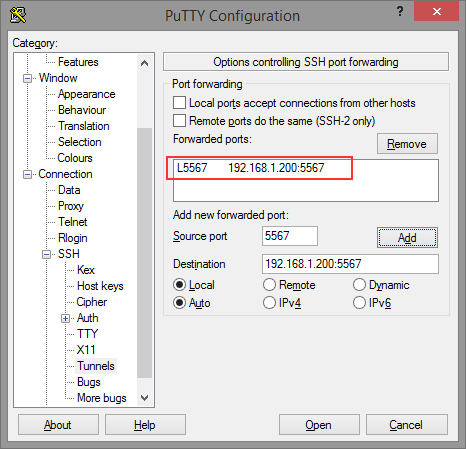
Thomas basically did all the research on the forwarding needed for ELC (formerly Belise/Elise), then showed the PuTTY equivalent to ssh user@remote -L5567:192.168.1.200:5567:
[WayBack] Remote access to the Embarcadero License Center via SSH tunnel – twm’s blog
Via: [WayBack] Once you have set up an Embarcadero License Center (ELC) for your company (with network named user or concurrent licenses) you will need network access … – Thomas Mueller (dummzeuch) – Google+
Related: [WayBack] Introducing the Embarcadero License Center – ELC
–jeroen

Posted in *nix, Communications Development, Delphi, Development, Internet protocol suite, Licensing, Power User, Software Development, SSH, ssh/sshd | Leave a Comment »
Posted by jpluimers on 2020/06/12
Often, configuration files work like this:
Not for ssh_config though, so I was right writing I should read more on it in Good read for starting to intermediate ssh users is “SSH Essentials: Working with SSH Servers, Clients, and Keys | DigitalOcean” and pointers to more advanced reading material.
So here is how ssh_config does it as per man page at [WayBack] ssh_config(5) – OpenBSD manual pages and [WayBack] ssh_config — OpenSSH SSH client configuration files at Linux.org:
     For each parameter, the first obtained value will be used.  The configuration files contain sections separated
     by “Host” specifications, and that section is only applied for hosts that match one of the patterns given in the
     specification.  The matched host name is the one given on the command line.

     Since the first obtained value for each parameter is used, more host-specific declarations should be given near
     the beginning of the file, and general defaults at the end.
This means a section Host * needs to come at the end.
I got that wrong and it took me the better half of a morning to figure out the cause of a connection problem ending in this:
debug1: Authentications that can continue: publickey,password

debug3: start over, passed a different list publickey,password

debug3: preferred publickey

debug3: authmethod_lookup publickey

debug3: remaining preferred:

debug1: No more authentication methods to try.
Somehow, the identity file was never used to try public key authentication at all because of the ssh_config order in ~/.ssh/config.
I’m not the only one confused, as during the search for the cause with “remaining preferred” “No more authentication methods to try.”:
Maybe now I should step up from manually editing the ssh_config file and use [WayBack] GitHub – moul/advanced-ssh-config: make your ssh client smarter to generate it for me.
–jeroen
Posted in *nix, *nix-tools, Communications Development, Development, Internet protocol suite, Power User, SSH, ssh/sshd, TCP | Leave a Comment »

 The Wiert Corner - irregular stream of stuff