Archive for the ‘HTTP’ Category
Posted by jpluimers on 2021/09/28
Interesting: [Archive.is] GitHub – proxykit/ProxyKit: A toolkit to create code-first HTTP reverse proxies on ASP.NET Core:
Having built proxies many times before, I felt it is time to make a package. Forked from
ASP.NET labs, it has been heavily modified with a different API, to facilitate a wider variety of proxying scenarios (i.e. routing based on a JWT claim) and interception of the proxy requests / responses for customization of headers and (optionally) request / response bodies. It also uses
HttpClientFactory internally that will mitigate against DNS caching issues making it suitable for microservice / container environments.
Related:
–jeroen
Posted in .NET, .NET Core, .NET Standard, ASP.NET, C#, Communications Development, Development, HTTP, Internet protocol suite, Software Development, TCP | Leave a Comment »
Posted by jpluimers on 2021/09/21
“Spooky dev environment hack: add 127.0.0.1 xn--9q8h to /etc/hosts and then all your dev servers can be accessed at http://👻 It’s localghost!”
Via:
–jeroen
Posted in Communications Development, Development, HTTP, Internet protocol suite, Power User, Software Development, TCP | Leave a Comment »
Posted by jpluimers on 2021/09/14
A while ago, I bumped into problems updating UltraVNC through Chocolatey.
It is similar to issues with other packages I have seen in the past: sha256 hash mismatches of which the reported mismatch changes over time, though the version stays the same.
This was tracked down to the actual file download site now needing a correct HTTP referer header. Likely this is to stop automated downloads, which kind of back-fires as ultimately you want to automate download and installation of things as much as possible.
Anyway: this is the [Archive.is] thread (which cannot be archived as Disqus hates archiving in the WayBack machine, and archive.is often fails with it too):
Graham Bloice • a month ago
The recent update to 1.2300 fails for me with a file hash error. The install script has fe3d1135ae0e7b72394a6f3cc137282cb5e6382a55b5ceee72140d28f5ffe961, but the installer as downloaded, and verified via a separate download and hash check has 5A42A24BED5A39ACA44443916E5B2C4C259CE8E843E90FD07F7AB3D26CB237C8
Related: Chocolatey got more strict on various URLs being correct; see [WayBack] (UltraVNC) Why has the X64 been removed? · Issue #42 · mkevenaar/chocolatey-packages · GitHub.
–jeroen
Posted in Chocolatey, CommandLine, Communications Development, Development, HTTP, Internet protocol suite, Power User, PowerShell, Software Development, TCP, Windows | Leave a Comment »
Posted by jpluimers on 2021/09/07
Long interesting thread at [WayBack] Thread by @sleevi_: “@SwiftOnSecurity So, some history: It used to be folks would get certs for “localhost”, just like they would from “webmail”, despite no CA e […]”
In 2019, applications were still using tricks (including shipping private keys!) to “securely” access https://127.0.0.1 on some port.
This should have stopped in 2015, but hadn’t. I wonder how bad it still is today.
Related:
- [WayBack] Tavis Ormandy on Twitter: “This turned out to be a real vulnerability! 😮 The certificate was issued by @digicert, who are now required to revoke it. It was issued before mandatory CT, so didn’t show up in …. See … for context.…”
- [WayBack] Ryan Sleevi on Twitter: “So, some history: It used to be folks would get certs for “localhost”, just like they would from “webmail”, despite no CA ever having validated the name. They just relied on pinky promises to be good. Luckily, browsers forbid that … “
- [WayBack] Ryan Sleevi on Twitter: “Look at the dates on those. Yes, it’s a things CAs used to do, and they had to be dragged kicking and screaming into not doing it (and even then, *many* ignored/“oopsied” the requirement to revoke). I regret to inform you it didn’t stop until 2015/2016 – … “
- [WayBack] Guidance on Internal Names – CAB Forum
- [Archive.is] HTTPS encryption on the web – Google Transparency Report: atlassian-domain-for-localhost-connections-only.com
- [Archive.is] HTTPS encryption on the web – Google Transparency Report
- SubjectC=AU, O=Atlassian Pty Ltd, L=Sydney, ST=New South Wales, CN=atlassian-domain-for-localhost-connections-only.com
- Serial NumberA:3E:93:53:0E:74:53:AE:CB:40:BA:20:10:12:F8:FB
- IssuerC=US, O=DigiCert Inc, OU=www.digicert.com, CN=DigiCert SHA2 High Assurance Server CAValidity11 May 2017 — 15 May 2020
- The domain is (at the time of writing, so hopefully that is now “was”) used by the [WayBack] Administering the Atlassian Companion App – Atlassian Documentation
- At the time of writing, the interactive Google DNS showed the domain pointing to localhost [WayBack] Google Public DNS:
Result for atlassian-domain-for-localhost-connections-only.com/A with DNSSEC validation:
{
  "Status": 0,
  "TC": false,
  "RD": true,
  "RA": true,
  "AD": false,
  "CD": false,
  "Question": [
    {
      "name": "atlassian-domain-for-localhost-connections-only.com.",
      "type": 1
    }
  ],
  "Answer": [
    {
      "name": "atlassian-domain-for-localhost-connections-only.com.",
      "type": 1,
      "TTL": 1620,
      "data": "127.0.0.1"
    }
  ]
}
- [Archive.is/WayBack] SSL Server Test: atlassian-domain-for-localhost-connections-only.com (Powered by Qualys SSL Labs)
Assessment failed: IP address is from private address space (RFC 1918)
Read the rest of this entry »
Posted in Communications Development, Development, DNS, HTTP, Internet, Power User, Software Development, TCP, TLS | Leave a Comment »
Posted by jpluimers on 2021/09/02
DNS over HTTPS
For my link archive:
JSON DNS output
Some DNS over HTTSP providers support dns-json, which Cloudflare delivers non-pretty printed.
Read the rest of this entry »
Posted in Cloud, Cloudflare, Communications Development, Development, DNS, Encryption, HTTP, https, HTTPS/TLS security, Infrastructure, Internet, Internet protocol suite, Power User, Security, Software Development, TCP, TLS | Leave a Comment »
Posted by jpluimers on 2021/03/25
A great way for testing REST JSON calls is using the [WayBack] JSONPlaceholder – Fake online REST API for developers:
Fake Online REST API for Testing and Prototyping
Serving ~200M requests per month
Powered by JSON Server [WayBack] + LowDB [WayBack]
It is like [WayBack] Placeholder.com: Placeholder Images Done For You [JPG, GIF & PNG] but for JSON and supports both CORS and JSON-P for cross domain requests.
You can either use that site (which has a predefined set of REST calls) or the basic [WayBack] My JSON Server – Fake online REST server for teams that allows you to respond it to a db.json file from github:
Fake Online REST server for teams
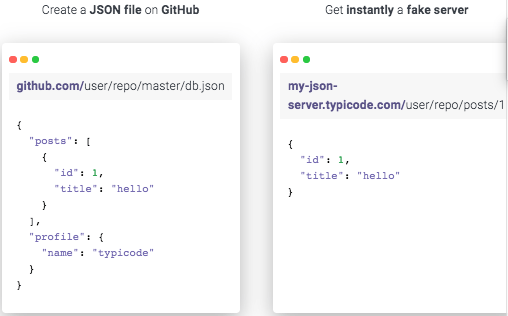
Create a JSON file on GitHub
github.com/user/repo/master/db.json
{
  "posts": [
    {
      "id": 1,
      "title": "hello"
    }
  ],
  "profile": {
    "name": "typicode"
  }
}
Get instantly a fake server
my-json-server.typicode.com/user/repo/posts/1
{
  "id": 1,
  "title": "hello"
}
Related
Documentation
There is basic documentation at the repository [WayBack] GitHub – typicode/jsonplaceholder: A simple online fake REST API server:
Read the rest of this entry »
Posted in Communications Development, Development, HTTP, Internet protocol suite, JavaScript/ECMAScript, JSON, REST, Scripting, Software Development, TCP | Leave a Comment »
Posted by jpluimers on 2020/05/12
[WayBack] Insomnia REST Client A powerful REST API Client with cookie management, environment variables, code generation, and authentication for Mac, Window, and Linux.
Source code at [WayBack] GitHub – getinsomnia/insomnia: The most intuitive cross-platform REST API Client 😴.
Via: [WayBack] Paw is nice – The Isoblog.
–jeroen
Posted in Communications Development, Development, HTTP, Internet protocol suite, JavaScript/ECMAScript, JSON, REST, Scripting, Software Development, TCP, Web Development | Leave a Comment »
Posted by jpluimers on 2020/05/04
Often, hotspots only allow http/https traffic. Other traffic – like SSH – is blocked. Nowadays, fewer hotspots block that, but too many still do.
So it can be worth a while to route your SSH server through HTTPS (I don’t like Web-based SSH that much as terminal emulation in browsers isn’t that well yet, but that seems to change rapidly, more on that in the “Further reading” section below).
After some background reading at apache – Tunnel over HTTPS – Stack Overflow, here are a few links that help you do it:
You need:
- An internet connected Apache server (eg. with IP address 10.1.2.3)
- A FQDN that points to this IP address (eg. ssh.yourdomain.com)
- A virtual host configuration in Apache for this domain (eg. /etc/httpd/conf.d/ssh.yourdomain.com.conf)
- A configuration to adapt ssh to use the HTTP tunnel
Read more at DAG: Tunneling SSH over HTTP(S) and SSH over SSL, a quick and minimal config..
Steps:
- Test of it works at all
- Edit your local ~/.ssh/config file to redirect SSH to HTTPS
Read more at Using SSH over the HTTPS port · GitHub Help.
Using Putty and an HTTP proxy to ssh anywhere through firewalls | Me in IT.
the Digital me: SSH Tunneling Proxy using Putty on Windows and Linux (Unblock YouTube / Orkut / Facebook).
Tunneling SSH through HTTP proxies using HTTP Connect – ArchWiki.
HTTP Tunneling – ArchWiki.
Running SSHD on port 443.
Not all proxy configurations and hotspots support this. But it might be worth a look: SSH Over Proxy.
SSH plugins for browsers:
Web based SSH:
–jeroen
Posted in Communications Development, Development, Encryption, HTTP, https, HTTPS/TLS security, Internet protocol suite, Power User, Security, SSH, TCP | Leave a Comment »
Posted by jpluimers on 2020/02/27
 Cool tool, but be aware it does a
JavaScript:xmlhttpPost from , so your data can be logged [WayBack] Redirect Detective – A Free Tool To Trace Where Redirects End Up.
For http://www.xs4all.nl/~jp, it shows these redirects (where in bold I’ve listed the changes):
Oh and it runs this call: JavaScript:xmlhttpPost("/linkdetect.px")?word=www.xs4all.nl%2F%7Ejp from [WayBack] redirectdetective.com/ajax.js.
Note that this shows more redirects than the plain http ones, so wget from [WayBack] wget – How do I display all URLs in a redirect chain? – Unix & Linux Stack Exchange shows this:
$ wget http://www.xs4all.nl/~jp 2>&1 | grep Location:

Location: https://www.xs4all.nl/~jp [following]

Location: https://jp.home.xs4all.nl/ [following]
–jeroen
Posted in *nix, *nix-tools, Communications Development, Development, HTTP, Internet protocol suite, Power User, TCP, wget | Leave a Comment »




 The Wiert Corner - irregular stream of stuff