The Wiert Corner – irregular stream of stuff

Jeroen W. Pluimers on .NET, C#, Delphi, databases, and personal interests

  • My badges

  • Twitter Updates

  • My Flickr Stream

  • Pages

  • All categories

  • Enter your email address to subscribe to this blog and receive notifications of new posts by email.

    Join 1,860 other subscribers

Archive for the ‘Arduino’ Category

A ton of keyboard conversions via GitHub – trekawek/mac-plus-ps2: Arduino project that allows to connect a PS2 keyboard to Macintosh Plus

Posted by jpluimers on 2025/12/12

This is for earliest compact Apple Macintosh systems predating the introduction ADB (Apple Desktop Bus) on Macintosh SE and Apple Macintosh II (and Apple IIgs which technically is not a Macintosh):

[Wayback/Archive] GitHub – trekawek/mac-plus-ps2: Arduino project that allows to connect a PS2 keyboard to Macintosh Plus

Before continuing to an even more impressive keyboard and mouse interfacing project below (basically many kinds of modern keyboard, mice and gamepads to many retro computers) that I found thanks to doing some more research after finding the above one, lets summarise where the above one is still useful for:

Read the rest of this entry »

Posted in Apple, Arduino, Classic Macintosh, Development, Hardware Development, History, Power User | Leave a Comment »

Eff-Uno Racer v1 by chrisbensen – Thingiverse: Open Wheel Race Car from LEGO© and 3D printed bricks, with RC motors controlled by a Raspberry Pi and Arduino

Posted by jpluimers on 2022/08/17

This is so cool!

[Wayback/Archive.is] Eff-Uno Racer v1 by chrisbensen – Thingiverse

Welcome to the home for the things to print for the Eff-Uno Racer project ([Wayback/Archive.is] github.com/oracle-devrel/eff-uno-racer). Eff-Uno Racer is a LEGO© Open Wheel Race Car that you can build and remotely control. Most of it is made with LEGO© bricks but the motors are regular RC motors controlled by a Raspberry Pi and Arduino. Below are the extra parts needed.

The videos are via these three tweets:

List is at: [Wayback/Archive.is] Cool DevRebel Projects – YouTube

Videos when writing (by now there should be more):

  1. [Wayback/Archive.is] Cloud Car Episode 1 — Custom Breadboard for Pi Zero – YouTube
  2. [Wayback/Archive.is] Cloud Car Episode 2 — Pi Controlled Motors – YouTube
  3. [Wayback/Archive.is] Cloud Car Episode 3 — Shoving a Pi & RC Motor into a Toy Car – YouTube
  4. [Wayback/Archive.is] Episode 4: Shoving a Motor and Speed Controller into a Toy Car – YouTube
  5. [Wayback/Archive.is] Episode 5 — Next Stage: 3D Printed RC Servo Motor Adapters – YouTube

Via [Archive.is] Chris Bensen on Twitter: “If you want to build your own open source cloud connected toy race car follow this thing”

–jeroen

Read the rest of this entry »

Posted in 3D printing, Arduino, Development, Hardware Development, LifeHacker, Power User, Raspberry Pi | Leave a Comment »

GitHub – JanDerogee/TeleJukebox: A project based on the concepts of the Wonderfoon and Arduinofoon

Posted by jpluimers on 2021/11/18

[Wayback/Archive.is] GitHub – JanDerogee/TeleJukebox: A project based on the concepts of the Wonderfoon and Arduinofoon which simplfies the design of the Wonderfoon keeping the most important music playback feature down to

a simple PCB in a small case where you plug the phone in

The completed project works very simple:

  • Pick up the phone, you hear the “dial tone” MP3, Dial a number, you hear the MP3 0..9 playing (depending on the dialed number), When the song is over, you hear the “disconnected” MP3, You can dial another number and hear another song or hang up the phone.
  • Some phones also have a button on the front. When you press this button, the phone randomly playes one of the songe 0..9 and when that song is over, it automatically plays a new song, randomly. This will allow the person on the phone to continuously listen to the music. This may be of help to those who can’t figure out how it works but love to hear the songs over and over again.
  • You can configure the music folder from which the MP3s are played, you can use up to 10 different folders
  • You can configure the volume of the device
  • Configurations are done through the phone itself (dial 738 OR hold the button while picking up the handpiece), you hear a voice that guides you through a menu and all you need to do is dial in your settings value.

You can power this design through a USB port cable. This way the device can be fed using a simple mobilephone charger OR be connected to the PC. When connected to a PC, the TeleJukebox identifies itself like a USB-stick and you can easily modify the file without removing the card from the system. Meaning that you do no even need to open the case in order to change the collection of MP3 files. Keep in mind that when the device is in USB-stick mode, it cannot playback MP3 files meaning that in this mode it will not act like a TeleJukebox.

Music rights

Especially when using this in a professional environment. be sure the music that plays is rights free (there are music therapists for treating people with Alzheimer’s and dementia that can help you with that).

Steps, reasoning, and building instructions

A less in depth Dutch article (with 13 minute explaining video below) explaining most of the steps and all the reasoning is this multi-part one:

  1. [Wayback] .Build – Bouw een Wonderfoon – Bouw een Wonderfoon voor iemand anders – Achtergrond – Tweakers

    It works with these and younger phones as long as they can do pulse-dialing:

    De T65, W65 en T65 TDK

  2. [Wayback] .Build – Bouw een Wonderfoon – Wat is een Wonderfoon? – Achtergrond – Tweakers

    The small regular and debug boxes under the PTT/KPN phone connector box:

    .Build Wonderfoon - Twee keer TeleJukebox

  3. [Wayback] .Build – Bouw een Wonderfoon – Een goedkopere variant – Achtergrond – Tweakers
  4. [Wayback] .Build – Bouw een Wonderfoon – Slopen is zonde – Achtergrond – Tweakers

    Both boards with electronics soldered:

    .Build Wonderfoon - Beide varianten van de TeleJukebox

    The non-debug board with components to be soldered:

    .Build Wonderfoon - Onderdelen TeleJukebox

  5. [Wayback] .Build – Bouw een Wonderfoon – T65 bewerken – Achtergrond – Tweakers

    The small cleanup and modification steps (shorting the microphone) for the T65 phone:

    .Build Wonderfoon - Contact haakT65 schoonmaken.Build Wonderfoon - Contact haakT65 schoonmaken

    .Build Wonderfoon - Aansluitingen T65.Build Wonderfoon - Aansluitingen T65.Build Wonderfoon - Aansluitingen T65.Build Wonderfoon - Aansluitingen T65

  6. [Wayback] .Build – Bouw een Wonderfoon – Solderen maar! – Achtergrond – Tweakers

    Schematics:

    .Build Wonderfoon - Schema TeleJukebox

    Shopping list:

    – 1x Pcb of perf board (€ 1,01)
    – 1x Arduino Pro Micro (€ 7,95)
    – 1x DFPlayer mp3-speler(€ 0,73)
    – 1x TIL111 optocoupler (€ 0,41)
    – 2x Weerstand 4K7 Ohm (€ 0,16)
    – 7x Weerstand 2K7 Ohm (€ 0,56)
    – 1x Weerstand 560 Ohm (€ 0,08)
    – 1x Elco 1000 µF 6.3 V (€ 0,23)
    – 1x Condensator 330nF (€ 0,13)
    – 1x Condensator 100nF (€ 0,05)
    – 2x Led (€ 0,06)
    – 1x USB, type B, pcb (€ 0,67)
    – 1x Tactile switch (€ 0,09)
    – 1x Pinheader, male, 6 breed (€ 0,03)
    – 4x Jumper kabel, female (€ 1,95)
    – 1x Micro sd-kaart (€ 2,50)
    – 1x PTT-wandcontactdoos (€ 2,99)
    – 1x Behuizing (€ 1,22)
    Totaal € 20,82

    Voor de compacte pcb kun je de switch, een led, een weerstand van 2k7 Ohm en de twee weerstanden van 4k7 Ohm weglaten.

  7. [Wayback] .Build – Bouw een Wonderfoon – Voor wie gaat hij worden? – Achtergrond – Tweakers

    The inside of the non-debug box:

    .Build Wonderfoon - TeleJukebox


Wonderfoon got more versatile

Note that the most recent Wonderfoon products got more versatile allowing more songs, warnings for taking pills, and ring-reminders based on morse code.

[Wayback] Home | Wonderfoon

. De Wonderfoon-Centrale

–jeroen

Read the rest of this entry »

Posted in Arduino, Arduino, Development, ESP32, ESP8266, ESP8266X, Hardware, Hardware Development, Hardware Interfacing, Raspberry Pi, Software Development | Leave a Comment »

Actiegroep @SchipholWatch heeft een heuse woordvoerder: @alfredblokhuize. Ik sprak hem over hun eigen lawaaimeetapp @AppExplane en hun gebrek aan vertrouwen in de overheid. @NHNieuws

Posted by jpluimers on 2021/09/13

Actiegroep @SchipholWatch heeft een heuse woordvoerder: @alfredblokhuize. Ik sprak hem over hun eigen lawaaimeetapp @AppExplane en hun gebrek aan vertrouwen in de overheid. @NHNieuws

[Archive.is] Actiegroep ontwikkelt zelf app die lawaai Schiphol meet: “Geen vertrouwen in overheid” – NH Nieuws

Via:

De normale Android app voor incidenteel meten kun je downloaden via [WayBack] ExPlane – the app to register aviation noise / [WayBack] Explane +150K (@AppExplane) / Twitter.

Waarschijnlijk is er inmiddels een app om het continue te meten [Archive.is] SchipholWatch on Twitter: “Oudere telefoon voor continu meten vliegherrie …” / Twitter:

  • [WayBack] Oudere telefoon voor continu meten vliegherrie | SchipholWatch / [WayBack] New version of Explane under development | Explane.org
    • … Explane: er komt een nieuwe versie van de app, waarmee ook continu kan worden gemeten. Met de nieuwe versie kunnen omwonenden gedurende zelf te kiezen periodes alle overkomende vliegtuigen registreren en doorgeven aan de centrale database.

    • Daarvoor is geen aparte sim-kaart nodig, zolang de telefoon maar in het bereik van een bekend wifi-netwerk ligt.

    • Ook zal de nieuwe versie via Bluetooth kunnen communiceren met een goedkope (en eventueel waterdichte) decibel-meter.

    • is wel enkele maanden tijd nodig, omdat ook deze weer wordt gebouwd door onze vrijwilliger Roelof Meijer. Hij werkt op vrije dagen aan de app.

En voor Raspberry Pi:

[WayBack] GitHub – SchipholWatch/explane-pi

via

Andere initiatieven:

–jeroen

Posted in Arduino, Development, Hardware Development, Raspberry Pi, Software Development, Soldering | Leave a Comment »

Good tips for powering any kind of LED strips from the Adafruit NeoPixel Überguide | Adafruit Learning System

Posted by jpluimers on 2020/10/22

Read these tips before playing with any kind of LED strips: [WayBack] Powering NeoPixels | Adafruit NeoPixel Überguide | Adafruit Learning System.

There are more, but these are the most important:

  • When connecting NeoPixels to any live power source or microcontroller, ALWAYS CONNECT GROUND (–) BEFORE ANYTHING ELSE. Conversely, disconnect ground last when separating.
  • Adding a 300 to 500 Ohm resistor between your microcontroller’s data pin and the data input on the first NeoPixel can help prevent voltage spikes that might otherwise damage your first pixel. Please add one between your micro and NeoPixel.
  • Before connecting a NeoPixel strip to ANY source of power, we very strongly recommend adding a large capacitor (1000 µF, 6.3V or higher) across the + and – terminals. This prevents the initial onrush of current from damaging the pixels.
  • Be extremely cautious with bench power supplies. Some — even reputable, well-regarded brands — can produce a large voltage spike when initially switched on, instantly destroying your NeoPixels!
    If you use a bench supply, do not connect NeoPixels directly. Turn on the power supply first, let the voltage stabilize, then connect the pixels (GND first).

Via: [WayBack] Bouw je eigen ledtafel – Tot slot – Achtergrond – Tweakers

–jeroen

Posted in Arduino, Development, Hardware Development, Hardware Interfacing, Raspberry Pi | Leave a Comment »

Remote power control your IoT hardware and remote updating boot SD cards

Posted by jpluimers on 2020/07/16

Thomas Rini (of U-Boot and Yocto fame) mentioned these solutions for remote power control of IoT devices and remote updating SD cards in this slide State of the U-Boot – Thomas Rini, Konsulko Group:

Two power solutions I like myself are:

The combination of these allows for really flexible production and testing environments.

Slides at [WayBackELC2017 – State of the U-Boot.pdf

–jeroen

Read the rest of this entry »

Posted in Arduino, Development, ESP8266, ESP8266X, Hardware Development, Hardware Interfacing, IoT Internet of Things, Network-and-equipment, Odroid, Power User, Raspberry Pi | Leave a Comment »

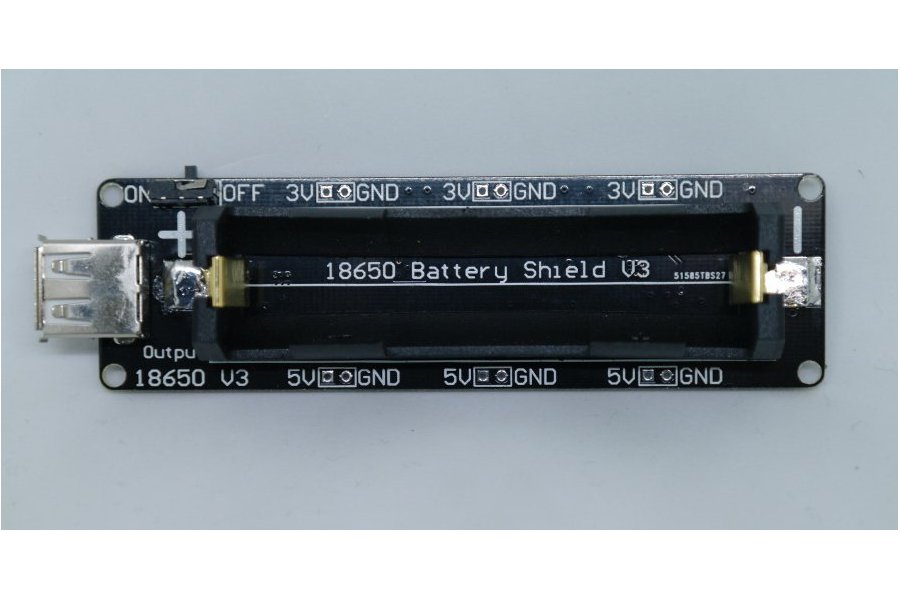
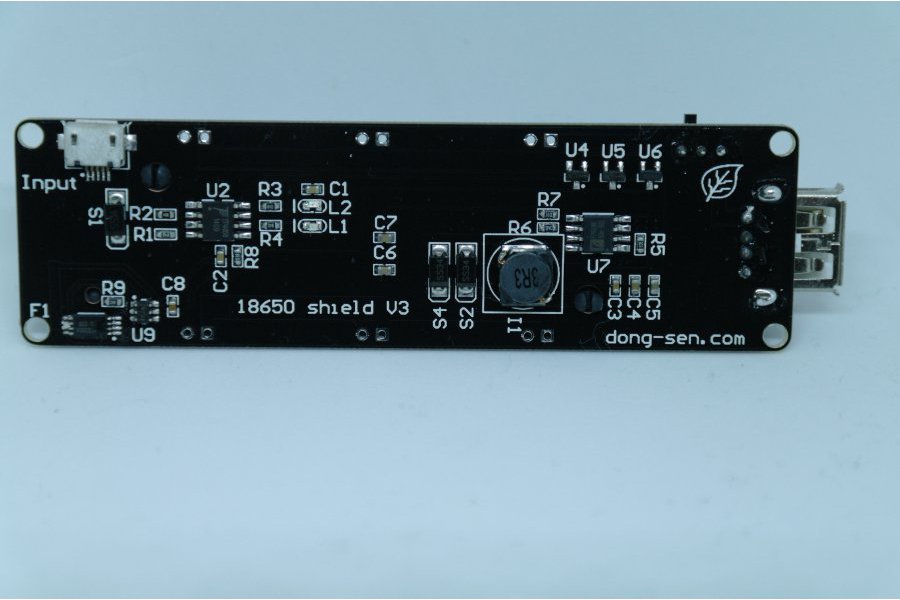
18650 Battery shield V3(RaspberryPi&Arduino) from lspoplove on Tindie

Posted by jpluimers on 2020/03/04

As you know Tesla has thousands of 18650 batteries. The 18650 battery is a strong existence. So we made this 18650 battery shield for maker.

Features:

  • Battery protection(Over charge or Over discharge)
  • Micro USB port Input
  • Type-A USB Output
  • 0.5A current charging
  • 1 switch control USB output
  • 5~8V Input Voltage
  • 3V & 1A Output
  • 5V & 2A Output
  • LED indicate(Green means full,Red means charging)
  • 3V output port x3
  • 5V output port x3

Charging can only be done at 0.5A, so using it as a sort of UPS seems not possible, but an interesting device nonetheless.

The other products referenced from the same page are interesting too and will undoubtedly bring me some new ideas for some projects.

Source: [WayBack18650 Battery shield V3(RaspberryPi&Arduino) from lspoplove on Tindie

Via:

–jeroen


Posted in 18650, Arduino, Batteries, Development, ESP8266, Hardware Development, Li-Ion, Odroid, Power User, Raspberry Pi | Leave a Comment »

Relays and Arduino / ESP8266 / ESP8266X

Posted by jpluimers on 2019/06/19

As a follow-up on Raspberry Pi and relays – follow up on Having one Raspberry Pi reset another Raspberry Pi through relay or transistor some of my research links to bring this to Arduino, ESP8266, ESP8266X and similar devices:

–jeroen

Posted in Arduino, Development, ESP8266, ESP8266X, Hardware Development | Leave a Comment »

Always watch your uA sources: The mystery of the Zombie RAM | josh.com

Posted by jpluimers on 2018/02/13

Interesting read [WayBack]: The mystery of the Zombie RAM | josh.com that starts with

It all started one bright morning when I wondered: Can the RAM memory on an AVR chip continue to store data after power is removed? If it can hold the data even just for a brief moment, then…

TL;DR: Always watch your uA sources. Or like Lübbe Onken puts it on G+:

In my first company, we had built a piece of hardware, which turned itself on mysteriously sometimes. We found out that this was caused by a status led that created enough current in bright sunlight.

–jeroen

via:


Posted in Arduino, Development, Hardware Development | Leave a Comment »

`-bash: warning: setlocale: LC_ALL: cannot change locale (en_US.UTF-8)` on fresh Raspbian on Raspberry

Posted by jpluimers on 2017/03/24

Every time I logged onto a freshly installed Rasbian system (Debian Jessie), I had this message:

The programs included with the Debian GNU/Linux system are free software;
the exact distribution terms for each program are described in the
individual files in /usr/share/doc/*/copyright.

Debian GNU/Linux comes with ABSOLUTELY NO WARRANTY, to the extent
permitted by applicable law.
Last login: Sat Aug 27 19:52:33 2016 from 192.168.171.24
-bash: warning: setlocale: LC_ALL: cannot change locale (en_US.UTF-8)

Asking for the locale settings would give this:

jeroenp@raspberrypi:~ $ locale
locale: Cannot set LC_CTYPE to default locale: No such file or directory
locale: Cannot set LC_MESSAGES to default locale: No such file or directory
locale: Cannot set LC_ALL to default locale: No such file or directory
LANG=en_GB.UTF-8
LANGUAGE=
LC_CTYPE="en_US.UTF-8"
LC_NUMERIC="en_US.UTF-8"
LC_TIME="en_US.UTF-8"
LC_COLLATE="en_US.UTF-8"
LC_MONETARY="en_US.UTF-8"
LC_MESSAGES="en_US.UTF-8"
LC_PAPER="en_US.UTF-8"
LC_NAME="en_US.UTF-8"
LC_ADDRESS="en_US.UTF-8"
LC_TELEPHONE="en_US.UTF-8"
LC_MEASUREMENT="en_US.UTF-8"
LC_IDENTIFICATION="en_US.UTF-8"
LC_ALL=en_US.UTF-8

Searching for raspbian jessie “-bash: warning: setlocale: LC_ALL: cannot change locale (en_US.UTF-8)” I found fix locale issue #15 · scaleway/image-debian@543e9b4 [WayBack] that fixes Locale issue on Debian Jessie · Issue #15 · scaleway/image-debian · GitHub [WayBack]:

When logging into to a freshly booted debian jessie image:

-bash: warning: setlocale: LC_ALL: cannot change locale (en_US.UTF-8)

Source: Locale issue on Debian Jessie · Issue #15 · scaleway/image-debian

I changed the crux of that solution to this one:

echo "en_US.UTF-8 UTF-8" >> /etc/locale.gen && locale-gen

When running, it showed this:

# echo "en_US.UTF-8 UTF-8" >> /etc/locale.gen && locale-gen
Generating locales (this might take a while)...
  en_GB.UTF-8... done
  en_US.UTF-8... done
Generation complete.

And logging this:

The programs included with the Debian GNU/Linux system are free software;
the exact distribution terms for each program are described in the
individual files in /usr/share/doc/*/copyright.

Debian GNU/Linux comes with ABSOLUTELY NO WARRANTY, to the extent
permitted by applicable law.
Last login: Sat Aug 27 20:26:34 2016 from 192.168.171.24

Problem solved: 1 line of code!

–jeroen

Posted in *nix, Arduino, Debian, Development, Hardware Development, Linux, Power User, Raspberry Pi, Raspbian | 1 Comment »