


- [WayBack] DIY Filament Sensor for your 3D Printer – Richard Hughes – Google+
- [WayBack] DIY Filament Sensor for your 3D Printer – DoorToDoorGeek “Stephen McLaughlin” – Google+
–jeroen
Posted by jpluimers on 2018/10/23
–jeroen

Posted in 3D printing, Development, Hardware Development, LifeHacker | Leave a Comment »
Posted by jpluimers on 2018/10/22
 Wow, EUR 15 is almost half the price of an Raspberry Pi 3 B+:
[WayBack] RPI3-MODBP-POE RASPBERRY-PI, Add-On Board, Power over Ethernet (PoE) HAT for Raspberry Pi 3 Model B+ | Farnell UK
Via:
–jeroen

Posted in Development, Hardware Development, Power User, Raspberry Pi | Leave a Comment »
Posted by jpluimers on 2018/10/11
Hopefully I get this to work after fixing
The first part of the fix was to
The second part is getting the USB web cameras to work.
I’ve got two types, but the label on them doesn’t list their common name, only their P/N sometimes with M/N:
The MotionEyeOS web interface didn’t list any working cameras so I had to do some digging.
Luckily [WayBack] Webcam software and driver support for Windows has a table of part and model numbers combined with product names, so they got revealed them as these:
Both are supported by motion according to [WayBack] Logitech < Motion < Foswiki though the Quick Cam Messenger needs [WayBack] Quickcam Messenger & Communicate driver for Linux which I should try to cross-compile one day.
The latter works fine. Below are some settings I used.
Posted in *nix, Development, Hardware Development, Linux, Odroid, Power User | Leave a Comment »
Posted by jpluimers on 2018/10/09
After the trouble in Ubuntu: Fixing the myserious “Failed to stop apt-daily.timer: Connection timed out” I got into more trouble:
apt-get update && apt-get upgrade hung the device.
It booted fine, but a new update showed it was in a hosed state.
I don’t expect vendor supported distributions to fail this way, so I gave up on the ubuntu-16.04-minimal-odroid-c1-20160817.img.xz .
–jeroen
| root@odroidC1:~# apt-get update && apt-get upgrade | |
| Hit:1 http://ports.ubuntu.com/ubuntu-ports xenial InRelease | |
| Hit:2 http://ports.ubuntu.com/ubuntu-ports xenial-updates InRelease | |
| Hit:3 http://ports.ubuntu.com/ubuntu-ports xenial-backports InRelease | |
| Hit:4 http://ports.ubuntu.com/ubuntu-ports xenial-security InRelease | |
| Hit:5 http://deb.odroid.in/c1 xenial InRelease | |
| Reading package lists… Done | |
| E: dpkg was interrupted, you must manually run 'dpkg –configure -a' to correct the problem. | |
| root@odroidC1:~# dpkg –configure -a | |
| Processing triggers for ureadahead (0.100.0-19) … | |
| Setting up initramfs-tools (0.122ubuntu8.8) … | |
| update-initramfs: deferring update (trigger activated) | |
| Processing triggers for systemd (229-4ubuntu17) … | |
| Processing triggers for initramfs-tools (0.122ubuntu8.8) … | |
| update-initramfs: Generating /boot/initrd.img-4.4.0-28-generic | |
| WARNING: missing /lib/modules/4.4.0-28-generic | |
| Ensure all necessary drivers are built into the linux image! | |
| depmod: ERROR: could not open directory /lib/modules/4.4.0-28-generic: No such file or directory | |
| depmod: FATAL: could not search modules: No such file or directory | |
| depmod: WARNING: could not open /var/tmp/mkinitramfs_FQEGW2/lib/modules/4.4.0-28-generic/modules.order: No such file or directory | |
| depmod: WARNING: could not open /var/tmp/mkinitramfs_FQEGW2/lib/modules/4.4.0-28-generic/modules.builtin: No such file or directory | |
| root@odroidC1:~# df -h | |
| Filesystem Size Used Avail Use% Mounted on | |
| udev 396M 0 396M 0% /dev | |
| tmpfs 81M 3.3M 78M 5% /run | |
| /dev/mmcblk0p2 59G 1.1G 55G 2% / | |
| tmpfs 403M 0 403M 0% /dev/shm | |
| tmpfs 5.0M 0 5.0M 0% /run/lock | |
| tmpfs 403M 0 403M 0% /sys/fs/cgroup | |
| /dev/mmcblk0p1 128M 11M 118M 9% /media/boot |
Posted in Development, Hardware Development, Odroid | 3 Comments »
Posted by jpluimers on 2018/10/04
There are very many, often contradictory, claims about the power requirements and limitations of the Pi. What are the exact requirements?
has a very elaborate answer at [WayBack] Raspberry Pi Power Limitations – Raspberry Pi Stack Exchange covering all non-zero models.
I’ve archived some of the links it points to:
And some links on how to power a Raspberry Pi when you only have a 12V power source:

Posted in Development, Hardware Development, Raspberry Pi | Leave a Comment »
Posted by jpluimers on 2018/09/15
Not sure in which changeset this happened, but here is one example:
1:b8:27:eb:1a:b1:ecff:eb:78:a9:4:0:1:0:1:22:6:67:49:b8:27:eb:78:a9:4The first one was marked static in the DHCP server, which means the Raspberry Pi now did get a different IP address.
This messes up a few places that cannot do proper address resolution.
Anyone who knows where this has changed / is configured?
These did not help finding the cause:
As commented by Leen below, this is about
Wicked changed its defaults to use this DHCPv6 compatible RFC4361 client-id in favour of the older RFC2132 client-id. However, this has caused some issues with older DHCPv4 servers and existing setups where the client-id stored by the server is used to assign a (static) address. It is recommended to fix this server-side, but still, wicked provides several ways of addressing this issue
So here are some links:
2018-02-02 - mt@suse.de
- version 0.6.44
- dhcp4: use rfc4361 client-id as new default for ethernet on sle15
(fate#323576). It can be also enabled/disabled in wicked-config(5).
- client: fixed broken wicked arp utility command (bsc#1078245)
- cleanup: add mising/explicit designated field initializers
- pkgconfig: fix to request libnl3 instead of libnl1
- dbus: add missing DBUS_ERROR_FAILED type to a dbus_set_error call
and enforce formatting input as string when an extension did not
returned any error message.
- Removed patch included in the source archive
[- 0001-wickedd-explicitly-unbind-slaves-on-deletion.patch]
The traditionally used RFC 2132 DHCPv4
client-idon Ethernet is constructed from the hardware type (01for Ethernet) and followed by the hardware address (the MAC address), for example:01:52:54:00:02:c2:67The RFC 4361
client-idstarts with0xff(instead of the hardware type), followed by the DHCPv6 IAID (the interface-address association ID that describes the interface on the machine), followed by the DHCPv6 DUID (client-idwhich identifies the machine).Using the above hardware type-based and hardware address-based DUID (LLT type used by default), the new RFC 4361 DHCPv4
client-idwould be:
- Using the last bytes of the MAC address as the IAID:
ff:00:02:c2:67:00:01:xx:xx:xx:xx:52:54:00:02:c2:67- When the IAID is a simple incremented number:
ff:00:00:00:01:00:01:xx:xx:xx:xx:52:54:00:02:c2:67
–jeroen
Posted in *nix, Hardware Development, Linux, openSuSE, Power User, Raspberry Pi, SuSE Linux, Tumbleweed | 6 Comments »
Posted by jpluimers on 2018/09/10
There are plenty of HDMI displays, but if you want a smaller size it become more complicated although some 7″ HDMI displays are available. However, if you
Source: [Archive.is] DFRobot 7″ HDMI Display with Touchscreen Sells for $69
Via: [Archive.is] 7″ HDMI touchscreen display with mounting holes for +Raspberry Pi board. – Jean-Luc Aufranc – Google+
–jeroen
Posted in Development, Hardware Development, Power User, Raspberry Pi | Leave a Comment »
Posted by jpluimers on 2018/09/09
The coupon for the Promo worked yesterday, so you might want to try it if you like a scope in a multimeter form factor: [WayBack] MUSTOOL MT8206 Multimeter & Oscilloscope Goes for $42 (Promo).
MUSTOOL MT8206 looks like a standard digital multimeter, but the device is actually a 2-in-1 device that also serves as a oscilloscope. Banggood have the…
Via [WayBack] New 2-in-1 digital multimeter + oscilloscope selling for ~$42 shipped for a limited time – Jean-Luc Aufranc – Google+
–jeroen

Posted in Development, Hardware Development, Power User | Leave a Comment »
Posted by jpluimers on 2018/09/07
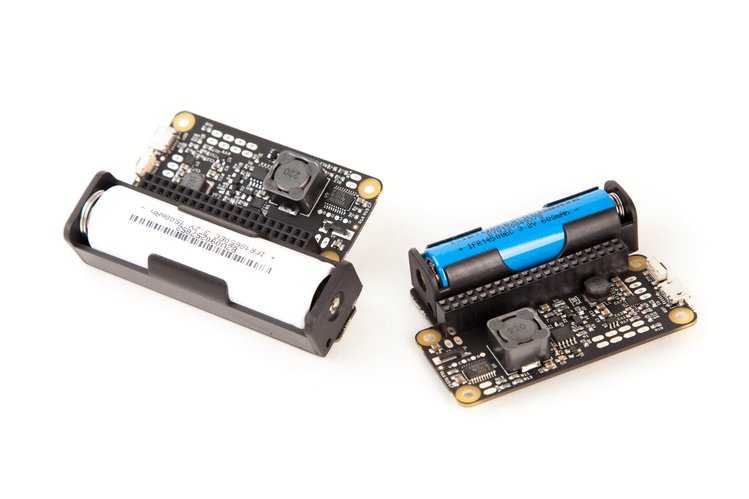
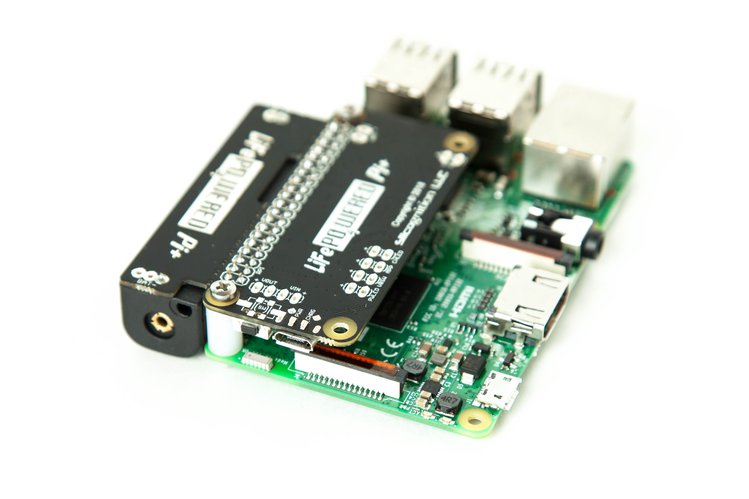
A few days left for [WayBack] LiFePO4wered/Pi+ | Crowd Supply: A full-featured LiFePO4 battery, power manager, and UPS for the Raspberry Pi
via:
–jeroen

Posted in Development, Hardware Development, Power User, Raspberry Pi | Leave a Comment »
Posted by jpluimers on 2018/08/31
cool solution for precise point positioning (PPP) GPS navigation.The RasPiGNSS “Aldebaran” expansion board fits onto the Pi’s expansion connector (named P1).
Source: Hi all, I found this cool solution for precise point positioning (PPP) GPS na…
Device: Dr. Franz Fasching » Products » GNSS » RasPiGNSS [WayBack]
–jeroen
Posted in Development, Hardware Development, IoT Internet of Things, Network-and-equipment, Power User, Raspberry Pi | Leave a Comment »


 The Wiert Corner - irregular stream of stuff