The Wiert Corner – irregular stream of stuff

Jeroen W. Pluimers on .NET, C#, Delphi, databases, and personal interests

  • My badges

  • Twitter Updates

  • My Flickr Stream

  • Pages

  • All categories

  • Enter your email address to subscribe to this blog and receive notifications of new posts by email.

    Join 1,839 other subscribers

Archive for the ‘Development’ Category

Decode URLs from The Great Suspender after a browser restart fails to reload them

Posted by jpluimers on 2017/03/16

Hosted at: Decode URLs from The Great Suspender after a browser restart fails to reload them

Converts URLs like these:
chrome-extension://klbibkeccnjlkjkiokjodocebajanakg/suspended.html#url=http%3A%2F%2Fwww.barryodonovan.com%2F2012%2F06%2F29%2Fmigrating-svn-with-branches-and-tags-to-git
back into
http://www.barryodonovan.com/2012/06/29/migrating-svn-with-branches-and-tags-to-git

Source below.

It decodes a URL encoded by The Great Suspender which is a cool Google Chrome plugin that suspends pages after some idle time.

The uncool thing is that when Google Crome restarts after a crash (it’s software, it does that, especially as it consumes truckloads of memory and is full of memory leaks) it often fails to restore some (but not many) of the suspended pages into a usable state: it shows only the encoded URLs.

–jeroen


<!DOCTYPE html>
<!–
Resurrect
Based on 20160531-Google-Plus–403.-That’s-an-error.–Your-client-does-not-have-permission-to-get-URL–sorry–IndexRedirect–workaround.html
at https://gist.github.com/jpluimers/4f07a2f3f9b9890a3a44e184c1abadf2
Converts URLs like these:
chrome-extension://klbibkeccnjlkjkiokjodocebajanakg/suspended.html#url=http%3A%2F%2Fwww.barryodonovan.com%2F2012%2F06%2F29%2Fmigrating-svn-with-branches-and-tags-to-git
back into
url=http://www.barryodonovan.com/2012/06/29/migrating-svn-with-branches-and-tags-to-git
The Great Suspender Google Extension:
https://chrome.google.com/webstore/detail/the-great-suspender/klbibkeccnjlkjkiokjodocebajanakg
Test at http://jsbin.com/yukidaferu/1/edit?html,console,output
–>
<html>
<title>Decode URLs from The Great Suspender after a browser restart fails to reload them</title>
<body>
<h1>Decode URLs from The Great Suspender after a browser restart fails to reload them</h1>
<p>Please URL encoded by <a href="https://github.com/deanoemcke/thegreatsuspender&quot; target="_blank">The Great Suspender</a>:</p>
<input id="suspenderUrl" size="200">
<button type="button" onclick="decodeSuspenderUrlMethod()">Submit</button>
<div id="decodedUrlsCaptionDiv">
<p id="decodedUrlsCaption">Here you will see the decoded URLs so you can follow them:</p>
</div>
<ul id="decodedUrlsUl">
</ul>
<script>
// based on http://www.w3schools.com/js/tryit.asp?filename=tryjs_intro_validate
function decodeSuspenderUrlMethod() {
var decodedUrl = "";
var errorText = "";
// Get the value of the input field with id="numb"
var suspenderUrl = document.getElementById("suspenderUrl").value;
var stripPrefix = "chrome-extension://klbibkeccnjlkjkiokjodocebajanakg/suspended.html#url=";
var prefix = stripPrefix + "http";
// Am I a SO developer now? At least I'm quickly learning some JavaScript basics…
// http://stackoverflow.com/questions/1767246/check-if-string-begins-with-something/9430330#9430330
// https://developer.mozilla.org/en/docs/Web/JavaScript/Reference/Global_Objects/String/substring
if (suspenderUrl.indexOf(prefix) == 0) {
// now strip the bits we don't need, then decode what is left.
// I always wondered why they call it substring instead of subString
var googlePlusEncodedUrl = suspenderUrl.substring(stripPrefix.length);
// decoding got a new new a while ago: http://stackoverflow.com/questions/4292914/javascript-url-decode-function/4292961#4292961
decodedUrl = decodeURIComponent(googlePlusEncodedUrl);
} else {
errorText = "URL is missing this prefix: <<" + prefix + ">>";
};
// for now, just add the output; in the future, only add unique output.
// Based on http://stackoverflow.com/questions/5519747/how-to-add-anchor-tags-dynamically-to-a-div-in-javascript/5519795#5519795
var decodedUrlsUl = document.getElementById("decodedUrlsUl");
var decodedUrlLi = document.createElement('li');
if (errorText == ""){
var aTag = document.createElement('a');
aTag.setAttribute('href', decodedUrl);
aTag.innerHTML = decodedUrl;
decodedUrlLi.appendChild(aTag);
} else {
var aDiv = document.createElement('div');
aDiv.innerHTML = errorText + " " + suspenderUrl;
decodedUrlLi.appendChild(aDiv);
}
decodedUrlsUl.appendChild(decodedUrlLi);
}
</script>
</body>
</html>

Posted in Chrome, Development, Google, HTML, HTML5, JavaScript/ECMAScript, Power User, Scripting, Software Development, Web Development | Leave a Comment »

Fixing 0x858C001E error on SQL Server 2012/2014 updates

Posted by jpluimers on 2017/03/16

A long time ago I wrote about Fixing 84b40000 error on SQL Server 2008 updates (like KB2977321 and KB2285068).

The same holds for error 0x858C001E errors when updating SQL Server 2012 and 2014:

For x86 systems, ensure these directories are not compressed:

C:\Program Files\Microsoft SQL Server
C:\Program Files\Microsoft SQL Server Compact Edition

For x64 systems, ensure these directories are not compressed:

C:\Program Files\Microsoft SQL Server
C:\Program Files x86\Microsoft SQL Server
C:\Program Files x86\Microsoft SQL Server Compact Edition

Sources:

–jeroen

Posted in Database Development, Development, SQL Server, SQL Server 2012, SQL Server 2014 | Leave a Comment »

Microsoft Remote Desktop 8 on OS X stores RDP configuration in com.microsoft.rdc.mac.plist and passwords in keychain

Posted by jpluimers on 2017/03/15

One day I write some scripts based on:

Some starting materials are at:

A thing I learned is that the Microsoft Remote Desktop 8 is basically a rebranded iTap RDP (it looks like Microsoft bought iTap RDP for Mac, as iTap RDP for Mac is now discontinued)

–jeroen

Posted in Apple, Development, Mac OS X / OS X / MacOS, OS X 10.10 Yosemite, OS X 10.11 El Capitan, OS X 10.8 Mountain Lion, OS X 10.9 Mavericks, Power User, Remote Desktop Protocol/MSTSC/Terminal Services, Scripting, Software Development, Windows, XML, XML/XSD | Leave a Comment »

How to secure memory? – Medo’s Home Page

Posted by jpluimers on 2017/03/15

Sometime you might want to protect your data in memory – the greatest example is when dealing with anything related to passwords. It is simply not smart to keep that data around in a plain-text. In .NET there are multiple methods you can use for this purpose, starting with SecureString, ProtectedMemory, and my favorite ProtectedData.…

Source: How to secure memory? – Medo’s Home Page

via: Found this via +Ilya S a post from +Josip Medved – Stuff like this should be way built into an OS, and RTL’s should have a secureMalloc()… – Joe C. Hecht – Google+

–jeroen


Posted in .NET, .NET 4.0, .NET 4.5, C#, C# 4.0, C# 5.0, C# 6 (Roslyn), Development, Software Development | Leave a Comment »

PSA: Don’t use the ‘save password’ feature, or plug random USBs into your computer.  – Album on Imgur

Posted by jpluimers on 2017/03/14

Rubber Ducky

Rubber Ducky

Looks like a simple USB sick. Has it’s own CPU, Micro SD storage and can run scripts by pretending to be a keyboard.

Easy way of getting into computers:

Imgur – PSA: Don’t use the ‘save password’ feature, or plug random USBs into your computer. 

This is a neat little tool called a USB Rubber Ducky.

It simulates a keyboard. Their motto goes along the lines of “Humans use keyboards. Computers trust humans.”. What they’re trying to say is the computer won’t look at this new device as malicious, because it’s ‘a keyboard’. It types at 1000 words a minute, meaning it takes about 8 seconds to completely infect a computer with a small scale payload. It has been featured on the tv show Mr. Robot.

You can get it here:

Take Social Engineering to the next level with a USB Rubber Ducky Deluxe hidden inside an inconspicuous “thumb drive” case. All the fixings included.  Since 201

Source: USB Rubber Ducky Deluxe – HakShop

  • Fast 60 MHz 32-bit Processor
  • Convenient Type A USB Connector
  • Expandable Memory via Micro SD
  • Hideable inside an in an innocuous looking case
  • Onboard Payload Replay Button

Community Payload Generators, Firmware, Encoders and Toolkits

The USB Rubber Ducky project has fostered considerable innovation and creativity among the community. Some gems include

–jeroen


via: PSA: Don’t use the ‘save password’ feature, or plug random USBs into your computer.  https://imgur.com/gallery/MGS0L – DoorToDoorGeek “Stephen McLaughlin” – Google+

Read the rest of this entry »

Posted in Development, Power User, Rubber Ducky, Scripting, Security, Software Development | Leave a Comment »

sed: convert Google Drive urls to direct download ones

Posted by jpluimers on 2017/03/14

RegEx Fu

RegEx Fu

One of the things after moving most of my things from copy.com to Google Drive was the direct (public) download URLs that copy.com provides. DropBox has them as well, but Google Drive lacks them in the UI.

There is a URL format that does allow for direct download though:

While Google aims for Drive to be a competent Dropbox competitor, there’s one small but key feature that isn’t easy: sharing direct download links. Fortunately, you can create your own.

Source: Share Direct Links to Files in Google Drive and Skip the Web Viewer

You can do a similar replacement for Google Doc URLs: How to Create Direct Download Links for Files on Google Drive

The Google Drive conversion seems straightforward as they convert from either of

https://drive.google.com/file/d/FILE_ID/edit?usp=sharing
https://drive.google.com/file/d/FILE_ID/view
https://drive.google.com/open?id=FILE_ID

to

https://drive.google.com/uc?export=download&id=FILE_ID

There are tons of RegEx examples for doing the first conversion at Regex to modify Google Drive shared file URL – Stack Overflow, but

  1. they don’t cover the two conversions
  2. they use the non-greedy (.*?) capturing groups which are tricky, introduce question mark escaping issues in hash and many sed implementations fail to implement non-greedy

Since I’m a command-line person, I’ve opted for a sed conversion that wasn’t in the above list. I choose sed because it allows you to convert either a line or a complete file at one time.

There are a few indispensable resources to get my regex expressions right:

So here it goes, starting with fixing https://drive.google.com/open?id=FILE_ID as it’s the most simple replacement because the FILE_ID is at the end.

First of all, these code fragments below are part of bash functions as bash functions remove the quoting hell you have with bash aliases.

Where bash aliases have no parameters (i.e. the arguments are put after the end of the expansion), functions have parameters. So if you want to pass all function parameters to a command inside a function, you have to use “$@” to pass all parameters.

This fragment fixes https://drive.google.com/open?id=FILE_ID printing each fix on one line using the p for printing command in sed:

sed -n 's@https://drive.google.com/open?id=@https://drive.google.com/uc?export=download\&id=@p' "$@"

A few remarks:

The second fragment fixes https://drive.google.com/file/d/FILE_ID/edit?usp=sharing and https://drive.google.com/file/d/FILE_ID/view again printing each fix:

sed -n 's@https://drive.google.com/file/d/\([^.]*\)/.*@https://drive.google.com/uc?export=download\&id=\1@p' "$@"

Some more remarks:

  • The FILE_ID is obtained from a capturing group during the match using \([^.]*\) and using the value in the replace with \1 as reference.
  • There is backslash escaping of the parentheses because that’s the sed way.
  • I’ve used a non-greedy \(.*?\) capturing group (sed can’t do that) but \([^.]*\)/ which matches any non-slash inside the capturing group until the first slash outside that group.

The final part is combing both replacement into one sed command:

sed 's@https://drive.google.com/open?id=@https://drive.google.com/uc?export=download\&id=@;s@https://drive.google.com/file/d/\([^.]*\)/.*@https://drive.google.com/uc?export=download\&id=\1@' "$@"

Final remarks:

–jeroen

Posted in *nix, *nix-tools, bash, bash, Development, Power User, Scripting, sed, sed script, Software Development | Leave a Comment »

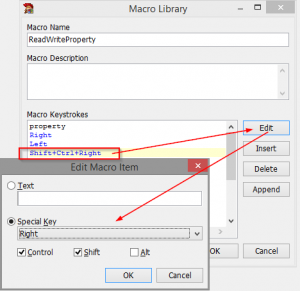
Display and edit keyboard macros with GExperts – twm’s blog

Posted by jpluimers on 2017/03/13

Yes!

The GExperts Macro Library expert can now display and edit keyboard macros that have been recorded in the Delphi IDE.

Thomas did some great work on GExperts. Again.

Source: [WayBackDisplay and edit keyboard macros with GExperts – twm’s blog

Via: [WayBack] The GExperts Macro Library expert can now display and edit keyboard macros that have been recorded in the IDE. – Thomas Mueller (dummzeuch) – Google+

–jeroen

Posted in Delphi, Development, Software Development | Leave a Comment »

Computerphile Mike Pound is now on GitHub – mikepound/mazesolving: A variety of algorithms to solve mazes from an input image

Posted by jpluimers on 2017/03/09

I love Computerphile. One of their presenters is Mike Pound and he is now on GitHub as mikepound

His repository is for the beow video on Maze Solving.

The repository mikepound/mazesolving: A variety of algorithms to solve mazes from an input image also has a Wiki where contributions are being discussed: Home · mikepound/mazesolving Wiki

–jeroen

Read the rest of this entry »

Posted in Algorithms, Development, Software Development | Leave a Comment »

PowerShell: when Format-Table -AutoSize displays only 10 columns and uses the width of the console when redirecting to file

Posted by jpluimers on 2017/03/09

Lets start with the second problem: There are various ways to redirect PowerShell output to a file.

  • Shell redirect with a greater than sign (>) to create/overwrite output or two greater than signs (>>) to append output.
  • Use Out-File [WayBack] with a filename and either -FilePath (default, similar to >) or -Append (similar >>).

I write “similar” as they are not fully equivalent. That’s where Format-Table [WayBack] with the -AutoSize parameter comes in (with or without a -Wrap parameter).

Apart from Format-Table displaying only 10 columns by default (see below), the -AutoSize will change columns presentation depending not just on the -Wrap parameter but also to the total width it thinks it has available.

Useful Format-Table parameters

First the representation:

Read the rest of this entry »

Posted in CommandLine, Development, Power User, PowerShell, PowerShell, Scripting, Software Development, Windows | 3 Comments »

ShellCheck – shell script analysis tool

Posted by jpluimers on 2017/03/09

This is golden: ShellCheck – shell script analysis tool.

It checks your shell scripts, either on-line or off-line (brew install shellcheck for Mac, apt, etc for Linuces)

–jeroen

via: regex – Read file line by line with bash script – Stack Overflow

Posted in bash, Development, Scripting, Sh Shell, Software Development | Leave a Comment »