


(:
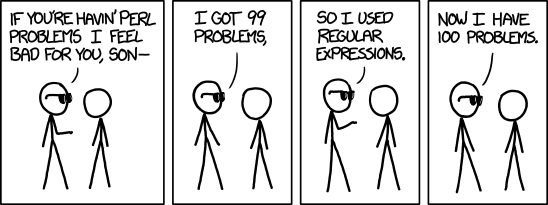
I got 99 problems. So I used regular expressions…
–jeroen
via: xkcd: Perl Problems.
Posted by jpluimers on 2013/02/08
Posted in Development, Perl, RegEx, Scripting, Software Development | Tagged: perl, regular expressions, technology | Leave a Comment »
Posted by jpluimers on 2013/02/07
The methods I described in via: Extracting MSI files didn’t work for the MSI installer for the Office 2003 Primary Interop Assemblies (which you get through here, or directly download the O2003PIA.exe installer).
I needed to extract the files, because of this problem described in by Office 2003 PIA Redistributable is available – Patrick Smith: Microsoft InfoPath – Site Home – MSDN Blogs:
Important Issues to keep in mind:
- This MSI is designed to contain all of the PIA’s which shipped with Microsoft Office System 2003. The product PIA’s will only install if the parent product is installed on the machine.
- Leave the PIA redistributable on the machine once it’s installed. Because this product is redistributable, many add-ins could ship it. The MSI will only install once and then subsequent installs would just see that it’s already on the machine. Removing it via Setup logic will remove it for everyone. The current recommendation is to leave uninstallation of the PIA Redistributable to the end user through Add/Remove Programs.
Currently I’m involved in a suite of .NET 4 applications that interface with Office. Office 2003 is the minimum required version, but:
In none of those scenarios, the PIAs are installed.
So I needed a way to extract all the PIA binaries with the official long filenames from the O2003PIA.MSI that is inside the O2003PIA.EXE installer.
Extracting the installer was simple: just install it, and it decompresses to a directory of choice. Or use your decompression tool of choice.
Extracting the O2003PIA.MSI was a lot harder: Read the rest of this entry »

Posted in .NET, Development, Office PIA, Software Development | Leave a Comment »
Posted by jpluimers on 2013/02/06
One of the really nice contributions on StackOverflow by Allen Bauer is almost 3 years ago.
It is about these three Delphi VCL methods introduced by TWinControl to make control development easier:
The really cool thing is that this API has been stable since 1995, and still allows you to subclass windows controls or create your own controls in a very simple way.
Note that Allen does not cover DestroyWnd or DestroyWindowHandle, but those are just counterparts of CreateWnd and CreateWindowHandle.
In normal Delphi application code, you have less Destroy overrides than Create overrides, and the same holds for control development.
–jeroen
via: delphi – What’s the difference between CreateWnd and CreateWindowHandle? – Stack Overflow.
Posted in Delphi, Delphi 1, Delphi 2005, Delphi 2006, Delphi 2007, Delphi 2009, Delphi 2010, Delphi 3, Delphi 4, Delphi 5, Delphi 6, Delphi 7, Delphi 8, Delphi x64, Delphi XE, Delphi XE2, Delphi XE3, Software Development | 2 Comments »
Posted by jpluimers on 2013/02/05
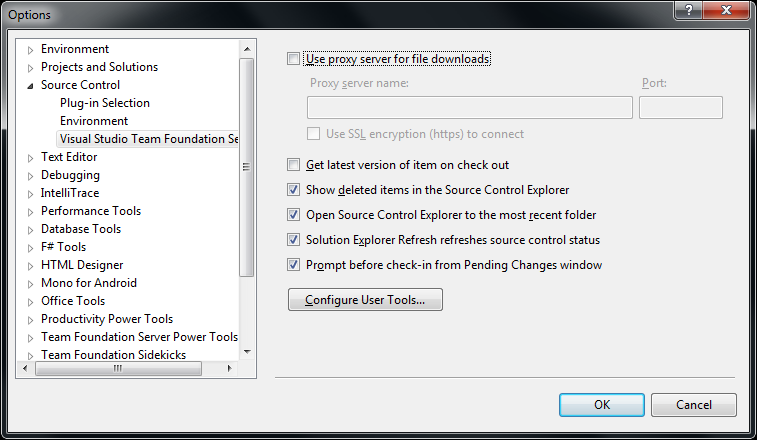 Clarification of the steps from via Support Beyond Compare to use Beyond Compare 3 or 2 from Visual Studio and with Team Foundation System.
First run this little batch file to show you the exact location of BComp.exe:
@echo off
  call :show "%ProgramFiles%\Beyond Compare 3\BComp.exe"
  call :show "%ProgramFiles(x86)%\Beyond Compare 3\BComp.exe"
  call :show "%ProgramFiles%\Beyond Compare 2\BComp.exe"
  call :show "%ProgramFiles(x86)%\Beyond Compare 2\BComp.exe"
  goto :eof
:show
  if not exist %1 goto :eof
  echo Beyond Compare is here:
  echo %~1
(I know that this will not find a Portable Beyond Compare installation).
Note that
BComp.exe(for GUI use) andBComp.com(for console use) are bootstrappers forBCompare.exe. Both will wait when ran from a GUI or console for the comparison to finish. StartingBCompare.exewill not wait. See BComp.exe vs BComp.com – Scooter Forums for more information on this.
Everywhere you see path to BComp.exe below, enter the path that the above batch file tells you.
The first two pictures on the right show common steps for all three integrations. The images below are the specific ones for each integration. You can click on each image to view a larger version.
The steps work with the full version of Visual Studio and the Team Explorer edition of Visual Studio.
You can find different arguments for other tools on this excellent diff/merge configuration in Team Foundation – common Command and Argument values post by James Manning.
 In Visual Studio Choose Options from the Tools menu.
Compare in the Operation combobox.path to BComp.exe in the Command edit.%1 %2 /title1=%6 /title2=%7You need Beyond Compare version 3 Professional for this.
(note: only the steps marked with * are different from above)
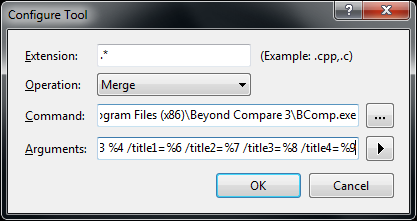 In Visual Studio Choose Options from the Tools menu.
Merge in the Operation combobox.path to BComp.exe in the Command edit.%1 %2 %3 %4 /title1=%6 /title2=%7 /title3=%8 /title4=%9This is for Beyond Compare version 2, and Beyond Compare version 3 Standard.
(note: only the step marked with * is different from above)
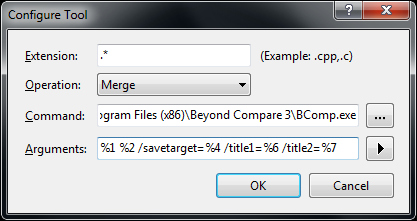 In Visual Studio Choose Options from the Tools menu.
Merge in the Operation combobox.path to BComp.exe in the Command edit.%1 %2 /savetarget=%4 /title1=%6 /title2=%7| Functionality |
entry in Operation combobox |
content of Arguments edit |
Beyond Compare version/edition |
| diff/merge | Compare |
%1 %2 /title1=%6 /title2=%7 |
any version/edition |
| 3-ware compare | Merge |
%1 %2 %3 %4 /title1=%6 /title2=%7 /title3=%8 /title4=%9 |
3/Professional |
| 2-way compare | Merge |
%1 %2 /savetarget=%4 /title1=%6 /title2=%7 |
2 or 3/Standard |
Hope this helps a few people.
–jeroen
via:

Posted in .NET, Beyond Compare, Development, Power User, Software Development, Visual Studio 11, Visual Studio 2002, Visual Studio 2003, Visual Studio 2005, Visual Studio 2008, Visual Studio 2010, Visual Studio and tools | Leave a Comment »
Posted by jpluimers on 2013/02/04
Whether you are an engineer or a manager, the article behind the conclusion below is a very interesting one to read: The care and feeding of software engineers (or, why engineers are grumpy) at NCZOnline.
We software engineers are an interesting bunch. There’s a definite personality that comes along with us, and we really do want to make the best thing possible. If you stop treating us like short-order cooks and start treating us like part of the creative process, you are likely to get much farther, faster than you would otherwise. […] We’re all just people who want to feel like a part of the solution rather than a worker bee.
–jeroen
via The care and feeding of software engineers (or, why engineers are grumpy) | NCZOnline.
Posted in About, Development, Opinions, Personal, Software Development | Leave a Comment »
Posted by jpluimers on 2013/02/01
Yet another interesting article on Technical Debt: BBC News – Why banks are likely to face more software glitches in 2013.
Note that this is not limited to Banks. I’ve seen quite a few companies in the Financial domain, and they all suffer from it.
Even stronger: all companies I visited suffer from Technical Debt, including my own workplace, hence I created a special Technical Debt post category and tagged some previous posts with it.
It is hard to produce software without any Technical Debt, even though I try the best I can or am allowed to spend.
Therefore it is very important as a developer to be aware of Technical Debt, and help spread knowledge about it.
–jeroen
Posted in Development, Opinions, Technical Debt | Tagged: banks, bbc news, developer, financial domain, software, software glitches, spread knowledge, technology | Leave a Comment »
Posted by jpluimers on 2013/01/30
Thanks Warren Postma for this Google Plus mention: both the question and answer are incredibly insightful.
And indeed: the code from the answer is not possible in with Generics Delphi (:
–jeroen
via: syntax – Is C++ context-free or context-sensitive? – Stack Overflow.
Posted in C++, C++ Builder, Delphi, Delphi 2009, Delphi 2010, Delphi XE, Delphi XE2, Delphi XE3, Development, Software Development | 2 Comments »
Posted by jpluimers on 2013/01/30
Just in case you wonder about Property using Generics in Delphi, they are not possible.
Thanks David for mentioning it, Hallvard for mentioning it even earlier and Rudy for confirming it.
These are supported with Generics in Delphi:
All of the supported aspects are linked to articles from excellent authors. There is far more on the internet about Delphi and Generics, but those are a good start.
Thanks Malcolm, Phil, Barry, Hallvard, Jolyon and many others for posting all those articles!
Note that this is not possible in C# either, Julian Bucknall organized a chat and explains why, but there is a workaround which I might try to port to Delphi in the future.
–jeroen
via: Property using Generics in Delphi – Stack Overflow.
Posted in .NET, .NET 2.0, .NET 3.0, .NET 3.5, .NET 4.0, .NET 4.5, C#, C# 2.0, C# 3.0, C# 4.0, C# 5.0, Delphi, Delphi 2009, Delphi 2010, Delphi XE, Delphi XE2, Delphi XE3, Development, Software Development | 3 Comments »
Posted by jpluimers on 2013/01/29
If Gloegg@Bonn has posted a few nice Delphi entries over the last couple of years, so he should be added to DelphiFeeds.
His last one was a very funny post on the Delphi implementation of Sleep sort.
It uses Generics, so you need at least Delphi 2009 or better.
–jeroen
via:
Posted in Delphi, Delphi 2009, Delphi 2010, Delphi XE, Delphi XE2, Delphi XE3, Development, Software Development | 4 Comments »
Posted by jpluimers on 2013/01/29
A while ago, I had to adapt a DOS app that used one specific version of Excel to do some batch processing so it would support multiple versions of Excel on multiple versions of Windows.
One of the big drawbacks of DOS applications is that the command lines you can use are even shorter than Windows applications, which depending you how you call an application are:
This is how the DOS app written in Clipper (those were the days, it was even linked with Blinker :) started Excel:
c:\progra~1\micros~2\office11\excel.exe parameters
01234567890123456789012345678901234567890
          1         2         3         4
The above depends on 8.3 short file names that in turn depend on the order in which similar named files and directories have been created.
The trick around this, and around different locations/versions of an application, is to use START to find the right version of Excel.
The reason it works is because in addition to PATH, it checks the App Paths portions in the registry in this order to find an executable: Read the rest of this entry »
Posted in Batch-Files, Development, Encoding, Power User, Scripting, Software Development, Unicode, Windows, Windows 7, Windows 8, Windows Server 2000, Windows Server 2003, Windows Server 2003 R2, Windows Server 2008, Windows Server 2008 R2, Windows Vista, Windows XP | Leave a Comment »


 The Wiert Corner - irregular stream of stuff