The Wiert Corner – irregular stream of stuff

Jeroen W. Pluimers on .NET, C#, Delphi, databases, and personal interests

  • My badges

  • Twitter Updates

  • My Flickr Stream

  • Pages

  • All categories

  • Enter your email address to subscribe to this blog and receive notifications of new posts by email.

    Join 1,861 other subscribers

Archive for the ‘Algorithms’ Category

Why does the Windows calculator generate tiny errors when calculating the square root of a perfect square? – The Old New Thing

Posted by jpluimers on 2016/12/07

In the continued “floating point code is hard for most software developers” series:

[WayBack] Why does the Windows calculator generate tiny errors when calculating the square root of a perfect square? – The Old New Thing

Because it doesn’t know that it’s a perfect square.

–jeroen

Posted in Algorithms, Conference Topics, Conferences, Development, Event, Floating point handling, Software Development, The Old New Thing, Windows Development | Leave a Comment »

Recursion

Posted by jpluimers on 2016/11/23

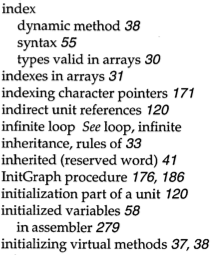
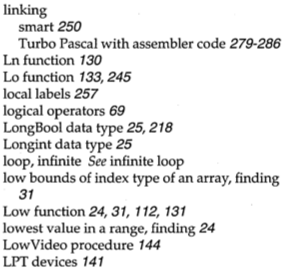
Apple fanboys all know about 1 Infinite Loop. Turbo Pascal adepts about the index entries “infinite loop See loop, infinite” and “loop, infinite See infinite loop”.

Google as a more direct approach: www.google.com/search?q=recursion

Read the rest of this entry »

Posted in Algorithms, Apple, Borland Pascal, Design Patterns, Development, Google, Pascal, Power User, Software Development, Turbo Pascal | Leave a Comment »

Coping with UTF-16 / UCS-2 little endian in Batch files: numbers from WMIC

Posted by jpluimers on 2016/11/22

A while ago, I needed to get the various date, time and week values from WMIC to environment variables with pre-padded zeros. I thought: easy job, just write a batch file.

Tough luck: I couldn’t get the values to expand properly. Which in the end was caused by WMIC emitting UTF-16 and the command-interpreter not expecting double-byte character sets which messed up my original batch file.

What I wanted What I got
wmic_Day=21
wmic_DayOfWeek=04
wmic_Hour=15
wmic_Milliseconds=00
wmic_Minute=02
wmic_Month=05
wmic_Quarter=02
wmic_Second=22
wmic_WeekInMonth=04
wmic_Year=2015
Day=21
wmic_DayOfWeek=4
wmic_Hour=15
wmic_Milliseconds=
wmic_Minute=4
wmic_Month=5
wmic_Quarter=2
wmic_Second=22
wmic_WeekInMonth=4
wmic_Year=2015

WMIC uses this encoding because the Wide versions of Windows API calls use UTF-16 (sometimes called UCS-2 as that is where UTF-16 evolved from).

As Windows uses little-endian encoding by default, the high byte (which is zero) of a UTF-16 code point with ASCII characters comes first. That messes up the command interpreter.

Lucikly rojo was of great help solving this.

His solution is centered around set /A, which:

  • handles integer numbers and calls them “numeric” (hinting floating point, but those are truncated to integer; one of the tricks rojo uses)
  • and (be careful with this as 08 and 09 are not octal numbers) uses these prefixes:
    • 0 for Octal
    • 0x for hexadecimal

Enjoy and shiver with the online help extract:
Read the rest of this entry »

Posted in Algorithms, Batch-Files, Development, Encoding, Floating point handling, Scripting, Software Development, UCS-2, UTF-16, UTF16 | Leave a Comment »

Diffie-Hellman Key Exchange – YouTube

Posted by jpluimers on 2016/07/20

Great explanation of Diffie-Hellman Key Exchange – YouTube.

It is based on mixing colors and some colors of the mix being private.

Brilliant!

–jeroen

Posted in Algorithms, Development, Encryption, Hashing, https, OpenSSL, Power User, Public Key Cryptography, Security, Software Development | Leave a Comment »

With 3 days notice. Yay. Another timezone database fire drill. Fixed in tzdata and tzcode.

Posted by jpluimers on 2016/07/05

Not as bad as #brexit but still: With 3 days notice. Yay. Another timezone database fire drill. – Peter da Silva – Google+:

[tz] Egypt cancelled DST

Additional reports concur that DST has been permanently canceled in Egypt, by both the Cabinet and the Parliament.

http://www.sis.gov.eg/En/Templates/Articles/tmpArticleNews.aspx?ArtID=105572

http://english.ahram.org.eg/NewsContent/1/64/232478/Egypt/Politics-/Egypts-cabinet-abolishes-daylight-saving-time.aspx

http://www.egyptindependent.com/news/cabinet-cancels-daylight-saving-time-following-parliament-vote

http://www.parlmany.com/News/7/101143/-

-Matt

It is already fixed in eggert/tz: Time zone database and code as mentioned in the announcement [tz] [tz-announce] 2016f release of tz code and data available

Via: With 3 days notice. Yay. Another timezone database fire drill. – Kristian Köhntopp – Google+

–jeroen

Don’t forget to watch The Problem with Time & Timezones – Computerphile – YouTube (thanks Andre Naumann)

Posted in Algorithms, Development, Software Development | Leave a Comment »

How Shazam Works To Identify (Nearly) Every Song You Throw At It

Posted by jpluimers on 2016/05/10

The basics:

  1. Beforehand, Shazam fingerprints a comprehensive catalog of music, and stores the fingerprints in a database.
  2. A user “tags” a song they hear, which fingerprints a 10 second sample of audio.
  3. The Shazam app uploads the fingerprint to Shazam’s service, which runs a search for a matching fingerprint in their database.
  4. If a match is found, the song info is returned to the user, otherwise an error is returned.

More details at How Shazam Works To Identify (Nearly) Every Song You Throw At It including this fingerprint example

Song Audio Fingerprint

Song Audio Fingerprint

–jeroen

via: How Shazam Works To Identify (Nearly) Every Song You Throw At It.

Posted in Algorithms, Development, Software Development | Leave a Comment »

The Simple, Elegant Algorithm That Makes Google Maps Possible | Motherboard

Posted by jpluimers on 2016/04/07

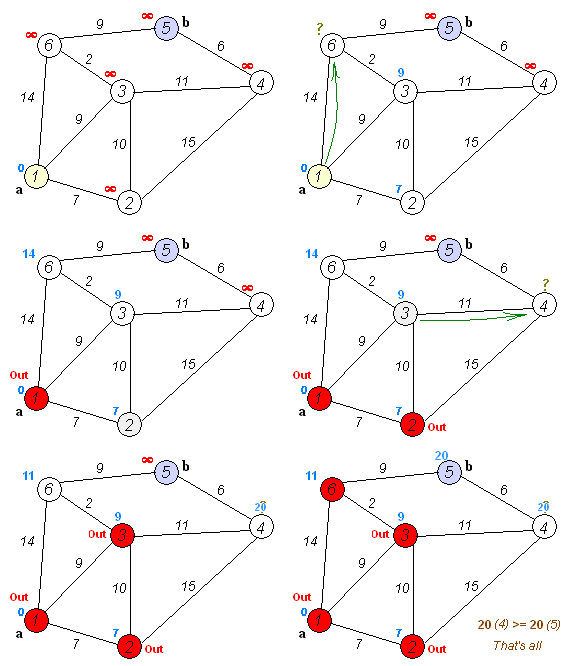
Very interesting read and nice GIF showing how the algorithm works: The Simple, Elegant Algorithm That Makes Google Maps Possible | Motherboard.

Dijkstra_Animation.gif   

Second image: ​Sub83/Wiki

–jeroen

Posted in Algorithms, Development, Software Development | 1 Comment »

Computer Color is broken: averaging and blurring colors – via Kristian Köhntopp – Google+

Posted by jpluimers on 2016/01/20

When everybody uses (a+b)/2 but should use sqrt((a*a+b*b)/2) or even [Wayback/Archive.is] weigh the RGB parts.

–jeroen

via: Kristian Köhntopp – Google+.

Read the rest of this entry »

Posted in Algorithms, Color (software development), Conference Topics, Conferences, Development, Event, Software Development | Leave a Comment »

c++ – In which order should floats be added to get the most precise result? – Stack Overflow

Posted by jpluimers on 2015/12/16

Interesting:

sorting in ascending order (of magnitude) usually improves things

–jeroen

via c++ – In which order should floats be added to get the most precise result? – Stack Overflow.

Posted in Algorithms, Development, Floating point handling, Software Development | Leave a Comment »

How is NSA breaking so much crypto? “weak” standard primes for Diffie-Hellman are being widely used and take NSA only ~$100 million to crack

Posted by jpluimers on 2015/11/19

Interesting: a few quotes below, read How is NSA breaking so much crypto? and the full paper Imperfect Forward Secrecy: How Diffie-Hellman Fails in Practice for details.

The key is, somewhat ironically, Diffie-Hellman key exchange, an algorithm that we and many others have advocated as a defense against mass surveillance. Diffie-Hellman is a cornerstone of modern cryptography used for VPNs, HTTPS websites, email, and many other protocols. Our paper shows that, through a confluence of number theory and bad implementation choices, many real-world users of Diffie-Hellman are likely vulnerable to state-level attackers.

.. there was a very important detail that got lost in translation between the mathematicians and the practitioners: an adversary can perform a single enormous computation to “crack” a particular prime, then easily break any individual connection that uses that prime.

How enormous a computation, you ask? …  For the most common strength of Diffie-Hellman (1024 bits), it would cost a few hundred million dollars to build a machine, based on special purpose hardware, that would be able to crack one Diffie-Hellman prime every year.

Would this be worth it for an intelligence agency? Since a handful of primes are so widely reused, the payoff, in terms of connections they could decrypt, would be enormous. Breaking a single, common 1024-bit prime would allow NSA to passively decrypt connections to two-thirds of VPNs and a quarter of all SSH servers globally. Breaking a second 1024-bit prime would allow passive eavesdropping on connections to nearly 20% of the top million HTTPS websites. In other words, a one-time investment in massive computation would make it possible to eavesdrop on trillions of encrypted connections.

NSA could afford such an investment. The 2013 “black budget” request …  shows that the agency’s budget is on the order of $10 billion a year, with over $1 billion dedicated to computer network exploitation, and several subprograms in the hundreds of millions a year.

… However, our proposed Diffie-Hellman break fits the known technical details about their large-scale decryption capabilities better than any competing explanation. For instance, the Snowden documents show that NSA’s VPN decryption infrastructure involves intercepting encrypted connections and passing certain data to supercomputers, which return the key. The design of the system goes to great lengths to collect particular data that would be necessary for an attack on Diffie-Hellman but not for alternative explanations, like a break in AES or other symmetric crypto.

Since weak use of Diffie-Hellman is widespread in standards and implementations, it will be many years before the problems go away, even given existing security recommendations and our new findings. In the meantime, other large governments potentially can implement similar attacks, if they haven’t already.

Our findings illuminate the tension between NSA’s two missions, gathering intelligence and defending U.S. computer security. If our hypothesis is correct, the agency has been vigorously exploiting weak Diffie-Hellman, while taking only small steps to help fix the problem. On the defensive side, NSA has recommended that implementors should transition to elliptic curve cryptography, which isn’t known to suffer from this loophole, but such recommendations tend to go unheeded absent explicit justifications or demonstrations. This problem is compounded because the security community is hesitant to take NSA recommendations at face value, following apparent efforts to backdoor cryptographic standards.

–jeroen

via:

Posted in Algorithms, Development, Encryption, Power User, Security, Software Development | Leave a Comment »