Archive for the ‘PowerShell’ Category
Posted by jpluimers on 2018/07/17
I wasn’t expecting it to be so easy to install PowerShell on Mac OS X:
brew install Caskroom/cask/powershell
In the background it executes this script: https://github.com/caskroom/homebrew-cask/blob/master/Casks/powershell.rb. which indirectly goes through the URL template https://github.com/PowerShell/PowerShell/releases/download/v#{version}/powershell-#{version}.pkg.
On other non-Windows systems, you have to go through GitHub yourself: https://github.com/powershell/PowerShell. The PowerShell team at Microsoft has many more repositories including the Win32-OpenSSH port which you can find through https://github.com/PowerShell.
At the time of writing, PowerShell was available for these platforms:
The first version I installed on Mac OS X was this: ==> Downloading https://github.com/PowerShell/PowerShell/releases/download/v6.0.0-alpha.17/powershell-6.0.0-alpha.17.pkg
By now I really hope it is out of Alpha state.
–jeroen
via:
Posted in *nix, Apple, CommandLine, Development, iMac, Linux, Mac, Mac OS X / OS X / MacOS, MacBook, MacBook Retina, MacBook-Air, MacBook-Pro, MacMini, openSuSE, Power User, PowerShell, PowerShell, Scripting, Software Development, SuSE Linux, Ubuntu | Leave a Comment »
Posted by jpluimers on 2018/06/19
Thanks [WayBack] gbabu for the below PowerShell ide
As PowerShell command:
Get-EventLog System | Where-Object {$_.EventID -eq "1074" -or $_.EventID -eq "6008" -or $_.EventID -eq "1076"} | ft Machinename, TimeWritten, UserName, EventID, Message -AutoSize -Wrap
Based on it and my own experience, thse Event IDs can be interesting:
- 41 – The system has rebooted without cleanly shutting down first
- 109 – The kernel power manager has initiated a shutdown transition.
- 1073 – The attempt by user [domain]\[username] to restart/shutdown computer [computername] failed.
- 1074 – The process [filename].[extension] has initiated the restart of computer [computername] on behalf of user [domain]\[username\ for the
- 1076 – ???
- 6008 – The previous system shutdown at [time-in-local-format] on [date-in-local-format] was unexpected.
You can also run this as a batch file, but not you need to escape the pipe | into ^| like this:
PowerShell Get-EventLog System ^| Where-Object {$_.EventID -eq "1074" -or $_.EventID -eq "6008" -or $_.EventID -eq "1076"} ^| ft Machinename, TimeWritten, UserName, EventID, Message -AutoSize -Wrap
If you have PowerShell 3.0 or greater, then you can use the [Archive.is] -In operator:
PowerShell Get-EventLog System ^| Where-Object {$_.EventID -in "41", "109", "1074", "6008", "1076"} ^| ft Machinename, TimeWritten, UserName, EventID, Message -AutoSize -Wrap
–jeroen
Posted in Batch-Files, CommandLine, Development, Power User, PowerShell, PowerShell, Scripting, Software Development, Windows | Leave a Comment »
Posted by jpluimers on 2018/03/26
I forgot to blog about this before, but 2 months ago PowerShell core came available: [WayBack] PowerShell Core 6.0: Generally Available (GA) and Supported! | PowerShell Team Blog.
[WayBack] Installing PowerShell Core on macOS and Linux | Microsoft Docs is easy (one way is through homebrew:
$ brew tap caskroom/cask

$ brew cask install powershell
If you already installed a beta, then the steps are these:
$ brew update

$ brew cask reinstall powershell
Note that after installation, it is known as pwsh (at least one of the betas named it powershell) to set PowerShell Core apart from PowerShell*:
$ pwsh --version

PowerShell v6.0.2
Via: [WayBack] PowerShell Core 6.0 is a new edition of PowerShell that is cross-platform (Windows, macOS, and Linux), open-source, and built for heterogeneous environm… – Lars Fosdal – Google+
*pwsh versus powershell
There has been quite a discussion on the PowerShell Core repository on the rename, but I think it is for a good reason.
Too bad that during part of the beta, the old name powershell was used, but beta-time means things break every now and then.
PowerShell Core is sufficiently different from prior PowerShell versions to warrant a name change. This also makes it a lot easier to use them side-by-side.
Many other names (like posh, pcsh or psh) were considered, usually because of naming conflicts with existing tools (like posh) or easy confusion with existing shells (like pcsh and csh). A benefit on Linux/macOS is that it now ends with sh like virtually all other shells.
More background information is at:
–jeroen
Posted in Apple, CommandLine, Development, Home brew / homebrew, Mac, Mac OS X / OS X / MacOS, MacBook, MacBook Retina, MacBook-Air, MacBook-Pro, MacMini, Power User, PowerShell, PowerShell, Scripting, Software Development | Leave a Comment »
Posted by jpluimers on 2018/03/21
About a year ago, [WayBack] Rumors of Cmd’s death have been greatly exaggerated – Windows Command Line Tools For Developers got published as a response to confusing posts like these:
But I still think it’s a wise idea to switch away from the Cmd and to PowerShell as with PowerShell you get way more consistent language features, far better documentation, truckloads of new features (of which I like the object pipeline and .NET interoperability most) and far fewer quirks.
It’s time as well, as by now, Windows 7 has been EOL for a while, and Windows 8.x is in extended support: [WayBack] Windows lifecycle fact sheet – Windows Help:
| Client operating systems |
Latest update or service pack |
End of mainstream support |
End of extended support |
| Windows XP |
Service Pack 3 |
April 14, 2009 |
April 8, 2014 |
| Windows Vista |
Service Pack 2 |
April 10, 2012 |
April 11, 2017 |
| Windows 7* |
Service Pack 1 |
January 13, 2015 |
January 14, 2020 |
| Windows 8 |
Windows 8.1 |
January 9, 2018 |
January 10, 2023 |
| Windows 10, released in July 2015** |
N/A |
October 13, 2020 |
October 14, 2025 |
Which means the PowerShell version baseline on supported Windows versions is at least 4.0: [Archive.is] windows 10 powershell version – Google Search and [WayBack] PowerShell versions and their Windows version – 4sysops
PowerShell and Windows versions ^
| PowerShell Version |
Release Date |
Default Windows Versions |
| PowerShell 2.0 |
October 2009 |
Windows 7 Windows Server 2008 R2 (**) |
| PowerShell 3.0 |
September 2012 |
Windows 8 Windows Server 2012 |
| PowerShell 4.0 |
October 2013 |
Windows 8.1 Windows Server 2012 R2 |
| PowerShell 5.0 |
April 2014 (***) |
Windows 10 |
So try PowerShell now. You won’t regret it.
–jeroen
via: [WayBack] Very interesting clear-up post and comments on CMD, command.com, PowerShell in past and future DOS/Windows versions and Unix shells altogether. – Ilya S – Google+
Posted in Batch-Files, CommandLine, Development, Power User, PowerShell, Scripting, Software Development, Windows, Windows 10, Windows 7, Windows 8, Windows 8.1, Windows Server 2012, Windows Server 2012 R2, Windows Server 2016 | Leave a Comment »
Posted by jpluimers on 2017/12/07
Ah, C. The best lingua franca we have… because we have no other lingua francas. Linguae franca. Surgeons general? C is fairly old — 44 years, now! — and comes from a time when there were possibly more architectures than programming languages. It works well for what it is, and what it is is a relatively simple layer of indirection atop assembly. Alas, the popularity of C has led to a number of programming languages’ taking significant cues from its design, and parts of its design are… slightly questionable. I’ve gone through some common features that probably should’ve stayed in C and my justification for saying so. The features are listed in rough order from (I hope) least to most controversial. The idea is that C fans will give up when I call it “weakly typed” and not even get to the part where I rag on braces. Wait, crap, I gave it away.
Great re-read towards the end of the year: [WayBack] Let’s stop copying C / fuzzy notepad
Via: [WayBack] Old and busted: emacs vs vi. New and hot: Language war, everybody against everybody else. – Kristian Köhntopp – Google+
–jeroen
Posted in .NET, APL, Awk, bash, BASIC, C, C#, C++, COBOL, CoffeeScript, CommandLine, D, Delphi, Development, F#, Fortran, Go (golang), Java, Java Platform, JavaScript/ECMAScript, Pascal, Perl, PHP, PowerShell, PowerShell, Python, Ruby, Scala, Scripting, Software Development, TypeScript, VB.NET, VBScript | 3 Comments »
Posted by jpluimers on 2017/06/22

The operation could not be completed.

Include In Project
I’ve got a bunch of PowerShell projects in a solution. In some of them, I can include new files, in others I get the below error.
The diff of a good/bad project is below as well.
Two questions:
- Does anybody know how to work around this?
- Does anybody know how to find the actual error for this?
---------------------------

Microsoft Visual Studio

---------------------------

The operation could not be completed

---------------------------

OK

---------------------------
Good file: WindowsLogsCbsInquiry.pssproj
Bad file: WindowsTempInquiry.pssproj
–jeroen
Read the rest of this entry »
Posted in CommandLine, Development, PowerShell, Software Development, Visual Studio 2015, Visual Studio and tools | Leave a Comment »
Posted by jpluimers on 2017/03/09
Lets start with the second problem: There are various ways to redirect PowerShell output to a file.
- Shell redirect with a greater than sign (
>) to create/overwrite output or two greater than signs (>>) to append output.
- Use Out-File [WayBack] with a filename and either
-FilePath (default, similar to >) or -Append (similar >>).
I write “similar” as they are not fully equivalent. That’s where Format-Table [WayBack] with the -AutoSize parameter comes in (with or without a -Wrap parameter).
Apart from Format-Table displaying only 10 columns by default (see below), the -AutoSize will change columns presentation depending not just on the -Wrap parameter but also to the total width it thinks it has available.
Useful Format-Table parameters
First the representation:
Read the rest of this entry »
Posted in CommandLine, Development, Power User, PowerShell, PowerShell, Scripting, Software Development, Windows | 3 Comments »
Posted by jpluimers on 2017/02/22
A while ago, I bitched that Microsoft moved away the Windows Update out of the Control panel into a language depended place (in Windows 10 1511 update broke the Hyper-V networking – Fix network connection issues).
Since then I had to maintain too many locales running Windows 10. So here is the batch file:
for /f "delims=" %%A in ('PowerShell -Command "(Get-Culture).Name"') do explorer "%LocalAppData%\Packages\windows.immersivecontrolpanel_cw5n1h2txyewy\LocalState\Indexed\Settings\%%A\AAA_SystemSettings_MusUpdate_UpdateActionButton.settingcontent-ms"
It uses these tricks:
- Set output of a command as a variable (in this case a for loop variable)
- Execute PowerShell script in a .bat file
- PowerShell Get-Culture (which gets a .NET CultureInfo instance)
- CultureInfo.Name property (which has the nl-NL, en-US, etc codes in it)
It replaced this simple batch-file which has worked for like 10 years:
%windir%\System32\rundll32.exe url.dll,FileProtocolHandler wuapp.exe
–jeroen
via: Windows Update Shortcut – Create in Windows 10 – Windows 10 Forums
Posted in .NET, .NET 1.x, .NET 2.0, .NET 3.0, .NET 3.5, .NET 4.0, .NET 4.5, Batch-Files, CommandLine, Development, Power User, PowerShell, Scripting, Software Development, Windows, Windows 10 | Leave a Comment »
Posted by jpluimers on 2016/07/25
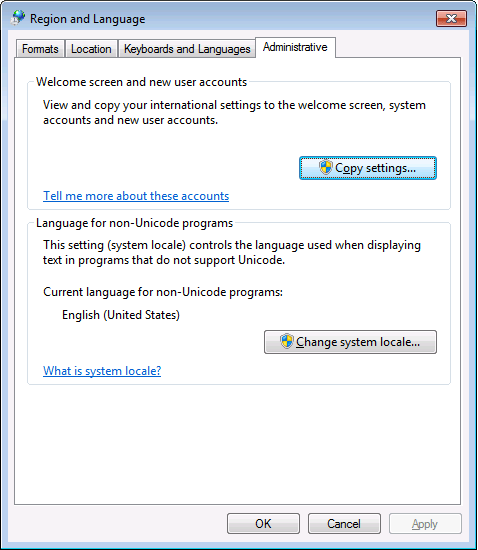
PowerShell 4.0 is madly in love with “English (United States)”
A long time ago I started writing up my blog post like this in March 2015 when I bumped into this the first time when upgrading from PowerShell 2 to PowerShell 4:
It seems there is no real workaround:
Good and not so good news: after reading the below linked posts, this is what works:
- PowerShell 4 and up works fine with any [Wayback] Lucida Console size (including 12) and boldness
- only when the “Language for non-Unicode programs” is set to “English (United States)”.
- PowerShell 4 works fine with [Wayback] Consolas on any size and boldness
- for any “Language for non-Unicode programs”
So if you’re like me and switch between “Dutch (Netherlands)” and “English (Ireland)” a lot (both use the EURO as currency, but have distinct enough other locale settings to cover a lot of European stuff) then you need to get used to the Consolas font.
Source:
Edit 20210930: a possible solution
I need to fire up some old systems having PowerShell v3 or v4 on them to test the below possible solution.
Read the rest of this entry »
Posted in CommandLine, Development, Font, Lucida Console, Power User, PowerShell, PowerShell, Scripting, Software Development, Windows, Windows 10, Windows 7, Windows 8, Windows 8.1, Windows 9 | Leave a Comment »


 The Wiert Corner - irregular stream of stuff