The Wiert Corner – irregular stream of stuff

Jeroen W. Pluimers on .NET, C#, Delphi, databases, and personal interests

  • My badges

  • Twitter Updates

  • My Flickr Stream

  • Pages

  • All categories

  • Enter your email address to subscribe to this blog and receive notifications of new posts by email.

    Join 1,860 other subscribers

Archive for the ‘.NET’ Category

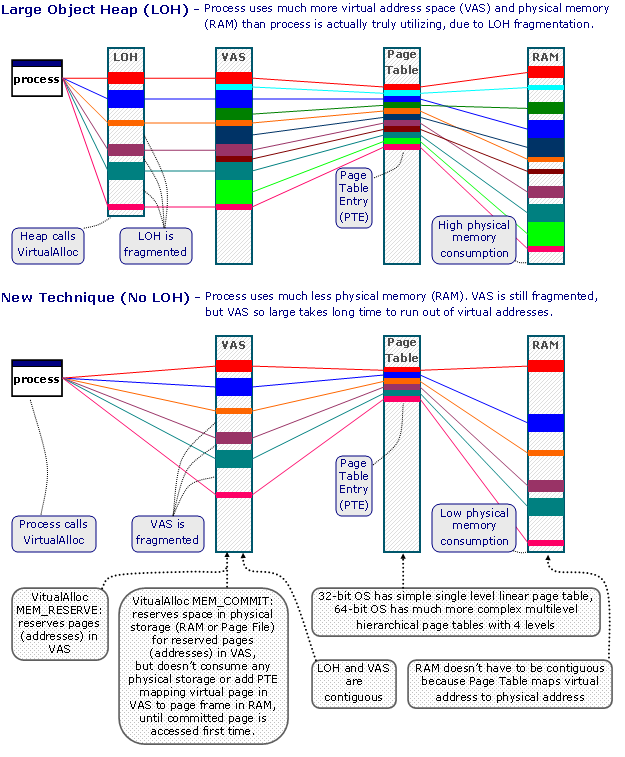
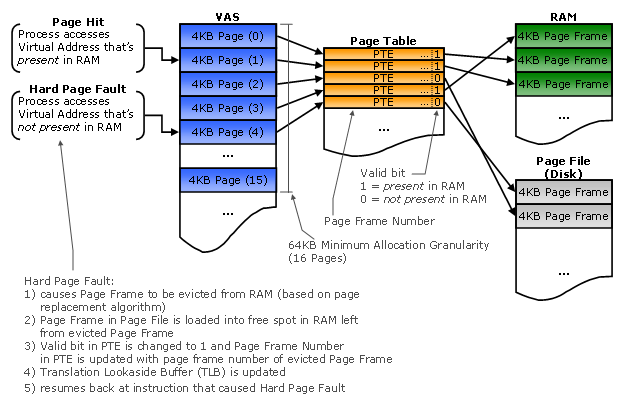
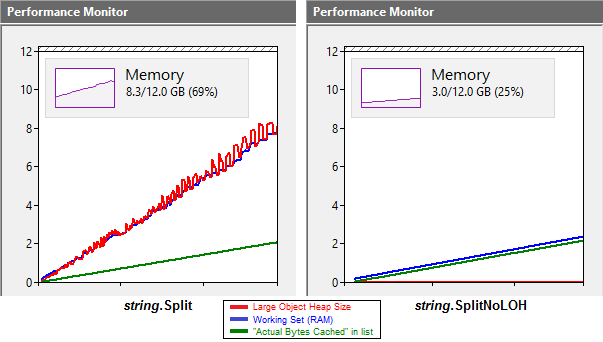
To Heap or not to Heap; That’s the Large Object Question? – CodeProject

Posted by jpluimers on 2018/12/27

Interesting discussion on an alternative to the LoH: [WayBackTo Heap or not to Heap; That’s the Large Object Question? – CodeProject.

Via: [WayBack] To Heap or not to Heap; That’s the Large Object Question?Detailed analysis of large object heap allocation impacts under .NET: “…would it be better t… – Lars Fosdal – Google+

–jeroen


Posted in .NET, Development, Software Development | Leave a Comment »

Take C# 8.0 for a spin | .NET Blog

Posted by jpluimers on 2018/12/06

[WayBack] Take C# 8.0 for a spin | .NET Blog: A first-hand look from the .NET engineering teams

Either:

download and install Preview 1 of .NET Core 3.0 and Preview 1 of Visual Studio 2019.

or with Visual Studio Code

[WayBack] Bill Wagner on Twitter: “@cecilphillip @MadsTorgersen @VisualStudio @code Yes, install .NET Core 3 preview, add the 8.0 element and it works fine.”

Then play around with:

  • Nullable reference types
  • Ranges and indices
  • Asynchronous streams

Via: [WayBack] Mads Torgersen on Twitter: “I blogged a little walkthrough of the three major C# 8.0 features (nullable reference types, range and index expressions and async streams) shipping in Preview 1 of @VisualStudio 2019 and Preview 1 of .NET Core 3.0. Hope you like it!https://t.co/4uM7JlSRwE”

–jeroen

Read the rest of this entry »

Posted in C#, C# 8, Development, Software Development | Leave a Comment »

UTF-8 support for single byte character sets is beta in Windows and likely breaks a lot of applications not expecting this (via Unicode in Microsoft Windows: UTF-8 – Wikipedia)

Posted by jpluimers on 2018/12/04

Uh-oh: [WayBack] Unicode in Microsoft Windows: UTF-8 – Wikipedia:

Microsoft Windows has a code page designated for UTF-8code page 65001. Prior to Windows 10 insider build 17035 (November 2017),[7] it was impossible to set the locale code page to 65001, leaving this code page only available for:

  • Explicit conversion functions such as MultiByteToWideChar
  • The Win32 console command chcp 65001 to translate stdin/out between UTF-8 and UTF-16.

This means that “narrow” functions, in particular fopen, cannot be called with UTF-8 strings, and in fact there is no way to open all possible files using fopen no matter what the locale is set to and/or what bytes are put in the string, as none of the available locales can produce all possible UTF-16 characters.

On all modern non-Windows platforms, the string passed to fopen is effectively UTF-8. This produces an incompatibility between other platforms and Windows. The normal work-around is to add Windows-specific code to convert UTF-8 to UTF-16 using MultiByteToWideChar and call the “wide” function.[8] Conversion is also needed even for Windows-specific api such as SetWindowText since many applications inherently have to use UTF-8 due to its use in file formats, internet protocols, and its ability to interoperate with raw arrays of bytes.

There were proposals to add new API to portable libraries such as Boost to do the necessary conversion, by adding new functions for opening and renaming files. These functions would pass filenames through unchanged on Unix, but translate them to UTF-16 on Windows.[9] This would allow code to be “portable”, but required just as many code changes as calling the wide functions.

With insider build 17035 and the April 2018 update (nominal build 17134) for Windows 10, a “Beta: Use Unicode UTF-8 for worldwide language support” checkbox appeared for setting the locale code page to UTF-8.[a] This allows for calling “narrow” functions, including fopen and SetWindowTextA, with UTF-8 strings. Microsoft claims this option might break some functions (a possible example is _mbsrev[10]) as they were written to assume multibyte encodings used no more than 2 bytes per character, thus until now code pages with more bytes such as GB 18030 (cp54936) and UTF-8 could not be set as the locale.[11]


  1. Jump up^ [WayBack“UTF-8 in Windows”Stack Overflow. Retrieved July 1, 2011.
  2. Jump up^ [WayBack“Boost.Nowide”.
  3. Jump up^ [WayBackhttps://docs.microsoft.com/en-us/cpp/c-runtime-library/reference/strrev-wcsrev-mbsrev-mbsrev-l
  4. Jump up^ [WayBack“Code Page Identifiers (Windows)”msdn.microsoft.com.

Via [WayBack] Microsoft Windows Beta UTF-8 support for Ansi API could break things. Wiki Article of the Change… – Tommi Prami – Google+

Related, as handling encoding is hard, especially if it is changed or not your default:

–jeroen

Posted in .NET, C, C++, Delphi, Development, Encoding, GB 18030, Power User, Software Development, UTF-16, UTF-32, UTF-8, UTF16, UTF32, UTF8, Windows, Windows 10 | 2 Comments »

An In Depth Guide Into a Ridiculously Simple API Using .NET Core

Posted by jpluimers on 2018/11/27

Since I am going to be involved with building some REST API servers and clients in .NET, here are some links to get me up to speed.

Posted in .NET, .NET ORM, ASP.NET, C#, Development, EF Entity Framework, NHibernate, Software Development | Leave a Comment »

Build Lambda Expressions Dynamically – CodeProject

Posted by jpluimers on 2018/11/08

On my research list: [WayBackBuild Lambda Expressions Dynamically – CodeProject

GitHub Source: dbelmont/ExpressionBuilder

–jeroen

Posted in .NET, Development, Software Development | Leave a Comment »

Creating a full off-line installation directory for Visual Studio 2017 Community

Posted by jpluimers on 2018/11/01

Steps:

  1. mkdir C:\Installs\VS2017Community\VS2017CommunityLayout
  2. pushd C:\Installs\VS2017Community
  3. bitsadmin.exe /transfer "VS2017CommunityBootstrap" https://aka.ms/vs/15/release/vs_community.exe C:\Installs\VS2017Community\vs_community.exe
  4. vs_community.exe --lang en-US --layout C:\Installs\VS2017Community\VS2017CommunityLayout
  5. VS2017CommunityLayout\vs_community.exe

Step 3 needs a full path to the destination file.

Step 4 can take a relative path.

Step 4 takes considerable time (for 15.2 about 90 minutes on a 100 Mibit/s fiber connection with an ~8 millisecond ping time to download.visualstudio.microsoft.com; for 15.8 with 80 Mibit/s and a ~4 millisecond ping about 120 minutes) resulting in ~40 gigabyte download.

After download, run the vs_setup.exe in theVS2017CommunityLayout directory.

Note that upgrading to a newer version of Visual Studio 2017 will require downloads! See [WayBack] Offline Install Modify always goes to the WEB – Developer Community.

Note that after installation, Visual Studio 2017 needs considerable disk space as found via visual studio 2017 disk size – Google Search:

[WayBack] Visual Studio 2017 System Requirements | Microsoft Docs:

Find the minimum system requirements, supported hardware, and languages for the Visual Studio 2017 product family.

Hardware
  • 1.8 GHz or faster processor. Dual-core or better recommended
  • 2 GB of RAM; 4 GB of RAM recommended (2.5 GB minimum if running on a virtual machine)
  • Hard disk space: up to 130 GB of available space, depending on features installed; typical installations require 20-50 GB of free space.
  • Hard disk speed: to improve performance, install Windows and Visual Studio on a solid state drive (SSD).
  • Video card that supports a minimum display resolution of 720p (1280 by 720); Visual Studio will work best at a resolution of WXGA (1366 by 768) or higher.

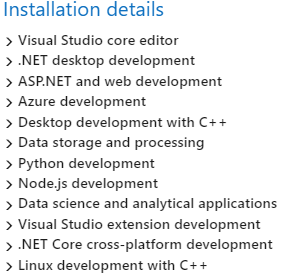
For instance, the choices below require about 22 gigabyte of space, while adding mobile .NET development adds another 13 gigabyte.
Via:

–jeroen

Posted in .NET, Development, Software Development, Visual Studio 2017, Visual Studio and tools | Leave a Comment »

A command-line REPL for RESTful HTTP Services – Scott Hanselman

Posted by jpluimers on 2018/10/31

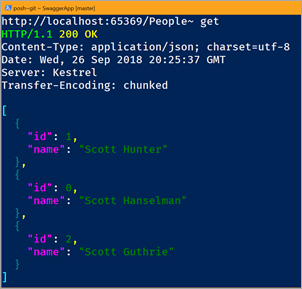
Somewhere in Q4 2018 (actual year, not fiscal year) when .NET Core 2.2 gets released, but you can tinker with it right now: [WayBack] A command-line REPL for RESTful HTTP Services – Scott Hanselman.

Release estimates at [WayBack] core/roadmap.md at master · dotnet/core · GitHub.

–jeroen

Posted in .NET, .NET Core, Development, Software Development | Leave a Comment »

Finding your program with an “Access Denied” (Error code 5) after lunch break…

Posted by jpluimers on 2018/10/24

Via: [WayBack] I just returned from lunch break and found my program faulted with an “Access Denied” (Error code 5) error in a call to Mouse.GetCoursorPos and was wond… – Thomas Mueller (dummzeuch) – Google+:

All of [WayBackGetCursorPos, [WayBackGetCursorInfo and [WayBack] GetKeyState can cause an “Access Denied” (Error code 5) when they do not have permission for the current desktop (for instance the logon desktop when a screen-saver has kicked in).

Solution: write a wrapper around it then [WayBack] patch calls going to the original into the patch [WayBack] delphi – Explain errors from GetKeyState / GetCursorPos – Stack Overflow

–jeroen

Posted in .NET, C#, C++, Delphi, Development, Software Development, Windows Development | Leave a Comment »

When Google Search returns one link twice in the results, thinking it was published on two different dates.

Posted by jpluimers on 2018/09/13

I laughed when https://www.google.com/#q=visual%20studio%20code%20indent%20settings%20per%20file%20type got me the first link twice (see below screenshot).

But I was glad that that link to [WayBack] visual studio code – How to set per-filetype tab size? – Stack Overflow.

This one:

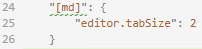
In addition, it taught me how to configure the settings.json with md specific settings, which – despite the IDE indicating the JSON is invalid – just works: markdown indentation is now 2 character positions.

    "[md]": {
      "editor.tabSize": 2
    }

The search result:

Read the rest of this entry »

Posted in .NET, Chrome, Development, Google, GoogleSearch, Power User, Software Development, Visual Studio and tools, vscode Visual Studio Code | Leave a Comment »

Delphi XE6 and up regression: “‘9999-12-31 23:59:59,1000’ is not a valid date and time” when passing a SOAP message with 9999-11-31T23:59:59.9999999; QC144171

Posted by jpluimers on 2018/09/06

A valid SOAP message with <urn:timeStamp>9999-11-31T23:59:59.9999999</urn:timeStamp> in a xs:dateTime field return '9999-12-31 23:59:59,1000' is not a valid date and time from a Delphi application with this SOAP response:

<SOAP-ENV:Envelope xmlns:SOAP-ENV="http://schemas.xmlsoap.org/soap/envelope/" xmlns:xsd="http://www.w3.org/2001/XMLSchema" xmlns:xsi="http://www.w3.org/2001/XMLSchema-instance" xmlns:SOAP-ENC="http://schemas.xmlsoap.org/soap/encoding/">
  <SOAP-ENV:Body>
    <SOAP-ENV:Fault>
      <faultcode>SOAP-ENV:Server</faultcode>
      <faultstring>'9999-12-31 23:59:59,1000' is not a valid date and time</faultstring>
      <faultactor/>
    </SOAP-ENV:Fault>
  </SOAP-ENV:Body>
</SOAP-ENV:Envelope>

The reason is this exception:

exception class EConvertError with message ''9999-12-31 23:59:59,1000' is not a valid date and time'.

This is from a .NET based test case passing in timeStamp = DateTime.MaxValuewhich is handled perfectly fine by other SOAP web services tested.

I know about different resolutions of time stamps, but would never expect the 999.9999 milliseconds to be rounded up to 1000 as it is always safer to truncated away from an upper limit.

A test using Soap UI [WayBack] with this parameter finally worked (max 3 digits second fraction):

<urn:timeStamp>9999-12-31T23:59:59.999</urn:timeStamp>

The true origin of problem is in this method in the Soap.XSBuiltIns unit which has been unchanged since at least Delphi 7:

function TXSBaseTime.GetMilliSecond: Word;
begin
  Result := Round(FractionalSeconds*1000);
end;

The problem exposed itself because as of Delphi XE6 the core of function TXSBaseCustomDateTime.GetAsDateTime piece was changed from

Result := EncodeDateTime(Year, Month, Day, Hour, Minute, Second, 0);

to

Result := EncodeDateTime(Year, Month, Day, Hour, Minute, Second, Millisecond);

A combination of lack of test cases and understanding XML specifications failed to reveal this bug.

The standards specify (among others):

  • '.' s+ (if present) represents the fractional seconds;
    The above is not limiting the amount of digits, not talking about milliseconds either.
  • All ·minimally conforming· processors ·must· support year values with a minimum of 4 digits (i.e., YYYY) and a minimum fractional second precision of milliseconds or three decimal digits (i.e. s.sss). However, ·minimally conforming· processors ·may· set an application-defined limit on the maximum number of digits they are prepared to support in these two cases, in which case that application-defined maximum number ·must· be clearly documented.
    Delphi not only limits the fractional second precission, it changes the limit over time and does not document the limit. Three strikes…
  • s -- represents a digit used in the time element "second". The two digits in a ss format can have values from 0 to 60. In the formats described in this specification the whole number of seconds ·may· be followed by decimal seconds to an arbitrary level of precision. This is represented in the picture by "ss.sss". A value of 60 or more is allowed only in the case of leap seconds.
    Given buggy the fractional second handling through milliseconds, the leap second handling is ripe for a test case as well.
    Strictly speaking, a value of 60 or more is not sensible unless the month and day could represent March 31, June 30, September 30, or December 31 in UTC. Because the leap second is added or subtracted as the last second of the day in UTC time, the long (or short) minute could occur at other times in local time. In cases where the leap second is used with an inappropriate month and day it, and any fractional seconds, should considered as added or subtracted from the following minute.

The reproduction is quite simple:

Read the rest of this entry »

Posted in .NET, C#, Conference Topics, Conferences, Delphi, Development, Event, SOAP/WebServices, Software Development, XML, XML/XSD | Leave a Comment »