The Wiert Corner – irregular stream of stuff

Jeroen W. Pluimers on .NET, C#, Delphi, databases, and personal interests

  • My badges

  • Twitter Updates

  • My Flickr Stream

  • Pages

  • All categories

  • Enter your email address to subscribe to this blog and receive notifications of new posts by email.

    Join 1,862 other subscribers

Archive for the ‘Visual Studio and tools’ Category

Samples Environment for Microsoft Chart Controls – Release: Samples for Chart Control – .NET Framework 4

Posted by jpluimers on 2013/06/19

I hadn’t done Charting for a while, but these got going very quickly:

Samples Environment for Microsoft Chart Controls – Release: Samples for Chart Control – .NET Framework 4.

There are example downloads for ASP.NET and WinForms requiring .NET 4 or higher.

In addition, these starting points also proved to be really helpful:

Since my objective was adding charts to an existing WinForms business app, this was the namespace at hand: System.Windows.Forms.DataVisualization.Charting Namespace ().

If you are at .NET 3.5, then start at DataVisualization.Charting.Chart simple example – C# – Snipplr Social Snippet Repository.

–jeroen

Posted in .NET, .NET 4.0, .NET 4.5, ASP.NET, C#, C# 3.0, C# 4.0, Development, Software Development, VB.NET, Visual Studio 2010, WinForms | Leave a Comment »

VS2012.2 ISOs for Visual Studio Updates: off-line installers the way they should be (via: The Visual Studio Blog)

Posted by jpluimers on 2013/06/07

I got a bit sick of the VS2012.2.exe on-line installer having to re-download each piece on every Visual Studio 2012 RTM machine to upgrade.

Here is the VS2012.2.iso for off-line installation.

Found it through Provide Visual Studio updates as an ISO image for offline installation – Customer Feedback for Microsoft.

–jeroen

Announcing availability of ISOs for Visual Studio Updates – The Visual Studio Blog – Site Home – MSDN Blogs.

.

Posted in .NET, .NET 4.5, Development, Software Development, Visual Studio 11, Visual Studio and tools | Leave a Comment »

What programmers font (monospaced!) do you like best?

Posted by jpluimers on 2013/05/08

Lucida Console Sample (thanks Wikimedia!)

Lucida Console Sample (thanks Wikimedia!)

I’m in search to see if there is a better programmers font than the monospaced Lucida Console mainly to be used in Visual Studio, Delphi, the Windows console, Xcode and Eclipse. What I love about Lucida Console design is the relatively large x-height combined with a small leading (often called “line height”). This combines very readable text, and a lot of code lines in view. Lucida has two small drawbacks, see the second image at the right:

  • The captial O and digit 0 (zero) are very similar.
  • Some uppercase/lowercase character pairs are alike (because of the large x-height)

But, since the font hasn’t been updated for a very long time, lots of Unicode code points that are now in current fonts, are missing from Lucida Console (unless you buy the [Waybackmost recent version that has 666 characters from Fonts.com) Well, there are dozens of monospaced fonts around, so I wonder: which ones do you like? In the mean while, I’m going to do some experimenting with fonts mentioned in these lists:CcKkOoSsUuVvWwXxZz are much alike.

A few fonts I’m considering (I only want scalable fonts, so raster .fon files are out):

I have tried Adobe Source Code Pro about half a year ago. That didn’t cut it: problem with italics in Delphi, and not enough lines per screen. [WaybackNew Open Source monospaced font from Adobe: Source Code Pro.

–jeroen

Posted in .NET, Adobe Source Code Pro, Apple, Delphi, Delphi 2007, Delphi XE3, Development, Encoding, Font, Lucida Console, Mac, Mac OS X / OS X / MacOS, Power User, Programmers Font, Software Development, Typography, Unicode, Visual Studio 11, Visual Studio 2005, Visual Studio 2008, Visual Studio 2010, Visual Studio and tools, Windows, Windows 7, Windows 8, Windows Server 2008 R2, Windows XP, xCode/Mac/iPad/iPhone/iOS/cocoa | 43 Comments »

excel “not enough storage is available to complete this operation (exception from hresult: 0x8007000e (e_outofmemory))” – Google Search

Posted by jpluimers on 2013/04/16

So I won’t forget to research this:

excel “not enough storage is available to complete this operation (exception from hresult: 0x8007000e (e_outofmemory))” – Google Search.

Somehow this occurs with Excel and the .NET app only having a few dozen megabytes of memory in use, so the cause must be something a lot more simple than “out of memory”.

It is a complex export, but I might just be able to get this going using ADO.NET, and make sure it is not a 60+k rows or 60+k characters issue.

–jeroen

Posted in .NET, .NET 4.0, C#, C# 4.0, Development, Excel, Office, Power User, Software Development, Visual Studio 2010, WinForms | Leave a Comment »

Dot Net Tips & Tricks, C# (C Sharp)Tips & Tricks: Visual Studio Immediate Window

Posted by jpluimers on 2013/03/06

Great post on what you can do with the Immediate Window: Dot Net Tips & Tricks , C# (C Sharp)Tips & Tricks: Visual Studio Immediate Window.

It is far more than you’d expect on first sight.

The really good thing: this Immediate Window gem has been there for over a decade (:

–jeroen

Posted in Development, Software Development, Visual Studio 11, Visual Studio 2002, Visual Studio 2003, Visual Studio 2005, Visual Studio 2008, Visual Studio 2010, Visual Studio and tools | Leave a Comment »

.NET/C# small program that shows you your proxy settings, demonstrates LINQ to Registry, and String.Contains

Posted by jpluimers on 2013/03/05

I’ve been working at a client where they have hardened most of their systems in a not so programmer friendly way. One of the things you cannot to is start RegEdit, not even for viewing. Since I need Fiddler2 to poke through their Internet Proxy in order to get access to an external TFS server, and their machines often reboot due to maintenance cycles, sometimes my proxy settings are dead. This tiny app shows you how to get display your proxy settings, demonstrating:

Enjoy! (Note, you could have done this with PowerShell in a very easy way too, as it access the Registry just like it was a file system).

When using Fiddler, it shows output like this:

AutoConfigProxy=wininet.dll
ProxyEnable=1
MigrateProxy=1
ProxyHttp1.1=1
ProxyOverride=<-loopback>
ProxyServer=http=127.0.0.1:8888;https=127.0.0.1:8888;

LINQ to Registry

One of the drawbacks of Registry work is that you need to dispose of your keys. That is handled inside ReadOnlyAccessToRegistryKey.Run which also handles your Code Access Security. This means that the lambda expression (could just as well have been an anonymous method) can just concentrate on the LINQ stuffreturning an enumeration of anonymous types. You need the ‘let’ portion if you also want to perform ‘where’ on the values.

using System;
using System.Collections.Generic;
using System.Linq;
using BeSharp.Win32;
using Microsoft.Win32;

namespace LinqToRegistryShowProxySettings
{
    class Program
    {
        static void Main(string[] args)
        {
            try
            {
                run();
            }
            catch (Exception ex)
            {
                Console.WriteLine(ex);
                throw;
            }
        }

        static void run()
        {
            const string internetSettingsKey = @"Software\Microsoft\Windows\CurrentVersion\Internet Settings";

            ReadOnlyAccessToRegistryKey.Run(Registry.CurrentUser, internetSettingsKey,
                registryKey =>
                {
                    var keyValues = from name
                                 in registryKey.GetValueNames()
                                    //let keyValue = new { key = name, value = registryKey.GetValue(name).ToString() } // only if you need the Value in the Where, as it created for all occurences
                                    where
                                    name.Contains("proxy", StringComparison.OrdinalIgnoreCase) ||
                                    name.Contains("autoConfig", StringComparison.OrdinalIgnoreCase)
                                    select new { key = name, value = registryKey.GetValue(name).ToString() };

                    foreach (var keyValue in keyValues)
                    {
                        Console.WriteLine("{0}={1}", keyValue.key, keyValue.value);
                    }
                }
            );

        }
    }
}

ReadOnlyAccessToRegistryKey

This manages the Code Access Security since you will access the registry readonly. It also disposes the RegistryKey instance. The Code Access Security access and revert must be in the same method, so you cannot create a class that does the Assert in the constructor, and the dispose in the Disposer.

using System;
using Microsoft.Win32;
using System.Security.Permissions;
using System.Security;

namespace BeSharp.Win32
{
    public class ReadOnlyAccessToRegistryKey
    {
        public static void Run(RegistryKey hiveRegistryKey, string subKeyName, Action action)
        {
            string fullKeyName = hiveRegistryKey.Combine(subKeyName);
            RegistryPermission readRegistryPermission = new RegistryPermission(RegistryPermissionAccess.Read, fullKeyName);
            readRegistryPermission.Assert();
            try
            {
                using (RegistryKey registryKey = hiveRegistryKey.OpenSubKey(subKeyName))
                {
                    action(registryKey);
                }
            }
            finally
            {
                CodeAccessPermission.RevertAssert();
            }
        }
    }
}

Extensions for the Registry:

  • easy way to get the full names for HKLM, HKCU, etc.
  • Combine key names (and insert \ between them)
  • implements a Contains method for strings (thanks to StackOverflow); should be in a separate class, will do that in the library.
using System;
using Microsoft.Win32;

namespace BeSharp.Win32
{
    public static class RegistryExtensions
    {
        // Hives: http://en.wikipedia.org/wiki/Windows_Registry
        public readonly static string HKCC = Registry.CurrentConfig.Name;
        public readonly static string HKCR = Registry.ClassesRoot.Name;
        public readonly static string HKCU = Registry.CurrentUser.Name;
#if Obsolete
        [Obsolete]
        public readonly static string HKDD = Registry.DynData.Name;
#endif
        public readonly static string HKLM = Registry.LocalMachine.Name;
        public readonly static string HKPD = Registry.PerformanceData.Name;
        public readonly static string HKU = Registry.Users.Name;

        public static string Combine(this string keyName, string subKeyName)
        {
            string result = string.Format(@"{0}\{1}", keyName, subKeyName);
            return result;
        }

        public static string Combine(this RegistryKey registryKey, string subKeyName)
        {
            string result = registryKey.Name.Combine(subKeyName);
            return result;
        }

        public static string Combine(this RegistryKey registryKey, RegistryKey subRegistryKey)
        {
            return registryKey.Combine(subRegistryKey.Name);
        }

        //http://stackoverflow.com/questions/444798/case-insensitive-containsstring/444818#444818

        public static bool Contains(this string value, string substring, StringComparison stringComparison = StringComparison.CurrentCulture)
        {
            int index = value.IndexOf(substring, stringComparison);
            bool result = (index >= 0);
            return result;
        }
    }
}

–jeroen

Posted in .NET, .NET 4.0, .NET 4.5, C#, C# 4.0, C# 5.0, Development, PowerShell, Scripting, Software Development, Visual Studio 11, Visual Studio 2010, Visual Studio and tools | 2 Comments »

Skype and the new Team Explorer – Brian Harry’s blog – Site Home – MSDN Blogs

Posted by jpluimers on 2013/02/18

Interesting, especially since Microsoft is moving Live Messenger users to Skype shortly: Skype and the new Team Explorer – Brian Harry’s blog – Site Home – MSDN Blogs.

–jeroen

Posted in .NET, Development, Power User, SocialMedia, Software Development, Visual Studio 11, Visual Studio 2008, Visual Studio 2010, Visual Studio and tools, Windows | Leave a Comment »

Integrating Beyond Compare into Visual Studio for use with Team Foundation System

Posted by jpluimers on 2013/02/05

Clarification of the steps from via Support Beyond Compare to use Beyond Compare 3 or 2 from Visual Studio and with Team Foundation System.

First run this little batch file to show you the exact location of BComp.exe:

@echo off
  call :show "%ProgramFiles%\Beyond Compare 3\BComp.exe"
  call :show "%ProgramFiles(x86)%\Beyond Compare 3\BComp.exe"
  call :show "%ProgramFiles%\Beyond Compare 2\BComp.exe"
  call :show "%ProgramFiles(x86)%\Beyond Compare 2\BComp.exe"
  goto :eof
:show
  if not exist %1 goto :eof
  echo Beyond Compare is here:
  echo %~1

(I know that this will not find a Portable Beyond Compare installation).

Note that BComp.exe (for GUI use) and BComp.com (for console use) are bootstrappers for BCompare.exe. Both will wait when ran from a GUI or console for the comparison to finish. Starting BCompare.exe will not wait. See BComp.exe vs BComp.com – Scooter Forums for more information on this.

Everywhere you see path to BComp.exe below, enter the path that the above batch file tells you.

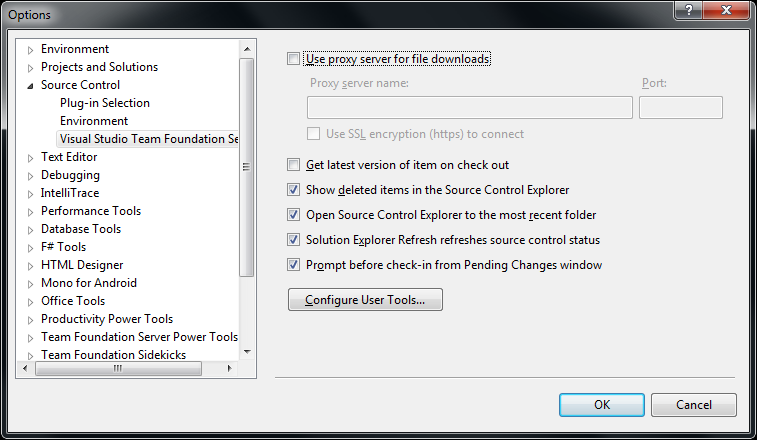
The first two pictures on the right show common steps for all three integrations. The images below are the specific ones for each integration. You can click on each image to view a larger version.

The steps work with the full version of Visual Studio and the Team Explorer edition of Visual Studio.

You can find different arguments for other tools on this excellent diff/merge configuration in Team Foundation – common Command and Argument values post by James Manning.

Adding diff/compare support to Visual Studio

  1. In Visual Studio Choose Options from the Tools menu.
  2. Expand Source Control in the treeview.
  3. Click Visual Studio Team Foundation Server in the treeview.
  4. Click the Configure User Tools button.
  5. Click the Add button.
  6. Enter “.*” in the Extension edit.
  7. Choose Compare in the Operation combobox.
  8. Enter the path to BComp.exe in the Command edit.
  9. In the Arguments edit, use:
    %1 %2 /title1=%6 /title2=%7
  10. Then press OK, then OK, then OK

Adding 3-way Merge to Visual Studio

You need Beyond Compare version 3 Professional for this.
(note: only the steps marked with * are different from above)

  1. In Visual Studio Choose Options from the Tools menu.
  2. Expand Source Control in the treeview.
  3. Click Visual Studio Team Foundation Server in the treeview.
  4. Click the Configure User Tools button.
  5. Click the Add button.
  6. Enter “.*” in the Extension edit.
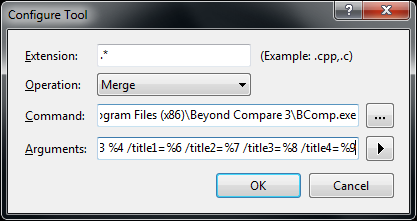
  7. * Choose Merge in the Operation combobox.
  8. Enter the path to BComp.exe in the Command edit.
  9. * In the Arguments edit, use:
    %1 %2 %3 %4 /title1=%6 /title2=%7 /title3=%8 /title4=%9
  10. Then press OK, then OK, then OK

Adding 2-way Merge to Visual Studio

This is for Beyond Compare version 2, and Beyond Compare version 3 Standard.
(note: only the step marked with * is different from above)

  1. In Visual Studio Choose Options from the Tools menu.
  2. Expand Source Control in the treeview.
  3. Click Visual Studio Team Foundation Server in the treeview.
  4. Click the Configure User Tools button.
  5. Click the Add button.
  6. Enter “.*” in the Extension edit.
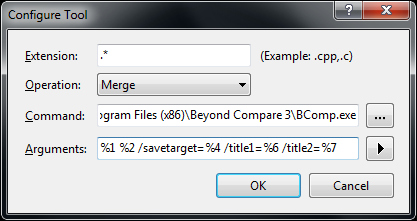
  7. Choose Merge in the Operation combobox.
  8. Enter the path to BComp.exe in the Command edit.
  9. * In the Arguments edit, use:
    %1 %2 /savetarget=%4 /title1=%6 /title2=%7
  10. Then press OK, then OK, then OK

To summarize, the differences

Functionality
entry in
Operation combobox
content of
Arguments edit
Beyond Compare
version/edition
 diff/merge Compare %1 %2 /title1=%6 /title2=%7 any version/edition
3-ware compare Merge %1 %2 %3 %4 /title1=%6 /title2=%7 /title3=%8 /title4=%9 3/Professional
2-way compare Merge %1 %2 /savetarget=%4 /title1=%6 /title2=%7 2 or 3/Standard

Hope this helps a few people.

–jeroen

via:

Posted in .NET, Beyond Compare, Development, Power User, Software Development, Visual Studio 11, Visual Studio 2002, Visual Studio 2003, Visual Studio 2005, Visual Studio 2008, Visual Studio 2010, Visual Studio and tools | Leave a Comment »

VBScript tips and tricks

Posted by jpluimers on 2013/01/22

I normally don’t do much VBScript stuff, but sometimes I have to, and these tips helped me big time:

–jeroen

This was the script in question (mimicked a bit after Prnmngr.vbs): Read the rest of this entry »

Posted in Development, Scripting, Software Development, VBScript, Visual Studio 11, Visual Studio 2005, Visual Studio 2008, Visual Studio 2010, Visual Studio and tools | Leave a Comment »

Converting Visual Studio 2003 WinForms to Visual Studio 2005/2008/2010/2012 partial classes (via: Duncan Smart’s Weblog)

Posted by jpluimers on 2013/01/10

In the .NET 1.x past, the WinForms designers in Visual Studio .NET and Visual Studio 2003 would put the C# or VB.NET code containing the form code as the InitializeComponent method of the top most class monolithic C# and VB.NET files that also contain the user code (for events and such).

As of Visual Studio 2005 (actually: Whidbey and higher), this code is based on partial classes. For each form (actually designable entity, but lets limit this to WinForms forms) you get a MyForm.cs and MyForm.Designer.cs

As a side note, with a bit of effort, you can generate the Windows Form Designer generated code yourself as this answer shows. This is for instance convenient when you have form definitions in a different technology and want to convert it to WinForms, WPF or another form of designer based .NET code.

I long time ago I wrote a short manual for co-workers on converting the monolithic files (for people interested, it is below).

Since then I found a couple of very interesting links: Read the rest of this entry »

Posted in .NET, .NET 1.x, .NET 2.0, .NET 3.0, C#, C# 1.0, C# 2.0, C# 3.0, C# 4.0, C# 5.0, Development, Software Development, Visual Studio 11, Visual Studio 2002, Visual Studio 2003, Visual Studio 2005, Visual Studio 2008, Visual Studio 2010, Visual Studio and tools, WinForms | 1 Comment »