Archive for the ‘Software Development’ Category
Posted by jpluimers on 2022/02/15
From my Windows XP days (which are long gone), but historically relevant the answer to [Wayback] DELPHI : EEncodingError – Invalid code page on windows xp embedded – Stack Overflow by [Wayback] Remy Lebeau:
The TEncoding.ASCII property uses codepage 20127, which is not installed on XP Embedded by default. You have to install it manually. The TEncoding class does not exist in D2006.
Are you using Indy 10, by chance? It uses TEncoding.ASCII by default for its string encodings. This exact error has been known to occur when using Indy on XP Embedded.
–jeroen
Posted in ASCII, Delphi, Development, Encoding, Power User, Software Development, XP-embedded | Leave a Comment »
Posted by jpluimers on 2022/02/14
An interesting take a while ago on [Wayback] Archive.is blog — People often compare various features of…
People often compare various features of archive.is to those of archive.org being mistaken by name similarity (and recently added “save a page” function to archive.org).
This project is different in at least two respects:
- We have no goal to save the entire Internet. Only manually submitted pages which may be deleted/altered soon. We are about 100x smaller than archive.org in the storage space (700TB vs. 70PB) and expenses (X,000 $/mo vs. X00,000 $/mo).
- The pages are not saved in their network form. Archive.today launches real browsers (not even headless) and tries to load lazy images, unroll folded content, login into accounts if prompted with login form, remove “subscribe our maillist” modals, … So archive.today is not suitable for making notarized or digitally signed snapshots.
It would be more correct to compare it with other thread unrollers.
The RSS feed of blog.archive.today is at blog.archive.today/rss
Read the rest of this entry »
Posted in archive.is / archive.today, Bookmarklet, Conference Topics, Conferences, Development, Event, Internet, InternetArchive, JavaScript/ECMAScript, Power User, Scripting, Software Development, Web Browsers | Leave a Comment »
Posted by jpluimers on 2022/02/13
I almost missed this: [Wayback/Archive] Happy 20th Anniversary, .NET! – .NET Blog.
Given I am still recovering from the long period of cancer treatments, I am glad that Beth Massi reminded me (a “thank you” is below the signature):
https://twitter.com/BethMassi/status/1492893829535514634
To keep the story about myself short: currently I am cancer free, long term (i.e. 10 years) looks dim, but my mental focus has recovered and I am getting joy again doing technical stuff. I am still working on the increasing my mental and physical endurance, so real work is not yet possible but unlike half a year ago, I am confident I will be able to eventually.
Back to the .NET story (as I have learned when to conserve energy): I kept track of Anders Hejlsberg ever since Turbo Pascal 1.0 on CP/M (see The calculators that got me into programming (via: calculators : Algorithms for the masses – julian m bucknall)) and when after the Visual J++ lawsuits things a first got a bit too silent to my liking.
Read the rest of this entry »
Posted in .NET, .NET 1.x, About, Conferences, DevDays09, Development, Event, History, Pascal, Personal, Software Development, Turbo Pascal, Visual J++ | Leave a Comment »
Posted by jpluimers on 2022/02/10
I will likely need some of these links in the future:
–jeroen
Posted in Apple, Development, Encoding, Mac, Mac OS X / OS X / MacOS, Power User, Software Development, Unicode | Leave a Comment »
Posted by jpluimers on 2022/02/09
Nowadays, some 35 years after the first Unicode ideas got drafted and 30+ years after the Unicode Consortium saw the light, UTF-8 is served my more than 95% of the web as shown in yesterday’s post UTF-8 web adoption is huge, closing 100%, but only soured up since around 2006..
I mentioned this:
It means that nowadays there is a very small chance you will see mangled characters (what Japanese call mojibake) when you’re surfing the web.
Serving UTF8 does not mean no unicode problems.
Below are some issues that happened not too long ago and still happen. I have reported them to all parties involved through web-care, but no response whatsoever, and this is bad: Unicode support beyond basic ASCII for the below systems are still broken even for relatively simple non-ASCII characters based in diacritics decorating a standard ASCII character.
Yes, I know the realm of encoding and code pages is a mess, especially when handling data in multiple layers of an application stack. That’s why I wrote this post in the first place, and have a whole encoding category of blog posts plus a Mojibake subset.
Read the rest of this entry »
Posted in Communications Development, CP850, Dark Pattern, Development, Encoding, ISO-8859, ISO8859, Mojibake, Software Development, Unicode, User Experience (ux), UTF-16, UTF-8, Windows-1252 | Leave a Comment »
Posted by jpluimers on 2022/02/09
As promised mid last year in “fixing” ESXi “rsync error: error allocating core memory buffers (code 22) at util2.c(106) [sender=3.1.2]”, I would follow up on building a static rsync for ESXi one day.
So below a few links on how to do this, roughly in the order I found them (most via [Wayback] vmware rsync “3.1.2” static – Google Search):
Especially the last link has a great set of steps on how to build manually.
Boy I forgot how long ago CentOS 3.9 was: [Wayback] [CentOS-announce] CentOS 3.9 is released for i386 and x86_64 Read the rest of this entry »
Posted in *nix, *nix-tools, CentOS, Development, Linux, Power User, RedHat, Software Development | 2 Comments »
Posted by jpluimers on 2022/02/09
Note: notepad cannot correctly guess the encoding, see the “old new thing”: [Wayback] Some files come up strange in Notepad | The Old New Thing (talking about ANSI a.k.a. Windows-1252, UTF-16LE, UTF-16BE, UTF-8, UTF-7 somewith and some without BOM as Notepad does not understand all permutations)
David Cumps discovered that certain text files come up strange in Notepad. The reason is that Notepad has to edit files in a variety of encodings, and when its back against the wall, sometimes it’s forced to guess.
[Wayback] C# Effective way to find any file’s Encoding – Stack Overflow shows how to detect various byte order marks in C#.
–jeroen
Posted in ASCII, Development, Encoding, Software Development, Unicode, UTF-16, UTF-32, UTF-8, UTF16, UTF32, UTF8 | Leave a Comment »
Posted by jpluimers on 2022/02/08
As a precursor to a post tomorrow showing that serving UTF8 does not mean organisations go without unicode problems, first some statistics.
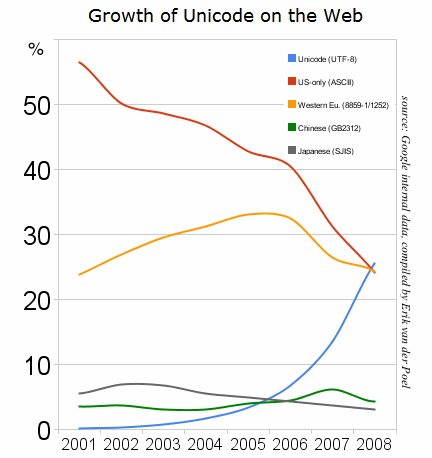
The first Unicode ideas got drafted some 30 years ago in 1987. In 1991, more than 30 years ago, the Unicode Consortium saw the light. Nowadays more than 95% percent of the web-pages (close to 100% when you include plain ASCII) is served using the UTF-8 encoding.
It means that nowadays there is a very small chance you
will see mangled characters (what Japanese call mojibake) when you’re surfing the web.
Some nice graphs of unicode growth are at these locations are at these locations:
I think especially important are 2008 (when UTF-8 had outgrown all other individual encodings) and slightly after 2010, when UTF-8 alone covered more than 50% of the pages served. These exclude ASCII-only pages. Adding those would make the figures even larger.


Historical yearly trends in the usage statistics of character encodings for websites, June 2021
–jeroen
Posted in Development, Encoding, Software Development, UTF-8, UTF8, Web Development | Leave a Comment »
Posted by jpluimers on 2022/02/03
I needed to search for IBAN numbers in documents and used this regular expression: [a-zA-Z]{2}[0-9]{2} ?[a-zA-Z0-9]{4} ?[0-9]{4} ?[0-9]{4} ?[0-9]{2} which supports the usual optional whitespace like in NL12 INGB 0345 6789 01.
It is based on a nice list with table of Notepad++ RegEx character classes supported at [Wayback] Searching | Notepad++ User Manual:
Character Classes
[set] ⇒ This indicates a set of characters, for example, [abc] means any of the literal characters a, b or c. You can also use ranges by doing a hyphen between characters, for example [a-z] for any character from a to z. You can use a collating sequence in character ranges, like in [[.ch.]-[.ll.]] (these are collating sequence in Spanish).[^set] ⇒ The complement of the characters in the set. For example, [^A-Za-z] means any character except an alphabetic character. Care should be taken with a complement list, as regular expressions are always multi-line, and hence [^ABC]* will match until the first A, B or C (or a, b or c if match case is off), including any newline characters. To confine the search to a single line, include the newline characters in the exception list, e.g. [^ABC\r\n].
Please note that the complement of a character set is often many more characters than you expect: (?-s)[^x]+ will match 1 or more instances of any non-x character, including newlines: the (?-s) search modifier turns off “dot matches newlines”, but the [^x] is not a dot ., so that class is still allowed to match newlines.
[[:name:]] or [[:☒:]] ⇒ The whole character class named name. For many, there is also a single-letter “short” class name, ☒. Please note: the [:name:] and [:☒:] must be inside a character class [...] to have their special meaning.
| short |
full name |
description |
equivalent character class |
|
alnum |
letters and digits |
|
|
alpha |
letters |
|
h |
blank |
spacing which is not a line terminator |
[\t\x20\xA0] |
|
cntrl |
control characters |
[\x00-\x1F\x7F\x81\x8D\x8F\x90\x9D] |
d |
digit |
digits |
|
|
graph |
graphical character, so essentially any character except for control chars, \0x7F, \x80 |
|
l |
lower |
lowercase letters |
|
|
print |
printable characters |
[\s[:graph:]] |
|
punct |
punctuation characters |
[!"#$%&'()*+,\-./:;<=>?@\[\\\]^_{ |
s |
space |
whitespace (word or line separator) |
[\t\n\x0B\f\r\x20\x85\xA0\x{2028}\x{2029}] |
u |
upper |
uppercase letters |
|
|
unicode |
any character with code point above 255 |
[\x{0100}-\x{FFFF}] |
w |
word |
word characters |
[_\d\l\u] |
|
xdigit |
hexadecimal digits |
[0-9A-Fa-f] |
Note that letters include any unicode letters (ASCII letters, accented letters, and letters from a variety of other writing systems); digits include ASCII numeric digits, and anything else in Unicode that’s classified as a digit (like superscript numbers ¹²³…).
Note that those character class names may be written in upper or lower case without changing the results. So [[:alnum:]] is the same as [[:ALNUM:]] or the mixed-case [[:AlNuM:]].
As stated earlier, the [:name:] and [:☒:] (note the single brackets) must be a part of a surrounding character class. However, you may combine them inside one character class, such as [_[:d:]x[:upper:]=], which is a character class that would match any digit, any uppercase, the lowercase x, and the literal _ and = characters. These named classes won’t always appear with the double brackets, but they will always be inside of a character class.
If the [:name:] or [:☒:] are accidentally not contained inside a surrounding character class, they will lose their special meaning. For example, [:upper:] is the character class matching :, u, p, e, and r; whereas [[:upper:]] is similar to [A-Z] (plus other unicode uppercase letters)
[^[:name:]] or [^[:☒:]] ⇒ The complement of character class named name or ☒ (matching anything not in that named class). This uses the same long names, short names, and rules as mentioned in the previous description.
–jeroen
Posted in Development, Notepad++, Power User, RegEx, Software Development, Text Editors | Leave a Comment »


 The Wiert Corner - irregular stream of stuff