The Wiert Corner – irregular stream of stuff

Jeroen W. Pluimers on .NET, C#, Delphi, databases, and personal interests

  • My badges

  • Twitter Updates

  • My Flickr Stream

  • Pages

  • All categories

  • Enter your email address to subscribe to this blog and receive notifications of new posts by email.

    Join 1,860 other subscribers

Archive for the ‘Web Development’ Category

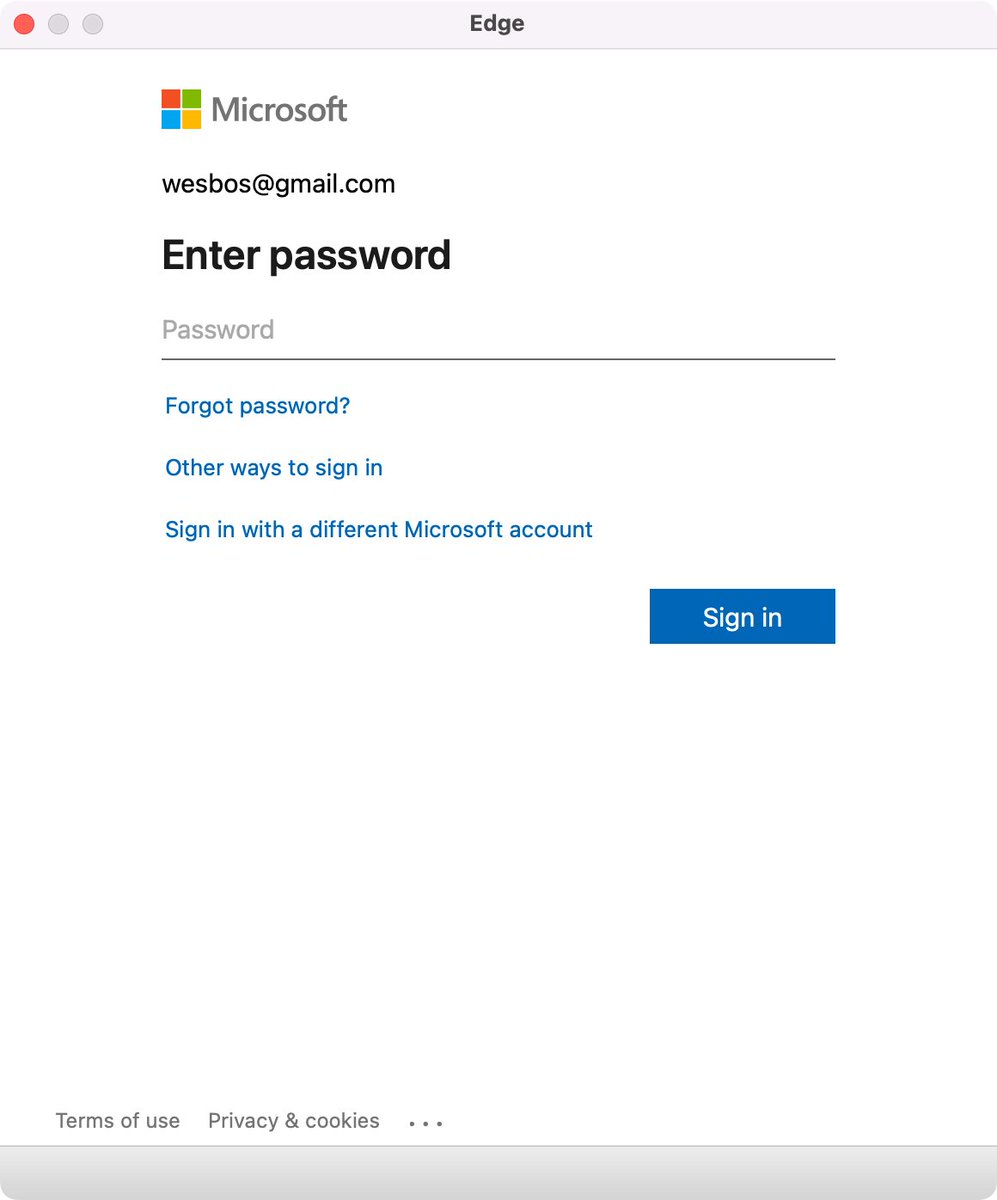
If you use web-logon for your app, show the web-browser pop-up including the URL (via @wesbos on Twitter)

Posted by jpluimers on 2024/11/05

Edge browser Window without address bar of a Microsoft logon page for wesbos@gmail.com not indicating what the logon is for.

Edge browser Window without address bar of a Microsoft logon page for wesbos@gmail.com not indicating what the logon is for.

[Wayback/Archive] Thread by @wesbos on Thread Reader App

Every single app that uses a popup to sign in needs to stop hiding the address bar.

There is no way to test if its a legit website and 1Password doesn’t work

Without this, your logon borders on a dark pattern which can easily be abused by scammers.

Basically there are three things to make very clear for any logon page belonging to an actually executable: what you are actually logging on to, for and with.

Preferably your application also makes very clear that the logon page actually belongs to the application executable (despite users can figure out the application itself through for instance the Task Manager, or Process Explorer).

For web based logon, this last step is not possible, so for that it is really important to show the URL and the relation of the URL to the application (especially if you use a 3rd party logon like a Microsoft account – formerly Microsoft Passport, Google Account or Facebook account like was popular in OpenID heydays decade surrounding 2010).

Tweet:

Read the rest of this entry »

Posted in Dark Pattern, Development, Software Development, User Experience (ux), Web Development, Windows Development | Leave a Comment »

Bookmarklet idea: find Wikipedia entry for currently selected text, then (when editing in WordPress) make the selected text link to it

Posted by jpluimers on 2024/11/05

Two stage bookmarklet idea (so if will be easier to create this in an agile fashion):

  1. create a bookmarklet that looks up the currently selected text in Wikipedia (or another source)
  2. modify the current selection to link to that Wikipedia entry (convenient when editing blog posts)

Hopefully these links will help me getting started:

Read the rest of this entry »

Posted in Bookmarklet, Development, JavaScript/ECMAScript, Power User, Scripting, Software Development, Web Browsers, Web Development | Leave a Comment »

On my list of things to try: Cisco Duo MFA

Posted by jpluimers on 2024/10/29

At the time of writingΒ [Wayback/Archive] Two-Factor Authentication & Data Protection | Duo SecurityΒ is supposed to be free for up to 10 users.

That seems to be an excellent opportunity to re-learn MFA things as it has been a while since I have done big work in that area.

Duo was one of the very many Cisco acquisitions and I wonder how it fits into the Cisco landscape.

Documentation bits to start at:

Read the rest of this entry »

Posted in 2FA/MFA, Authentication, Development, Mobile Development, Power User, Security, Software Development, Web Development | Leave a Comment »

Online Paste to Markdown (in JavaScript + HTML)

Posted by jpluimers on 2024/10/08

Apparently I was living under a stone since the 2015 introduction of [Wayback/Archive] Paste to Markdown:

Paste to Markdown

Instructions

  1. Find the text to convert to Markdown (e.g., in another browser tab)
  2. Copy it to the clipboard (Ctrl+C, or ⌘+C on Mac)
  3. Paste it into this window (Ctrl+V, or ⌘+V on Mac)
  4. The converted Markdown will appear!

The conversion is carried out by to-markdown, a Markdown converter written in JavaScript and running locally in the browser.

The “to-markdown” I did already know (see A few HTML to Markdown converters written in javascript, Python, Ruby, PHP and C#) but has been renamed from [Wayback/Archive] GitHub – domchristie/to-markdown: An HTML to Markdown converter written in JavaScript into then “turndown” repository below.

More links:

Read the rest of this entry »

Posted in Development, HTML, JavaScript/ECMAScript, Lightweight markup language, MarkDown, Scripting, Software Development, Web Development | Leave a Comment »

Fixing the Google Calendar item editor CSS so the title 40% of my window width

Posted by jpluimers on 2024/10/08

When working on larger screens, I am always amazed at how little window estate most web sites actually use.

For sites that just try to look nice that is not so much or a problem, but for productivity sites it is.

The go-to solution for this is to manually modify the CSS. This can often be a pain because the CSS is either deeply nested or – even worse – uses semi-random HTML class attribute values.

This post is a reminder to myself to check if the below CSS modification in my Stylus library still works (gist link is at the bottom of this post):

Read the rest of this entry »

Posted in CSS, HTML, HTML5, Software Development, Web Development | Leave a Comment »

Reminder to self write a JavaScript NoDrives encoder/decoder on a web-page

Posted by jpluimers on 2024/10/01

A long time ago, I wrote about How to hide an entire drive from prying eyes on Windows 10 | Windows Central.

The easiest way is still to add/modify a NoDrives value in the Registry, but regrettably [WayBack]Β NT Drive Calculator – The β€˜NoDrives’ Registry Key Value Calculator is down (it was a server-side solution, so the WayBack Machine link does display a page, but the calculator does not function).

My use case is that I have an existing NoDrives value that I want to update (as there have been one or more drive letters added/changed).

Read the rest of this entry »

Posted in Development, HTML, HTML5, JavaScript/ECMAScript, Scripting, Software Development, Web Development | Leave a Comment »

string – Check if MyString[1] is an alphabetical character? – Stack Overflow (and how Embarcadero broke one of the product version neutral redirects)

Posted by jpluimers on 2024/09/24

Quite a while ago [Wayback/Archive] string – Check if MyString[1] is an alphabetical character? – Stack Overflow asked by [Wayback/Archive] User Jeff was answered by [Wayback/Archive] Andreas Rejbrand:

The simplest approach is

function GetAlphaSubstr(const Str: string): string;
const
  ALPHA_CHARS = ['a'..'z', 'A'..'Z'];
var
  ActualLength: integer;
  i: Integer;
begin
  SetLength(result, length(Str));
  ActualLength := 0;
  for i := 1 to length(Str) do
    if Str[i] in ALPHA_CHARS then
    begin
      inc(ActualLength);
      result[ActualLength] := Str[i];
    end;
  SetLength(Result, ActualLength);
end;

but this will only consider English letters as “alphabetical characters”. It will not even consider the extremely important Swedish letters Γ…, Γ„, and Γ– as “alphabetical characters”!

Slightly more sophisticated is

function GetAlphaSubstr2(const Str: string): string;
var
  ActualLength: integer;
  i: Integer;
begin
  SetLength(result, length(Str));
  ActualLength := 0;
  for i := 1 to length(Str) do
    if Character.IsLetter(Str[i]) then
    begin
      inc(ActualLength);
      result[ActualLength] := Str[i];
    end;
  SetLength(Result, ActualLength);
end;

Back in 2011 I added a comment that for more than a decade would redirect to the most current documentation on the IsLetter method:

+1 for usingΒ IsLetter which checks the Unicode definition for being a letter or not [Wayback] docwiki.embarcadero.com/VCL/en/Character.TCharacter.IsLetter

Back then, Delphi X2 was current, so it would redirect

  1. from [Wayback] http://docwiki.embarcadero.com/VCL/en/Character.TCharacter.IsLetter
  2. to [Wayback] http://docwiki.embarcadero.com/VCL/XE2/en/Character.TCharacter.IsLetter
  3. then to [Wayback] http://docwiki.embarcadero.com/VCL/XE2/en/Character.TCharacter.IsLetter
  4. ending at [Wayback] http://docwiki.embarcadero.com/Libraries/XE2/en/System.Character.TCharacter.IsLetter

After a long outage in 2022 (seeΒ The Delphi documentation site docwiki.embarcadero.com has been down/up oscillating for 4 days is now down for almost a day.) only the Alexandria help was restored.

This killed the above redirect.

Luckily [Wayback/Archive] George BirbilisΒ noticed that and commented this:

@JeroenWiertPluimers the correct link now is:Β docwiki.embarcadero.com/Libraries/Alexandria/en/…

In order to refer to the most recent Delphi version, now you have to use [Wayback] http://docwiki.embarcadero.com/Libraries/en/System.Character.TCharacter.IsLetter.

This redirects:

  1. via [Wayback] http://docwiki.embarcadero.com/Libraries/Alexandria/en/System.Character.TCharacter.IsLetter to
  2. to [Wayback] https://docwiki.embarcadero.com/Libraries/Alexandria/en/System.Character.TCharacter.IsLetter

The above breaks the help integration from older Delphi products which is bad. It is also bad because it makes it harder to port legacy Delphi code to more modern Delphi versions.

Hopefully the above gives you a bit insight how the docwiki help system was designed and what is left of that design.

–jeroen

Posted in Communications Development, Conference Topics, Conferences, Delphi, Development, Encryption, Event, HTML, HTTP, https, HTTPS/TLS security, Internet protocol suite, Power User, Security, Software Development, TCP, TLS, Web Development | Leave a Comment »

View DOM Source bookmarklet

Posted by jpluimers on 2024/09/12

This is cool as it shows the page source not as it was first loaded, but from how it is currently rendered which includes all post-load modifications by any scripts: [Wayback/Archive] View DOM Source bookmarklet.

ViaΒ [Wayback/Archive] Martin Splitt on Twitter: “I made a bookmarklet to view the rendered source (aka the DOM) of a page. πŸ‘€ πŸš€ Works with Chrome, Firefox, Safari and possibly others, too. 🌈 Beautifies the code 🎨 Includes syntax highlighting πŸ’» Get the bookmarklet at πŸ‘‰ experiments.geekonaut.de/view-dom-source πŸ‘ˆ”

Read the rest of this entry »

Posted in Bookmarklet, CSS, Development, HTML, HTML5, JavaScript/ECMAScript, Power User, Scripting, Software Development, Web Browsers, Web Development | Leave a Comment »

GitHub – AnswerDotAI/fasthtml: The fastest way to create an HTML app

Posted by jpluimers on 2024/09/11

The HTMX based [Wayback/Archive] GitHub – AnswerDotAI/fasthtml: The fastest way to create an HTML app

FastHTML is a new next-generation web framework for fast, scalable web applications with minimal, compact code. It’s designed to be:
  • Powerful and expressive enough to build the most advanced, interactive web apps you can imagine.
  • Fast and lightweight, so you can write less code and get more done.
  • Easy to learn and use, with a simple, intuitive syntax that makes it easy to build complex apps quickly.
FastHTML apps are just Python code, so you can use FastHTML with the full power of the Python language and ecosystem.
Could this be something for me?

Via [Wayback/Archive] Erik Meijer on X: “Reverse selling in full action.”

Read the rest of this entry »

Posted in Deployment, Development, HTML, htmx, Python, Scripting, Software Development, Web Development | Leave a Comment »

11.2: Bookmarklets – Programming with Text – YouTube

Posted by jpluimers on 2024/09/11

Cool video about the basics of [Wayback/Archive] 11.2: Bookmarklets – Programming with Text – YouTube

–jeroen

Posted in Bookmarklet, Development, JavaScript/ECMAScript, Power User, Scripting, Software Development, Web Browsers, Web Development | Leave a Comment »