


Links from a while ago because some crash caught my eye:
Archive for the ‘Windows Development’ Category
Some links on Windows kernel APIs
Posted by jpluimers on 2024/12/10

Posted in Development, Software Development, Windows Development | Leave a Comment »
Save the Environment (Variable)
Posted by jpluimers on 2024/12/05
For my link archive as this is environment variable override trick to override DLL loading is not just limited to executables shipping with Windows, but also with other products (likely: virus scanners that run privileged); another alternative is running a local process serving the WebDAV protocol.
Share this:

Posted in Development, Power User, Security, Software Development, Windows, Windows 10, Windows 11, Windows Development | Tagged: DEFCON30 | Leave a Comment »
IMAGE_FILE_HEADER (winnt.h) – Win32 apps | Microsoft Learn: IMAGE_FILE_UP_SYSTEM_ONLY flag (not what you think it means)
Posted by jpluimers on 2024/12/04
Need to write a tool for this that sets/clears the ………… flag in the PE .EXE header.
Officially it is for this:
[Wayback/Archive] IMAGE_FILE_HEADER (winnt.h) – Win32 apps | Microsoft Learn
- IMAGE_FILE_UP_SYSTEM_ONLY
- 0x4000
The file should be run only on a uniprocessor computer.
In practice, this sets the affinity to 1 single CPU core (which is kind of random, and could change each time you start the executable).
This is ideal for code that is known for causing trouble executing on multiple cores, or – more importantly – to disallow core-switching for programs that give best performance when executed on a single core.
Via: [Wayback/Archive] Thread by @0gtweet on Thread Reader App – Did you ever hear about IMAGE_FILE_UP_SYSTEM_ONLY flag in NtHeader->FileHeader->Characteristics of an exe file?
Share this:
Posted in Development, Software Development, Windows Development | Leave a Comment »
Hijack Libs
Posted by jpluimers on 2024/12/04
Interesting for both red teams and blue teams: [Wayback/Archive] Hijack Libs
This project provides an curated list of DLL Hijacking candidates. A mapping between DLLs and vulnerable executables is kept and can be searched via this website. Additionally, further metadata such as resources provide more context.
Share this:
Posted in Blue team, Development, Power User, Red team, Security, Software Development, Windows Development | Leave a Comment »
Un4seen.Bass Namespace – BASS.NET API for the Un4seen BASS Audio Library
Posted by jpluimers on 2024/11/19
A while ago, within a week time, I got reminded of a project I did some 15 years ago involving low-latency audio using the .NET platform on Windows XP Embedded.
For that I used the BASS.NET wrapper classes and P/Invoke methods around the Un4seen BASS Audio Library.
Back in those days there was not much documentation about this, but now there is more.
Some starting points are:
- [Wayback/Archive] BASS.NET API for the Un4seen BASS Audio Library – Table of Content
- [Wayback/Archive] BASS.NET Overview
- [Wayback/Archive] BASS.NET API
BASS.NET is a .Net wrapper for the BASS Audio Library and all it’s Add-Ons – available @ http://www.un4seen.com. The Bass.Net.dll release version is installed in the specified ‘install-directory’ and will be registered to the .NET Framework as a standard component (if you left all the installation options checked). Note, that there are various Bass.Net assemblies available (side-by-side): one targeting the .Net v4.8 Full Framework and one targeting the .Net v6.0 Core Framework.
The native BASS libraries (e.g. bass.dll) are NOT included and need to be downloaded seperately – so make sure to download the BASS library and the needed add-on libraries and place them to your project executable directory (e.g. place the bass.dll to .\bin\Debug).
…
followed by an elaborate list of the Bass.net namespaces.
- [Wayback/Archive] Version History (back to the initial 2005 version; I used it from 2007-2009)
- [Wayback/Archive] Upgrading from Previous Versions
- [Wayback/Archive] Interoperating with Unmanaged Code was still in its infancy somewhere on the forums when I used the Bass.net library. Wish it had been in its current state, as it now is a set of wonderful guidelines.
- [Wayback/Archive] Un4seen Developments – Welcome
Via:
- [Wayback/Archive] Online samenspelen | rolfhoogenberg.eu
Maart 2021
Momenteel repeteer ik wekelijks met mijn muziekverenigingen realtime via internet. We kunnen echt samen muziek maken en dat is heerlijk!
Om succesvol samen te kunnen spelen via internet begruiken we 2 programma’s:
- Zoom – dit gebruiken we voor het beeld, de video.
- Jamulus – dit gebruiken we voor het geluid, de audio.
Op deze pagina vindt u een handleiding die ik schreef voor de installatie en het instellen van deze 2 programma’s.
Let op: Er is een aparte handleiding voor Windows en een aparte handleiding voor MacOS.
Verder kun je via deze pagina de installatieprogramma’s downloaden die nodig zijn om Jamulus en ASIO4ALL te installeren.
Dit is Open Source software die je ook kunt downloaden van www.jamulus.io en www.asio4all.org.
- [Wayback/Archive] Jeroen Wiert Pluimers @wiert@mastodon.social on X: “@lucasmeijer It’s been a long time ago, so just to check that we are talking about the same thing: I was using the BASS .NET wrappers around ASIO audio back then.”
Related:
- [Wayback/Archive] Jamulus ‒ Play music online. With friends. For free.
- [Wayback/Archive] Jamulus – Internet Jam Session Software download | SourceForge.net
- [Wayback/Archive] GitHub – jamulussoftware/jamulus: Jamulus enables musicians to perform real-time jam sessions over the internet.
- [Wayback/Archive] GitHub – grundic/jamulus-docker: Docker image for online jamming software Jamulus
- [Wayback/Archive] GitHub – jamulussoftware/jamuluswebsite: This is the GitHub Pages repository for the Jamulus main website. For the jamulus application source code, please visit jamulussoftware/jamulus.
- [Wayback/Archive] ASIO4ALL Official Home – Universal Windows ASIO Driver
- [Wayback/Archive] GitHub – dechamps/FlexASIO: A flexible universal ASIO driver that uses the PortAudio sound I/O library. Supports WASAPI (shared and exclusive), KS, DirectSound and MME.
…
Among other things, this makes it possible to emulate a typical Windows application that opens an audio device in shared mode. This means other applications can use the same audio devices at the same time, with the Windows audio engine mixing the various audio streams. Other universal ASIO drivers do not offer this functionality as they always open audio devices in exclusive mode.
…
- [Wayback/Archive] GitHub – L4ZZA/ASIO4ALL.NET: A simple C#/C++ Interop project upgraded to modern frameworks. Credits @robinvierich
--jeroen
Share this:
Posted in .NET, Audio, Conference Topics, Conferences, Development, Event, LifeHacker, Media, Power User, Software Development, Windows Development | Leave a Comment »
If you use web-logon for your app, show the web-browser pop-up including the URL (via @wesbos on Twitter)
Posted by jpluimers on 2024/11/05
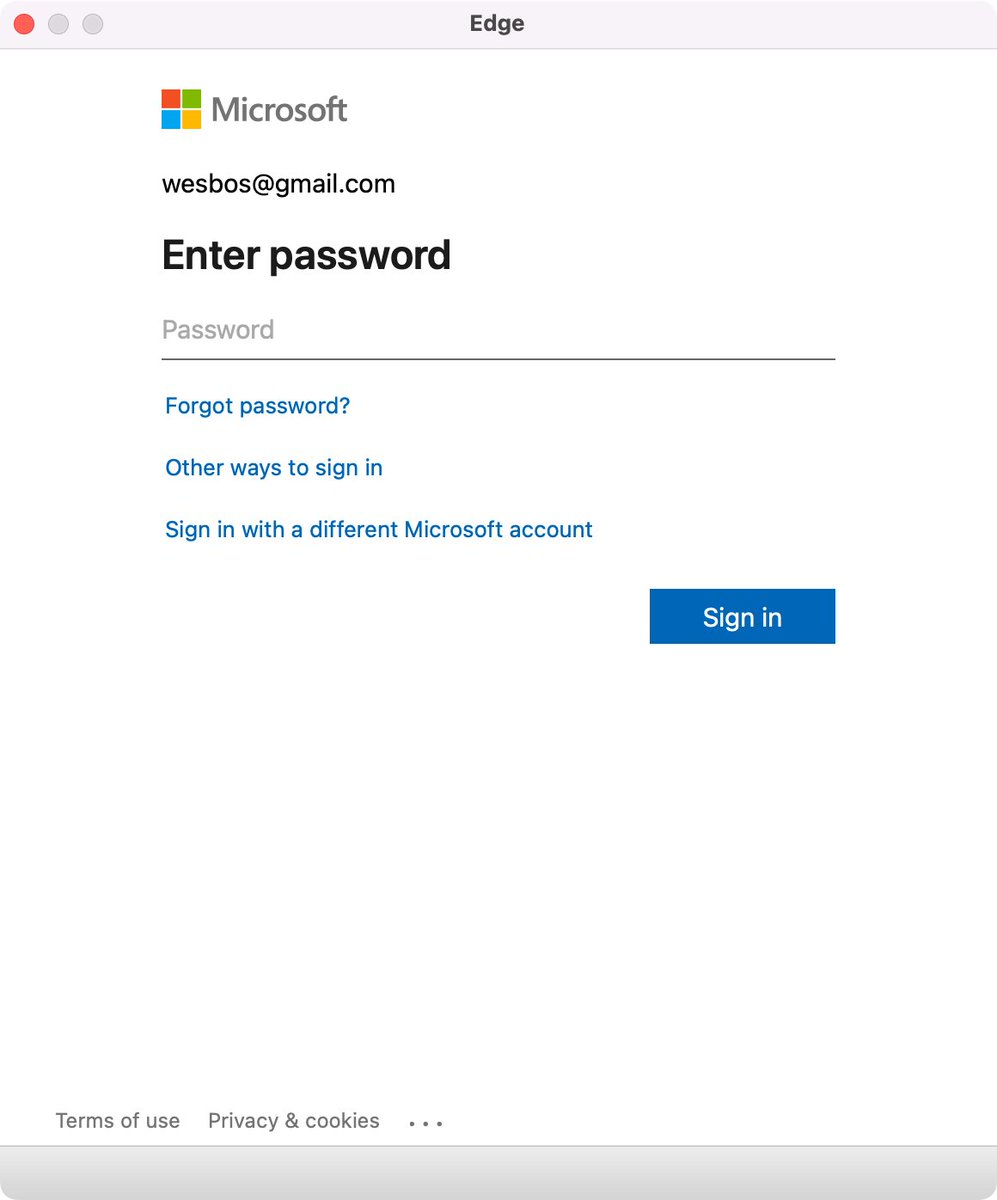
Edge browser Window without address bar of a Microsoft logon page for wesbos@gmail.com not indicating what the logon is for.
[Wayback/Archive] Thread by @wesbos on Thread Reader App
Every single app that uses a popup to sign in needs to stop hiding the address bar.
There is no way to test if its a legit website and 1Password doesn’t work
Without this, your logon borders on a dark pattern which can easily be abused by scammers.
Basically there are three things to make very clear for any logon page belonging to an actually executable: what you are actually logging on to, for and with.
Preferably your application also makes very clear that the logon page actually belongs to the application executable (despite users can figure out the application itself through for instance the Task Manager, or Process Explorer).
For web based logon, this last step is not possible, so for that it is really important to show the URL and the relation of the URL to the application (especially if you use a 3rd party logon like a Microsoft account – formerly Microsoft Passport, Google Account or Facebook account like was popular in OpenID heydays decade surrounding 2010).
Tweet:
Share this:

Posted in Dark Pattern, Development, Software Development, User Experience (ux), Web Development, Windows Development | Leave a Comment »
Need to check out the Windows AutoLogonSID registry value and other autologon security features in Windows
Posted by jpluimers on 2024/10/16
On my list of things to look at via [Wayback/Archive] “AutoLogonSID” – Google Search:
Share this:
Posted in Conference Topics, Conferences, Development, Event, Power User, Security, Software Development, Windows, Windows 10, Windows 11, Windows 7, Windows 8, Windows 8.1, Windows Development | Leave a Comment »
The state of malware today: From Highly Obfuscated Batch File to XWorm and Redline – SANS Internet Storm Center
Posted by jpluimers on 2024/10/10
A very interesting read, where it keeps me wondering how batch files like these are being generated (making them by hand feels very surreal): [Wayback/Archive] From Highly Obfuscated Batch File to XWorm and Redline – SANS Internet Storm Center
VirusTotal entry: [Wayback/Archive] VirusTotal – File – 453c017e02e6ce747d605081ad78bf210b3d0004a056d1f65dd1f21c9bf13a9a
The day after the article was written, only Kaspersky and ZoneAlarm detected it; in the past ZoneAlarm used the Kaspersky engine, but that stopped a while ago: [Wayback/Archive] ZoneAlarm Free Antivirus Review | PCMag.
The malware uses at least these technologies:
Share this:
Posted in Antivirus, Batch-Files, Development, Power User, PowerShell, Python, Scripting, Security, Software Development, Windows Development | Leave a Comment »
Downloading a file from the Windows console without first installing a command-line tool
Posted by jpluimers on 2024/10/09
Note that the below methods likely will cause security warnings if a Windows machine has been properly configured, but in most cases at least one of them works.
- using cURL (Widows 10 and up)
curl --url https://speed.hetzner.de/100MB.bin --output %TEMP%\100MB.bin - using [Wayback/Archive]
certutil| Microsoft Docs (at least Windows 7 and up; needs UAC elevation)
certutil.exe -urlcache -split -f https://speed.hetzner.de/100MB.bin %TEMP%\100MB.bin - using PowerShell (at least Windows Vista and up)
powershell.exe -Command (New-Object System.Net.WebClient).DownloadFile('https://speed.hetzner.de/100MB.bin','%TEMP%\100MB.bin')
I think it works for all versions of curl, certutil, and PowerShell though I did not have anything older than up-to-date Windows 7 (having PowerShell version 3) and recent to test on.
Share this:
Posted in *nix, *nix-tools, .NET, Batch-Files, CommandLine, cURL, Development, Power User, PowerShell, PowerShell, Scripting, Software Development, Windows, Windows 10, Windows 11, Windows 7, Windows 8, Windows 8.1, Windows Development, Windows Vista | Leave a Comment »
Shadow IT has entered the chat – got caught running scripts again : sysadmin
Posted by jpluimers on 2024/09/05
Shadow IT has entered the chat
Many companies have hardly any idea how many scripts are being used by their people to get the chores of day to day work done.
Share this:
Posted in Batch-Files, Development, Power User, PowerShell, Python, Scripting, Software Development, Windows, Windows Development | Leave a Comment »
 The Wiert Corner - irregular stream of stuff