Archive for the ‘The Old New Thing’ Category
Posted by jpluimers on 2020/03/24
Designing for a good user experience is hard, especially to programmers. So if you are a programmer, please read, let them sink in, rinse, repeat the below linked articles multiple times. Being ~15 years old, they are still so very relevant:
–jeroen
Posted in Development, Software Development, The Old New Thing, Usability, User Experience (ux), Windows Development | Leave a Comment »
Posted by jpluimers on 2020/02/06
Interesting bit of history: [WayBack] Why does HRESULT begin with H when it’s not a handle to anything? – The Old New Thing.
TL;DR:
- It used to be a handle
- Few programs cared about the underlying objects
- Managing the underlying objects was way too expensive
- It got trimmed down to a number, but the name stuck
–jeroen
Posted in Development, History, Software Development, The Old New Thing, Windows Development | Leave a Comment »
Posted by jpluimers on 2019/12/31
A while back there were a few G+ threads sprouted by David Heffernan on decoding big files into line-ending splitted strings:
Code comparison:
Python:
with open(filename, 'r', encoding='utf-16-le') as f:
  for line in f:
    pass
Delphi:
for Line in TLineReader.FromFile(filename, TEncoding.Unicode) do
  ;
This spurred some nice observations and unfounded statements on which encodings should be used, so I posted a bit of history that is included below.
Some tips and observations from the links:
- Good old text files are not “good” with Unicode support, neither are TextFile Device Drivers; nobody has written a driver supporting a wide range of encodings as of yet.
- Good old text files are slow as well, even with a changed SetTextBuffer
- When using the TStreamReader, the decoding takes much more time than the actual reading, which means that [WayBack] Faster FileStream with TBufferedFileStream • DelphiABall does not help much
- TStringList.LoadFromFile, though fast, is a memory allocation dork and has limits on string size
- Delphi RTL code is not what it used to be: pre-Delphi Unicode RTL code is of far better quality than Delphi 2009 and up RTL code
- Supporting various encodings is important
- EBCDIC days: three kinds of spaces, two kinds of hyphens, multiple codepages
- Strings are just that: strings. It’s about the encoding from/to the file that needs to be optimal.
- When processing large files, caching only makes sense when the file fits in memory. Otherwise caching just adds overhead.
- On Windows, if you read a big text file into memory, open the file in “sequential read” mode, to disable caching. Use the FILE_FLAG_SEQUENTIAL_SCAN flag under Windows, as stated at [WayBack] How do FILE_FLAG_SEQUENTIAL_SCAN and FILE_FLAG_RANDOM_ACCESS affect how the operating system treats my file? – The Old New Thing
- Python string reading depends on the way you read files (ASCII or Unicode); see [WayBack] unicode – Python codecs line ending – Stack Overflow
Though TLineReader is not part of the RTL, I think it is from [WayBack] For-in Enumeration – ADUG.
Encodings in use
It doesn’t help that on the Windows Console, various encodings are used:
Good reading here is [WayBack] c++ – What unicode encoding (UTF-8, UTF-16, other) does Windows use for its Unicode data types? – Stack Overflow
Encoding history
+A. Bouchez I’m with +David Heffernan here:
At its release in 1993, Windows NT was very early in supporting Unicode. Development of Windows NT started in 1990 where they opted for UCS-2 having 2 bytes per character and had a non-required annex on UTF-1.
UTF-1 – that later evolved into UTF-8 – did not even exist at that time. Even UCS-2 was still young: it got designed in 1989. UTF-8 was outlined late 1992 and became a standard in 1993
Some references:
–jeroen
Read the rest of this entry »
Posted in Delphi, Development, Encoding, PowerShell, PowerShell, Python, Scripting, Software Development, The Old New Thing, Unicode, UTF-16, UTF-8, Windows Development | Leave a Comment »
Posted by jpluimers on 2019/10/02
I got an interesting question a while ago: should an application terminate (anonymous) threads or not?
A problem is that a thread might not execute unless you call WaitFor before Terminate is called. The reason is that the internal function ThreadProc does not start Execute if the thread is already terminated.
The ThreadProc in the System.Classes unit is an ideal place to set breakpoints in order to see which threads might start.
Other useful places to set breakpoints:
TAnonymousThread.ExecuteTExternalThread.Execute
Execute not being called by ThreadProc is a bug, but it is not documented because QC is gone (taking the below entry with it), it is not in QP and the docwiki never got updated.
Given QC has so much information, I am still baffled that Embarcadero took it down.
Sergey Kasandrov (a.k.a. serg or sergworks) wrote in [WayBack] Sleep sort and TThread corner case | The Programming Works about this bug and refers to WayBack: QualityCentral 35451 – TThread implementation doesn’t guarantee that thread’s Execute method will be called at all .
The really bad thing are the WayBack: QualityCentral Resolution Entries for Report #35451 Resolution “As Designed” implying the design is wrong.
In his post, sergworks implemented the Sleep sorting in Delphi. Related:
Note that application shutdown is a much debated topic. Best is to do as little cleanup as possible: your process is going to terminate soon anyway. No need to close handles or free memory: Windows will do that for you anyway. See for instance:
Related to waiting:
Related to executing:
–jeroen
Posted in Conference Topics, Conferences, Delphi, Development, Event, Multi-Threading / Concurrency, Software Development, The Old New Thing, Windows Development | Leave a Comment »
Posted by jpluimers on 2019/08/12
Via [WayBack] Anyone with a hint on how to work around this: … “Please re-run this installer as a normal user instead of”… – Jeroen Wiert Pluimers – Google+
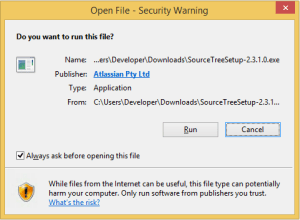
This happened for instance when trying to install Source Tree 2.x on Windows (1.9.x works fine):
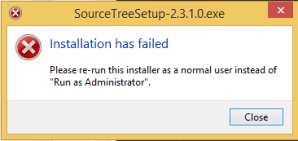
[Window Title]
SourceTreeSetup-2.3.1.0.exe
[Main Instruction]
Installation has failed
[Content]
Please re-run this installer as a normal user instead of “Run as Administrator”.
[Close]
The problem was by accident the machine got in a state to run commands without UAC approval, so the run dialog would already look have “This task will be created with administrative privileges”:

It was odd, as the machine didn’t have it enabled in the security policy (secpo.msc):

So I did a bit more digging, bumped into [WayBack] Why does my Run dialog say that tasks will created with administrative privileges? – The Old New Thing and had one of those #facepalm moments: Explorer had crashed, and I had started it from Process Explorer, forgetting Process Explorer had an UAC token.
The solution is easy:
- Logoff / Logon
- Verify the Windows-R shows a “normal” run:

Then you can just run the installer:
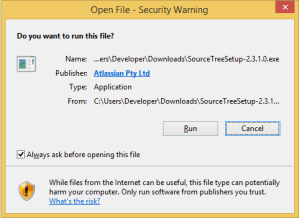
–jeroen
Posted in Batch-Files, Console (command prompt window), Development, Power User, Scripting, Software Development, The Old New Thing, Windows, Windows Development | Leave a Comment »
Posted by jpluimers on 2018/11/23
I needed a “get only the first result” of WHERE (which is present after Windows 2000, so XP, Server 2003 and up), so based on [WayBack] A 90-byte “whereis” program – The Old New Thing I came up with this:
@echo off
:: based on https://blogs.msdn.microsoft.com/oldnewthing/20050120-00/?p=36653
::for %%f in (%1) do @echo.%%~$PATH:f
for %%e in (%PATHEXT%) do @for %%i in (%1 %~n1%%e) do (
  @if NOT "%%~$PATH:i"=="" (
    echo %%~$PATH:i
    goto :eof
  )
)
:: note: WHERE lists all occurrences of a file on the PATH in PATH order
goto :eof
Two changes:
- it takes into account the extension if you specify it (unlike WHERE.EXE)
- it bails out at the first match (like WHERE.EXE)
References:
–jeroen
Posted in Batch-Files, Development, Power User, Scripting, Software Development, The Old New Thing, Windows, Windows Development | Leave a Comment »
Posted by jpluimers on 2018/09/11
On x86/x64/ARM/…:
It’s where the function is going to return to, not where it came from.
And:
Bonus chatter: This reminds me of a quirk of the 6502 processor: When it pushed the return address onto the stack, it actually pushed the return address minus one. This is an artifact of the way the 6502 is implemented, but it results in the nice feature that the stack trace gives you the line number of the call instruction.
Of course, this is all hypothetical, because 6502 debuggers didn’t have fancy features like stack traces or line numbers.
Source: [WayBack] Remember that in a stack trace, the addresses are return addresses, not call addresses – The Old New Thing
Which resulted in these comments at [WayBack] CC +mos6502 – Jeroen Wiert Pluimers – Google+:
- mos6502: And don’t forget the crucial difference in PC on 6502 between RTS and RTI!
- Jeroen Wiert Pluimers: +mos6502 I totally forgot about that one. Thanks for reminding me
<<Note that unlike RTS, the return address on the stack is the actual address rather than the address-1.>>
References:
[WayBack] 6502.org: Tutorials and Aids – RTI
RTI retrieves the Processor Status Word (flags) and the Program Counter from the stack in that order (interrupts push the PC first and then the PSW).
Note that unlike RTS, the return address on the stack is the actual address rather than the address-1.
[WayBack] 6502.org: Tutorials and Aids – RTS
RTS pulls the top two bytes off the stack (low byte first) and transfers program control to that address+1. It is used, as expected, to exit a subroutine invoked via JSR which pushed the address-1.
RTS is frequently used to implement a jump table where addresses-1 are pushed onto the stack and accessed via RTS eg. to access the second of four routines.
–jeroen
Posted in 6502, 6502 Assembly, Assembly Language, Development, History, Software Development, The Old New Thing, Windows Development, x64, x86 | Leave a Comment »
Posted by jpluimers on 2018/08/16
Cool feature borrowed from Notepad, which can read files locked by other references (for instance a process having the handle open): [WayBack] c# – Notepad beats them all? – Stack Overflow.
The example from the answer is in .NET, but can be used in a native environment as well (Notepad is a native application).
Notepad reads files by first mapping them into memory, rather than using the “usual” file reading mechanisms presumably used by the other editors you tried. This method allows reading of files even if they have an exclusive range-based locks.
You can achieve the same in C# with something along the lines of:
using (var f = new FileStream(processIdPath, FileMode.Open, FileAccess.Read, FileShare.ReadWrite))
using (var m = MemoryMappedFile.CreateFromFile(f, null, 0, MemoryMappedFileAccess.Read, null, HandleInheritability.None, true))
using (var s = m.CreateViewStream(0, 0, MemoryMappedFileAccess.Read))
using (var r = new StreamReader(s))
{
    var l = r.ReadToEnd();
    Console.WriteLine(l);
}
Via: [WayBack] Maintaining Notepad is not a full-time job, but it’s not an empty job either – The Old New Thing
–jeroen
Posted in .NET, Delphi, Development, Software Development, The Old New Thing, Windows Development | Leave a Comment »


 The Wiert Corner - irregular stream of stuff