The Wiert Corner – irregular stream of stuff

Jeroen W. Pluimers on .NET, C#, Delphi, databases, and personal interests

  • My badges

  • Twitter Updates

  • My Flickr Stream

  • Pages

  • All categories

  • Enter your email address to subscribe to this blog and receive notifications of new posts by email.

    Join 1,839 other subscribers

Archive for the ‘GitHub’ Category

Learning github actions by creating a repository with a dynamic README.md for your profile information

Posted by jpluimers on 2023/01/23

TL;DR:

  1. Create a GitHub repository with the same name as your profile name
  2. Add a README.md with Markdown describing your profile
  3. In the README.md, add begin/end HTML comment markers <!-- and --> for various types of dynamic content
  4. In the Actions of this repository, add Workflows for each of the set comment markers that use them to refresh that part of the content using GitHub Actions learning some continuous integration/continuousc deployment (CI/CD) on the fly.

You can spice this up with all kinds of badges to make it look pretty.

HTML Comments in Markdown?

Yes, it is indeed odd to have HTML comments in Markdown where you could just as easy use Markdown comments, but hey: I didn’t define the way this works.

A Markdown comment looks like this:

(empty line)
[comment]: # (This actually is the most platform independent comment)

For explanation on why/how this works, see the below two great StackOverflow answers in this order:

  1. [Wayback/Archive] syntax – Comments in Markdown: concise example – Stack Overflow by [Wayback/Archive] Magnus.
  2. [Wayback/Archive] syntax – Comments in Markdown: explainer – Stack Overflow by [Wayback/Archive] User Nick Volynkin – Stack Overflow

Howto

The below two videos (also embedded below the signature) show how to do this. Thanks [Archive] Jesse Hall 🦸‍♂️ #vsCodeHero (@codeSTACKr) | Twitter for creating them!

  1. [Wayback/Archive] Next Level GitHub Profile README (NEW) | How To Create An Amazing Profile ReadMe With GitHub Actions – YouTube
  2. [Wayback/Archive] UPDATE: Next Level GitHub Profile README (NEW) | GitHub Actions | Vercel | Spotify – YouTube

The description of the videos contain all sorts of links to sites and underlying repositories for:

  • icons
  • shields
  • badges
  • youtube/blog/RSS and other feed actions
  • profile examples

You can see the effects at [Wayback/Archive] codeSTACKr/codeSTACKr in the [Wayback/Archive] raw README.md sources.

Enough to get you some experimentation (:

Watch your commits

One of the drawbacks of mixing manual and automated changes to a repository, is that the automated changes can cause a lot of commits.

This is OK as long as the automated changes add value to the changed content.

In this regard, having stable RSS feeds is important, and YouTube is kind of bad at this when you look at [Wayback/Archive] History for README.md – codeSTACKr/codeSTACKr: videos changing order or popping in/out of the last 5 is kind of annoying.

–jeroen

Read the rest of this entry »

Posted in Development, DVCS - Distributed Version Control, git, GitHub, GitHub Actions, Lightweight markup language, MarkDown, Power User, Source Code Management | Leave a Comment »

Some experience of htmlpreview.github.io as a replacement for rawgit.com

Posted by jpluimers on 2022/12/01

With [Wayback/Archive] rawgit.com having sunset years ago, but still having a [Wayback/Archive] few links to it from my blog, it was time to take a closer look at the alternative [Wayback/Archive] htmlpreview.github.io.

First of all, htmlpreview needs more examples. I might submit a pull request for it later, as it is open source at [Archive/Archive] htmlpreview/htmlpreview.github.com: HTML Preview for GitHub Repositories.

Second, some actual example URLs, based on content I previously accessed through rawgit.com.

Read the rest of this entry »

Posted in Development, DVCS - Distributed Version Control, git, GitHub, HTML, Power User, rawgit, Software Development, Source Code Management, Versioning, Web Development | Leave a Comment »

Setting up a GitHub project so it is served over https as a github.io and a custom subdomain

Posted by jpluimers on 2022/04/27

Some links that helped me getting this working:

Read the rest of this entry »

Posted in Cloud, Cloudflare, Communications Development, Development, Encryption, GitHub, HTML, HTTP, HTTPS/TLS security, Infrastructure, Internet protocol suite, Let's Encrypt (letsencrypt/certbot), Power User, Security, Software Development, Source Code Management, TCP, TLS, Web Development | Leave a Comment »

Git Explorer: a cool tool to visually learn git commands

Posted by jpluimers on 2022/03/03

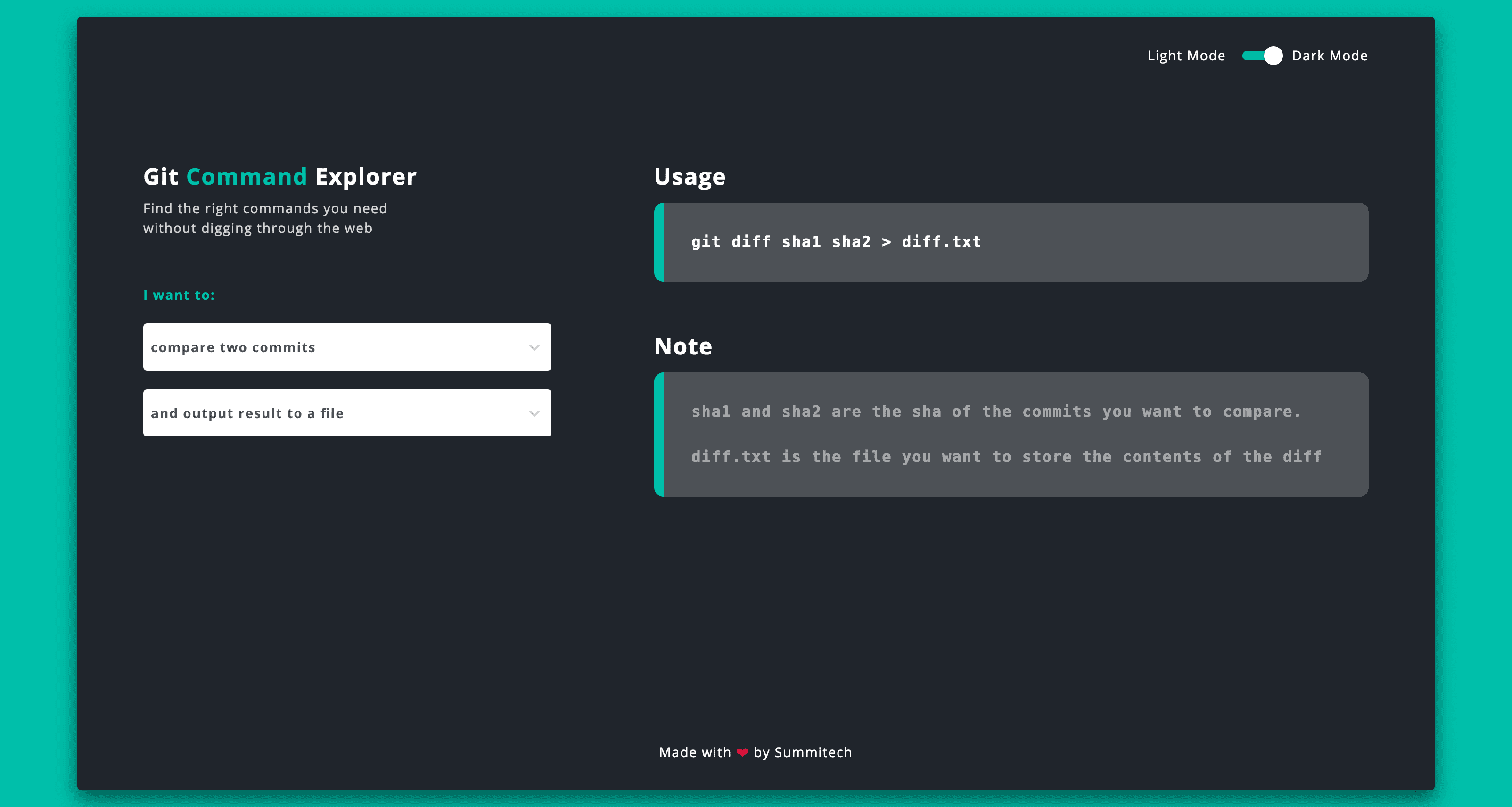
This is sooooo cool: [Wayback] Git Explorer

GitExplorer: Find the right git commands you need without digging through the web

What I like is the simple clean UI with a two step selection of what git functionality you want to use followed by a simple usage and explanation.

Very well suites for both referencing and interactive learning.

Bonus: it is open source at [Wayback/Archive.is] summitech/gitexplorer: Find the right git commands without digging through the web..

Via: [Archive.is] Marko ⚡ Denic on Twitter: “You can find the right git commands without digging through the web. “

–jeroen

Posted in Development, DVCS - Distributed Version Control, git, GitHub, Software Development, Versioning | Leave a Comment »

Great git videos on YouTube by @shanselman (thanks @simongeering)

Posted by jpluimers on 2021/11/11

[Archive.is] simon geering on Twitter: “Thanks to @shanselman for creating these great Git Videos. As a senior dev starting to mentor/teach tech skills this is very helpful. What tool do you use for the green arrows and other overlays please? Git 101; GitHub PRs “:

Embedded videos below the fold.

–jeroen

Read the rest of this entry »

Posted in Development, DVCS - Distributed Version Control, git, GitHub, Software Development, Source Code Management | Leave a Comment »

No GitHub: re-introducing an Inbox or Direct Messages is a bad idea!

Posted by jpluimers on 2021/08/18

Yesterday I published about Yet again, GitHub violates the Web Content Accessibility Guidelines by stealing a key: not it is the dot (.), and this week some feelers were put out for a kind of GitHub Inbox / Direct Message feature:

[Archive.is] GitHub Projects on Twitter: “What if there was 📨 DM/inbox feature on GitHub?”

There already is gitter.im (which is public instant messaging around GitHub repositories), and people have enough trouble managing all their incoming private message streams (be it paper/email inbox, social media and others), in large part because of SPAM and harassment messages.

It wasn’t by accident that the Private Messaging at GitHub feature was ditched almost a decade ago during [Wayback/Archive.is] 2012 Spring Cleaning | The GitHub Blog:

Private Messaging, however, was a step backwards: nobody wants another inbox. And a sub-par one, at that. Email is still the best way to contact someone.

Today we’re removing Private Messaging from GitHub. If you want people to contact you, please provide a public email address for your profile.

So I’m with all these:

Yes, I know [Archive.is] Tierney Cyren on Twitter: “A reminder that this account doesn’t actually represent GitHub nor any feature planning GitHub is doing… “, but I want to make absolutely clear to GitHub that another private message feature is a very bad idea.

–jeroen

Posted in Development, DVCS - Distributed Version Control, GitHub, Source Code Management | Leave a Comment »

Yet again, GitHub violates the Web Content Accessibility Guidelines by stealing a key: not it is the dot (.)

Posted by jpluimers on 2021/08/17

More sites seem to have a tendency of stealing keyboard shortcuts and violating the WCGA (Web Content Accessibility Guidelines), especially the (lowest!) conformance level A in [Wayback] WCAG version 2.1, section Success Criterion 2.1.4 Character Key Shortcuts

If a keyboard shortcut is implemented in content using only letter (including upper- and lower-case letters), punctuation, number, or symbol characters, then at least one of the following is true:

1. Turn off
mechanism is available to turn the shortcut off;
2. Remap
A mechanism is available to remap the shortcut to use one or more non-printable keyboard characters (e.g. Ctrl, Alt, etc);
3. Active only on focus
The keyboard shortcut for a user interface component is only active when that component has focus.

Mind you, I’m a keyboard person, there is even a: Keyboards and Keyboard Shortcuts category, but they always need to be configurable, anything else is a sin.

And GitHub did it again: [Archive.is] GitHub on Twitter: “🤫 New shortcut: Press . on any GitHub repo.… “.

So I’m totally with these:

Now they have started to steal the dot (.) keyboard to (in-place, with a fully new URL and no indication how to easily go back) start Visual Studio Code in the current repository.

Going back, though not documented, actually takes between one and three “back” movements in your web-browser history: utterly ridiculous for a key one can accidentally hit.

This behaviour violates all three above sub-criterions:

  1. it cannot be turned off
  2. there is no way to remap it
  3. it is almost always activated (unless there a text input – like “search” or “goto file” – has focus)

This is a very bad way to cope with accessibility, especially as conformance level A is yet again violated.

[Wayback] WCAG 2.1: section 5.2.1 Conformance Level:

One of the following levels of conformance is met in full.

  • For Level A conformance (the minimum level of conformance), the Web page satisfies all the Level A Success Criteria, or a conforming alternate version is provided.
  • For Level AA conformance, the Web page satisfies all the Level A and Level AA Success Criteria, or a Level AA conforming alternate version is provided.
  • For Level AAA conformance, the Web page satisfies all the Level A, Level AA and Level AAA Success Criteria, or a Level AAA conforming alternate version is provided.

To me another cardinal sin is that they stole Ctrl-F / Command-F (depending if you use non-MacOS or MacOS) from the web browser. So now it does not find it in the full page, but only in the currently selected file. (You guessed it, I’m with [Archive.is] KewlCat on Twitter: “I hate it when they intercept “/” and even [Ctrl]-F… “ too)

More of those conformance violation sins are at [Wayback] Keyboard shortcuts – GitHub Docs.

It isn’t hard to prevent this kind of thinking: it’s a mind set as described by [Archive.is] Patrick Joannisse on Twitter: “I don’t know if you are expecting a real answer but here goes: it starts with the mindset. In my training they had us wear goggles to block our vision and made us use a screen reader for a while. We met people with disabilities and they would show us how they work.… “

If you still like it and want to know how it works

–jeroen

Read the rest of this entry »

Posted in accessibility (a11y), Development, GitHub, Keyboards and Keyboard Shortcuts, Power User, Software Development, Source Code Management | Leave a Comment »

Frank A. Krueger on Twitter: “I made a build status IoT thing! Automatically polls @bitrise and is even Alexa controlled (for brightness and to turn off). Now I want to add github issue and PR counts. Just a $12 ESP32 and a $30 led matrix.”

Posted by jpluimers on 2021/07/28

[WayBack] Frank A. Krueger on Twitter: “I made a build status IoT thing! Automatically polls @bitrise and is even Alexa controlled (for brightness and to turn off). Now I want to add github issue and PR counts. Just a $12 ESP32 and a $30 led matrix.”

[WayBack]

https://web.archive.org/web/20190822202203/https://video.twimg.com/ext_tw_video/1164251716927156224/pu/vid/1280×720/Pn_rAACnrcUHfXol.mp4

–jeroen

Posted in Development, DVCS - Distributed Version Control, ESP32, GitHub, Hardware Development, Software Development, Source Code Management | Leave a Comment »

Thread by @mathdroid: “I now have the most swagger @github profile, EVER Sorry, your browser doesn’t support embedded videos @github Method: Download and install G […]”

Posted by jpluimers on 2021/03/24

That was such a cool idea: rickrolling your own git profile. [WayBack] Thread by @mathdroid: “I now have the most swagger @github profile, EVER […]”.

Github profile (which in the mean time changed): [WayBack] mathdroid (Odi) · GitHub.

–jeroen

Read the rest of this entry »

Posted in Development, DVCS - Distributed Version Control, Fun, GitHub, Source Code Management | Leave a Comment »

Syncing your fork to the original repository via the browser · KirstieJane/STEMMRoleModels Wiki · GitHub

Posted by jpluimers on 2020/12/31

[WayBack] Syncing your fork to the original repository via the browser · KirstieJane/STEMMRoleModels Wiki · GitHub

TL;DR: you can do the sync from the Web UI, but it always gives you an extra merge commit.

–jeroen

Posted in Development, DVCS - Distributed Version Control, git, GitHub, LifeHacker, Power User, Source Code Management | Leave a Comment »