The Wiert Corner – irregular stream of stuff

Jeroen W. Pluimers on .NET, C#, Delphi, databases, and personal interests

  • My badges

  • Twitter Updates

  • My Flickr Stream

  • Pages

  • All categories

  • Enter your email address to subscribe to this blog and receive notifications of new posts by email.

    Join 1,860 other subscribers

Archive for the ‘History’ Category

Horace Dediu on Twitter: “Personal computing, the first 40 years.… “

Posted by jpluimers on 2018/06/01

[WayBackHorace Dediu on Twitter: “Personal computing, the first 40 years.… “

–jeroen

Read the rest of this entry »

Posted in History, Power User | Leave a Comment »

DRAM Access Timing – now and then (then = during 6502 times) TL;DR: Modern DR…

Posted by jpluimers on 2018/05/28

DRAM Access Timing – now and then (then = during 6502 times)TL;DR: Modern DRAM ist faster old stuff, but not much. – Kristian Köhntopp – Google+

Source: [WayBackDRAM Access Timing – now and then (then = during 6502 times) TL;DR: Modern DR…

Full article: [WayBackdram_latency_then_and_now.md by [WayBackPer Vognsen.

–jeroen

Posted in Development, Hardware Development, History, Software Development | Leave a Comment »

Apple II Ethernet Module – a2RetroSystems

Posted by jpluimers on 2018/05/25

Reminder to self: see if I can order this:

Apple II Ethernet Module – This product is based on the Wiznet W5100 chip. It has an embedded hardware IP stack. Contiki, IP65, Marinetti and ADTPro have been updated to work with the new card.

We will be using Itead as our current PCB supplier.
The card will be assembled by Circuits Central

Source: [WayBackWelcome to a2RetroSystems

Other links:

–jeroen

Read the rest of this entry »

Posted in //e, 6502, Apple, Apple ][, History, Power User | Leave a Comment »

MMX – speed up your Delphi development, now maintained by Raabe Software

Posted by jpluimers on 2018/05/23

New home [WayBackMMX – speed up your Delphi development

Old home [WayBack] ModelMaker Tools

Thanks a lot to Gerrit Beuze for al the efforts and insights while he created and maintained MMX for such a long time

Thanks a lot to Uwe Raabe for taking over the maintenance and providing the binaries for free.

I have posted links to some archived site pages below, just in case anybody needs them (when QC went off-line after a while the Google Search failed to show search results for this; hopefully this will keep some of the information retrievable).

As a follow up to:

–jeroen

Archived links (in semi-random order) hopefully they survive the shutdown of the links:

Read the rest of this entry »

Posted in Delphi, Development, Diagram, History, ModelMaker Code Explorer, Software Development, UML | 2 Comments »

The Businesses Apple Has Left Behind – MacStories

Posted by jpluimers on 2018/05/21

Since I’m in history mode: [WayBackThe Businesses Apple Has Left Behind – MacStories

  • Digital Cameras
  • Printers
  • Scanners
  • External Speakers
  • External Storage Devices
  • Monitors

–jeroen

Posted in History, Power User | Leave a Comment »

Open Apple #66 (December 2016) : Glenda “The Atom” Adams | Open Apple

Posted by jpluimers on 2018/05/21

From a while back: [WayBack] Open Apple #66 (December 2016) : Glenda “The Atom” Adams | Open Apple

This month on Open Apple, we sit down with Glenda Adams, better known on the Apple II as The Atom. She was a cracker of some note back in the 1980s, and she shares great stories with us…

It reminded me of the days I started to learn programming. Good memories. @glenda_atom was way ahead of me (:

–jeroen

Posted in //e, 6502, Apple, Apple ][, Classic Macintosh, History, Macintosh SE/30, Power User | Leave a Comment »

More old Apple documentation

Posted by jpluimers on 2018/04/27

It’s been a while back, but these are part of bitsavers.org:

  1. [WayBack] http://bitsavers.trailing-edge.com/pdf/apple/service/PN_072-0213F_Apple_Service_Technical_Procedures_Peripheral_Interface_Guide-Jan_1991.pdf
  2. [WayBack] http://bitsavers.trailing-edge.com/pdf/apple/service/Apple_Service_Source_LaserWriter_Pro.pdf

I expect few people to still have a functioning Apple LaserWriter Pro as – despite them bing very solid devices – having them last for almost 25 years is quite a feat.

But I do know many people have machines from the Apple II through Macintosh II era, and that’s what the first manual is about. Some of the contents:

Peripheral Interface Guide rev. Jan 91

Macintosh Family Computers

  • Introduction 3
  • Computer Port Locations 4
  • Computer Ports 6
    • Modem and Printer Connectors – DE-9 6
    • Modem and Printer Connectors – Mini DIN-8 7
    • SCSI Connector (Pins 1-12) 8
    • SCSI Connector (Pins 13-25) 9
    • Apple Desktop Bus Connector 10
    • Keyboard Connector 11
    • Mouse Connector 11
    • Audio Input Connector 12
    • Audio Output Connector – Monaural 12
    • Audio Output Connector – Stereo 12
    • External Disk Drive Connector 13
    • External Video Connector 14
    • External Video Connector – Macintosh Portable 14
  • Interface Cards 16
    • Macintosh Display Cards 4/8, 8/24, 16 and 8/24-GC
    • Macintosh II High-Resolution and I-bit Monochrome Video Cards 17
    • Macintosh II Portrait Display and Two-Page Monochrome Monitor Video Cards (Current Version) 18
    • Macintosh II Portrait Display and TWO-Page Monochrome Monitor Video Cards (Obsolete Version) 19
    • EtherTalk Interface and EtherTalk NB Cards 20
    • TokenTalk NB Interface Card 20
    • Coax/fwinax Interface Card – Coax Connector 21
    • Coax/fwinax Interface Card – Twinax Connector 21
    • Serial NB Interface Card (Pins 1-20) 22
    • Serial NB Interface Card (Pins 21-40) 23
    • Serial NB Interface Card (Pins 41-62) 24

Apple II Family Computers

  • Introduction 3
  • Computer Port Locations 4
  • Apple IIGS Computer Ports 5
    • Sound Input/Output Connector 5
    • Audio Connector 5
    • Composite Video Connector 5
    • Modem and Printer Connectors 6
    • Apple Desktop Bus Connector 6
    • Disk Drive Connector 7
    • RGB Video Connector 8
    • Joystick/Hand Controller Connector 9
  • Apple lIc/IIc plus Computer Ports 10
    • Modem and Printer Connectors – Mini DIN-5 10
    • Modem and Printer Connectors – Mini DIN-8 11
    • Joystick/Hand Controller/Mouse Connector 12
    • Video Expansion Connector 13
    • External Disk Drive Connector 14
    • Composite Video Connector 15
    • Audio Connector 15
    • Power Adapter Connector 15
  • Apple II/II Plus/lIe Computer Ports 16
    • Cassette Input Connector 16
    • Cassette Output Connector 16
    • Composite Video Connector 17
    • Auxiliary Video Connector 17
    • Game Controller Connector 18
    • Joystick/Hand Controller Connector 19
    • Apple II Interface Cards 20
    • Communications Card Pin-outs 20
    • Super Serial Card Pin-outs 21
    • Super Serial Card Printer Mode – Switch SW1 22
    • Super Serial Card Printer Mode – Switch SW2 23
    • Super Serial Card Communication Mode – Switch SWI 24
    • Super Serial Card Communication Mode – Switch SW2 25
    • Serial Interface Card Pin-outs 26
    • Serial Interface Card Switch Settings 27
    • Parallel Printer and Centronics Printer Interface Card Pin-outs 28
    • IEEE-488 Interface Pin-outs 29
    • Parallel Interface Card Pin-outs 30
    • Parallel Interface Card Switch Settings 31
    • Apple II Video Overlay Card Pin-outs 32
    • Apple II SCSI and High-Speed SCSI Cards Pin-outs 33
    • Graphics Tablet Interface Pin-outs – Pen 34
    • Graphics Tablet Interface Pin-outs – Tablet 34
    • Peripheral Connections 35
    • Apple II/II Plus/IIe Peripheral Connections 35
    • Apple lIe Peripheral Connections 36
    • Apple IIGS and lIe Plus Peripheral Connections 37
Apple III & Lisa/Mac XL Computers
  • Introduction 3
  • Computer Port Locations 4
  • Apple III/III Plus Computer Ports 5
    • Audio Connector 5
    • Monochrome Video Connector 5
    • Serial Connector 5
    • External Disk Drive Connector 6
    • Color Video Connector 7
    • Joystick A Connector 8
    • Joystick B Connector 9
  • Apple ill/III Plus Interface Cards 10
    • Universal Parallel Interface Card Pin-outs 10 (Pins 1-20)
    • Universal Parallel Interface Card Pin-outs 11 (Pins 21-40)
    • Serial Card III Pin-outs 12
  • Peripheral Connections 13
    • Apple III and III Plus Peripheral Connections 13
  • Lisa/Macintosh XL Computer Ports 14
    • Serial A Connector 14
    • Serial B Connector 15
    • Mouse Connector 16
    • Composite Video Connector 16
    • Parallel Connector 17
  • Lisa/Macintosh XL Interface Cards 18
    • Two-Port Parallel Card Pin-outs 18
  • Peripheral Connections 19

Peripherals

  • Introduction 3
  • Laser Printers 4
    • Personal LaserWriter NT, LaserWriter II NT and NTX Pin-outs – RS-422 4
    • Personal LaserWriter NT – Thumbwheel Switch 6
    • Personal LaserWriter NT, LaserWriter II NT and NTX Pin-outs – RS-232 4
    • LaserWriter II NTX – Switch 1 5
    • LaserWriterIINl-Switch1 5
    • LaserWriter II SC and Personal LaserWriter SC 7
    • Pin-outs LaserWriter and LaserWriter Plus Pin-outs AppleTalk 8
    • LaserWriter and LaserWriter Plus Pin-outs – RS-232 8
  • Non-Laser Printers
    • ImageWriter II and II/L Pin-outs 9
    • ImageWriter II and II/L – Switch 1 10
    • ImageWriter 11 and II/L – Switch 2 11
    • ImageWriter LQ Pin-outs 12
    • ImageWriter LQ – Switch 1 13
    • ImageWriter LQ – Switch 2 14
    • ImageWriter LQ – Switch 3 15
    • ImageWriter and ImageWriter 15-Inch Pin-outs 16
    • ImageWriter and ImageWriter 15-Inch – Switch 2 16
    • ImageWriter and ImageWriter 15-Inch – Switch 1 17
    • Daisy Wheel Printer Pin-outs 18
    • Daisy Wheel Printer – Inside Front Panel Switch 19
    • Daisy Wheel Printer – Rear Panel Switch 1 20
    • Daisy Wheel Printer – Rear Panel Switch 2 21
    • Scribe Pin-outs 22 Scribe – Switch 1 23
    • Dot Matrix Printer Pin-outs 24
    • Dot Matrix Printer – Switch 1 25
    • Dot Matrix Printer – Switch 2 26
    • Color Plotter Pin-outs
    • Color Plotter – Switch 1 27 28
  • Modems and Communication Devices 29
    • Apple Personal Modem Pin-outs 29
    • AppleFax Modem and Apple Data Modem 2400 – Pin-outs 29
    • Modem 300/1200 Pin-outs 30
    • Modem 300 – Switches 30
    • Modem 1200 – Switches 31
    • AppleLine Pin-outs 32
    • Cluster Controller Pin-outs – Asynchronous Direct Port 33
    • Cluster Controller Pin-outs — Modem Port 33
  • Monitors 34
    • AppleColor High-Resolution RGB Monitor Pin-outs 34
    • Apple High-Resolution Monochrome Monitor Pin-outs 35
    • Macintosh Portrait Display and Two-Page Monochrome Monitor Pin-outs 36
    • AppleColor RGB and Color Monitor 100 Pin-outs 37
  • Miscellaneous
    • Apple Scanner, CD SC, HD SC, and Tape Backup 40 SC Pin-outs 38
    • Apple MIDI Interface Pin-outs 39

Cables


–jeroen

Posted in //e, 6502, 68k, Apple, Apple ][, Classic Macintosh, History, Macintosh SE/30, Power User | Leave a Comment »

History: Pascal compiler for 68000 firmware development

Posted by jpluimers on 2018/04/03

From the 1980s: GCS Pascal compiler for 68000 firmware development [WayBack] http://www.wirfs-brock.com/allen/files/tek/gcsPascal.pdf article by Allen Wirfs-Brock and Paul L. McCuiiough both working for Tektronix back then (note the company still exists after all these years).

via: [WayBack] A PASCAL COMPILER FOR MOTOROLA 68000 FIRMWARE DEVELOPMENT – Pascal is a computer programming language known for itsunique combination of simplicity, pow… – Kyle Miller – Google+

–jeroen

Posted in 68k, Development, History, Pascal, Software Development | Leave a Comment »

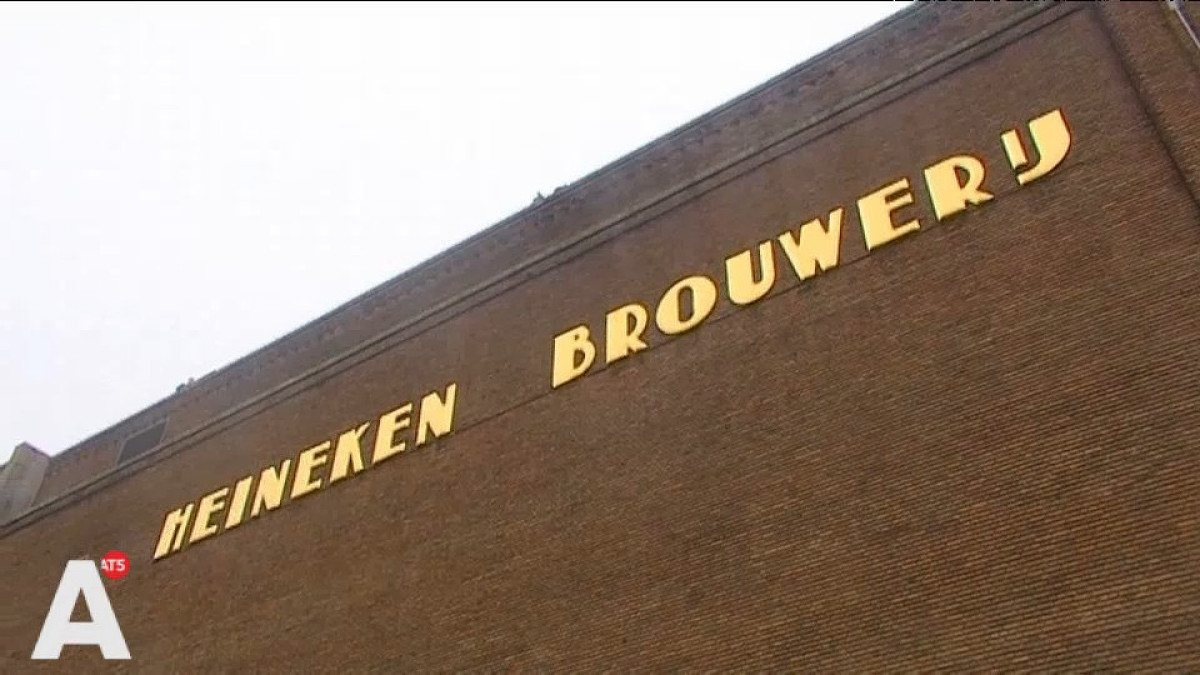
The origin of the space between in the “Heineken Brouwerij” logo of the Amsterdam brewery

Posted by jpluimers on 2018/04/02

On the very early adoption of the spacing in the typography:

Ooit wel eens stilgestaan bij het iets te grote gat tussen de woorden Heineken en Brouwerij op de Stadhouderskade? Of waarom de belettering op bruggen in de stad zo ‘Amsterdams’ aandoet? Waarschijnlijk niet. Typograaf Bas Jacobs deed dat wel. Zijn ontdekkingen bundelde hij in een speciale toeristengids.

A small book (just EUR 15) tells you more about his Amsterdam findings: Safari Typo Amsterdam

Source: [WayBackWaar komt Heineken spatie Brouwerij eigenlijk vandaan? – AT5: de nieuwszender van Amsterdam en omgeving

–jeroen
Posted in Font, History, Typography | Leave a Comment »

Exclusive: The Silicon Valley quest to preserve Stephen Hawking’s voice – San Francisco Chronicle

Posted by jpluimers on 2018/04/01

Long read: [WayBackExclusive: The Silicon Valley quest to preserve Stephen Hawking’s voice – San Francisco Chronicle

Eric Dorsey, a 62-year-old engineer in Palo Alto, was watching TV Tuesday night when he started getting texts that Stephen Hawking had died. He turned on the news and saw clips of the famed physicist speaking in his iconic android voice – the voice that Dorsey had spent so much time as a young man helping to create, and then, much later, to save from destruction. Dorsey and Hawking had first met nearly 30 years earlier to the day. In March 1988, Hawking was visiting UC Berkeley during a three-week lecture tour. At 46, Hawking was already famous for his discoveries about quantum physics and black holes, but not as famous as he was about to be.

Via: [WayBack] Steven Hawkings last voice was a Pi.  – Tim Rowledge – Google+

–jeroen

Read the rest of this entry »

Posted in History, Power User, science | Leave a Comment »