The Wiert Corner – irregular stream of stuff

Jeroen W. Pluimers on .NET, C#, Delphi, databases, and personal interests

  • My badges

  • Twitter Updates

  • Pages

  • All categories

  • Enter your email address to subscribe to this blog and receive notifications of new posts by email.

    Join 1,854 other subscribers

Archive for the ‘History’ Category

More old Apple documentation

Posted by jpluimers on 2018/04/27

It’s been a while back, but these are part of bitsavers.org:

  1. [WayBack] http://bitsavers.trailing-edge.com/pdf/apple/service/PN_072-0213F_Apple_Service_Technical_Procedures_Peripheral_Interface_Guide-Jan_1991.pdf
  2. [WayBack] http://bitsavers.trailing-edge.com/pdf/apple/service/Apple_Service_Source_LaserWriter_Pro.pdf

I expect few people to still have a functioning Apple LaserWriter Pro as – despite them bing very solid devices – having them last for almost 25 years is quite a feat.

But I do know many people have machines from the Apple II through Macintosh II era, and that’s what the first manual is about. Some of the contents:

Peripheral Interface Guide rev. Jan 91

Macintosh Family Computers

  • Introduction 3
  • Computer Port Locations 4
  • Computer Ports 6
    • Modem and Printer Connectors – DE-9 6
    • Modem and Printer Connectors – Mini DIN-8 7
    • SCSI Connector (Pins 1-12) 8
    • SCSI Connector (Pins 13-25) 9
    • Apple Desktop Bus Connector 10
    • Keyboard Connector 11
    • Mouse Connector 11
    • Audio Input Connector 12
    • Audio Output Connector – Monaural 12
    • Audio Output Connector – Stereo 12
    • External Disk Drive Connector 13
    • External Video Connector 14
    • External Video Connector – Macintosh Portable 14
  • Interface Cards 16
    • Macintosh Display Cards 4/8, 8/24, 16 and 8/24-GC
    • Macintosh II High-Resolution and I-bit Monochrome Video Cards 17
    • Macintosh II Portrait Display and Two-Page Monochrome Monitor Video Cards (Current Version) 18
    • Macintosh II Portrait Display and TWO-Page Monochrome Monitor Video Cards (Obsolete Version) 19
    • EtherTalk Interface and EtherTalk NB Cards 20
    • TokenTalk NB Interface Card 20
    • Coax/fwinax Interface Card – Coax Connector 21
    • Coax/fwinax Interface Card – Twinax Connector 21
    • Serial NB Interface Card (Pins 1-20) 22
    • Serial NB Interface Card (Pins 21-40) 23
    • Serial NB Interface Card (Pins 41-62) 24

Apple II Family Computers

  • Introduction 3
  • Computer Port Locations 4
  • Apple IIGS Computer Ports 5
    • Sound Input/Output Connector 5
    • Audio Connector 5
    • Composite Video Connector 5
    • Modem and Printer Connectors 6
    • Apple Desktop Bus Connector 6
    • Disk Drive Connector 7
    • RGB Video Connector 8
    • Joystick/Hand Controller Connector 9
  • Apple lIc/IIc plus Computer Ports 10
    • Modem and Printer Connectors – Mini DIN-5 10
    • Modem and Printer Connectors – Mini DIN-8 11
    • Joystick/Hand Controller/Mouse Connector 12
    • Video Expansion Connector 13
    • External Disk Drive Connector 14
    • Composite Video Connector 15
    • Audio Connector 15
    • Power Adapter Connector 15
  • Apple II/II Plus/lIe Computer Ports 16
    • Cassette Input Connector 16
    • Cassette Output Connector 16
    • Composite Video Connector 17
    • Auxiliary Video Connector 17
    • Game Controller Connector 18
    • Joystick/Hand Controller Connector 19
    • Apple II Interface Cards 20
    • Communications Card Pin-outs 20
    • Super Serial Card Pin-outs 21
    • Super Serial Card Printer Mode – Switch SW1 22
    • Super Serial Card Printer Mode – Switch SW2 23
    • Super Serial Card Communication Mode – Switch SWI 24
    • Super Serial Card Communication Mode – Switch SW2 25
    • Serial Interface Card Pin-outs 26
    • Serial Interface Card Switch Settings 27
    • Parallel Printer and Centronics Printer Interface Card Pin-outs 28
    • IEEE-488 Interface Pin-outs 29
    • Parallel Interface Card Pin-outs 30
    • Parallel Interface Card Switch Settings 31
    • Apple II Video Overlay Card Pin-outs 32
    • Apple II SCSI and High-Speed SCSI Cards Pin-outs 33
    • Graphics Tablet Interface Pin-outs – Pen 34
    • Graphics Tablet Interface Pin-outs – Tablet 34
    • Peripheral Connections 35
    • Apple II/II Plus/IIe Peripheral Connections 35
    • Apple lIe Peripheral Connections 36
    • Apple IIGS and lIe Plus Peripheral Connections 37
Apple III & Lisa/Mac XL Computers
  • Introduction 3
  • Computer Port Locations 4
  • Apple III/III Plus Computer Ports 5
    • Audio Connector 5
    • Monochrome Video Connector 5
    • Serial Connector 5
    • External Disk Drive Connector 6
    • Color Video Connector 7
    • Joystick A Connector 8
    • Joystick B Connector 9
  • Apple ill/III Plus Interface Cards 10
    • Universal Parallel Interface Card Pin-outs 10 (Pins 1-20)
    • Universal Parallel Interface Card Pin-outs 11 (Pins 21-40)
    • Serial Card III Pin-outs 12
  • Peripheral Connections 13
    • Apple III and III Plus Peripheral Connections 13
  • Lisa/Macintosh XL Computer Ports 14
    • Serial A Connector 14
    • Serial B Connector 15
    • Mouse Connector 16
    • Composite Video Connector 16
    • Parallel Connector 17
  • Lisa/Macintosh XL Interface Cards 18
    • Two-Port Parallel Card Pin-outs 18
  • Peripheral Connections 19

Peripherals

  • Introduction 3
  • Laser Printers 4
    • Personal LaserWriter NT, LaserWriter II NT and NTX Pin-outs – RS-422 4
    • Personal LaserWriter NT – Thumbwheel Switch 6
    • Personal LaserWriter NT, LaserWriter II NT and NTX Pin-outs – RS-232 4
    • LaserWriter II NTX – Switch 1 5
    • LaserWriterIINl-Switch1 5
    • LaserWriter II SC and Personal LaserWriter SC 7
    • Pin-outs LaserWriter and LaserWriter Plus Pin-outs AppleTalk 8
    • LaserWriter and LaserWriter Plus Pin-outs – RS-232 8
  • Non-Laser Printers
    • ImageWriter II and II/L Pin-outs 9
    • ImageWriter II and II/L – Switch 1 10
    • ImageWriter 11 and II/L – Switch 2 11
    • ImageWriter LQ Pin-outs 12
    • ImageWriter LQ – Switch 1 13
    • ImageWriter LQ – Switch 2 14
    • ImageWriter LQ – Switch 3 15
    • ImageWriter and ImageWriter 15-Inch Pin-outs 16
    • ImageWriter and ImageWriter 15-Inch – Switch 2 16
    • ImageWriter and ImageWriter 15-Inch – Switch 1 17
    • Daisy Wheel Printer Pin-outs 18
    • Daisy Wheel Printer – Inside Front Panel Switch 19
    • Daisy Wheel Printer – Rear Panel Switch 1 20
    • Daisy Wheel Printer – Rear Panel Switch 2 21
    • Scribe Pin-outs 22 Scribe – Switch 1 23
    • Dot Matrix Printer Pin-outs 24
    • Dot Matrix Printer – Switch 1 25
    • Dot Matrix Printer – Switch 2 26
    • Color Plotter Pin-outs
    • Color Plotter – Switch 1 27 28
  • Modems and Communication Devices 29
    • Apple Personal Modem Pin-outs 29
    • AppleFax Modem and Apple Data Modem 2400 – Pin-outs 29
    • Modem 300/1200 Pin-outs 30
    • Modem 300 – Switches 30
    • Modem 1200 – Switches 31
    • AppleLine Pin-outs 32
    • Cluster Controller Pin-outs – Asynchronous Direct Port 33
    • Cluster Controller Pin-outs — Modem Port 33
  • Monitors 34
    • AppleColor High-Resolution RGB Monitor Pin-outs 34
    • Apple High-Resolution Monochrome Monitor Pin-outs 35
    • Macintosh Portrait Display and Two-Page Monochrome Monitor Pin-outs 36
    • AppleColor RGB and Color Monitor 100 Pin-outs 37
  • Miscellaneous
    • Apple Scanner, CD SC, HD SC, and Tape Backup 40 SC Pin-outs 38
    • Apple MIDI Interface Pin-outs 39

Cables


–jeroen

Posted in //e, 6502, 68k, Apple, Apple ][, Classic Macintosh, History, Macintosh SE/30, Power User | Leave a Comment »

History: Pascal compiler for 68000 firmware development

Posted by jpluimers on 2018/04/03

From the 1980s: GCS Pascal compiler for 68000 firmware development [WayBack] http://www.wirfs-brock.com/allen/files/tek/gcsPascal.pdf article by Allen Wirfs-Brock and Paul L. McCuiiough both working for Tektronix back then (note the company still exists after all these years).

via: [WayBack] A PASCAL COMPILER FOR MOTOROLA 68000 FIRMWARE DEVELOPMENT – Pascal is a computer programming language known for itsunique combination of simplicity, pow… – Kyle Miller – Google+

–jeroen

Posted in 68k, Development, History, Pascal, Software Development | Leave a Comment »

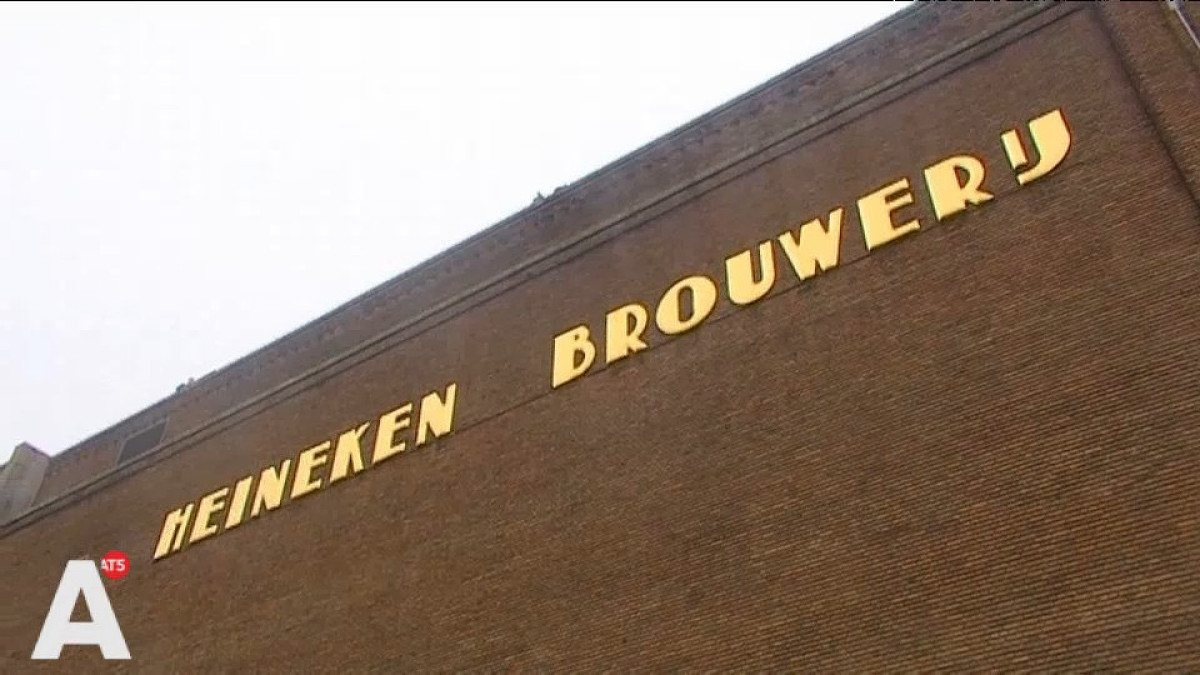
The origin of the space between in the “Heineken Brouwerij” logo of the Amsterdam brewery

Posted by jpluimers on 2018/04/02

On the very early adoption of the spacing in the typography:

Ooit wel eens stilgestaan bij het iets te grote gat tussen de woorden Heineken en Brouwerij op de Stadhouderskade? Of waarom de belettering op bruggen in de stad zo ‘Amsterdams’ aandoet? Waarschijnlijk niet. Typograaf Bas Jacobs deed dat wel. Zijn ontdekkingen bundelde hij in een speciale toeristengids.

A small book (just EUR 15) tells you more about his Amsterdam findings: Safari Typo Amsterdam

Source: [WayBackWaar komt Heineken spatie Brouwerij eigenlijk vandaan? – AT5: de nieuwszender van Amsterdam en omgeving

–jeroen
Posted in Font, History, Typography | Leave a Comment »

Exclusive: The Silicon Valley quest to preserve Stephen Hawking’s voice – San Francisco Chronicle

Posted by jpluimers on 2018/04/01

Long read: [WayBackExclusive: The Silicon Valley quest to preserve Stephen Hawking’s voice – San Francisco Chronicle

Eric Dorsey, a 62-year-old engineer in Palo Alto, was watching TV Tuesday night when he started getting texts that Stephen Hawking had died. He turned on the news and saw clips of the famed physicist speaking in his iconic android voice – the voice that Dorsey had spent so much time as a young man helping to create, and then, much later, to save from destruction. Dorsey and Hawking had first met nearly 30 years earlier to the day. In March 1988, Hawking was visiting UC Berkeley during a three-week lecture tour. At 46, Hawking was already famous for his discoveries about quantum physics and black holes, but not as famous as he was about to be.

Via: [WayBack] Steven Hawkings last voice was a Pi.  – Tim Rowledge – Google+

–jeroen

Read the rest of this entry »

Posted in History, Power User, science | Leave a Comment »

23 Things Only 90s Sysadmins will Remember – DiscoPosse.com

Posted by jpluimers on 2018/03/24

[WayBack23 Things Only 90s Sysadmins will Remember – DiscoPosse.com.

Much more for me:

–jeroen

via:

Read the rest of this entry »

Posted in History | Leave a Comment »

Wolfgang Rupprecht on Dennis H. Klat, Carlos Hawking and Deeklatt – Google+

Posted by jpluimers on 2018/03/18

Wow: [WayBackWolfgang Rupprecht – Google+:

Dennis H. Klatt 1938 – 1988

I knew him at MIT. He was my undergraduate thesis advisor and was a kind and gentle person. When I knew him around 1980 he was about to build the prototype for the first Klatt Talker as it was called then. He had speech samples generated by running his mathematical model of the vocal tract on a large mainframe, but no way to generate speech in real time. I remember being quite happy years later when I heard he had convinced DEC to produce it. The local Boston radio stations would sometimes use it on air when they were goofing around. The initial voice (and the only voice early on) had a bug that made it sound like a Mexican accent to most people. It wasn’t intentional and was a bit of a surprise that a vocal tract modeled from first principles would sound that way. Going with that observation and figuring it was best to advertise bugs as features, the voice was often called “Carlos”. I didn’t realize that Hawking’s voice was also based on the Klatt models (and Klatt’s own voice at that!)

Poking around Google to see what else Google had on him dredged up one more interesting tidbit. There was a character in a TV cartoon called Deeklatt that used his voice. I wonder how many people realize that Deeklatt was a play on D. Klatt. Dennis, we should all be so lucky as to leave a legacy like yours.

–jeroen

Posted in History, LifeHacker, science | 1 Comment »

Sex, Pong, And Pioneers: What Atari Was Really Like, According To Women Who Were There

Posted by jpluimers on 2018/03/03

If we apply todays standards to the past, how will we be rated by future generations?

Interesting thoughts and stories on [WayBackSex, Pong, And Pioneers: What Atari Was Really Like, According To Women Who Were There.

Via:

–jeroen

Posted in History, Opinions | Leave a Comment »

Bye bye plaxo link

Posted by jpluimers on 2018/02/28

Just found out that Plaxo died. So bye bye for this link:

–jeroen

via: [WayBack]Sean Parker’s other notorious startup, Plaxo, is finally dead — here’s how it influenced Facebook

Posted in History | Leave a Comment »

Etaoin shrdlu – via 5 Hole Paper Tape – Computerphile

Posted by jpluimers on 2018/01/29

Etaoin shrdlu (/ˈɛtiˌɔɪnˈʃɜrdluː/)[1] … is the approximate order of frequency of the 12 most commonly used letters in the English language.

via 5 Hole Paper Tape – Computerphile

Source: Etaoin shrdlu – Wikipedia, the free encyclopedia

Posted in Fun, History, Quotes, T-Shirt quotes | Leave a Comment »

Installing A Maccon Card In A Macintosh Se/30 – Asante MacCon Family Ethernet Network Cards For The Macintosh Installation Manual [Page 29]

Posted by jpluimers on 2018/01/19

To get started:

Pictures, binary driver image from Index of /pdf/apple/nubus/asante/MacCon_SE30

Index of /pdf/apple/nubus/asante/MacCon_SE30

[ICO] Name Last modified Size Description

[PARENTDIR] Parent Directory
[   ] 5000118-00-01.BIN 2018-01-11 10:16 16K
[IMG] Asante_MacCon_SE30_1.JPG 2018-01-10 14:24 545K
[IMG] Asante_MacCon_SE30_2.JPG 2018-01-10 14:24 418K
[IMG] Asante_MacCon_SE30_3.JPG 2018-01-11 10:17 573K
[IMG] Asante_MacCon_SE30_4.JPG 2018-01-11 10:17 543K
[IMG] Asante_MacCon_SE30_5.JPG 2018-01-11 10:17 439K
[IMG] Farallon_SI_A_Series_b.JPG 2018-01-11 10:17 438K
[IMG] Farallon_SI_A_Series_f.JPG 2018-01-11 10:17 637K

Apache/2.4.18 (Ubuntu) Server at bitsavers.trailing-edge.com Port 80


–jeroen

Posted in Apple, Classic Macintosh, History, Macintosh SE/30, Power User | Leave a Comment »