The Wiert Corner – irregular stream of stuff

Jeroen W. Pluimers on .NET, C#, Delphi, databases, and personal interests

  • My badges

  • Twitter Updates

  • My Flickr Stream

  • Pages

  • All categories

  • Enter your email address to subscribe to this blog and receive notifications of new posts by email.

    Join 1,861 other subscribers

Archive for the ‘OS X 10.11 El Capitan’ Category

iMovie on a 2010 iMac was starting and running slow: 2 simple steps solved that

Posted by jpluimers on 2017/02/27

iMovie on a 2010 iMac was starting and running slow. During startup, it wasn’t using much memory, but during editing it did: less than 2 gigabyte out of 8 gigabyte free memory left.

The hard-disk was like 30% full, there wasn’t much in the cache, few processes were auto-starting and the recycle bin was almost empty.

So my first thought was adding more RAM (which is easy): duplicating it to 16 megabyte was easy and not expensive when you look at the Amazon prices for it.

After that it was faster, but not really fast: especially the loading was still slow (less slow than before, but still taking minutes).

Then I scanned for permission issues and there were quite a few as the machine had been getting updates since 2010. So I repaired the permissions using disk utility.

Now iMovie loaded much faster as well: in under a minute.

So out of 17 Ways to Speed Up Mac OS X Lion – ChrisWrites.com, only 2 steps were really needed so far.

–jeroen

Posted in Apple, iMac, Mac, Mac OS X / OS X / MacOS, Mac OS X 10.6 Snow Leopard, Mac OS X 10.7 Lion, OS X 10.10 Yosemite, OS X 10.11 El Capitan, OS X 10.8 Mountain Lion, OS X 10.9 Mavericks, Power User | Leave a Comment »

Determining the current shell in *n*x variants including ESXi

Posted by jpluimers on 2017/02/08

On most systems, I use bash as shell, but not all systems have it, for instance the shell.xs4all.nl server uses tcsh and ESXi 4+ uses a very limited ash shell from busybox (ESX 4 had bash though).

There is this huge script that covers many shell and operating system versions (even DOS, Windows) and interpreters (python, ruby, php, etc) what shell is this which I got through Stéphane Chazelas‘s answer in linux – determine shell in script during runtime – Unix & Linux Stack Exchange

I wanted a shorter thing that works in current Linux, BSD, OS X and ESXi versions.

Some very short scripts are less reliable, for instance echo $SHELL looks nice, but isn’t always set.

Similar for echo $0 which will fail for instance if it shows as sh but in fact is a different shell in disguise.

This works for bash, tcsh and busybox sh, is a bit more precise than getting $0. It’s based on HOWTO: Detect bash from shell script – Stack Overflow:

lsof -p $$ | awk '(NR==2) {print $1}'

But on ESXi it shows this because lsof doesn’t take any parameter there and just dumps all information:

----------+---------------------+---------------------+--------+------------------

It’s because lsof on ESXi always shows this header where Cartel and World aren’t exactly well documented:

Cartel | World name | Type | fd | Description
----------+---------------------+---------------------+--------+------------------

Empirically for non VM related processes, it looks like the Cartel is the PID and World name the command.

On Linux and BSD based systems, the header looks like this, so command and PID are reversed in ESXi:

COMMAND PID USER FD TYPE DEVICE SIZE/OFF NODE NAME

This command then works on both ESXi, OS X, Linux and BSD assuming you can word search for the PID and noting that PID/command will be reversed on ESXi as compared to OSX/Linux/BSD:

lsof -p $$ | grep -w $$ | awk '(NR==2) {print $1,$2}'

–jeroen

Posted in Apple, bash, BSD, Development, iMac, Mac, Mac OS X / OS X / MacOS, Mac OS X 10.4 Tiger, Mac OS X 10.5 Leopard, Mac OS X 10.6 Snow Leopard, Mac OS X 10.7 Lion, MacBook, MacBook Retina, MacBook-Air, MacBook-Pro, MacMini, OS X 10.10 Yosemite, OS X 10.11 El Capitan, OS X 10.8 Mountain Lion, OS X 10.9 Mavericks, Power User, Scripting, Software Development | Leave a Comment »

Inspecting/unpacking a Linux rpm file on Mac OS X

Posted by jpluimers on 2016/11/18

You need this statement to unpack an rpm file on Mac OS X without having rpm installed:

rpm2cpio ##filename.rpm## | cpio -idmv

This will make rpm2cpio unpack the rpm file in the current directory using these cpio options:

  • i – use the rpm2cpoio as unput
  • d – created directories when needed
  • m – set modification timestamps from the archive
  • v – verbose filenames to stderr

cpio is already part of the Mac OS X system.

You can get rpm2cpio through homebrew by typing brew install rpm2cpio which will likely also download he xz dependency.

–jeroen

via: rhel – Open a RPM on a Mac? – Unix & Linux Stack Exchange

Posted in *nix, *nix-tools, Apple, iMac, Linux, Mac, Mac OS X / OS X / MacOS, MacBook, MacBook Retina, MacBook-Air, MacBook-Pro, MacMini, OS X 10.10 Yosemite, OS X 10.11 El Capitan, OS X 10.9 Mavericks, Power User, rpm | Leave a Comment »

Some notes on modifying NIB files on Mac OS X to add/change shortcuts

Posted by jpluimers on 2016/10/19

One of the nitpicks in VMware Fusion is that it has no keyboard shortcut for Resume or Suspend. I was trying to add Command-R and Command-S for those but that didn’t work out.

Since the links below seem to work for some other applications, I’ve kept them:

–jeroen

Posted in Apple, Development, Keyboards and Keyboard Shortcuts, Mac, Mac OS X / OS X / MacOS, MacBook, MacBook Retina, MacBook-Air, MacBook-Pro, MacMini, OS X 10.10 Yosemite, OS X 10.11 El Capitan, OS X 10.9 Mavericks, Power User, Software Development | Leave a Comment »

How to Remove Duplicates & Customize the “Open With” Menu in Mac OS X « Mac Tips

Posted by jpluimers on 2016/09/26

Various steps showing How to Remove Duplicates & Customize the “Open With” Menu in Mac OS X « Mac Tips

–jeroen

Posted in Apple, Mac, Mac OS X / OS X / MacOS, MacBook, MacBook Retina, MacBook-Air, MacBook-Pro, MacMini, OS X 10.10 Yosemite, OS X 10.11 El Capitan, OS X 10.9 Mavericks, Power User | Leave a Comment »

Mac OS X – Spotlight not finding many files: force a rescan solved it

Posted by jpluimers on 2016/09/23

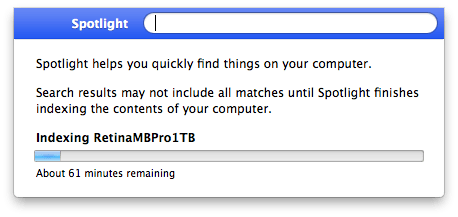
I was looking for some PDF files that I knew for sure were on my SSD but Spotlight would not find them. Looking for more obvious files I noticed Spotlight was returning hardly any files at all: somehow the index was messed up.

Years ago I also had Spotlight issues; then it would find nothing (now it did find some files) which was solved by a reboot: Spotlight refuses to be enabled on Lion: reboot helped.

Screenshot 2016-06-29 12.57.34

Screenshot 2016-06-29 12.57.34

Now this was right after a reboot, and because Spotlight did find some files I know Spotlight was turned on (no need for mdutil tricks mentioned in After restoring fresh HDD from Time Machine Backup: No results from Spotlight).

So I dug a bit deeper and decided to try [WayBack] Rebuild the Spotlight index on your Mac – Apple Support with these steps:

  1. Search for something that returns few results (in my case Xyzzy)
  2. Click Spotlight Preferences...
  3. Go to the Privacy tab
  4. From the Finder, drag your disk(s) to the Prevent Spotlight from searching these locations list.
  5. Remove your disk(s) from that lists using the minus (-) button.
  6. Wait for re-indexing to complete

That worked like a charm to refresh the index: it started indexing again which took about one hour.

After a few minutes though, I found back the 32pfl7404h_12_dfu_nld.pdf I was looking for.

A second time, it had lost the index to iTunes, and found it back in about 2 hours (as the SSD was much more full).

A third time, this trick from [WayBack/Archive.is] Re-Index Spotlight from the Terminal, Re-Gain Valuable Time for Life [OS X Tips] | Cult of Mac worked:

sudo mdutil -E /

This basically re-indexes from the root (/) folder.

I find it easier than the above 6 steps (which are also on [WayBack/Archive.is] Make Spotlight Work Again [OS X Tips] | Cult of Mac).

–jeroen

Posted in Apple, Mac, Mac OS X / OS X / MacOS, MacBook, MacBook Retina, MacBook-Pro, OS X 10.10 Yosemite, OS X 10.11 El Capitan, OS X 10.9 Mavericks, Power User, SpotLight | Leave a Comment »

Make A Bootable Windows 10 USB Install Stick On Linux With WinUSB Fork ~ Web Upd8: Ubuntu / Linux blog

Posted by jpluimers on 2016/07/29

One day I’m going to need this: Make A Bootable Windows 10 USB Install Stick On Linux With WinUSB Fork ~ Web Upd8: Ubuntu / Linux blog

So I’m glad WinUSB (which hadn’t been maintained for a long time) got forked on github by slaka.

Since my day-to-day unix-like system is OS X, I’d love a good working solution there too which means I probably need to investigate a bit along these lines:

–jeroen

via: Make A Bootable Windows 10 USB Install Stick On Linux With WinUSB Fork WebUpd8 – Google+  / DoorToDoorGeek “Stephen McLaughlin” – Google+


Posted in *nix, Apple, BIOS, Boot, BSD, Linux, Mac OS X / OS X / MacOS, OS X 10.10 Yosemite, OS X 10.11 El Capitan, OS X 10.9 Mavericks, Power User, Ubuntu, UEFI, Windows, Windows 10, Windows 7, Windows 8, Windows 8.1, Windows 9, Windows Server 2000, Windows Server 2003, Windows Server 2003 R2, Windows Server 2008, Windows Server 2008 R2, Windows Server 2012, Windows Server 2012 R2, Windows Vista, Windows XP | Leave a Comment »

Tools that Isotopp installed on his Mac…

Posted by jpluimers on 2016/04/01

IRC so: »i> Isotopp: Ich habe jetzt nen Mac als Arbeitsplatzrechner… Was will man als UNIX Hacker zuerst an Tools installieren?«

Source: IRC so: »i> Isotopp: Ich habe jetzt nen Mac als Arbeitsplatzrechner… Was will… by Kristian Köhntopp.

Since G+ is very bad at searching, I created this summary of the tools; read the full G+ post (Google Translate is quite OK), including comments on why.

Edit: 20160402 – I’m posting regular updates based on the comments for that G+ post. I’ve changed or added German iTunes store links to US-English ones.

Read the rest of this entry »

Posted in Apple, Audacity, Audio, Fusion, Hardware, Keybase, Keyboards and Keyboard Shortcuts, KVM keyboard/video/mouse, Mac, Mac OS X / OS X / MacOS, MacBook, MacBook Retina, MacBook-Pro, Media, OS X 10.10 Yosemite, OS X 10.11 El Capitan, Power User, Security, VirtualBox, Virtualization, VMware | Leave a Comment »

OpenVPN – How to connect to Access Server from a Mac – basically says use Tunnelblick

Posted by jpluimers on 2016/03/18

Nice summary for just saying “Use Tunnelblick

This howto article explains how to obtain and setup a Mac openvpn client to connect to the OpenVPN Access Server.

Source: How to connect to Access Server from a Mac

–jeroen

Posted in Apple, Mac, Mac OS X / OS X / MacOS, Mac OS X 10.5 Leopard, Mac OS X 10.6 Snow Leopard, Mac OS X 10.7 Lion, MacBook, MacBook Retina, MacBook-Air, MacBook-Pro, MacMini, OpenVPN, OS X 10.11 El Capitan, OS X 10.8 Mountain Lion, OS X 10.9 Mavericks, Power User | Leave a Comment »