The Wiert Corner – irregular stream of stuff

Jeroen W. Pluimers on .NET, C#, Delphi, databases, and personal interests

  • My badges

  • Twitter Updates

  • My Flickr Stream

  • Pages

  • All categories

  • Enter your email address to subscribe to this blog and receive notifications of new posts by email.

    Join 1,860 other subscribers

Archive for the ‘Compression’ Category

XZ 5.6.x are backdoored and present in many systems: downgrade to 5.4.x or earlier now; consider libarchive compromised until proven otherwise

Posted by jpluimers on 2024/03/30

Edit 20240331: because of

https://mastodon.social/@kobold/112183756981119562

Debian is working on reverting back to even earlier than 5.4.x

[Wayback/Archive] #1068024 – revert to version that does not contain changes by bad actor – Debian Bug report logs

> I'd suggest reverting to 5.3.1. Bearing in mind that there were security
> fixes after that point for ZDI-CAN-16587 that would need to be reapplied.

Note that reverted to such an old version will break packages that use
new symbols introduced since then. From a quick look, this is at least:
- dpkg
- erofs-utils
- kmod

Having dpkg in that list means that such downgrade has to be planned
carefully.


Original post:

Everything I know about the XZ backdoor

Note that because of the Wayback Machine limit of 5 archivals per URL per day, the archived versions are rapidly getting out-of-date.

It is way worse:

[Wayback/Archive] Thread by @_ruby on Thread Reader App – Thread Reader App

@_ruby: The setup behind the CVE-2024-3094 supply-chain attack is fascinating. I originally wanted to finish and share a tool to audit other OSS projects for anomalous contributor behavior, but I feel what I found tr……

How it was found:

Analogy on how it was found:

Via:

Related:

If you are running homebrew on a Mac, then update too:

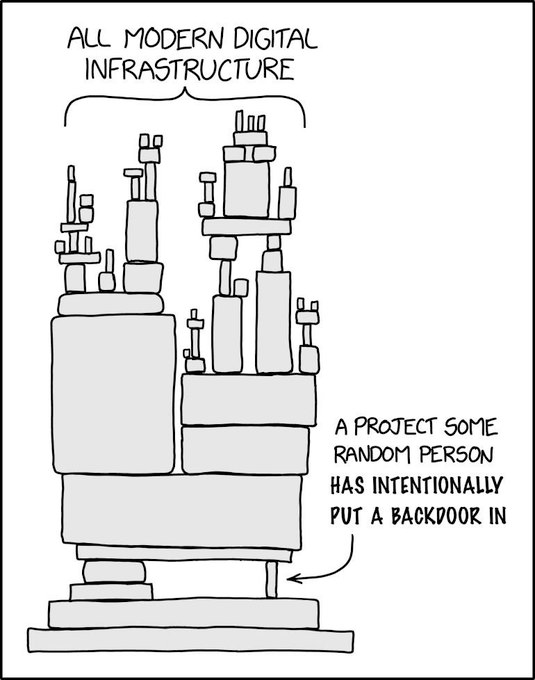
Of course this “XKCD dependency” adoption applies:

[Wayback/Archive] GJ4KvbeWIAAS_mu (535×680)

Posted in C, Compression, Development, Infosec (Information Security), Power User, Security, Software Development, xz | Leave a Comment »

A choco install list

Posted by jpluimers on 2021/02/03

Sometimes I forget the choco install mnemonics for various tools, so here is a small list below.

Of course you have to start with an administrative command prompt, and have a basic Chocolatey Installation in place.

If you want to clean cruft:

choco install --yes choco-cleaner

Basic install:

choco install --yes 7zip
choco install --yes everything
choco install --yes notepadplusplus
choco install --yes beyondcompare
choco install --yes git.install --params "/GitAndUnixToolsOnPath /NoGitLfs /SChannel /NoAutoCrlf /WindowsTerminal"
choco install --yes hg
choco install --yes sourcetree
choco install --yes sysinternals

For VMs (pic one):

choco install --yes vmware-tools
choco install --yes virtio-drivers

For browsing (not sure yet about Chrome as that one has a non-admin installer as well):

choco install --yes firefox

For file transfer (though be aware that some versions of Filezilla contained adware):

choco install --yes filezilla
choco install --yes winscp

For coding:

choco install --yes vscode
choco install --yes atom

For SQL server:

choco install --yes sql-server-management-studio

For web development / power user:

choco install --yes fiddler

For SOAP and REST:

choco install --yes soapui

If you don’t like manually downloading SequoiaView at gist.github.com/jpluimers/b0df9c2dba49010454ca6df406bc5f3d (e8efd031d667de8a1808d6ea73548d77949e7864.zip):

choco install --yes windirstat

For drawing, image manipulation (paint.net last, as it needs a UI action):

choco install --yes gimp
choco install --yes imagemagick
choco install --yes paint.net

For ISO image mounting in pre Windows 10:

choco install --yes wincdemu

For hard disk management:

choco install --yes hdtune
choco install --yes seatools
choco install --yes speedfan

For Fujitsu ScanSnap scanners (not sure yet this includes PDF support):

choco install --yes scansnapmanager

–jeroen

Posted in 7zip, atom editor, Beyond Compare, Chocolatey, Compression, Database Development, Development, DVCS - Distributed Version Control, Everything by VoidTools, Fiddler, Firefox, Fujitsu ScanSnap, git, Hardware, Mercurial/Hg, Power User, Scanners, SOAP/WebServices, Software Development, Source Code Management, SQL Server, SSMS SQL Server Management Studio, SysInternals, Text Editors, Versioning, Virtualization, VMware, VMware ESXi, vscode Visual Studio Code, Web Browsers, Web Development, Windows | Leave a Comment »

How to make a self extracting archive runs your setup.exe, 7zip -sfx

Posted by jpluimers on 2020/01/01

For my link archive step by step instruction on the command-line which can be automated:

Via:

–jeroen

Posted in 7zip, Batch-Files, Compression, Development, Power User, Scripting, Software Development | Leave a Comment »

7zip / 7za command-line parameters for highest compression

Posted by jpluimers on 2019/03/14

On my systems these so far give the best compression results with 7zip and p7zip 16.02:

-t7z -m0=lzma2:d=1024m -mx=9 -aoa -mfb=64 -md=32m -ms=on

Note the -d=1024m is mentioned on some sites, but is gone around version 16.

Via:

If you want to delete the files after archiving, then use the -sdel switch: -sdel (Delete files after including to archive) switch

If -sdel switch is specified, 7-Zip deletes files after including to archive. So it works like moving files to archive., moves txt files from disk’s directory to a.7z archive.

–jeroen

Posted in 7zip, Compression, Power User | 1 Comment »

7zip on ESXi through p7zip – redux

Posted by jpluimers on 2019/03/12

Steps to get it working on ESXi 6.x with p7zip 16.02:

  1. Copy the output of https://sourceforge.net/projects/p7zip/files/p7zip/16.02/p7zip_16.02_x86_linux_bin.tar.bz2/download to a place where you can reach it through http (as wget on ESXi does not understand https)
  2. Follow the script below

mkdir -p /local/bin
cd /local bin
wget http://192.168.71.62/esxi/netcologne.dl.sourceforge.net/project/p7zip/p7zip/16.02/p7zip_16.02_x86_linux_bin.tar.bz2
bzip2 -d p7zip_16.02_x86_linux_bin.tar.bz2
mv p7zip_16.02/bin/7z* .
chmod 755 7z 7za 7zra

Based on much longer steps involving Windows and an older version of p7zip: 7zip on ESXi through p7zip.

–jeroen

Posted in 7zip, Compression, ESXi4, ESXi6, ESXi6.5, Power User, Virtualization, VMware, VMware ESXi | Leave a Comment »

Locating the 7z.exe command-line tool on Windows

Posted by jpluimers on 2018/09/18

From one of my scripts: it will find a  64-bit 7z.exe if it was installed as part of the 7-zip installer, then run it with the parameters provided to the batch file.

  setlocal
  
:verify7zip
:: registry trick from http://www.robvanderwoude.com/files/sortdate2_nt.txt
:: extra trick: tokens=2* allows to get the  3rd (and beyond: space delimited!) value in one variable %%b
  for /F "tokens=2*" %%a IN ('REG QUERY "HKEY_LOCAL_MACHINE\SOFTWARE\7-Zip" /v Path64 2^>nul') do set sevenZipDirectoryPath=%%b
  call :checkMissingSetting sevenZipDirectoryPath     || goto :help
  
  set sevenZipExeFilePath=%sevenZipDirectoryPath%7z.exe
  if not exist "%sevenZipExeFilePath%" call :showError "No 7-zip executable at %sevenZipExeFilePath%" || goto :help
  
:run7zip
  "%sevenZipExeFilePath%" %*

  endlocal
  goto :end
  
:checkMissingSetting
  if not defined %1 call :notifyMissingSetting %1 && exit /b 1
  call :showSetting %1
  exit /b 0
  goto :end

:notifyMissingSetting
  echo Registry didn't provide the environment variable "%1"
  goto :end
  
:showError
  :: remove double quotes using tilde trick:
  echo %~1
  
:help
  echo Syntax: %0 7z.exe-commandline-parameters
  goto :end

:end

–jeroen

Posted in 7zip, Batch-Files, Compression, Development, Power User, Scripting, Software Development | Leave a Comment »

calculate crc32 on the command-line using 7z.exe – Using 7-zip hashing to compare directories and files – Sami Lehtinen

Posted by jpluimers on 2018/02/26

Searching 7z.exe calculate crc32 didn’t return any meaningful results, but [WayBackUsing 7-zip hashing to compare directories and files – Sami Lehtinen did help me as I never noticed that somewhere along the line the h command got added to 7z.exe. It’s not even in the documentation, as found by searching for 7zip commandline arguments:

but it is in the command-line help, at least in versions 16.x:

C:\temp>"C:\Program Files\7-Zip\7z.exe" --help

7-Zip [64] 16.02 : Copyright (c) 1999-2016 Igor Pavlov : 2016-05-21

Usage: 7z  [...]  [...]
       [<@listfiles...>]


  a : Add files to archive
  b : Benchmark
  d : Delete files from archive
  e : Extract files from archive (without using directory names)
  h : Calculate hash values for files
  i : Show information about supported formats
  l : List contents of archive
  rn : Rename files in archive
  t : Test integrity of archive
  u : Update files to archive
  x : eXtract files with full paths

–jeroen

Posted in 7zip, Compression, Power User | Leave a Comment »

Decompression libraries and tools for many formats

Posted by jpluimers on 2016/09/15

7-zip can uncompress a truckload of formats, but what if you need formats it doesn’t support or you want to integrate decompression in your own software?

Then some libraries can be really useful provided you regularly update them (otherwise you – like Symantec – can run in substantial security risks).

libmspack (license: GNU LGPL, version 2)

Formats supported:

File format Year Algorithm Supported?
COMPRESS.EXE (SZDD) 1990 LZSS Decompression
Microsoft Help (.HLP) 1990 LZSS To-do
COMPRESS.EXE (KWAJ) 1993 LZSS, Huffman, DEFLATE Decompression
Microsoft Cabinet (.CAB) 1995 DEFLATE, Quantum, LZX Decompression
HTML Help (.CHM) 1997 LZX Decompression
Microsoft eBook (.LIT) 2000 LZX, SHA, DES To-do
Windows Imaging Format (.WIM) 2007 LZX, XPRESS To-do
Exchange Offline Address Book (.LZX) 2008 LZX DELTA Decompression

cabextract (license: GNU GPL)

Pre-compiled console wrappers around libmspack for many platforms.

WinRAR archiver, a powerful tool to process RAR and ZIP files

Libraries and pre-compiled console applications for many platforms.

HTML Help (CHM) Index

Background on CHM files.

–jeroen

Via:

Symantec dropped the ball here. A quick look at the decomposer library shipped by Symantec showed that they were using code derived from open source libraries like libmspack and unrarsrc, but hadn’t updated them in at least 7 years.

Source: Project Zero: How to Compromise the Enterprise Endpoint

Posted in 7zip, Compression, Development, Power User, Software Development | Leave a Comment »

7zip on a Mac: Keka, 7zip on Windows: their plain installer.

Posted by jpluimers on 2014/08/04

Though I’ve written only a few blog posts about 7zip – my compressor of choice ever since I discovered 7zip some 10 years ago around version 3.13 (their history goes much further back: 1999) – here is a fresh one:

7zip is a fast, free, multi-platform and has great compression. No wonder Toms Hardware gave them an award last year: And The Undisputed Winner Is… 7-Zip.

For Windows, I take the downloads from 7-Zip: there are both x64 and x86 versions (x64 supports more memory so can handle bigger archives).

For Mac, I’ve been using Keka – the free Mac OS X file archiver. Both compressing and decompressing involve dragging the uncompressed or compressed files to the Keka dock icon.

That is slightly more involved than the context menu in Windows, but it works great.

For Windows command line usage, I use either 7za.exe or 7z.exe (uses DLLs, supports more compression)

For Mac command line usage, I use p7zip.

–jeroen

Posted in 7zip, Apple, Compression, Mac, Mac OS X / OS X / MacOS, Mac OS X 10.4 Tiger, Mac OS X 10.5 Leopard, Mac OS X 10.6 Snow Leopard, Mac OS X 10.7 Lion, MacBook, MacBook Retina, MacBook-Air, MacBook-Pro, OS X 10.8 Mountain Lion, Power User, Windows, Windows 7, Windows 8, Windows Server 2000, Windows Server 2003, Windows Server 2003 R2, Windows Server 2008, Windows Server 2008 R2, Windows Vista, Windows XP | Leave a Comment »

7za in the OS X Terminal on your Mac

Posted by jpluimers on 2014/01/25

On both Windows and OS X, I use 7zip a lot. Usually the GUI versions (currently 7z920 on Windows and Keka 1.0.4 on OS X).

But for some purposes (for instance: compressing .lnk files) the 7za command-line version is a must (it has lots of options).

Note that the Windows 7za command-line version is 32-bit.

If you handle really large files on Windows, you might want to use the 64-bit 7z.exe that is in `%ProgramFiles%\7-Zip\7z.exe`.

There are a few ways to install the 7za console version on a Mac so you can access 7za from the Terminal in OS X. Read the rest of this entry »

Posted in 7zip, Apple, Compression, Mac, Mac OS X / OS X / MacOS, Mac OS X 10.4 Tiger, Mac OS X 10.5 Leopard, Mac OS X 10.6 Snow Leopard, Mac OS X 10.7 Lion, MacBook, MacBook Retina, MacBook-Air, MacBook-Pro, OS X 10.8 Mountain Lion, OS X 10.9 Mavericks, Power User | Leave a Comment »