Go to chrome://settings/adPrivacy and disable all to make it look like this:
[Wayback/Archive] 266577344-cd2613d0-f97d-46e1-bfbb-9d8c432c40c8.png (656×183)
Via these tweets: Read the rest of this entry »
Posted by jpluimers on 2023/09/06
Go to chrome://settings/adPrivacy and disable all to make it look like this:
[Wayback/Archive] 266577344-cd2613d0-f97d-46e1-bfbb-9d8c432c40c8.png (656×183)
Via these tweets: Read the rest of this entry »
Posted in Chrome, Chrome, Google, Power User, Privacy, Web Browsers | Leave a Comment »
Posted by jpluimers on 2023/08/01
I am a keyboard user, so I love keyboard shortcuts. If these are unavailable, still do it by keyboard quicker than by mouse.
Based on various answers and comments in [Wayback/Archive] Shortcut to open specific bookmark / URL in Chrome – Super User my way to open Chrome bookmarks (from my vast collection) is this:
- Move focus to the url bar with ⌘+L (macOS) or Ctrl+L (Windows/Linux).
- Type the first part of the bookmark name.
- Press navigation keys to select the bookmark.
- Press enter to select the bookmark.
Thanks to these Super User users:
Via [Wayback/Archive] chrome hotkey for bookmark bar – Google Search
–jeroen
Posted in Bookmarklet, Chrome, Development, Google, Power User, Software Development, Web Browsers | Leave a Comment »
Posted by jpluimers on 2023/01/24
I’m not sure yet why sometimes my system is lagging with the combination of these four circumstances on a Windows 10 system with 32 gigabyte of memory:
Windows Compression was introduced in Windows 10 (back in 2015) and I’m still fairly new to it.
So here are some links I want to eventually dig into to make myself more familiar with it, and see if it affects Chrome runtime behaviour:
Thanks [Wayback/Archive] magicandre1981, [Wayback/Archive] peterh, [Wayback/Archive] Raymond Burkholder, and [Wayback/Archive] Falco Alexander for the above questions and answers.
From them, I learned that on a UAC elevated administrative command prompt, you can use these PowerShell for managing Memory Compression:
Get-MMAgent shows the current Memory Compression stateDisable-MMAgent -mc disables Memory Compression (requires a reboot)Enable-MMAgent -mc enables Memory Compression (requires a reboot)BTW:
–jeroen
Posted in Chrome, Google, Power User, procexp Process Explorer, SysInternals, Windows, Windows 10 | Leave a Comment »
Posted by jpluimers on 2022/11/29
For my link archive: [Wayback/Archive] google chrome devtools – Use JavaScript to set value of textbox when .value and events don’t seem to work – Stack Overflow
Sometimes fields are blocked from pasting values.
Normally a trick like this works in the chrome development panel console:
document.getElementById('nonPasteElementID').value = 'myValueFromTheClipboard'
With some web development environments this does not work.
For react, after finding the react render name for the input (in the case of the answer, it was “reactNameForInputElement“) this is a solution:
To make it work you will need this:
const input = document.getElementById('nonPasteElementID'); const event = new Event('reactNameForInputElement', { bubbles: true }); input.value = '1'; input.dispatchEvent(event);
–jeroen
Posted in Chrome, Chrome, Development, Google, JavaScript/ECMAScript, Power User, Scripting, Software Development, Web Browsers, Web Development | Leave a Comment »
Posted by jpluimers on 2022/09/14
A while ago, I wanted to convert the dl delimited list html element on a web page into a regular table so I could more easily reorder the data into cells.
So I ran the below bit of code in the Chrome Console after first putting the mentioned table with id here_table in the place where I wanted the table to be included:
| <table id="here_table"></table> |
| var arr = $("#delimitedList").children().map(function () { | |
| return $(this).html(); | |
| }).get(); | |
| for (var i = 0; i < arr.length; i += 2) { | |
| $('#here_table').append('<tr><td>' + arr[i] + '</td><td>' + arr[i + 1] + '</td></tr>'); | |
| } |
For this script to work, you need jQuery, so yesterday I wrote Better, Stronger, Safer jQuerify Bookmarklet | Learning jQuery.
The code is based on [Wayback/Archive.is] Rebuild each definition list () as a table using JQuery – Stack Overflow (thanks [Wayback/Archive.is] easy!) with an important adoption instead of calling text() to get the textual dt and dd information, it uses html() so the original innerHTML is being preserved.
Some similar JavaScript pieces of code are at [Wayback/Archive.is] Turning HTML into a nested JavaScript array with jQuery – Stack Overflow.
Related:
–jeroen
Posted in Bookmarklet, Chrome, Development, Google, JavaScript/ECMAScript, jQuery, Pingback, Power User, Scripting, Software Development, Stackoverflow, Web Browsers, Web Development | Leave a Comment »
Posted by jpluimers on 2022/09/12
[WayBack] Roderick Gadellaa on Twitter: “My new favorite chrome flag: global-media-controls (older article, it’s live in stable now)… “
[WayBack ]Chrome is testing new media playback controls that can even work with background tabs
To enable to controls, head to chrome://flags/#global-media-controls. After a browser restart, you’ll see a play button in your toolbar next to the extensions whenever you have media playing in Chrome. Clicking it will show the title of what’s playing, where it’s playing from, and provide play/pause and skip buttons.
–jeroen
Posted in Chrome, Google, Power User | Leave a Comment »
Posted by jpluimers on 2022/07/14
Below is a cool solution to refresh a page using a bookmarklet is to embed it into an iframe, then automatically reload it every interval.
It for instance works for the [Wayback/Archive.is] Woonveilig and often in Fritz!Box environments.
[Wayback] Jon described the below method as a solution for his own question, 6 years after asking it in [Wayback/Archive.is] Automatically reload page in Chrome without plugin – Super User.
So I made this a bookmark:
| javascript:document.getElementsByTagName("body")[0].innerHTML = "<iframe id=\"testFrame\" src=\""+window.location.toString()+"\" style=\"position: absolute; top:0; left:0; right:0; bottom:0; width:100%; height:100%;\"><\/iframe>";reloadTimer = setInterval(function(){ document.getElementById("testFrame").src=document.getElementById("testFrame").src },5*60*1000) |
(it is in a gist as the WordPress editors keep killing the embedded html code, despite it being escaped within <code> tags.
–jeroen
Posted in Bookmarklet, Chrome, Chrome, Development, Firefox, Google, HTML, JavaScript/ECMAScript, Power User, Scripting, Software Development, Web Browsers, Web Development | Leave a Comment »
Posted by jpluimers on 2022/02/22
I an with [Wayback] Craig Buckler to consider Dark Patterns being wider than the strict sense.
For me anything that costs a user extra time or makes accessibility harder is a Dark Pattern.
So I agree with the issues he explains at [Wayback] The Web’s Most Annoying Dark Patterns – SitePoint
Does the web delight or displease you? Craig lists his least favourite UI and marketing dark patterns. Have you developed on the dark side?

Paste is enabled, but does not function
Having had RSI, I’m dependent on keeping my hands and arms in good shape. This means minimising the use of pointing devices and also trying to minimise typing.
In addition, I have heavily segmented my use of email addresses (among others for cutting down SPAM). Basically any point of contact gets a new email address.
This means I realy on tooling like password managers and email address generators. It means copying and pasting information.
So I bumped into a web-site that disallowed pasting the (unique and long!) email address into the email verification field.
[Archive.is] Jeroen Wiert Pluimers on Twitter: “The @olvg #mijnOLVG site is now on my Dark Patterns list as they make #accessibility harder by blocking pasting into the email address verification field. Blocking the paste-blocker. CC some people advocating mijnolvg.nl @MauricevdBosch @ronklitsie63 @kyntha”
Despite the popup menu, paste didn’t work. Chrome autofill did, but didn’t have the information for this particular (new and unique) email address yet, so could not be used yet.
It is relatively easy to disable a paste block. In this case, I was using chrome, but this can be done with any browser. Some browsers even have optional extensions that can do this for you.
In the case of Chrome, when right clicking, there is an “Inspect” option
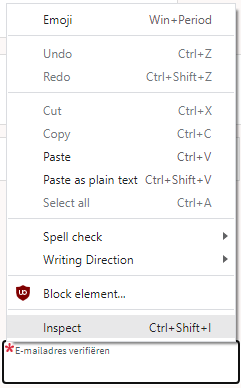
Inspect is enabled and actually works.
It inspects the current element, which on this site looks like this:

The element does not contain event handlers. But the code hooks them behind our backs.
On the “Event Listeners” tab on the right, you can see there are two JavaScript methods hooked to the paste handler:

The paste handlers. The first is OK, the second blocks paste.
The first one is OK, though I did not really look into what the proxy does.
Second paste event handler: remove this one.

First paste event handler: keep this one.
The second is not OK, as it effectively prevents the event from being handled any further at all by calling preventDefault

Second paste event handler: remove this one.
- [Wayback] Event.preventDefault() – Web APIs | MDN
The Event interface’s preventDefault() method tells the user agent that if the event does not get explicitly handled, its default action should not be taken as it normally would be.
By clicking on the second Remove button above, the paste blocker is gone and you can paste again.
–jeroen
Posted in Chrome, Chrome, Dark Pattern, Development, Google, JavaScript/ECMAScript, Power User, Scripting, Software Development, User Experience (ux), Web Browsers | Leave a Comment »
Posted by jpluimers on 2022/01/20
For quite some time now, Chrome (think years) refuses to prompt for saving passwords whereas Firefox and Safari do prompt and save them, even for site types that it used to save passwords for in the past.
It has been annoying enough for too long now that I tried to do better than the Google searches I used back when I saw this happen first.
Below are some links based on new searches (starting with [Wayback] adding a password in chrome settings – Google Search); hopefully I can try them after I made a list of sites that Chrome does not show the password save prompt for.
Solutions I tried that failed (but maybe useful for others):
input field being marked with type="password", and if not add it.Solutions still to try:
Posted in Chrome, Chrome, Communications Development, Development, Encryption, ESXi6, ESXi6.5, ESXi6.7, Firefox, Fritz!, Fritz!Box, Fritz!WLAN, Google, https, HTTPS/TLS security, Internet, Internet protocol suite, Let's Encrypt (letsencrypt/certbot), Power User, routers, Safari, Security, TCP, TLS, Virtualization, VMware, VMware ESXi, Web Browsers, Web Development | Leave a Comment »
Posted by jpluimers on 2022/01/14
If use the Chrome web browser, it’s fairly likely you will find Chrome autofill suggestions recommending things for various forms and text entry points. Sometimes those autofill suggestions c…
[Wayback] How to Delete Specific Chrome Autofill Suggestions
Most important are the steps:
- Open the related website which has a form entry where autofill suggestions appear
- Start typing so that the suggestion shows up as an option in Chrome
- Using the keyboard arrows, navigate down the suggestion list to the item(s) you want to remove from the Chrome autofill suggestions
- With the suggestion highlighted, use the appropriate keystroke sequence to delete the Chrome suggestion:
- Mac:
Shift+FN+Delete- Windows:
Shift+Delete- Chromebook / Chrome OS:
Alt+Shift+Delete- Repeat with other suggestions to delete if desired
Via: [WayBack] edit google chrome autocomplete list – Google Search
–jeroen
Posted in Chrome, Chrome, Google, Power User, Web Browsers | Leave a Comment »