The Wiert Corner – irregular stream of stuff

Jeroen W. Pluimers on .NET, C#, Delphi, databases, and personal interests

  • My badges

  • Twitter Updates

  • My Flickr Stream

  • Pages

  • All categories

  • Enter your email address to subscribe to this blog and receive notifications of new posts by email.

    Join 1,860 other subscribers

Archive for the ‘GoogleCalendar’ Category

Great tip by Jen Gentleman on Twitter: “Colour coding all my meetings – seriously I don’t know why I held off for so long, it made my calendar so much easier to read

Posted by jpluimers on 2024/07/22

Reminder to check out the tools I use so I can go [Wayback/Archive] Jen Gentleman on Twitter: “Colour coding all my meetings – seriously I don’t know why I held off for so long, it made my calendar so much easier to read”

This is the scheme that Jen uses: [Wayback/Archive] Jen Gentleman on Twitter: “@melvinjoosten Yeah – I have a lot of recurring meetings, so I use one colour for 1-1s, one colour for big team meetings, and one colour for office hours. It makes it a lot easier to spot the one off meetings which have been added to my calendar (which I leave the default colour)”

or in list form, differentiate between:

  • one-on-one
  • big team
  • office hours
  • default (for events added by others)

–jeroen

Posted in Google, GoogleCalendar, LifeHacker, Office, Outlook, Power User | Leave a Comment »

How to Switch to a 24 Hour Clock in Google Calendar – Live2Tech

Posted by jpluimers on 2023/11/14

Apparently you have to do this once for a Google account, as it is on the account level, not the web-browser level.

The odd thing was that somehow despite setting the country to The Netherlands when setting up the account, these were the settings in Google Calendar

  • Language: English (UK)‎
  • Country: Netherlands (Nederland)
  • Date format: 12/31/2021
  • Time format: 1:00pm

After the steps from [Wayback] How to Switch to a 24 Hour Clock in Google Calendar – Live2Tech, the settings now are these:

Read the rest of this entry »

Posted in Development, Google, GoogleCalendar, internatiolanization (i18n) and localization (l10), Power User | Leave a Comment »

Figured out why on fresh Chrome installs, iframe with embedded Google Calendar won’t work and show `(blocked:other)` in the Network Tab of Chrome Developer Tools

Posted by jpluimers on 2023/11/09

Wow, what a long title!

What happened is that I have a few dashboards for people that include various embedded Google Calendar widgets in <iframe>s.

These won’t show on fresh installs of Google Chrome that have the particular user signed on in the Chrome Settings so that settings will be synchronised, right?

Right?!

Wrong!!

Not all Chrome settings will be synchronised by Chrome. Things like [Wayback/Archive] “On startup” (with the pages shown after Chrome startup) and wich installed extensions are synchronised including the visibility of their icons. But the settings of the extensions themselves will not.

This means that odd things happen, for instance extensions like [Wayback/Archive] Privacy Badger and [Wayback/Archive] uBlock Origin being installed, but both reverting to their default settings.

That in turn leads to hard to see problems, in this case the embedded Google Calendar <iframe>s failing.

Read the rest of this entry »

Posted in Chrome, Development, Google, GoogleCalendar, Power User, Privacy, Software Development, Web Development | Leave a Comment »

Need to keep an eye on Clockwise until it supports either personal (non G-Suite) Google accounts or Office-365

Posted by jpluimers on 2022/03/07

Too bad that when trying this out in 2021, you got the message

Please sign in with your work Google account.Clockwise does not currently support signing in with a personal Google account.

G-Suite only

G-Suite only

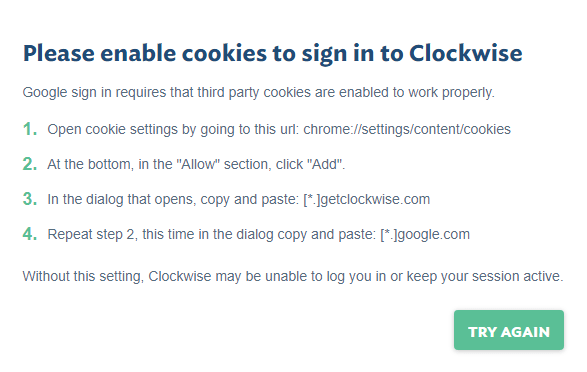
Note that if you have a G-Suite account, it needs these cookies to be accepted to signup via [Archive.is] https://www.getclockwise.com/signup:

Please enable cookies to sign in to Clockwise

Google sign in requires that third party cookies are enabled to work properly.
  1. Open cookie settings by going to this url: chrome://settings/content/cookies
  2. At the bottom, in the “Allow” section, click “Add”.
  3. In the dialog that opens, copy and paste: [*.]getclockwise.com
  4. Repeat step 2, this time in the dialog copy and paste: [*.]google.com
Without this setting, Clockwise may be unable to log you in or keep your session active.
The domains on which cookies are required.

The domains on which cookies are required.

More info:

Via:

–jeroen

Read the rest of this entry »

Posted in Google, GoogleCalendar, Power User | Leave a Comment »

Google calendar: add a yearly repeating event on the last/#th/first weekday of a month

Posted by jpluimers on 2022/01/05

TL;DR: recurrence in Google Calendar can be tough.

Adding a yearly repeating event on a last weekday (where weekday is any day of the week: sunday, monday, etc) of a month in Google Calendar was a lot less obvious than I hoped for.

The easiest path “Custom Event” by default does not show last/#th/first, only a fixed date when selecting yearly or monthly repeating events, which is contrary to the suggested answer at [Wayback/Archive.is] Google calendar question: How to set an event to repeat on the first Monday of a specific Month : google:

Create an event on September 3rd. Choose custom recurrence. Repeat every 12 months monthly on the first Monday. I just tested that out on the browser version of Google calendar

The trick is to first select a normally repeating monthly event on the last#th/first weekday day of a month.

Note that for the 5th week, you cannot do this in the Google Calendar UI as per [Wayback] google calendar – Schedule an event for last Sunday (or another day of week) of each month – Web Applications Stack Exchange:

If you actually want a day on the 5th week of every month (versus the last week), the Google Calendar UI does not support this, but you can do it by importing an .ics file

Below is an example while writing this: adding a yearly recurring event on the last Sunday of May (which in 2021 was Sunday the 30th of May).

These are the steps:

Read the rest of this entry »

Posted in Google, GoogleCalendar, LifeHacker, Power User | Leave a Comment »

calendar google sub-calendar – Google Search

Posted by jpluimers on 2021/09/17

For a web-dashboard showing both agenda and month-calendar, I wanted to show the daily activities only on the agenda, and all other events on both the agenda and mont-calendar.

For that I needed a sub-Google-calendar for the daily activities next to the main Google-calendar, so I searched for [WayBack] calendar google sub-calendar – Google Search

Google sub calendars
Once the calendar is created, you’ll see it on your browser and in the app.
  • On your computer, open Google Calendar.
  • On the left side, above “My calendars,” click Add other calendars New calendar.
  • Add a name and description for your calendar.
  • Click Create calendar.
Create a new calendar – Calendar Help – Google Support


This wasn’t fully accurate:

  • the add option intuitively is a plus sign (+):

  • In addition it is not above “my calendars”, but next to “other calendars”:

Alternative

Read the rest of this entry »

Posted in Google, GoogleCalendar, Power User | Leave a Comment »

Need to put some research in Google Calendar support for EXRULE and EXDATE

Posted by jpluimers on 2019/01/15

Though the Google Calendar UI does not support EXRULE and EXDATE to exclude certain slots (via dates or rules) from recurring events.

The API supports them: [WayBackGoogle Calendar API, RRULE and EXDATE – Stack Overflow

–jeroen

Posted in Communications Development, Development, Google, GoogleCalendar, HTTP, Internet protocol suite, Power User, REST, TCP | Leave a Comment »

Some ideas to show a Google Calendar on a TV using a Raspberry Pi and HDMI output

Posted by jpluimers on 2019/01/10

Using OpenSuSE Tumbleweed E20 on Raspberry Pi 3: accessing the enlightenment desktop over VNC after automatic logon I wanted to buy an on-line read-only diary to help my mentally retarded brother see what his next few days are going to be like.

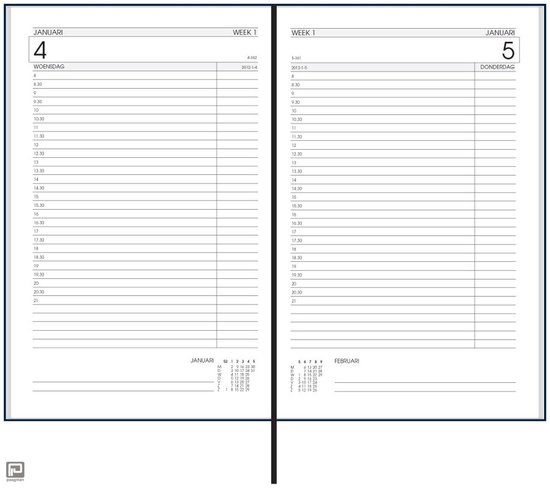
He increasingly has difficulty handling a paper agenda and has an agenda with 30 minute blocks like [Archive.isbol.com | Bureau Agenda 2017 – 1 dag per Pagina | 0041560163422 | Boeken (and the [Archive.is] picture on the right), but actually he needs 15 minute blocks during some portions of the day.

We call that kind “bureau agenda” which I think translates well into “desk diary”.

They were quite different from the agendas I used to have at school (:

[WayBack[Zonder titel] Rijam agenda 1983/84 verzamelen? Stripcatalogus op Catawiki

For most school mates, they were more like this:

Had je een O’Neill of ging je voor De Familie Doorzon? De oude agenda’s uit je middelbare schooltijd zijn de verpersoonlijking van je eigen puber-ik. Afgelopen weekend startte in het Nationaal Onderwijsmuseum in Dordrecht de toffe tentoonstelling Grow Up over die vuistdikke, volgeplakte agenda’s.

[WayBackSchoolagenda vol sentiment | Go with the Vlo

Anyway, some ideas I initially had are below.

This is what I actually did:

Two things for the future:

Initial thoughts

Raspberry based:

Chromecast based:

–jeroen

Read the rest of this entry »

Posted in Development, Google, GoogleCalendar, Hardware Development, JavaScript/ECMAScript, JSFiddle, LifeHacker, Power User, Raspberry Pi, Scripting, Software Development | 2 Comments »

It looks like gmail finally understands Outlook Calendar entries

Posted by jpluimers on 2018/11/12

For a very long time, gMail did nothing with Outlook Calendar entires.

So I had to view at the message source, then translate them to Google Calendar entries myself.

--_000_430b30b9ffd74d959b74ab7ba778b487ultrawarenl_
Content-Type: text/calendar; charset="utf-8"; method=REQUEST
Content-Transfer-Encoding: base64

...

As of late, they seem to be processed into Google Calendar compatible entries. Nice!

–jeroen

Posted in base64, Development, Encoding, GMail, Google, GoogleCalendar, MIME, Office, Outlook, Power User, Software Development, UTF-8, UTF8 | Leave a Comment »

Chris Bensen: Sync a Shared Google Calendar with Calendar in iOS or macOS

Posted by jpluimers on 2018/04/06

[WayBack] Chris Bensen: Sync a Shared Google Calendar with Calendar in iOS or macOS

Cool: configure a shared Google Calendar to show up in the Calendar in iOS or macOS

https://calendar.google.com/calendar/syncselect

–jeroen

Posted in Apple, Google, GoogleCalendar, iOS, iPad, iPhone, iPod touch, Power User | Leave a Comment »