Archive for the ‘Google’ Category
Posted by jpluimers on 2016/07/04
Just so you know:
Yann Penduff said: …
I’ve read reports that it seems to take 2 or + weeks for the 1TB promotion to take effect.
Source: Local Guide – Level 4 (1TB on Google Drive) – Google Product Forums
In practice it’s usually not that bad as most of the times it’s a matter of days not weeks though it can take up to 5 weeks.
It’s nice to be a Google Local Guide as you learn a lot of new things and people that way for instance through the Local Guide events.
If you’re interested, read Level 0-4 in 40 days, what I’ve learned from Google Local Guides – Pocketables
I only discovered about this a while ago as it was early last year for Google Replacing City Experts with Local Guides Program | Understanding Google My Business & Local Search
What really helps contributing is to view your Google Maps Timeline
–jeroen
Posted in Google, GoogleMaps, Local Guides, Power User | Leave a Comment »
Posted by jpluimers on 2016/07/01
 I checked our home using the recently improved Google satellite imagery: from Google Earth you can get better detail than from Google Maps.
You can even count our solar panels and see one is misaligned after a storm (a few days after this image was taken I managed to re-align that panel).
13 PV panels and one hot water panel lowered our energy bills for more than EUR 1000/year.
–jeroen
Posted in About, Google, GoogleEarth, GoogleMaps, Personal, Power User, Solar Power | Leave a Comment »
Posted by jpluimers on 2016/06/27
I figured that both gmail and photos take up the largest parts of my Google storage, so I did some cleaning.
You can figure out which part of your Google storage is used by email using https://www.google.com/settings/storage
Still people send huge BMP screenshots to me (probably Microsoft will never learn that pasting clipboard screenshots can be done just as well using PNG format?), so I started searching for mails with large attachments that GMail introduced a while ago:
older_than:1y size:10m
This will include mails of 10 megabyte and larger (so size is a minimum size, not an exact size) that are older than one year.
Then I deleted irrelevant mails notifying the people they should have converted their BMP files to PNG as they take up lots of space on their end as well.
Then storage didn’t decrease, as the messages were still in the trash:
in:trash
Luckily from there, you can empty the trash from there.
–jeroen
Posted in GMail, Google, Power User | Leave a Comment »
Posted by jpluimers on 2016/06/24
Add your Hidden Summer Hotspot in Amsterdam and share with other Local Guides. Where to find that small theatre, that cosy restaurant or that hidden museum in remote streets? Created live during the Amsterdam Hotspot Party by Local Guides in the city.
Source: Local Guides Hidden Hotspots Amsterdam
Short: http://g.co/hiddenAmsterdam
–jeroen
Posted in Google, GoogleMaps, LifeHacker, Local Guides, Power User | Leave a Comment »
Posted by jpluimers on 2016/06/21
I’m using these Chrome Extensions for most of the http / https call mockups, and after that put them in SoapUI (which despite the name also does REST and has come a long way sinceSource: SoupUI – as sometimes that is the only thing that works):
You can get both Postman versions through GetPostman.com as well.
–jeroen
Posted in .NET, .NET 2.0, .NET 3.0, .NET 3.5, .NET 4.0, .NET 4.5, ASP.NET, C#, C# 3.0, C# 4.0, C# 5.0, Chrome, Communications Development, Development, Google, HTTP, Internet protocol suite, Power User, REST, Software Development, TCP | 1 Comment »
Posted by jpluimers on 2016/05/20

First corkboard production server by Google in 1998
Remember the image on the right? It was the first “corkboard” production server Google used in 1998 (it’s a museum piece now).
From there they were using commodity-class x86 server computers running customized versions of Linux for a “long” time which around 2005 even got their own 12V battery as UPS inside the machine and running 1160 machines in a 1AAA shipping container.
Later whey started using a mix of CPU and GPU increasing the performance per watt and recently went from 12V to 48V and even contributed 48V DC Data Center Rack to Open Compute.
In the mean time, Tensor Flow and AI got even more important for Google and during the Google I/O 2016 keynote, they revealed yet another step: TPU chips especially made for TensorFlow providing even better performance per watt for machine learning than GPU. The TPUs are not FPGAs (popular for instance when mining BitCoins), but ASICs that perform orders of magnitude better.
So in about 18 years, Google moved from cleverly assembled commodity hardware to highly specialised custom chips.
Exciting times are ahead of us. I’m really looking forward to the next steps.
–jeroen
Sources:
Read the rest of this entry »
Posted in Cloud, Google, History, Infrastructure, Power User | Leave a Comment »
Posted by jpluimers on 2016/05/06
Since many sites use one or more of these cookies:
- __utma
- __utmb
- __utmc
- __utmz
- __utmv
I went on a search, and this explains them From __utma to __utmz (Google Analytics Cookies) : Analytics Blog @MoreVisibility.
–jeroen
Posted in Google, Google Analytics, Power User | Leave a Comment »
Posted by jpluimers on 2016/04/15
Indeed the “Something’s not right” error message – Hangouts Help was right: the corporate network blocked some URLs.
Too bad, as it makes it increasingly more difficult to stay in touch with near-shore co-workers.
“Something’s not right” error message
Networks at businesses and schools are sometimes set to allow access only to certain web sites, like mail.google.com. This can prevent Hangouts from loading.
If you are on a network with restricted access, you may need to ask your network administrator to whitelist the following domains to use Hangouts:
–jeroen
via “Something’s not right” error message – Hangouts Help.
Posted in Google, Hangouts, Power User | Leave a Comment »
Posted by jpluimers on 2016/02/19
Just updated Cool: Vysor screen sharing by Koush with this:
Edit 20160217: new keyboard/mouse shortcuts
- Old: keyboard shortcuts
Escape -> Back Button;F1 -> Menu Button;Home -> Home Button;
- New: mouse shortcuts
Middle Click -> Home;Right Click -> Back
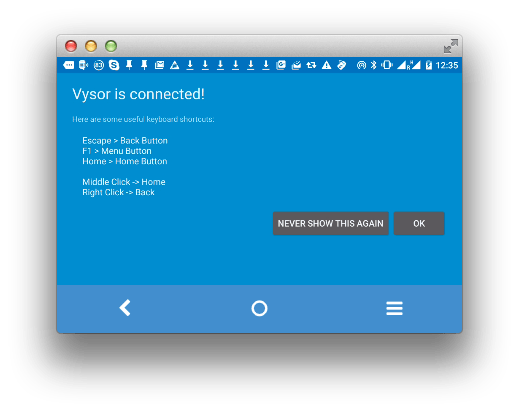
Now hopefully the screen resolution thing will be fixed: [Wayback/Archive] github.com/koush/vysor.io/issues/68
–jeroen
Posted in Android, Android Devices, Chrome, Development, Google, Keyboards and Keyboard Shortcuts, KVM keyboard/video/mouse, Mobile Development, Power User, Vysor | Leave a Comment »
Posted by jpluimers on 2016/02/01
You can set the long date format in Google Calendar, but not the short date format. This plugin does:
Changes the short date format in Google Calendar from [month]/[day] to [day]/[month] or the other way around.
It fixes this long standing bug: formatting – How do I change date format at top of day in Google Calendar? – Web Applications Stack Exchange which was reported in at least these places:
Source: Short Date Format Fix For Google Calendar™ – Chrome Web Store
–jeroen
Posted in Google, GoogleCalendar, Power User | Leave a Comment »


 The Wiert Corner - irregular stream of stuff