Archive for the ‘Google’ Category
Posted by jpluimers on 2023/08/02
For my link archive, the table of contents of [Wayback/Archive/Archive] Searching code – GitHub Docs:
Limitations apply:
Due to the complexity of searching code, there are some restrictions on how searches are performed:
- You must be signed into a user account on GitHub to search for code across all public repositories.
- Code in forks is only searchable if the fork has more stars than the parent repository. Forks with fewer stars than the parent repository are not indexed for code search. To include forks with more stars than their parent in the search results, you will need to add
fork:true or fork:only to your query. For more information, see “Searching in forks.”
- Only the default branch is indexed for code search.
- Only files smaller than 384 KB are searchable.
- Only repositories with fewer than 500,000 files are searchable.
- Only repositories that have had activity or have been returned in search results in the last year are searchable.
- Except with
filename searches, you must always include at least one search term when searching source code. For example, searching for language:javascript is not valid, while amazing language:javascript is.
- At most, search results can show two fragments from the same file, but there may be more results within the file.
- You can’t use the following wildcard characters as part of your search query:
. , : ; / \ ` ' " = * ! ? # $ & + ^ | ~ < > ( ) { } [ ] @. The search will simply ignore these symbols.
There is a truckload of languages supported, though the yaml format of the list is not really human readable: [Wayback/Archive] linguist/languages.yml at master · github/linguist
I’ll try this and see if it works better than Google Search.
Via:
–jeroen
Posted in Development, DVCS - Distributed Version Control, GitHub, Google, GoogleSearch, Power User, Software Development, Source Code Management | Leave a Comment »
Posted by jpluimers on 2023/08/01
I am a keyboard user, so I love keyboard shortcuts. If these are unavailable, still do it by keyboard quicker than by mouse.
Based on various answers and comments in [Wayback/Archive] Shortcut to open specific bookmark / URL in Chrome – Super User my way to open Chrome bookmarks (from my vast collection) is this:
- Move focus to the url bar with ⌘+L (macOS) or Ctrl+L (Windows/Linux).
- Type the first part of the bookmark name.
- Press navigation keys to select the bookmark.
- Press enter to select the bookmark.
Thanks to these Super User users:
Via [Wayback/Archive] chrome hotkey for bookmark bar – Google Search
–jeroen
Posted in Bookmarklet, Chrome, Development, Google, Power User, Software Development, Web Browsers | Leave a Comment »
Posted by jpluimers on 2023/05/10
Do not use the Google 2FA Authenticator to to sync secrets across devices.
The why is explained in the (long) tweet by [Wayback/Archive] Mysk on Twitter: “Google has just updated its 2FA Authenticator app and added a much-needed feature: the ability to sync secrets across devices. TL;DR: Don’t turn it on. The new update allows users to sign in with their Google Account and sync 2FA secrets across their iOS and Android devices.…”
For similar reasons, you might not want to use Authy by Twilio to sync between devices either, though that is less insecure as it enforces you to use a backup-password in order to sync these through the cloud: in the past that backup-password had few security restrictions so it was easy to use a relatively insecure password.
Related (most in Dutch):
Read the rest of this entry »
Posted in 2FA/MFA, Authentication, Google, GoogleAuthenticator, Power User, Security | Tagged: 103, 18, 258, 42, securitynl | Leave a Comment »
Posted by jpluimers on 2023/01/24
I’m not sure yet why sometimes my system is lagging with the combination of these four circumstances on a Windows 10 system with 32 gigabyte of memory:
- Process Explorer showing low (less than 10%) CPU usage
- Process explorer showing Memory Compression using more than 2 gigabytes of Working Set
- System Commit being larger than 20 gigabyte
- Lots of Chrome tabs open (no easy way to total memory usage, but likely 16 gigabyte or more)
Windows Compression was introduced in Windows 10 (back in 2015) and I’m still fairly new to it.
So here are some links I want to eventually dig into to make myself more familiar with it, and see if it affects Chrome runtime behaviour:
Thanks [Wayback/Archive] magicandre1981, [Wayback/Archive] peterh, [Wayback/Archive] Raymond Burkholder, and [Wayback/Archive] Falco Alexander for the above questions and answers.
From them, I learned that on a UAC elevated administrative command prompt, you can use these PowerShell for managing Memory Compression:
Get-MMAgent shows the current Memory Compression stateDisable-MMAgent -mc disables Memory Compression (requires a reboot)Enable-MMAgent -mc enables Memory Compression (requires a reboot)
BTW:
–jeroen
Posted in Chrome, Google, Power User, procexp Process Explorer, SysInternals, Windows, Windows 10 | Leave a Comment »
Posted by jpluimers on 2023/01/19
After publishing Free Linux cloud shell for Gmail users – shell in the browser that works in all locations I’ve been so far, the Google Cloud Shell got extended quite a bit.
There is now [Wayback/Archive] Safe Mode (which skips initialisation scripts):
If there’s a problem in your .bashrc or .tmux.conf files, Cloud Shell immediately close after connection. To resolve this, open Cloud Shell in safe mode by appending cloudshellsafemode=true to the URL. This restarts your Cloud Shell instance and logs you in as root, allowing you to fix any issues in the files.
To permanently delete all files in your home directory and restore your Cloud Shell home directory to a clean state, you can reset your Cloud Shell VM.
And there is support for way more [Wayback/Archive] tools and languages:
Read the rest of this entry »
Posted in .NET, C#, Cloud, Development, Go (golang), Google, GoogleCloudShell, Infrastructure, Java, Java Platform, JavaScript/ECMAScript, Node.js, Perl, PHP, Power User, Python, Ruby, Scripting, Software Development | Leave a Comment »
Posted by jpluimers on 2022/12/26
For my link archive: [WayBack/Archive.is] Your Google Store charges and receipts – Google Store Help
Charges:
- Visit pay.google.com/.
- Sign in to your Google account.
- On the left, click Subscriptions and services.
- Click View purchases.
Receipts and order numbers
- Visit pay.google.com/ and sign in with your Google account.
- On the left, click Subscriptions and services.
- Click View purchases.
- Select an order to see your receipt.
- If you need your order number, you can find it on the receipt page.
VAT invoice
If you live in the European Union, Switzerland, or Norway, learn how to request a VAT invoice:
You can request each month’s invoice in the first few days of the following month. It might take up to 24 hours to process your request.
The address shown on your VAT invoice is your legal address at the time the purchase was made. You can’t change the address that appears on a VAT invoice after the purchase is made.
- Sign in to Settings.
- Check that you’ve entered your tax ID number. If you haven’t, enter it now.
- In some countries, you can’t get a VAT invoice if you didn’t enter your tax ID number before you made the purchase.
- Click Activity.
- Click on the transaction you want an invoice for.
- At the bottom of the transaction details, click Download VAT invoice. You may be asked to enter some information, like your full address or a tax ID.
- Click Save. You’ll see a link where you can download your invoice.
–jeroen
Posted in Google, GooglePay, Power User | Leave a Comment »
Posted by jpluimers on 2022/11/29
For my link archive: [Wayback/Archive] google chrome devtools – Use JavaScript to set value of textbox when .value and events don’t seem to work – Stack Overflow
TL;DR
Sometimes fields are blocked from pasting values.
Normally a trick like this works in the chrome development panel console:
document.getElementById('nonPasteElementID').value = 'myValueFromTheClipboard'
With some web development environments this does not work.
For react, after finding the react render name for the input (in the case of the answer, it was “reactNameForInputElement“) this is a solution:
To make it work you will need this:
const input = document.getElementById('nonPasteElementID');
const event = new Event('reactNameForInputElement', { bubbles: true });
input.value = '1';
input.dispatchEvent(event);
–jeroen
Posted in Chrome, Chrome, Development, Google, JavaScript/ECMAScript, Power User, Scripting, Software Development, Web Browsers, Web Development | Leave a Comment »
Posted by jpluimers on 2022/10/18
For my link archive (all my Chromecast devices are wired via LAN to low-latency fiber backed ISPs):
For v1 Chromecast devices, it seems Google does not care any more and will always stream at 1060p50 or 1060p60 without giving the opportunity to tune down the quality from the Android Chromecast app (my app always shows “Quality:Unavailable”, see the picture below the signature).
For v2 and up, there sometimes are firmware issues that take long times to get resolved.
–jeroen
Read the rest of this entry »
Posted in Chromecast, Google, Power User | Leave a Comment »
Posted by jpluimers on 2022/10/17
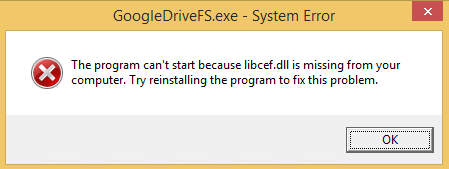
GoogleDriveFS – cannot find libcef.dll
Don’t you love errors after things try to audo-update themselves without testing preerquisites:
---------------------------
GoogleDriveFS.exe - System Error
---------------------------
The program can't start because libcef.dll is missing from your computer. Try reinstalling the program to fix this problem.
---------------------------
OK
---------------------------
The message was from the csrss.exe Client/Server Runtime Subsystem – Wikipedia process:
Read the rest of this entry »
Posted in Google, GoogleDrive, Power User, Windows, Windows 8 | Leave a Comment »


 The Wiert Corner - irregular stream of stuff