The Wiert Corner – irregular stream of stuff

Jeroen W. Pluimers on .NET, C#, Delphi, databases, and personal interests

  • My badges

  • Twitter Updates

  • My Flickr Stream

  • Pages

  • All categories

  • Enter your email address to subscribe to this blog and receive notifications of new posts by email.

    Join 1,860 other subscribers

Archive for the ‘X10SRH-CF’ Category

Some links on SuperMicro X10 and “PEI–Could Not Find Recovery Image…”

Posted by jpluimers on 2023/02/06

An X10 machine here hardly needs reboots, but at one point it did, and got a dreaded message “PEI--Could Not Find Recovery Image...“, so I started Googling.

  1. [Wayback/Archive] “pei” “could not find recovery image” – Google Search returned only one Russian thread: [Wayback/Archive] Восстановление BIOS на Supermicro X10SRi.
  2. Hard to read, I dug further with [Wayback/Archive] “PEI–Could Not Find Recovery Image…” – Google Search and [Wayback/Archive] “pei could not find recovery image” – Google Search, which both went for inexact matches: bummer.

The good news is that few people bump into this problem. The bad news is that the ones that do, usually do not find a way to solve it. For example:


What helped in retrospect, was using IPMI (which still worked), re-flash the most recent BIOS, then powered down the machine and rebooted: it worked.

Not sure if I will be so lucky next time, but via [Wayback/Archive] supermicro “could not find recovery image” – Google Search , I found the the idea from [Wayback/Archive] X9SRL-F POSTs only via BIOS recovery process | ServeTheHome Forums that might help: solder a new BIOS Flash ship. Definitely not for the fainthearted: [Wayback/Archive] Bios Recovery via Chip Reprogramming Supermicro X10SLM+-LN4F | ServeTheHome Forums.


I got at the BIOS programming via IPMI idea via the second set of searches above, which got me at [Wayback/Archive] Supermicro BIOS recovery – SUPER.ROM – Server Fault (thanks anonymous [Wayback/Archive] user303507):

Get mainboards with a “-F” in the product name. Then you have IPMI and can even flash a faulty BIOS. It requires a key from Supermicro to activate this feature which is not for free

The 2nd flash area can also be fully impacted by a faulty flash process, therefore the trick with Ctrl+HOME does not work.

This worked because all my SuperMicro mainboards are of the “-F” type and I had the key.

If you don’t have the key it can be generated, for instance with the bash script I published in Supermicro Bios Update – YouTube.

You can find back most letters and numbers SuperMicro uses at [Wayback/Archive1/Archive2] Motherboards (Intel UP) | Product Naming Conventions | Super Micro Computer, Inc. which has a few tables like this:

Read the rest of this entry »

Posted in Hardware, Mainboards, Power User, SAS/SATA, SuperMicro, X10SRH-CF | Leave a Comment »

PCIe bifurcation to split an x16 or x8 slot into multiple x4 channels: allows PCIe adapters with multiple NVMe cars

Posted by jpluimers on 2022/03/07

It looks like some X9 and X10 Supermicro boards already support PCIe bifurcation (splitting of PCIe slots into multiple channels), which might be worth a try to upgrade some of my older rigs to use NVMe instead of SATA storage as it will allow me to use adapters that support multiple NVMe devices into a single PCIe slot.

The X9 motherboards uses an LGA 2011-R socket, and the X10 motherboards an LGA 2011-R3 sockets.

Both use chipsets not being that different: the X9 uses the C600 series (which are similar to the X79 consumer series), and the X10 uses the C610 series (which are similar to the X99 consumer series).

This is what I found out about the bifurcation support for my boards:

References:

–jeroen

Posted in Hardware, Mainboards, Power User, SuperMicro, X10SRH-CF, X9SRi-3F, X9SRi-F | Leave a Comment »

Supermicro: 5 BIOS beeps might just mean internal VGA is disabled

Posted by jpluimers on 2021/05/03

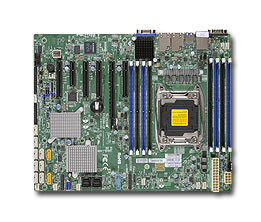
A while ago, I got a second hand Supermicro workstation and wondered why the IPMI KVM would not show anything.

The video card in it worked fine, so I used it as a desktop machine setup for a while, happily running VMS.

I finally decided to move into a closet, so I removed the video card, and rebooted.

Then it beeped 5 times, which was odd: I expected it to switch from the video card to the internal video. It didn’t.

Older BIOS codes: [WayBack] AMI BIOS Beep Codes – Thomas-Krenn-Wiki

From PDF [WayBack] BIOS POST Codes for C7/X9/X10/X11/B9/B10/B1/A1 Motherboards

PEI Beep Codes

# of Beeps Description
1 Memory not Installed
1 Memory was installed twice (InstallPeiMemory routine in PEI Core called twice)
2 Recovery started
3 DXEIPL was not found
3 DXE Core Firmware Volume was not found
4 Recovery failed
4 S3 Resume failed
7 Reset PPI is not available

DXE Beep Codes

# of Beeps Description
1 Invalid password
4 Some of the Architectural Protocols are not available
5 No Console Output Devices are found
5 No Console Input Devices are found
6 Flash update is failed
7 Reset protocol is not available
8 Platform PCI resource requirements cannot be met

So I did a bit of reading in the manual, then found about a jumper which had happily been living out of view, under the video card:

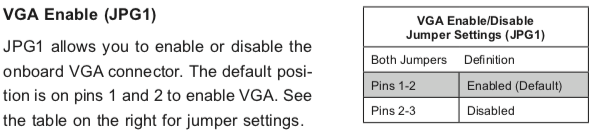
VGA Enable (JPG1)

JPG1 allows you to enable or disable the onboard VGA connector. The default position is on pins 1 and 2 to enable VGA.

Setting the jumper to pins 1&2 made internal VGA available again, it happily booted and showed in the IPMI KVM.

Later I understood why the jumper was set to VGA disabled: when having two video cards, by default Windows will extend your desktop to an invisible monitor.

The easiest workaround for that is just to disable VGA. However, you can also change Windows

Older versus newer boards

It appears that most older SuperMicro systems have a hardware switch, but for newer chipsets supporting Intel Quick Sync Video a there is a BIOS setting: [WayBack] Enable internal graphics in SUPERMICRO servers | Any IT here? Help Me!

Windows 10 fixing video cards and ACPI_BIOS_ERROR

The reboot did not work fine: Windows 10 would not initialise properly, but hung when detecting video cards.

Read the rest of this entry »

Posted in Hardware, IPMI, Mainboards, Power User, SuperMicro, X10SRH-CF, X9SRi-3F, X9SRi-F | Leave a Comment »

Need to do some reading on local domains on the internal network

Posted by jpluimers on 2021/04/09

A long time I wondered why I saw ESXi systems on my local network have two entries in their /etc/hosts file:

[root@ESXi-X10SRH-CF:~] cat /etc/hosts
# Do not remove the following line, or various programs
# that require network functionality will fail.
127.0.0.1   localhost.localdomain localhost
::1     localhost.localdomain localhost
192.168.71.91   ESXi-X10SRH-CF ESXi-X10SRH-CF

Then I bumped into someone who had a different setup:

[root@ESXi-X10SRH-CF:~] cat /etc/hosts
# Do not remove the following line, or various programs
# that require network functionality will fail.
127.0.0.1   localhost.localdomain localhost
::1     localhost.localdomain localhost
192.168.0.23    esxi.dynamic.ziggo.nl esxi

So now I knew that the first entry can have a domain resolving it (it still makes be wonder why ziggo is using a top-level domain to resolve local stuff; but searching for  dynamic.ziggo.nl did not get me further on that).

So I installed a quick ESXi machine on that local network, and got the same.

When back home the machine still thought it was esxi.dynamic.ziggo.nl, though clearly I was outside a Ziggo network

I wanted to get rid of it, but that was hard.

Since I forgot to take screenshots beforehand, I can only provide the ones without a search domain bellow.

Reminder to self: visit someone within the Ziggo network, then retry.

Normally you can edit things like these in the default TCP/IP stack. There are two places to change this:

Neither of these allowed me to change it to a situation like this, but luckily the console did.

In the below files, I had to remove the bold parts, then restart the management network (I did keep a text dump, lucky me):

[root@esxi:/etc] grep -inr ziggo .
./vmware/esx.conf:116:/adv/Misc/HostName = "esxi.dynamic.ziggo.nl"
./resolv.conf:2:search dynamic.ziggo.nl 
./hosts:5:192.168.71.194    esxi.dynamic.ziggo.nl esxi
[root@esxi:/etc] cat /etc/resolv.conf 
nameserver 192.168.71.3
search dynamic.ziggo.nl 
[root@esxi:/etc] cat /etc/hosts
# Do not remove the following line, or various programs
# that require network functionality will fail.
127.0.0.1   localhost.localdomain localhost
::1     localhost.localdomain localhost
192.168.71.194  esxi.dynamic.ziggo.nl esxi

Future steps

  1. Read more on local domains, search domains and related topics
  2. Configure a local domain on my local network, so DHCP hands it out, and DHCP handed out host names are put in the local DNS
  3. Test if all services on all machines still work properly

Reading list

Read the rest of this entry »

Posted in DNS, ESXi6.5, ESXi6.7, Hardware, Internet, Mainboards, Network-and-equipment, Power User, SuperMicro, Virtualization, VMware, VMware ESXi, X10SRH-CF, X9SRi-3F | Leave a Comment »

Supermicro Single CPU Board for ESXi Home lab – Upgrading LSI 3008 HBA on the X10SRH-CLN4F | ESX Virtualization

Posted by jpluimers on 2021/04/09

This LSI 3008 HBA update to TI firmware is still on my wish list, but I could not find it when I bought the board in 2018.

[WayBack] Supermicro Single CPU Board for ESXi Home lab – Upgrading LSI 3008 HBA on the X10SRH-CLN4F | ESX Virtualization:

As you know my lab got an addition this year with Supermicro’s Single CPU board, the X10SRH-CLN4F. In this post we will be upgrading LSI 3008 HBA on the X10SRH-CLN4F.

I have learned a new way to patch via UEFI. In fact, it’s same (or easier) than through DOS-based bootable USB. The IT firmware can be reverted back to IR firmware as in the ZIP package there are both versions there. So in case you need a server with hardware RAID, you can use the IR version. I was actually wondering what it means the IT and IR and here is what I have found at LSI (Avago) website:

“IT” firmware maximizes the connectivity and performance aspects of the HBA. “IR” firmware offers RAID functionality via RAID 0, 1, and 10 capabilities.

Via:

SR-IOV?

The step afterwards is to enable SR-IOV for this LSI 3008 HBA.

These links should help with that:


–jeroen

Posted in ESXi6.5, ESXi6.7, Hardware, Mainboards, Power User, SuperMicro, Virtualization, VMware, VMware ESXi, X10SRH-CF | Leave a Comment »

Running SuperMicro IPMIView on MacOS

Posted by jpluimers on 2021/03/16

I wrote about SuperMicro mainboards and IPMIView recently, but that ran only on Windows and Linux. Since I focus my desktop mainly on MacOS, and never on Linux, I did not want to use the Windows IPMView (though it did work most of the time).

Not having a MacOS version sounded odd, as there was an iOS version:

[WayBack] ‎Supermicro IPMIView on the App Store “This app is only available on the App Store for iOS devices.”

A quick search made me find a few links:

The last one looked most promising, so I forked it.

Following the steps already made me write down a few notes for changes in the README.md file.

But then I bumped into a strange error when wanting to use the KVM Console from IPMIView, as it threw the same error all the time:

".jre/Contents/Home/bin/java": error=2, No such file or directory

I made a quick note in [WayBack] KVM Console cannot start due to java not found · Issue #1 · jpluimers/IPMIView.app · GitHub:

When starting a KVM Console, you get this error: ".jre/Contents/Home/bin/java": error=2, No such file or directory

Try to fix this.

Later I dug a bit deeper, and managed to fix it in the script steps of the README.md:

git clone https://github.com/TheCase/IPMIView.app
pushd IPMIView.app/
mkdir -p Resources/IPMIView
pushd Resources/IPMIView/
tar -zxvf ~/Downloads/IPMIView*.tar.gz --strip=1
pushd jre/
mkdir -p Contents/Home/bin
pushd Contents/Home/bin
ln -s `which java` java
popd
popd
popd
popd
rsync -avlo IPMIView.app/ ~/Applications/IPMIView.app/

Of course I ran into another problem on one of my SuperMicro machines: the KVM Console would consistently crash. Luckily that was solved by a IPMI Firmware Upgrade:

[WayBack] java – Supermicro IPMIView KVM Console does not work at all – Server Fault

The problem was the firmware for the IPMI on these boards was too old (not the same as the BIOS – updating the BIOS will not help in this case). Digging around SuperMicro’s site (never did get a reply from them), I found the Firmware Revision of 3.20 & was able to install it. On the IPMI device tab, under “Device Information”, you should see: Firmware Revision 3.20 IPMI Revision: 2.0 I can now see the KVM Console in both the IPMIView software

–jeroen

Posted in Hardware, IPMI, Mainboards, Power User, SuperMicro, X10SRH-CF, X9SRi-3F | Leave a Comment »

Supermicro Bios Update – YouTube

Posted by jpluimers on 2020/09/14

I needed to get myself an OOB license for the BIOS update over the IPMI console or SUM (Supermicro Update Manager). An IPMI update can be done without an OOB license from the IPMI console, but the BIOS requires a license.

Links that initially helped me with that to get a feel for what I needed:

I thought that likely I need to purchase a key for it:

Obtain the license code from your IPMI BMC MAC address

But then I found out the below links on reverse engineering.

From those links, I checked both the Perl and Linux OpenSSL versions. Only the Perl version works on MacOS.

Then I fiddled with the bash version: unlike the OpenSSL version above, this one printed output. It wrongly printed the last groups of hex digits instead of the first groups of hex digits that the Perl script prints.

Here is the corrected bash script printing the first groups of hex digits (on my systems, I have an alias supermicro_hash_IPMI_BMC_MAC_address_to_get_OOB_license_for_BIOS_update for it):

#!/bin/bash
function hash_mac {
  mac="$1"
  key="8544e3b47eca58f9583043f8"
  sub="\x"
  #convert mac to hex
  hexmac="\x${mac//:/$sub}"
  #create hash
  code=$(printf "$hexmac" | openssl dgst -sha1 -mac HMAC -macopt hexkey:"$key")
  #DEBUG
  echo "$mac"
  echo "$hexmac"
  echo "$code"

  echo "${code:0:4}-${code:4:4}-${code:8:4}-${code:12:4}-${code:16:4}-${code:20:4}"
}

Steps

Reverse engineering links

  • [WayBack] The better way to update Supermicro BIOS is via IPMI – VirtualLifestyle.nl

    Another way to update the BIOS via the Supermicro IPMI for free is simply calculating the license key yourself as described here: https://peterkleissner.com/2018/05/27/reverse-engineering-supermicro-ipmi/ [WayBack].

    • [WayBack] Reverse Engineering Supermicro IPMI – peterkleissner.com

      Algorithm:

      MAC-SHA1-96(INPUT: MAC address of BMC, SECRET KEY: 85 44 E3 B4 7E CA 58 F9 58 30 43 F8)

      Update 1/14/2019: The Twitter user @astraleureka posted this code perl code which is generating the license key:

      #!/usr/bin/perl
      use strict;
      use Digest::HMAC_SHA1 'hmac_sha1';
      my $key  = "\x85\x44\xe3\xb4\x7e\xca\x58\xf9\x58\x30\x43\xf8";
      my $mac  = shift || die 'args: mac-addr (i.e. 00:25:90:cd:26:da)';
      my $data = join '', map { chr hex $_ } split ':', $mac;
      my $raw  = hmac_sha1($data, $key);
      printf "%02lX%02lX-%02lX%02lX-%02lX%02lX-%02lX%02lX-%02lX%02lX-%02lX%02lX\n", (map { ord $_ } split '', $raw);

      Update 3/27/2019: There is also Linux shell version that uses openssl:

      echo -n 'bmc-mac' | xxd -r -p | openssl dgst -sha1 -mac HMAC -macopt hexkey:8544E3B47ECA58F9583043F8 | awk '{print $2}' | cut -c 1-24
    • [WayBack] Modular conversion, encoding and encryption online — Cryptii

      Web app offering modular conversion, encoding and encryption online. Translations are done in the browser without any server interaction. This is an Open Source project, code licensed MIT.

      Steps:

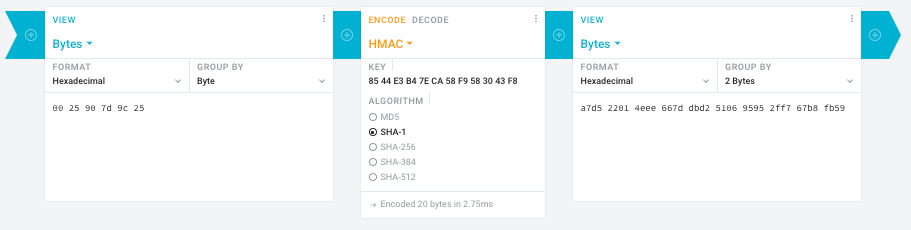
      1. In the left pane, select the “View” drop-down to be “Bytes”, then paste the HEX bytes of your IPMI MAC address there (like 00 25 90 7d 9c 25)
      2. In the middle pane, select the drop-down to become “HMAC” followed by the radio-group to be “SHA1“, then paste these bytes into the “Key” field: 85 44 E3 B4 7E CA 58 F9 58 30 43 F8
      3. In the right pane, select the drop-down to become “Bytes”, then the “Group by” to become “2 bytes”, which will you give the output (where the bold part is the license key: 6 groups of 2 bytes): a7d5 2201 4eee 667d dbd2 5106 9595 2ff7 67b8 fb59

      Result:

    • Michael Stapelberg’s private website, containing articles about computers and programming, mostly focused on Linux.[WayBack] Securing SuperMicro’s IPMI with OpenVPN
    • [WayBack] GitHub – ReFirmLabs/binwalk: Firmware Analysis Tool
  • [WayBack] The better way to update Supermicro BIOS is via IPMI – VirtualLifestyle.nl

    Ahh…..a few corrections :-P

    #!/bin/bash
    function hash_mac {
      mac="$1"
      key="8544e3b47eca58f9583043f8"
      sub="\x"
      #convert mac to hex
      hexmac="\x${mac//:/$sub}"
      #create hash
      code=$(printf "$hexmac" | openssl dgst -sha1 -mac HMAC -macopt hexkey:"$key")
      #DEBUG
      echo "$mac"
      echo "$hexmac"
      echo "$code"
      echo "${code:9:4} ${code:13:4} ${code:17:4} ${code:21:4} ${code:25:4} ${code:29:4}"
    }
    #hex output with input
    hash_mac "$1"
    
    #Look out for the quotes, they might get changed by different encoding
  • [WayBack] The better way to update Supermicro BIOS is via IPMI – VirtualLifestyle.nl

    Thanks Peter. For anyone interested, here’s a bash script that takes the MAC as the only argument and outputs the activation key:

    #!/bin/bash
    function hash_mac {
      mac="$1"
      key="8544e3b47eca58f9583043f8"
      sub="\x"
      #convert mac to hex
      hexmac="\x${mac//:/$sub}"
      #create hash
      code=$(printf "$hexmac" | openssl dgst -sha1 -mac HMAC -macopt hexkey:"$key")
      ## DEBUG
      echo "$mac"
      echo "$hexmac"
      echo "$code"
      echo "${code:9:4} ${code:13:4} ${code:17:4} ${code:21:4} ${code:25:4} ${code:29:4}"
    }
    ## hex output with input
    hash_mac "$1"


–jeroen

Read the rest of this entry »

Posted in Development, Encoding, Hardware, Hashing, HMAC, Mainboards, OpenSSL, Power User, Security, SHA, SHA-1, Software Development, SuperMicro, X10SRH-CF | Leave a Comment »

how to install OS remotly using Supermicro IPMI? – Server Fault

Posted by jpluimers on 2019/05/31

I wasn’t aware that IPMI more recent than 3.3 also supports virtual media, but in retrospect it’s very logical it does. When managing remote machines, you don’t walk up to it to switch physical media (:

Worked splendid on my X10SRH-CF based server, and even supports SMB based network shares.

The how-to is very simple, steps are for instance at these links:

Note: the for IPMI mounted ISO images, I found out that they will not work in UEFI mode and that you have to switch your BIOS back to LEGACY boot mode:

Read the rest of this entry »

Posted in Hardware, Mainboards, Power User, SuperMicro, X10SRH-CF | Leave a Comment »

ESXi 6.5.0a hang after “balloonVMCI loaded successfully”

Posted by jpluimers on 2019/03/25

No Google results for “balloonVMCI loaded successfully”.

I had this when booting from a USB installation of ESXi 6.5.0.a.

It got resolved with ESXi 6.5.0 Update 1. Apparently the first version has issues booting on a SuperMicro-X10SRH-CF from a USB stick.

It’s a bit tricky to get the accompanying VMware-VMvisor-Installer-6.5.0.update01-5969303.x86_64.iso as the my VMware site is a bit broken (even if you have the license, it says you are not entitled), but luckily the ESXi 6.5 update 1 download page [Cache/Archive.is] has the hashes:

MD5SUM: 6d71ca1a8c12d73ca75952f411d16dc7
SHA1SUM: 5a38ae10162e0a1395b12ea31cba6342796f6383
SHA256SUM: f6e5000dff423c275b3ffbdfe08145f369d04b8c4ade5a413f2ef2a029a5e3ef

You also need a good USB stick. If it’s not good enough, you get errors like “Host Local Swap Location has not been enabled” during boot**.

–jeroen

** full log at for instance [WayBack] 2017-02-03T03:00:01Z crond[66604]: crond: USER root pid 87677 cmd /usr/lib/vmwar – Pastebin.com

Posted in ESXi6.5, Mainboards, Power User, SuperMicro, Virtualization, VMware, VMware ESXi, X10SRH-CF | Leave a Comment »

Supermicro | Products | Motherboards | Xeon® Boards | X10SRH-CF

Posted by jpluimers on 2019/03/01

I still like this board: [WayBackSupermicro | Products | Motherboards | Xeon® Boards | X10SRH-CF.

It’s in my main virtualisation workhorse, uses little power, has loads of disk (SAS/SATA) ports, IPMI, two network connections and enough slots for memory and I/O to be extensible.

I use it for most of my software development even when on the road: VPN home over one of the fiber connections and it screams.

Some links, as SuperMicro tends to hide them behind POST requests:

–jeroen

Posted in Development, ESXi6.5, Hardware, Mainboards, Power User, Software Development, SuperMicro, Virtualization, VMware, VMware ESXi, X10SRH-CF | Leave a Comment »