


For my link archive: domain name registration prices in The Netherlands: [WayBack] Domeinnaam prijzen – Internetproviders en Hosting – GoT
–jeroen
Posted by jpluimers on 2021/03/12
For my link archive: domain name registration prices in The Netherlands: [WayBack] Domeinnaam prijzen – Internetproviders en Hosting – GoT
–jeroen

Posted in DNS, Hosting, Internet, Power User | Leave a Comment »
Posted by jpluimers on 2020/10/15
Postfix has documentation on primary MX and secondary MX, but not on tertiary MX.
If the primary MX is down, you have a series of secondary MX and tertiary MX that configured the same way, MX DNS priority for primary, the series of secondary MX and tertiary MX have increasing numbers, and the primary MX goes down, then senders can get “too many hops” as secondary and tertiary MX are looping.
I had a hard time finding a good and easy solution as these queries do not return many meaningful results:
Here are some links that helped getting this solved:
Short answer: this message means that mail is probably looping. If you see this after you turned on Postfix content filtering, then you have made a mistake that causes mail to be filtered repeatedly. This is cured by appropriate use of content_filter=, header_checks=, and body_checks=.
Long answer: the message has too many
Received:message headers. A received header is added whenever Postfix (or any MTA) receives a message. A large number ofReceived:message headers is an indication that mail is looping around.Side comment: email uses the opposite of the technique that is used to avoid IP forwarding loops. With IP, the sender sets a TTL (time to live) field in the IP header. The field is decremented by each router. When the TTL reaches zero the packet is discarded and an ICMP error message is returned to the sender.
In case you or anyone else was/is wondering about the
mydestination = localhostthing, the reason it has to be set to just localhost is because MIAB uses Postfix’s “virtual domain hosting” (http://www.postfix.org/VIRTUAL_README.html) support. Per the documentation formydestinationat http://www.postfix.org/postconf.5.html#mydestination:Do not specify the names of virtual domains – those domains are specified elsewhere. See VIRTUAL_README for more information.
(in the context of MIAB every domain is a virtual domain).
In my case a series of these:
Received: from mwgp.xs4all.nl (mwgp.xs4all.nl [80.101.239.92])
    by fiber24315337242.heldenvannu.net (Postfix) with ESMTP id 26395200FE
    for <jeroen@pluimers.com>; Fri, 29 Jun 2018 11:01:02 +0200 (CEST)
Received: from fiber24315337242.heldenvannu.net (unknown [37.153.243.246])
    by mwgp.xs4all.nl (Postfix) with ESMTP id 077A5E937
    for <jeroen@pluimers.com>; Fri, 29 Jun 2018 11:01:02 +0200 (CEST)
Specifying the transport will likely help me solve this problem:
This all came down to editing /etc/postfix/transport adding lines for each relayed domain like this one:
example.org smtp:[mx-a-record.example.org]
Lines like it direct to use the smtp transport and use a specific host (normally, the relay transport is being used).
After this:
# postmap /etc/postfix/transport

# rcpostfix reload
I choose not to configure [WayBack] Postfix Configuration Parameters: relay_recipient_maps, but might if I had an automated way of replicating lists of valid (and invalid) users.
Another option was confirmed at [WayBack] Software-update: Postfix 3.4.0 / 3.3.3 / 3.2.8 / 3.1.11 / 3.0.15 – Computer – Downloads – Tweakers by [WayBack] menocchio. Thanks!
Dat is volgens mij eenvoudig op te lossen met relay_transport of transport_maps. Zie ook: Postfix transport table format.
Daarmee dwing je de secondary servers de mail altijd af te willen leveren bij de primary server (en dus niet bij een andere secondary). En als de primary niet online is, dan wacht ie netjes tot dat wel het geval is :-)
Bijvoorbeeld:
relay_transport = smtp:[primarymx.domain.tld]
Likely relevant: [WayBack] The Book of Postfix
Maybe relevant in the future:
mydestination
relay_domains and relayhost
The second part of this document presents additional configurations for hosts in specific environments.
Found on my hunt for the above:
Create a file named
transportin /etc/postfix and add the following text,gmail.com smtp:smtp.yourisp.com:25
googlemail.com smtp:smtp.yourisp.com:25Remember to swap “smtp.yourisp.com” for the address of your ISP’s smtp relay server.
Now we need to compile this file using the postmap command,
postmap /etc/postfix/transport
Edit /etc/postfix/main.cf and add this line at the bottom,
transport_maps = hash:/etc/postfix/transport
Restart postfix and you should find all mail addressed to @gmail.com or @googlemail.com will be redirected to your smtp relay.
Optional list of relay hosts for SMTP destinations that can’t be found or that are unreachable. With Postfix 2.3 this parameter is renamed to smtp_fallback_relay.
Optional list of relay hosts for SMTP destinations that can’t be found or that are unreachable. With Postfix 2.2 and earlier this parameter is called fallback_relay.
Try not to make typo’s: [WayBack] postfix appears not finding MX records or host names from DNS
Interesting thought, but not sure how smart SPAM bots are now: [Archive.is] Spam relaying through secondary MX… – Google Groups
To archive this:
–jeroen
Posted in *nix, Communications Development, Development, DevOps, DNS, etckeeper, Infrastructure, Internet, Internet protocol suite, Linux, Power User, SMTP | Leave a Comment »
Posted by jpluimers on 2020/07/28
From the hindsight department [WayBack] Nice when someone in Dallas using 69.162.119.78 is querying your DNS infrastructure for many permutations of domains… https://gist.github.com/jpluimer… – Jeroen Wiert Pluimers – Google+.
Wolfgang Rupprecht gave me some hints on the cause, as the IP address 69.162.119.78 Google Search used to be of a gaming server: [WayBack] TwotailsTikat’s Profile – Member List – Minecraft Forum
After a good night sleep,
# nslookup 69.162.119.78

78.119.162.69.in-addr.arpa name = mail.uptimerobot.com
In retrospect: perfectly normal behaviour for monitoring machine “snip”.
Log by https://github.com/gamelinux/passivedns
–jeroen
Posted in *nix, DNS, Internet, Monitoring, Power User, Uptimerobot | Leave a Comment »
Posted by jpluimers on 2019/07/22
[WayBack] CAA Mandated by CA/Browser Forum | Qualys Blog
Certification Authority Authorization (CAA), specified in RFC 6844 in 2013, is a proposal to improve the strength of the PKI ecosystem with a new control to restrict which CAs can issue certificates…
Related:
–jeroen
Posted in Conference Topics, Conferences, DNS, Encryption, Event, HTTPS/TLS security, Internet, Power User, Security | Leave a Comment »
Posted by jpluimers on 2018/12/10
I did this a long time ago, but forgot to blog about it back then: [Archive.is] Windows Server 2008 and Server 2008 R2 – OpenDNS.
Summary:
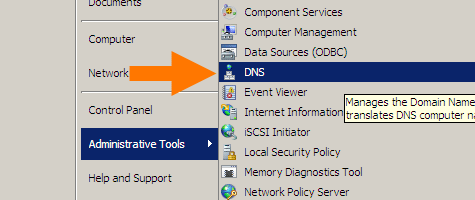
Start with the DNS manager:
%SystemRoot%\system32\dnsmgmt.msc /s
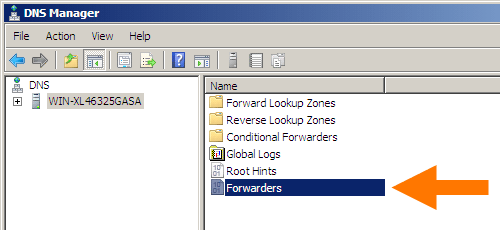
Then open your machine, and double-click
Forwarders:
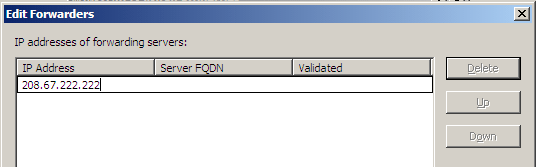
In the dialog, click the
Editbutton and add DNS servers (for instance Google DNS 8.8.8.8 and 8.8.4.4).
In my case it became this:
Google DNS servers added
Click
Donebuttons until all dialogs are closed.
–jeroen

Posted in DNS, Internet, Power User, Windows, Windows Server 2008, Windows Server 2008 R2 | Leave a Comment »
Posted by jpluimers on 2018/12/04
[WayBack] Uptime Robot on Twitter: “Sorry all that the API and status pages fluctuated since the last 18 hours. The issue is completely fixed and it is all back to normal now.”
[WayBack] Jeroen Pluimerson Twitter: “Some are still broken, especially the ones with IDs 778601760 778601763 778601765 778601777 778601814 779973649 779677530 779677532 All of them reachable through various ISPs, but UpTimeRobot marks them down since about 11 hours”
See:
Failing:
Found out what happened: the IP got blocked on some spam lists. This is odd:
Even though the SMTP server behind it has relay blocked apart from the 2 domains it is primary MX for, somebody found a trick around it, I think by sending mail to the primary domains that
The trick caused the IP to appear on 3 blacklists according to MXTOOLBOX:
Blacklist Reason TTL ResponseTime LISTED
CBL 80.100.143.119 was listed Detail 806 0 Ignore Hostkarma Black 80.100.143.119 was listed Detail 805 0 Ignore Spamhaus ZEN 80.100.143.119 was listed Detail 300 281 Ignore
Checking these revealed all to be around CBL:
This IP address was detected and listed 6 times in the past 28 days, and 0 times in the past 24 hours. The most recent detection was at Tue Dec 4 02:25:00 2018 UTC +/- 5 minutes
Your reverse DNS is correct! – snip.xs4all.nl
The IP address for the reverse lookup name matches the original IP – RDNS InformationThis is a list from our log files showing the activity from IP address 80.100.143.119. Our system stores information for 4 days.
/ip-log/karma.log.06:black 80.100.143.119 auth-bad ID=79648-15207 X=mxbackup H=snip.xs4all.nl [80.100.143.119]:40353 HELO=[[127.0.0.1]] SN=[M.ASMMSS.06446644586518723606@terrain.gov.harvard.edu] AUTH=[antonio] T=[irena.getheridge2018@outlook.fr] S=[Re: RcPT[(ALERT) | 0644664458]]
80.100.143.119 is not listed in the SBL
80.100.143.119 is not listed in the PBL
80.100.143.119 is listed in the XBL, because it appears in:
Further research also found an entry in dnsbl.spfbl.net:
Check result of IP 80.100.143.119
This is the rDNS found:
- <snip.xs4all.nl> valid FCrDNS.
This IP was flagged due to misconfiguration of the e-mail service or the suspicion that there is no MTA at it.
For the delist key can be sent, select the e-mail address responsible for this IP:
- add a PayPal user’s email for 6.00 BRL.
- add a PayPal user’s email for 1.50 USD.
- <abuse@xs4all.nl> qualified.
- <postmaster@snip.xs4all.nl> qualified.
- <postmaster@xs4all.nl> qualified.
A chicken-and-egg situation here: since snip.xs4all.nl is blocked because of the blacklist entry, I cannot request a validation email for the blacklist entry.
But then there was MultiRBL showing that most DNS black lists are aggregators of others.
—jeroen

Posted in *nix, DNS, Internet, Monitoring, Power User, Uptimerobot | Leave a Comment »
Posted by jpluimers on 2018/11/15
For many dig queries, it helps to get the current list of root DNS servers.
Though the list is pretty static, occasionally it changes. While writing there were 13 of them and the most recent history report was in “RSSAC023: History of the Root Server System” at [WayBack] www.icann.org/en/system/files/files/rssac-023-04nov16-en.pdf.
So below are the steps to get an accurate list based on
+noall need to be in front of your query).First find out what the root servers are:
$  dig +noall +answer . ns | sort
.           106156  IN  NS  a.root-servers.net.
.           106156  IN  NS  b.root-servers.net.
.           106156  IN  NS  c.root-servers.net.
.           106156  IN  NS  d.root-servers.net.
.           106156  IN  NS  e.root-servers.net.
.           106156  IN  NS  f.root-servers.net.
.           106156  IN  NS  g.root-servers.net.
.           106156  IN  NS  h.root-servers.net.
.           106156  IN  NS  i.root-servers.net.
.           106156  IN  NS  j.root-servers.net.
.           106156  IN  NS  k.root-servers.net.
.           106156  IN  NS  l.root-servers.net.
.           106156  IN  NS  m.root-servers.net.
You should shorten this to $ dig +noall +answer . ns but that will not give you the TTL (how long the information will be cached before your DNS server refreshes it).
Now query at least 3 of these to get the actual list of root servers (I list only one statement, the rest is similar):
$ dig +noall +answer . ns @j.root-servers.net. | sort
.           518400  IN  NS  a.root-servers.net.
.           518400  IN  NS  b.root-servers.net.
.           518400  IN  NS  c.root-servers.net.
.           518400  IN  NS  d.root-servers.net.
.           518400  IN  NS  e.root-servers.net.
.           518400  IN  NS  f.root-servers.net.
.           518400  IN  NS  g.root-servers.net.
.           518400  IN  NS  h.root-servers.net.
.           518400  IN  NS  i.root-servers.net.
.           518400  IN  NS  j.root-servers.net.
.           518400  IN  NS  k.root-servers.net.
.           518400  IN  NS  l.root-servers.net.
.           518400  IN  NS  m.root-servers.net.
Compare the lists. If they are equal, then you’re done.
If not, then the internet is in trouble (:
When you want the A and AAAA records with IP addresses in addition to the NS records with names, then add +additional to your query:
dig +noall +answer +additional @j.root-servers.net. | sort
.           518400  IN  NS  a.root-servers.net.
.           518400  IN  NS  b.root-servers.net.
.           518400  IN  NS  c.root-servers.net.
.           518400  IN  NS  d.root-servers.net.
.           518400  IN  NS  e.root-servers.net.
.           518400  IN  NS  f.root-servers.net.
.           518400  IN  NS  g.root-servers.net.
.           518400  IN  NS  h.root-servers.net.
.           518400  IN  NS  i.root-servers.net.
.           518400  IN  NS  j.root-servers.net.
.           518400  IN  NS  k.root-servers.net.
.           518400  IN  NS  l.root-servers.net.
.           518400  IN  NS  m.root-servers.net.
a.root-servers.net. 518400  IN  A   198.41.0.4
a.root-servers.net. 518400  IN  AAAA    2001:503:ba3e::2:30
b.root-servers.net. 518400  IN  A   192.228.79.201
b.root-servers.net. 518400  IN  AAAA    2001:500:200::b
c.root-servers.net. 518400  IN  A   192.33.4.12
d.root-servers.net. 518400  IN  A   199.7.91.13
e.root-servers.net. 518400  IN  A   192.203.230.10
f.root-servers.net. 518400  IN  A   192.5.5.241
g.root-servers.net. 518400  IN  A   192.112.36.4
h.root-servers.net. 518400  IN  A   198.97.190.53
i.root-servers.net. 518400  IN  A   192.36.148.17
j.root-servers.net. 518400  IN  A   192.58.128.30
k.root-servers.net. 518400  IN  A   193.0.14.129
l.root-servers.net. 518400  IN  A   199.7.83.42
m.root-servers.net. 518400  IN  A   202.12.27.33
–jeroen
Posted in DNS, Internet, Power User | 1 Comment »
Posted by jpluimers on 2018/11/15
Lets find the authoritative name server and TTL (time to live) for the example.org domain and www.example.org subdomain.
Notes:
- you can also do this using the web-page wrapper around dig [WayBack] Dig web interface
- web-pages return most information in one go are [WayBack] intodns.com/example.org and [WayBack] dnsinspect.com: Report for example.org.
- the steps below are partially based on a more in depth domain consistency check at [WayBack] Debugging nameservers using dig +norec
First start with a root server (dig: getting the list of root servers) to get parents of the name servers for example.org (don’t you love indirection!):
$ dig +norecurse +noall +authority @f.root-servers.net. example.org.
org.            172800  IN  NS  a0.org.afilias-nst.info.
org.            172800  IN  NS  a2.org.afilias-nst.info.
org.            172800  IN  NS  b0.org.afilias-nst.org.
org.            172800  IN  NS  b2.org.afilias-nst.org.
org.            172800  IN  NS  c0.org.afilias-nst.info.
org.            172800  IN  NS  d0.org.afilias-nst.org.
You can repeat this query for 2 more root servers to ensure they are in sync.
Now repeat with at least 3 of these to ensure they give matching results for the name servers for example.org:
$ dig +norecurse +noall +authority @b0.org.afilias-nst.info. example.org.
example.org.        86400   IN  NS  b.iana-servers.net.
example.org.        86400   IN  NS  a.iana-servers.net.
$ dig +norecurse +noall +authority @c0.org.afilias-nst.info. example.org.
example.org.        86400   IN  NS  a.iana-servers.net.
example.org.        86400   IN  NS  b.iana-servers.net.
$ dig +norecurse +noall +authority @a0.org.afilias-nst.info. example.org.
example.org.        86400   IN  NS  a.iana-servers.net.
example.org.        86400   IN  NS  b.iana-servers.net.
A query to a public DNS server will also return a name server list, but then you would need to know that name server first. In addition, you can not ask for +authority; you have to ask for +answer NS in stead:
$ dig +norecurse +noall +answer NS @8.8.8.8 example.org.
example.org.        55312   IN  NS  a.iana-servers.net.
example.org.        55312   IN  NS  b.iana-servers.net.
The name servers on the list are not guaranteed to be authoritative, as this query returns an empty result:
$ dig +norecurse +noall +authority @8.8.8.8 example.org.
From the name servers returned, you can now check if the servers themselves return the same name servers. If so, then you are sure they are authoritative:
$ dig +norecurse +noall +authority @a.iana-servers.net. example.org.
example.org.        86400   IN  NS  a.iana-servers.net.
example.org.        86400   IN  NS  b.iana-servers.net.
$ dig +norecurse +noall +authority @b.iana-servers.net. example.org.
example.org.        86400   IN  NS  b.iana-servers.net.
example.org.        86400   IN  NS  a.iana-servers.net.
With the authoritative name servers, you can get the actual TTL:
$ dig +norecurse +noall +answer SOA @a.iana-servers.net. example.org.
example.org.        3600    IN  SOA sns.dns.icann.org. noc.dns.icann.org. 2017042729 7200 3600 1209600 3600
$ dig +norecurse +noall +multiline +answer SOA @a.iana-servers.net. example.org.
example.org.        3600 IN SOA sns.dns.icann.org. noc.dns.icann.org. (
                2017042729 ; serial
                7200       ; refresh (2 hours)
                3600       ; retry (1 hour)
                1209600    ; expire (2 weeks)
                3600       ; minimum (1 hour)
                )
I got the +multiline trick from [WayBack] HOWTO: Using dig(1) to Find DNS Time to Live (TTL) Values – A-Team Systems.
You can repeat the above process with a non-authoritative name server a few times to see the TTL decrease:
$ dig +norecurse +noall +answer SOA example.org.
example.org.        322 IN  SOA sns.dns.icann.org. noc.dns.icann.org. 2017042729 7200 3600 1209600 3600
$ dig +norecurse +noall +answer SOA example.org.
example.org.        321 IN  SOA sns.dns.icann.org. noc.dns.icann.org. 2017042729 7200 3600 1209600 3600
This is for instance what is returned by [WayBack] example.org DNS information – who.is example.org DNS information. DNS records such SOA, TTL, MX, TXT and more.
Public DNS servers having multiple servers per IP can even run disperse TTL numbers, for instance Google DNS at 8.8.8.8 does this:
$ dig +norecurse +noall +answer SOA @8.8.8.8 example.org.
example.org.        13  IN  SOA sns.dns.icann.org. noc.dns.icann.org. 2017042729 7200 3600 1209600 3600
$ dig +norecurse +noall +answer SOA @8.8.8.8 example.org.
example.org.        1388    IN  SOA sns.dns.icann.org. noc.dns.icann.org. 2017042729 7200 3600 1209600 3600
$ dig +norecurse +noall +answer SOA @8.8.8.8 example.org.
example.org.        10  IN  SOA sns.dns.icann.org. noc.dns.icann.org. 2017042729 7200 3600 1209600 3600
+nssearch does not work for meUsing +nssearch as per [WayBack] How to find what Authoritative Name Server provided the answer using dig? – Server Fault fails for me:
$ dig +nssearch example.org
SOA sns.dns.icann.org. noc.dns.icann.org. 2017042729 7200 3600 1209600 3600 from server 199.43.135.53 in 83 ms.
SOA sns.dns.icann.org. noc.dns.icann.org. 2017042729 7200 3600 1209600 3600 from server 199.43.133.53 in 144 ms.
;; connection timed out; no servers could be reached
This reveals this in the bold values:
sns.dns.icann.org is not publicly accessible.7200 (7200 seconds is 2 hours).Authoritative answers might not be present in dig queries on some platforms. I need to dig deeper into [WayBack] terminal – Dig not returning authority section? – Ask Different to see why.
Glue records are always tricky to get right: [WayBack] How to check domain NS glue records using dig « Admins eHow
–jeroen
Posted in *nix, *nix-tools, bash, Development, dig, DNS, Internet, Power User, Scripting, Software Development | Leave a Comment »
Posted by jpluimers on 2018/09/07
A few links that helped me track down why a sudden new Ziggo IP-address was blacklisted:
–jeroen
Posted in DNS, Internet, Power User | Leave a Comment »
Posted by jpluimers on 2018/04/04
Abstract from this morning’s Twitter feed:
1.1.1.1 [Wayback] DNS is broken in many areas (because of for instance AT&T, Vodafone, Cisco screwing up and 1.1.1.1 historically being marked for research purposes)9.9.9.9 [Wayback] DNS has government affiliation (owned by Quad9, but the partner list below does not look nice)So what’s left?
1.0.0.1 alternative to 1.1.1.1
8.8.8.8 with secondary at 8.8.4.4
There are a more interesting IPv4 addresses untaken for DNS, but I’m not sure they are likable enough:
Posted in Cloud, Cloudflare, DNS, Infrastructure, Internet, LifeHacker, Power User | Tagged: AllesIstKaput, Cloudflare, DNS, Privacy, TLS | Leave a Comment »

 The Wiert Corner - irregular stream of stuff