Archive for the ‘Internet’ Category
Posted by jpluimers on 2020/08/14
In the end, this list worked on a Fritz!Box, but I still do not know which other subdomains and protocols they silently let pass:
windowsupdate.microsoft.com
*.windowsupdate.microsoft.com
*.update.microsoft.com
*.windowsupdate.com
download.windowsupdate.com
download.microsoft.com
*.download.windowsupdate.com
test.stats.update.microsoft.com
ntservicepack.microsoft.com
update.microsoft.com
*.update.microsoft.com
*.download.microsoft.com
windowsupdate.com
wustat.windows.com
login.live.com
mp.microsoft.com
*.mp.microsoft.com
www.update.microsoft.com
support.microsoft.com
www.msftconnecttest.com
Some source materials:
–jeroen
Read the rest of this entry »
Posted in Fritz!, Fritz!Box, Internet, Power User, Windows, Windows 10, Windows 7 | Leave a Comment »
Posted by jpluimers on 2020/07/06
[WayBack] RB450G and “..could not get answer from dns server” – MikroTik: I do not see a default route. It would be the route with “dst-address=0.0.0.0/0“.
–jeroen
Posted in Internet, MikroTik, Power User, routers | Leave a Comment »
Posted by jpluimers on 2020/05/11
Despite clear guidelines (European level since 2016, W3C level since 2018), web accessibility is still hard, both for web site developers and their users.
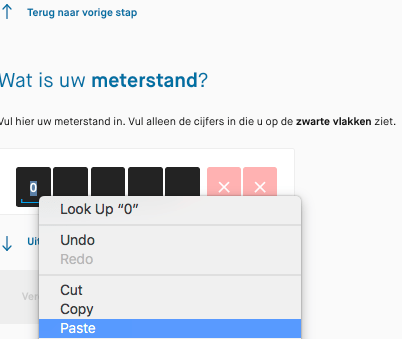
Two years ago, bumped into a Dutch government web site that had become worse over time: they disabled keyboard paste for numeric fields, only would paste 1 digit at a time, and managed to have the delete button delete the current digit (like what the backspace does and should do) instead of the next.
Please do not do that!
Here are the guidelines: [WayBack] Web Content Accessibility Guidelines (WCAG) 2.1
This is the (Dutch) story:
[WayBack] Thread by @jpluimers: “Beste @Waternet, waarom kan ik niet meer het hele opnamenummer in 1 keer plakken? Cijfertje voor cijfertje uit de gescippen plakken is nogal veel werk. Vroeger ging dit wel goed. plakken werkt niet met het toetsenbord: alleen m […]”
[WayBack] Jeroen Pluimers on Twitter: “Beste @Waternet, waarom kan ik niet meer het hele opnamenummer in 1 keer plakken? Cijfertje voor cijfertje uit de gescande brief knippen plakken is nogal veel werk. Vroeger ging dit wel goed.… “
[WayBack] Jeroen Pluimers on Twitter: “plakken werkt niet met het toetsenbord: alleen maar met de muis, dus onhandig voor mensen met een beperking. Als je in het veld staat werken alleen de numerieke toetsen en pijltjes van je toetsenbord, en de delete knop haalt het verkeerde karakter weg. Wie verzint die ongein?”
[WayBack] Jeroen Pluimers Twitterissä: “Bij postcode werkt plakken weer wel (en de rest van het toetsenbord ook helemaal), maar bij meterstand weer niet. Hoe maak je je site onhandig voor mensen met een beperking les 1: het is helemaal gelukt. Jammer! Lees eens … en … “
[WayBack] Jeroen Pluimers Twitterissä: “Bij email adres werkt plakken weer wel (gelukkig, het zijn maar 40 karakters), maar er mist een cruciale stap: meternummer. Die controle is voor adressen met meerdere meters ontzettend belangrijk. Vroeger werd dat wel gecontroleerd. Het invoerproces is dus een achteruitgang.”
[WayBack] Jeroen Pluimers on Twitter: “Laatste probleem is een waarschuwing *achteraf* dat jullie geen email bevestiging kunnen sturen. Super onhandig, omdat je op dat moment de stand ook niet meer kunt afdrukken. Er is veel werk voor jullie aan de winkel. Hou me gaarne op de hoogte van de vorderingen. CC @matijn”

[WayBack] Jeroen Pluimers on Twitter: “Bij dit soort problemen denk ik altijd aan @matijn en anderen waar toegankelijkheid van onschatbaar belang is. Zo zonde dat organisaties het voor elkaar krijgen om dit te verslechteren in plaats van de verbeteren, ondanks de Europese richtlijnen uit 2016 “
–jeroen
Read the rest of this entry »
Posted in Development, Internet, Software Development, Usability, User Experience (ux), Web Development | Leave a Comment »
Posted by jpluimers on 2020/04/03
I totally forgot it was possible to usie an old Fritz!Box to act as a DECT repeater:
Um die Abdeckung von DECT für mobile Festnetztelefone zu verbessern, lässt sich eine ältere Fritzbox verwenden.
Source: [WayBack] Ältere Fritzbox als DECT-Repeater verwenden – PC-WELT
Via: [WayBack] Bludau Media – Google+
–jeroen
Posted in Fritz!, Fritz!Box, Internet, Power User | Leave a Comment »
Posted by jpluimers on 2020/02/24
Reminder to self: [WayBack] Tomato by shibby – upgrade procedure and cfg backup | LinksysInfo.org:
I keep a text file with the changes I’ve made after a fresh install and I keep the file updated as I make changes.
Re-configuring the router after that takes a bit of time, but it is not that bad. Toastman’s method (here) noted above as well as the methods described here and here can also be used, but I haven’t tried them.
which references:
- [WayBack] Using QOS – Tutorial and discussion | Page 3 | LinksysInfo.org
You need to save a file somewhere on or off the router, with the following command from the command line.
nvram export –set >config.txt
This outputs the complete setup in useable text form, each line beginning with “nvram set”. This means it’s ready to input to the router without having to add the “nvram set” to every line. You could do this by ssh or telnet.
NOTE – you can only restore the whole config file to the original router. To configure a different router you need to cherry pick the important lines (see below)
e.g.
nvram set clkfreq=480,240,120
nvram set wl0_country=AU
nvram set wan_domain=freewifi
nvram commit
- [WayBack] Tomato RAF Releases | Page 18 | LinksysInfo.org
save off the results of nvram export –quote, ie:
Code:
nvram export –quote > nvram_clean
after erasing, then subsequent changes are easy to find later with:
Code:
nvram export –quote | grep -Fvf nvram_clean
While not quite as readable or cut and paste friedly as –set, –quote is script friendly with the advantage that all entries are always a single line.
- [WayBack] I’ve created a command-line NVRAM cfg file parser | LinksysInfo.org
Decodes Tomato cfg files into JSON so they can be changed and compared against other backups. Encodes JSON-formatted Tomato cfg key/value pairs into the Tomato cfg format.
–jeroen
Posted in Internet, Power User, routers, TomatoUSB | Leave a Comment »
Posted by jpluimers on 2019/11/25
Nice landing page to check various aspects of IP addresses: [WayBack] ipvoid.com:
We offer a vast range of IP address tools to discover details about IP addresses. IP smtp blacklist check, whois lookup, dns lookup, ping, and more!
I irregularly use them to check out blacklist issues (yes, sometimes 8.8.8.8, 8.8.4.4 and even 9.9.9.9 appear on blacklists).
–jeroen
Posted in Internet, Network-and-equipment, Power User | Leave a Comment »