The Wiert Corner – irregular stream of stuff

Jeroen W. Pluimers on .NET, C#, Delphi, databases, and personal interests

  • My badges

  • Twitter Updates

  • My Flickr Stream

  • Pages

  • All categories

  • Enter your email address to subscribe to this blog and receive notifications of new posts by email.

    Join 1,839 other subscribers

Archive for the ‘Internet’ Category

Need to do some reading on local domains on the internal network

Posted by jpluimers on 2021/04/09

A long time I wondered why I saw ESXi systems on my local network have two entries in their /etc/hosts file:

[root@ESXi-X10SRH-CF:~] cat /etc/hosts
# Do not remove the following line, or various programs
# that require network functionality will fail.
127.0.0.1   localhost.localdomain localhost
::1     localhost.localdomain localhost
192.168.71.91   ESXi-X10SRH-CF ESXi-X10SRH-CF

Then I bumped into someone who had a different setup:

[root@ESXi-X10SRH-CF:~] cat /etc/hosts
# Do not remove the following line, or various programs
# that require network functionality will fail.
127.0.0.1   localhost.localdomain localhost
::1     localhost.localdomain localhost
192.168.0.23    esxi.dynamic.ziggo.nl esxi

So now I knew that the first entry can have a domain resolving it (it still makes be wonder why ziggo is using a top-level domain to resolve local stuff; but searching for  dynamic.ziggo.nl did not get me further on that).

So I installed a quick ESXi machine on that local network, and got the same.

When back home the machine still thought it was esxi.dynamic.ziggo.nl, though clearly I was outside a Ziggo network

I wanted to get rid of it, but that was hard.

Since I forgot to take screenshots beforehand, I can only provide the ones without a search domain bellow.

Reminder to self: visit someone within the Ziggo network, then retry.

Normally you can edit things like these in the default TCP/IP stack. There are two places to change this:

Neither of these allowed me to change it to a situation like this, but luckily the console did.

In the below files, I had to remove the bold parts, then restart the management network (I did keep a text dump, lucky me):

[root@esxi:/etc] grep -inr ziggo .
./vmware/esx.conf:116:/adv/Misc/HostName = "esxi.dynamic.ziggo.nl"
./resolv.conf:2:search dynamic.ziggo.nl 
./hosts:5:192.168.71.194    esxi.dynamic.ziggo.nl esxi
[root@esxi:/etc] cat /etc/resolv.conf 
nameserver 192.168.71.3
search dynamic.ziggo.nl 
[root@esxi:/etc] cat /etc/hosts
# Do not remove the following line, or various programs
# that require network functionality will fail.
127.0.0.1   localhost.localdomain localhost
::1     localhost.localdomain localhost
192.168.71.194  esxi.dynamic.ziggo.nl esxi

Future steps

  1. Read more on local domains, search domains and related topics
  2. Configure a local domain on my local network, so DHCP hands it out, and DHCP handed out host names are put in the local DNS
  3. Test if all services on all machines still work properly

Reading list

Read the rest of this entry »

Posted in DNS, ESXi6.5, ESXi6.7, Hardware, Internet, Mainboards, Network-and-equipment, Power User, SuperMicro, Virtualization, VMware, VMware ESXi, X10SRH-CF, X9SRi-3F | Leave a Comment »

email file decoding: Encode/Decode Quoted Printable – Webatic

Posted by jpluimers on 2021/03/26

For my link archive: [WayBack] Encode/Decode Quoted Printable – Webatic.

It did a splendid job at decoding email files in MIME format Quoted-printable.

–jeroen

Posted in *nix, *nix-tools, Communications Development, Development, eMail, Encoding, Internet, Internet protocol suite, Power User, sendmail, SMTP, SocialMedia, Software Development | Leave a Comment »

Interactive tool to record a web-site, then archive it as WARC: GitHub – webrecorder/webrecorder-user-guide: webrecorder user guide and glossary

Posted by jpluimers on 2021/03/26

Learned about this in the fall of G+: [WayBack] GitHub – webrecorder/webrecorder-user-guide: webrecorder user guide and glossary

Back then, fully automated tools were easier.

So it is on my list of things to try one day for smaller projects.

From the glossary:

Quick Start

  1. Enter a URL in the box in the center of the screen labeled ‘URL to capture’.
  2. Press the ‘start’ button (look down and to the right of the box where you entered the URL).
  3. Interact with the web page that loads so Webrecorder can capture the content displayed on this page. To collect audio or video from a page be sure to press ‘play’ so the file will load into the browser.
  4. Continue to visit and browse the pages you would like to capture. Each page you view will be included in your capture session. Note: you will be capturing the contents of each page you visit but will not automatically obtain pages that are linked to on the pages you collect (hyperlinks).
  5. To end your capture session hover over the ‘Capture’ button in the upper left corner of the screen so it changes to read ‘Stop’ then click that button.
  6. Your capture will then be browsable. Note: the capture will not ‘replay’ like a linear recording but instead be an interactive copy of the pages you have collected.
  7. If you are a logged-in user, this session will be saved to your account automatically. If you are not logged in an account, you can sign up for an account or log in to your existing account to save the collection after you create it. If you do not log in you can still download your collection for a limited time (approximately 90 minutes from when you stop your recording session).

–jeroen

Posted in Internet, InternetArchive, Power User | Leave a Comment »

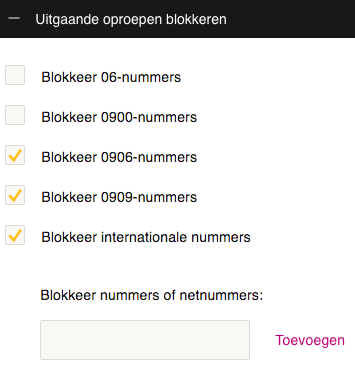
xs4all voip with Fritz!Box equipment: do not combine Fritz!Box “With prefix” number formats with xs4all “Block international numbers”: it will block non-international numbers too.

Posted by jpluimers on 2021/03/22

If you use xs4all VoIP from any Fritz!Box device, then keep the “Telephone Number Format” for “Country code” on “No”, and “Area code” to “None”:

If you have changed these to “With prefix” like I did:

combined with VoIP settings to block international numbers on the right, then when you dial a number outside your area, you will get a friendly voice telling you “this number is blocked”

–jeroen

Posted in Internet, ISP, Power User, Telephony, VoIP, xs4all | Leave a Comment »

Helping the WayBack ArchiveTeam team: running their Warrior virtual appliance on ESXi

Posted by jpluimers on 2021/03/19

The [WayBack] Archiveteam helps the WayBack machine with feeding new content.

You can help that team by running one or more “warrior” virtual machine instances. The VM is distributed as a virtual appliance in an ova file according to the Open Virtualization Format.

That format sounds more generic than it actually is, so the (at the time of writing) archiveteam-warrior-v3-20171013.ova file at [WayBack] Index of /downloads/warrior3/ was created for VirtualBox.X

This meant running it on VMware ESXi or VMware vSphere takes a few steps for patching it, then uploading it to your VMware host.

Since I might want to run the appliance on multiple places or multiple instances, I wanted to have a ready-to-go solution, I created a git repository with both the patch instructions and the update at [WayBack] wiert.me / public / ova / archiveteam-warrior-v3-20171013.ESXi · GitLab.

Read the rest of this entry »

Posted in ArchiveTeamWarrior, Cloud, Containers, Docker, Infrastructure, Internet, InternetArchive, Kubernetes (k8n), Power User, WayBack machine | Leave a Comment »

Domeinnaam prijzen – Internetproviders en Hosting – GoT

Posted by jpluimers on 2021/03/12

For my link archive: domain name registration prices in The Netherlands: [WayBack] Domeinnaam prijzen – Internetproviders en Hosting – GoT

–jeroen

Posted in DNS, Hosting, Internet, Power User | Leave a Comment »

Some LCID links and notes

Posted by jpluimers on 2021/02/10

Document locations changed, so here are some links to newer and older documentation on LCID related things:

More Delphi related links:


–jeroen

Posted in Development, Internet, link rot, Power User, Software Development, Windows Development, WWW - the World Wide Web of information | Leave a Comment »

56 Linux Networking commands and scripts

Posted by jpluimers on 2021/01/25

Back in 2019, there were 56 commands and scripts covered. I wonder how many there are now.

An ongoing list of Linux Networking Commands and Scripts. These commands and scripts can be used to configure or troubleshoot your Linux network.

Source: [WayBack55 Linux Networking commands and scripts

List back then (which goes beyond just built-in commands: many commands from optional packages are here as well):

  1. arpwatch – Ethernet Activity Monitor.
  2. bmon – bandwidth monitor and rate estimator.
  3. bwm-ng – live network bandwidth monitor.
  4. curl – transferring data with URLs. (or try httpie)
  5. darkstat – captures network traffic, usage statistics.
  6. dhclient – Dynamic Host Configuration Protocol Client
  7. dig – query DNS servers for information.
  8. dstat – replacement for vmstat, iostat, mpstat, netstat and ifstat.
  9. ethtool – utility for controlling network drivers and hardware.
  10. gated – gateway routing daemon.
  11. host – DNS lookup utility.
  12. hping – TCP/IP packet assembler/analyzer.
  13. ibmonitor – shows bandwidth and total data transferred.
  14. ifstat –  report network interfaces bandwidth.
  15. iftop – display bandwidth usage.
  16. ip (PDF file) – a command with more features that ifconfig (net-tools).
  17. iperf3 – network bandwidth measurement tool. (above screenshot Stacklinux VPS)
  18. iproute2 – collection of utilities for controlling TCP/IP.
  19. iptables – take control of network traffic.
  20. IPTraf – An IP Network Monitor.
  21. iputils – set of small useful utilities for Linux networking.
  22. jwhois (whois) – client for the whois service.
  23. “lsof -i” – reveal information about your network sockets.
  24. mtr – network diagnostic tool.
  25. net-tools – utilities include: arp, hostname, ifconfig, netstat, rarp, route, plipconfig, slattach, mii-tool, iptunnel and ipmaddr.
  26. ncat – improved re-implementation of the venerable netcat.
  27. netcat – networking utility for reading/writing network connections.
  28. nethogs – a small ‘net top’ tool.
  29. Netperf – Network bandwidth Testing.
  30. netsniff-ng – Swiss army knife for daily Linux network plumbing.
  31. netstat – Print network connections, routing tables, statistics, etc.
  32. netwatch – monitoring Network Connections.
  33. ngrep – grep applied to the network layer.
  34. nload – display network usage.
  35. nmap – network discovery and security auditing.
  36. nslookup – query Internet name servers interactively.
  37. ping – send icmp echo_request to network hosts.
  38. route – show / manipulate the IP routing table.
  39. slurm – network load monitor.
  40. snort – Network Intrusion Detection and Prevention System.
  41. smokeping –  keeps track of your network latency.
  42. socat – establishes two bidirectional byte streams and transfers data between them.
  43. speedometer – Measure and display the rate of data across a network.
  44. speedtest-cli – test internet bandwidth using speedtest.net
  45. ss – utility to investigate sockets.
  46. ssh –  secure system administration and file transfers over insecure networks.
  47. tcpdump – command-line packet analyzer.
  48. tcptrack – Displays information about tcp connections on a network interface.
  49. telnet – user interface to the TELNET protocol.
  50. tracepath – very similar function to traceroute.
  51. traceroute – print the route packets trace to network host.
  52. vnStat – network traffic monitor.
  53. wget –  retrieving files using HTTP, HTTPS, FTP and FTPS.
  54. Wireless Tools for Linux – includes iwconfig, iwlist, iwspy, iwpriv and ifrename.
  55. Wireshark – network protocol analyzer.

Via:

–jeroen

Posted in *nix, *nix-tools, cURL, dig, Internet, nmap, Power User, SpeedTest, ssh/sshd, tcpdump, Wireshark | Leave a Comment »

Mike Cardwell’s Tech Blog: Twitter to RSS with Google Cloud Function – Grepular

Posted by jpluimers on 2020/12/03

Cool, on my list of things to tinker with: [WayBack] Twitter to RSS with Google Cloud Function – Grepular at Mike Cardwell’s Tech Blog

Source at [WayBack] Mike Cardwell / funcTwitter · GitLab, of which these are the most important bits:

Via [WayBack] Mike Cardwell on Twitter: “Twitter to RSS with Google Cloud Function”

–jeroen

Posted in Cloud Apps, Cloud Development, Development, Google, Google Cloud Function, Internet, Power User, RSS, SocialMedia, Software Development, Twitter | Leave a Comment »

Archiving Google Product Forums URLs

Posted by jpluimers on 2020/11/13

Archiving Google Product Forum URLs is a pain in the butt for a couple of reasons:

So the trick for saving is:

  1. Get from the /forum/#!topic/ based URL to the /d/topic/ based one
  2. Put it after the archive.is/?run=1&url=, then save

--jeroen


Posted in Conference Topics, Conferences, Event, Internet, InternetArchive, Power User, WayBack machine | Leave a Comment »