


Last week, I posted about Setting up a GitHub project so it is served over https as a custom github.io subdomain.
Today it’s the equivalent, but on GitLab.
Why GitLab? Two major reasons: unlike GitHub:
- it’s open source
- provides way more granular control over permissions
- allows a hierarchy of repositories on which you can specify that permission control
Already 2. and 3. combined are a huge advantage, though we will see that 3. also makes some of the subcases (hosting as user.gitlab.io from account gitlab.com/user where user is your username) is harder than the similar user.github.io, github.com/user combo.
So here we go, starting with a similar set of links:
- [Wayback] GitLab Pages | GitLab
- Links outside the Table of Contents:
- [Wayback] Static vs Dynamic Websites – What’s the difference? | GitLab
- [Wayback] All About Modern Static Site Generators | GitLab
- [Wayback] SSGs Part 3: Build any SSG site with GitLab Pages | GitLab
- [Wayback] Posting to your GitLab Pages blog from iOS | GitLab
- [Wayback] GitLab CI: Run jobs sequentially, in parallel or build a custom pipeline | GitLab
- [Wayback] How to use GitLab CI to deploy to multiple environments | GitLab
- [Wayback] Building a new GitLab Docs site with Nanoc, GitLab CI, and GitLab Pages | GitLab
- [Wayback] Publish code coverage report with GitLab Pages | GitLab
- [Wayback] Tutorial: Create a GitLab Pages website from scratch | GitLab
- [Wayback] Create a Pages website by using a CI/CD template | GitLab
- [Wayback] Create a Pages website from a forked sample | GitLab
- Links outside the Table of Contents:
- [Wayback] Create a Pages website from a template | GitLab
- [Wayback] GitLab Pages domain names, URLs, and base URLs | GitLab
- [Wayback] Custom domains and SSL/TLS certificates | GitLab
- [Wayback] DNS records overview | GitLab
- [Wayback] SSL/TLS certificates | GitLab
- [Wayback] GitLab Pages integration with Let’s Encrypt | GitLab
- [Wayback] GitLab Pages access control | GitLab
- [Wayback] Create redirects for GitLab Pages | GitLab
- [Wayback] Exploring GitLab Pages | GitLab
- Links outside the Table of Contents:
- [Wayback/Archive] Keyword reference for the `
.gitlab-ci.yml` file | GitLab
- Links outside the Table of Contents:
- Golang source code: [Wayback/Archive.is] GitLab.org / gitlab-pages · GitLab
- [Wayback] Hosting on GitLab.com with GitLab Pages | GitLab
The goal is to have
- page projects as or under
wiert.gitlab.io(likewiert.gitlab.io/wiert) - a
gitlabstatus.wiert.meplain html (or maybe markdown) page project that eventually will show some status information (kind of like status.gitlab.com, but for different things).
The beauty of GitLab is that it supports hierarchies of repositories through groups and subgroups, so I already had these subgroups hoping they would cover both the first and second kind of page projects:
Steps I did
Since there are quite a few links above, here are the steps I took from my gitlab.com/wiert account and gitlab.com/wiert.me group.
Steps for wiert.gitlab.io/wiert
- For wiert.gitlab.io/wiert, try A (failed in part, and therefore interesting to understand why):
- Under leaf group gitlab.com/wiert.me/public/web/sites/gitlab.io, created a new GitLab repository
- Chose “Create from template”
- Chose the template “Pages/Plain HTML”
- Named the project “
wiert” (with slug “wiert“) so it would appear at gitlab.com/wiert.me/public/web/sites/gitlab.io/wiert - From the left sidebar, navigated to your project’s “CI/CD”, then “Pipelines”
- Now I got in a confusing situation as the page indicated “There are currently no pipelines.”, but an enabled blue “Run pipeline” button:
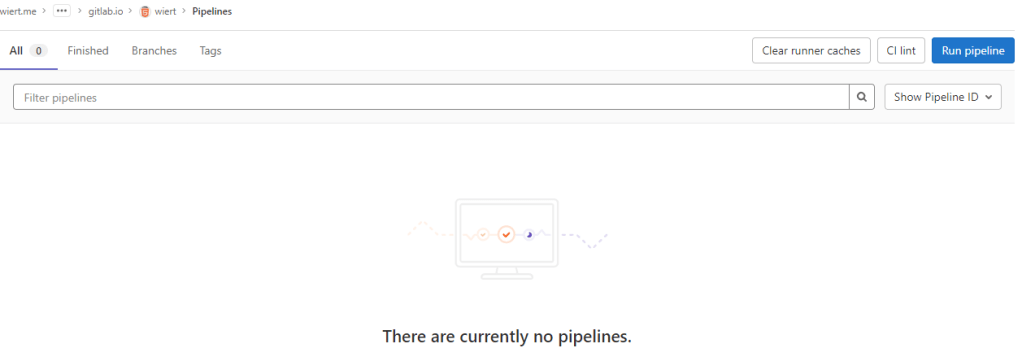
By default there is no CI/CD pipeline, but there is an enabled blue “Run pipeline” button: confusing.
- Clicked the “Run pipeline” button nonetheless, and that created [Wayback/Archive.is] a pipeline asking for parameters (that already had correct default values) and revealed a new blue “Run pipeline” button.
- Clicked that new “Run pipeline button” which created [Wayback/Archive.is] a job and deployed the page.
- From the left sidebar, navigated to “Settings”, then “Pages” to get the links to the pages site: http://wiert.me.gitlab.io/public/web/sites/gitlab.io/wiert/ and https://wiert.me.gitlab.io/public/web/sites/gitlab.io/wiert/

Warning: When using Pages under the general domain of a GitLab instance (gitlab.io), you cannot use HTTPS with sub-subdomains.
The sites do work (see the [Archive.is http version] and [Archive.is https version]), but the HTTPS fails because
wiert.me.gitlab.iodoes not match the SANs (Subject Alternative Names) in the certificate:*.gitlab.io, gitlab.io
- For wiert.gitlab.io/wiert, try B (failed, and therefore interesting to understand why):
- In my my groups gitlab.com/dashboard/groups, added a new group
wiert - Added subgroups until the leaf
gitlab.com/wiert/public/web/sites/gitlab.iowhich as URL is gitlab.com/wier1/public/web/sites/gitlab.io because user accountwiertalready occupies gitlab.com/wiert. - Under leaf group gitlab.com/wier1/public/web/sites/gitlab.io, created a new GitLab repository
- Chose “Create from template”
- Chose the template “Pages/Plain HTML”
- Named the project “
wiert” (with slug “wiert“) so it would appear at gitlab.com/wiert.me/public/web/sites/gitlab.io/wiert - From the left sidebar, navigated to your project’s “CI/CD”, then “Pipelines”
- Again there was “There are currently no pipelines.”, but an enabled blue “Run pipeline” button, which I clicked
- That created [Wayback/Archive.is] a pipeline asking for parameters (that already had correct default values) and revealed a new blue “Run pipeline” button.
- Clicked that new “Run pipeline button” which created [Wayback/Archive.is] a job deployed the page.
- From the left sidebar, navigated to “Settings”, then “Pages” to get the links to the pages site: http://wier1.gitlab.io/public/web/sites/gitlab.io/wiert and https://wier1.gitlab.io/public/web/sites/gitlab.io/wiert.
Bummer: again not thewiert.gitlab.io/wiertI hoped for
The sites do work (see the [Archive.is http version] and [Archive.is https version]). The HTTP does not redirect to the HTTP version, as I did not tick the☐ Force HTTPS (requires valid certificates)
-
If a user
wiertexists and occupiesgitlab.com/wiert, then a group namedwiertcannot occupygitlab.com/wiert, and therefore a project namedwiertwithin that group won’t be deployed towiert.gitlab.io/wiert.
Maybe this can be shortened like “if there is a userwiert, then no group namedwiertcannot be used to contain a project namedwiertto host aswiert.gitlab.io/wiert“.
Let’s find out!
- In my my groups gitlab.com/dashboard/groups, added a new group
- For wiert.gitlab.io/wiert, try C (success, steps 1, 3, 4, 7 and 8 were the key ones):
- In my user gitlab.com/wiert, created a new GitLab repository
- Chose “Create from template”
- Chose the template “Pages/Plain HTML”
- Named the project “
wiert” (with slug “wiert“) so it would appear at gitlab.com/wiert - The odd but cool thing is that the actual project now ended up at gitlab.com/wiert/wiert:
- From the left sidebar, navigated to your project’s “CI/CD”, then “Pipelines”
- Again there was “There are currently no pipelines.”, but an enabled blue “Run pipeline” button, which I clicked
- That created [Wayback/Archive.is] a pipeline asking for parameters (that already had correct default values) and revealed a new blue “Run pipeline” button.
- Clicked that new “Run pipeline button” which created [Wayback/Archive.is] a job deployed the page.
- From the left sidebar, navigated to “Settings”, then “Pages” to get the links to the pages site: http://wiert.gitlab.io/wiert/ and https://wiert.gitlab.io/wiert/.
Success: finally thewiert.gitlab.io/wiertI hoped for: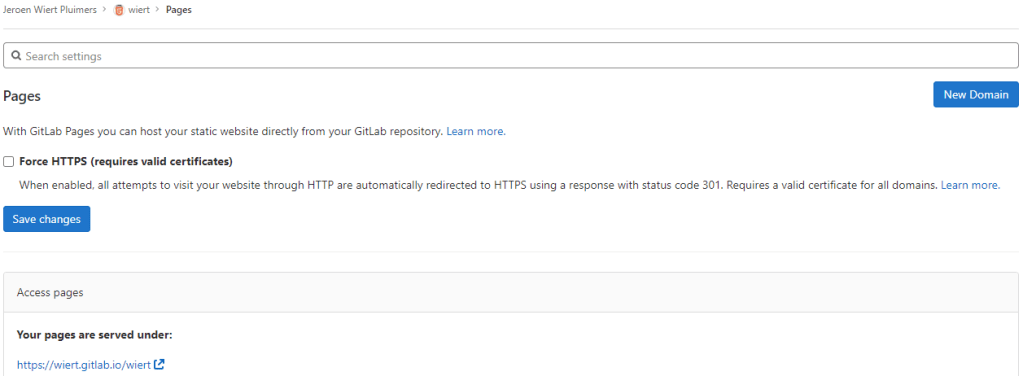
Success: published at https://wiert.gitlab.io/wiert/
The sites do work fine (see the [Archive.is http version] and [Archive.is https version]). The HTTP does not redirect to the HTTP version, as I did not tick the
☐ Force HTTPS (requires valid certificates)
Steps for wiert.gitlab.io
- For wiert.gitlab.io, try A (failed, and therefore interesting to understand why):
- Under leaf group gitlab.com/wiert.me/public/web/sites/gitlab.io, created a new GitLab repository
- Chose “Create from template”
- Chose the template “Pages/Plain HTML”
- Named the project “
wiert.gitlab.io” (with slug “wiert.gitlab.io“) so it would appear at gitlab.com/wiert.me/public/web/sites/gitlab.io/wiert.gitlab.io - From the left sidebar, navigated to your project’s “CI/CD”, then “Pipelines”
- Again there was “There are currently no pipelines.”, but an enabled blue “Run pipeline” button, which I clicked
- That created [Wayback/Archive.is] a pipeline asking for parameters (that already had correct default values) and revealed a new blue “Run pipeline” button.
- Clicked that new “Run pipeline button” which created [Wayback/Archive.is] a job deployed the page.
- From the left sidebar, navigated to “Settings”, then “Pages” to get the links to the pages site: http://wiert.me.gitlab.io/public/web/sites/gitlab.io/wiert.gitlab.io and https://wiert.me.gitlab.io/public/web/sites/gitlab.io/wiert.gitlab.io.
Failure: not thewiert.gitlab.ioI hoped for.The sites do work (see the [Archive.is http version] and [Archive.is https version]), but the HTTPS fails becausewiert.me.gitlab.iodoes not match the SANs (Subject Alternative Names) in the certificate:*.gitlab.io, gitlab.io. The HTTP does not redirect to the HTTP version, as I did not tick the☐ Force HTTPS (requires valid certificates)
- For wiert.gitlab.io, try B (failed, and therefore interesting to understand why):
- Under leaf group gitlab.com/wier1/public/web/sites/gitlab.io, created a new GitLab repository
- Chose “Create from template”
- Chose the template “Pages/Plain HTML”
- Named the project “
wiert.gitlab.io” (with slug “wiert.gitlab.io“) so it would appear at gitlab.com/wier1/public/web/sites/gitlab.io/wiert.gitlab.io - From the left sidebar, navigated to your project’s “CI/CD”, then “Pipelines”
- Again there was “There are currently no pipelines.”, but an enabled blue “Run pipeline” button, which I clicked
- That created [Wayback/Archive.is] a pipeline asking for parameters (that already had correct default values) and revealed a new blue “Run pipeline” button.
- Clicked that new “Run pipeline button” which created [Wayback/Archive.is] a job deployed the page.
- From the left sidebar, navigated to “Settings”, then “Pages” to get the links to the pages site: http://wier1.gitlab.io/public/web/sites/gitlab.io/wiert.gitlab.io and https://wier1.gitlab.io/public/web/sites/gitlab.io/wiert.
Bummer: again not thewiert.gitlab.ioI hoped for
The sites do work (see the [Archive.is http version] and [Archive.is https version]). The HTTP does not redirect to the HTTP version, as I did not tick the☐ Force HTTPS (requires valid certificates)
-
Try A and B were almost identical to wiert.gitlab.io/wiert try A and B, so let’s see if the solution C for that also works for us:
- For wiert.gitlab.io, try C (success, steps 1, 3, 4, 7 and 9 were the key ones)
- In my user gitlab.com/wiert, created a new GitLab repository
- Chose “Create from template”
- Chose the template “Pages/Plain HTML”
- Named the project “
wiert.gitlab.io” (with slug “wiert.gitlab.io“) so it would appear at gitlab.com/wiert/wiert.gitlab.io. - From the left sidebar, navigated to your project’s “CI/CD”, then “Pipelines”
- Again there was “There are currently no pipelines.”, but an enabled blue “Run pipeline” button, which I clicked
- That created [Wayback/Archive.is] a pipeline asking for parameters (that already had correct default values) and revealed a new blue “Run pipeline” button.
- Clicked that new “Run pipeline button” which created [Wayback/Archive.is] a job deployed the page.
- From the left sidebar, navigated to “Settings”, then “Pages” to get the links to the pages site: http://wiert.gitlab.io/ and https://wiert.gitlab.io/.
Success: finally thewiert.gitlab.ioI hoped for with working sites (see the [Archive.is http version] and [Archive.is https version]). - Note the HTTP does not redirect to the HTTP version, as I did not tick the
☐ Force HTTPS (requires valid certificates)
Steps for gitlabstatus.wiert.me
Having learned from the GitHub githubstatus.wiert.me procedure (where I had to wait a long time for the default *.wiert.me domain mapping timeout and the githubstatus.wiert.me DNS CNAME record to become effective), I started on the DNS CNAME record side which is documented at [Wayback] Custom domains and SSL/TLS certificates: Section 3. Set up DNS records for Pages: For subdomains | GitLab:
Subdomains (
subdomain.example.com) require:
- A DNS
CNAMErecord pointing your subdomain to the Pages server.- A DNS
TXTrecord to verify your domain’s ownership.
From DNS Record To subdomain.example.comCNAMEnamespace.gitlab.io_gitlab-pages-verification-code.subdomain.example.comTXTgitlab-pages-verification-code=00112233445566778899aabbccddeeffNote that, whether it’s a user or a project website, the
CNAMEshould point to your Pages domain (namespace.gitlab.io), without any/project-name.

The value for the TXT record is only known after you created the pages project, but the value for the CNAME record is known beforehand:
From DNS Record To gitlabstatus.wiert.meCNAMEnamespace.gitlab.io
So let’s see if I can do this in one try, with these steps:
- For gitlabstatus.wiert.me, try A (success, steps 1, 3, 4, 7 and 9 were the key ones)
- In my DNS settings of the wiert.me domain, created a
CNAMErecord fromgitlabstatus.wiert.metonamespace.gitlab.io:
gitlabstatus.wiert.me
CNAMErecord pointing to namespace.gitlab.io - Under leaf group gitlab.com/wiert.me/public/web/sites/wiert.me, created a new GitLab repository
- Chose “Create from template”
- Chose the template “Pages/Plain HTML”
- Named the project “
gitlabstatus.wiert.me” (with slug “gitlabstatus.wiert.me“) so it would appear at gitlab.com/wiert.me/public/web/sites/wiert.me/gitlabstatus.wiert.me - From the left sidebar, navigated to your project’s “CI/CD”, then “Pipelines”
- Again there was “There are currently no pipelines.”, but an enabled blue “Run pipeline” button, which I clicked
- That created [Wayback/Archive.is] a pipeline asking for parameters (that already had correct default values) and revealed a new blue “Run pipeline” button.
- Clicked that new “Run pipeline button” which created [Wayback/Archive.is] a job deployed the page.
- From the left sidebar, navigated to “Settings”, then “Pages” to get the links to the pages site: http://wiert.me.gitlab.io/public/web/sites/wiert.me/gitlabstatus.wiert.me and https://wiert.me.gitlab.io/public/web/sites/wiert.me/gitlabstatus.wiert.me.
Intermediate success: working sites (see the [Archive.is http version] and [Archive.is https version]).
- Now it is time to get the DNS
CNAMErecord fromgitlabstatus.wiert.metonamespace.gitlab.iointo operation by clicking the “New Domain” button:
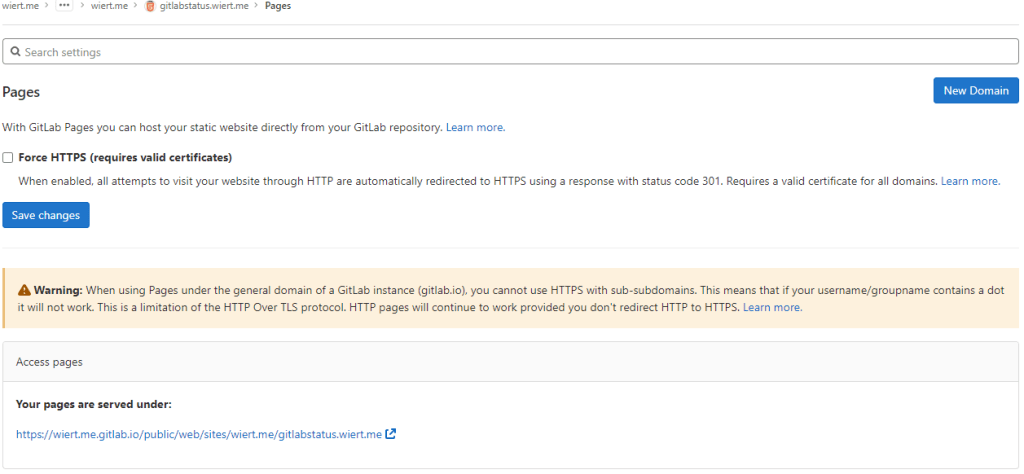
“New Domain” button in the “Pages” settings.
-
There I filled in the correct
gitlabstatus.wiert.medomain name, then pressed the “Create New Domain” button: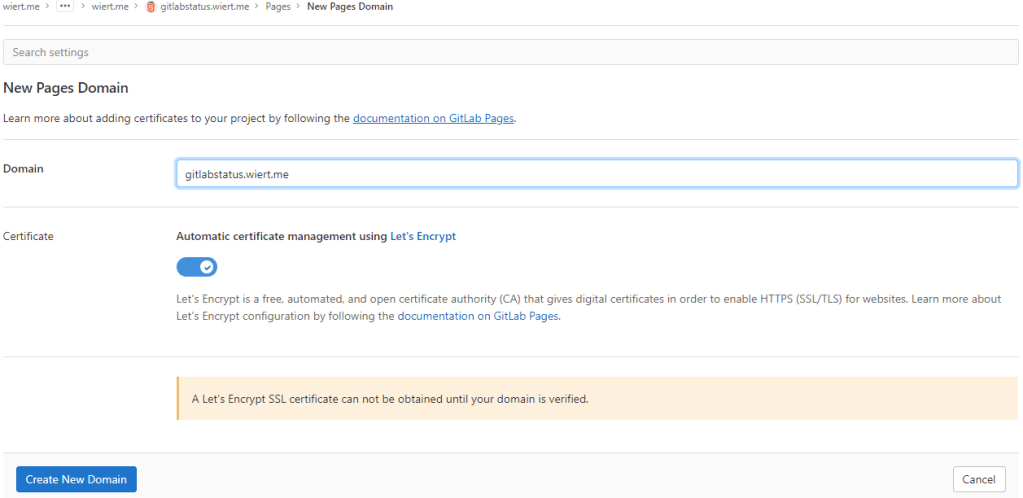
New domain becomes
gitlabstatus.wiert.me - Then a page appeared voiding the DNS
CNAMEwork I already did: the documentation is clearly wrong as these are the two DNS record entries to be made as shown by gitlab.com/wiert.me/public/web/sites/wiert.me/gitlabstatus.wiert.me/pages/domains/gitlabstatus.wiert.me:
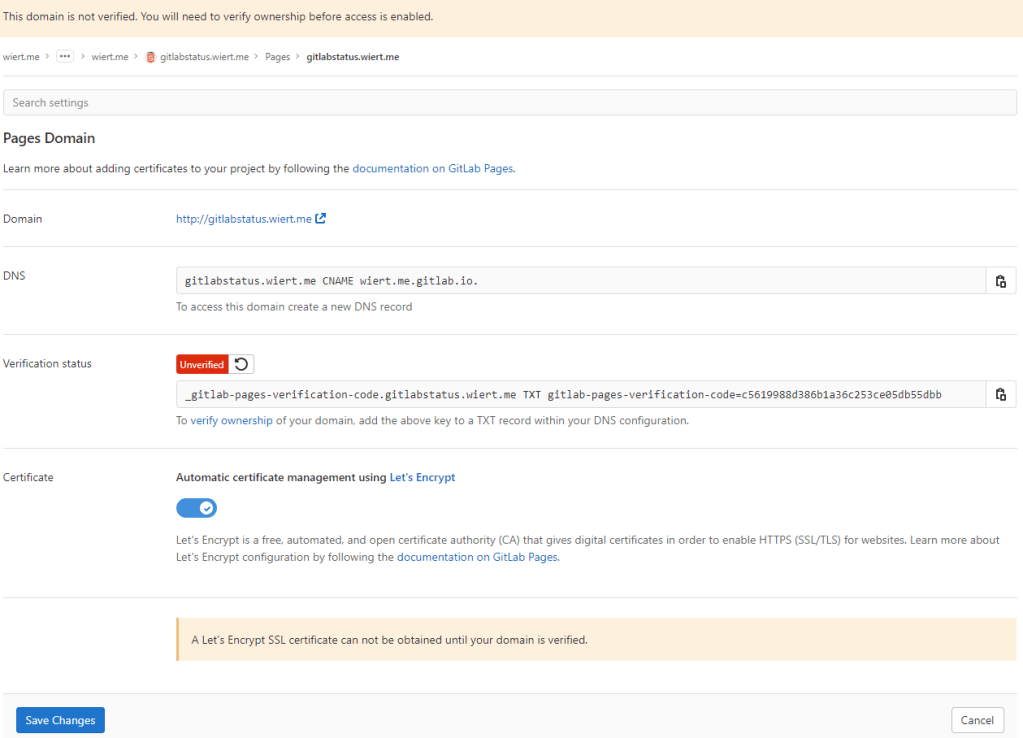
Correct instructions for the DNS records to get gitlabstatus.wiert.me working
Subdomains (
gitlabstatus.wiert.me) require:- A DNS
CNAMErecord pointing your subdomain to the Pages server. - A DNS
TXTrecord to verify your domain’s ownership.
From DNS Record To gitlabstatus.wiert.meCNAMEwiert.me.gitlab.io._gitlab-pages-verification-code.gitlabstatus.wiert.meTXTgitlab-pages-verification-code=c5619988d386b1a36c253ce05db55dbbBasically the whole
namespace.gitlab.iopart of the documentation is a placeholder for the actualnamespacethat belongs to the leaf group the pages project is in (in my casewiert.me).So this is the new DNS entry, for which I had to wait until the DNSTTLto time out and effectuate:
New DNS gitlabstatus.wiert.me
CNAMErecord pointing to wiert.me.gitlab.ioNote that this DNS administrative interface from WordPress.com does omit the final period of the
CNAMEdestination (officially this would bewiert.me.gitlab.io.) - A DNS
- After the
CNAMEDNS record, I also made the TXT DNS record:

New DNS TXT record for verification of gitlabstatus.wiert.me
Then I waited a little for the DNS
TXTrecord to be saved and try the verification of theTXTrecord. - Even then, verification took some time. I had to click the refresh button a few times before verification succeeded:

The DNS TXT record for gitlabstatus.wiert.me finally got verified
- Now I could press blue “Save Changes” button below and waited for the
CNAMErecord DNSTTLto expire so I could check the domain and – hopefully – the TLS certificate to be requested by Let’s Encrypt:
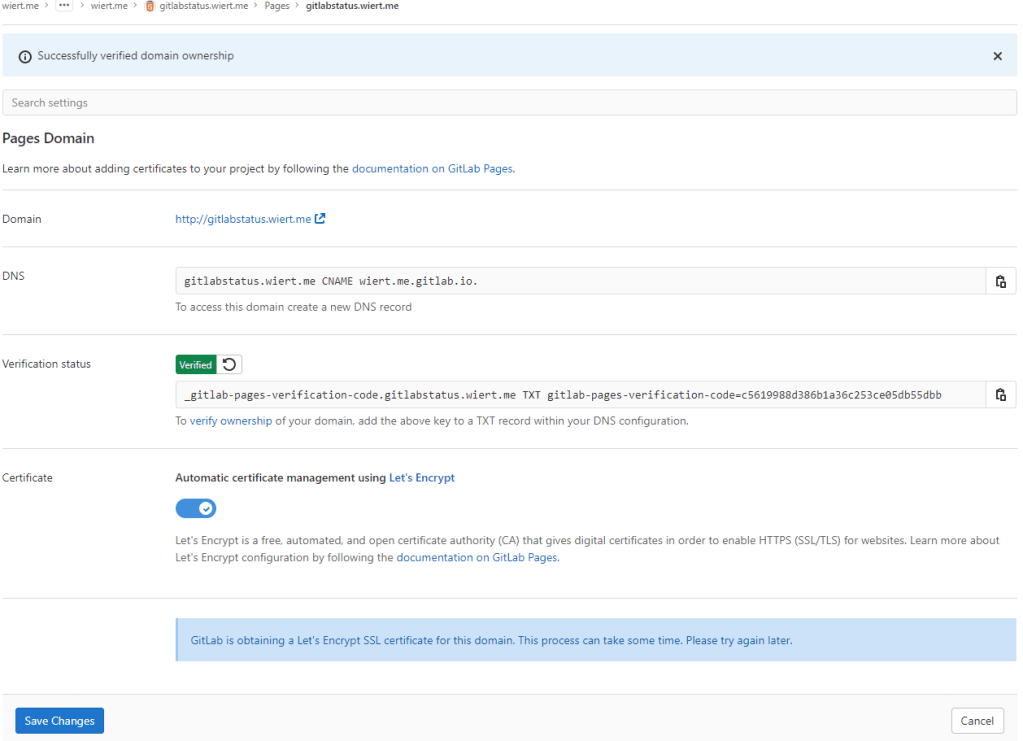
After the
gitlabstatus.wiertDNS TXT record got verified, I could save the domain information - After the old
CNAMErecord DNSTTLexpired and the newCNAMErecord came into effect, the domain became available as http://gitlabstatus.wiert.me/:
Waiting for
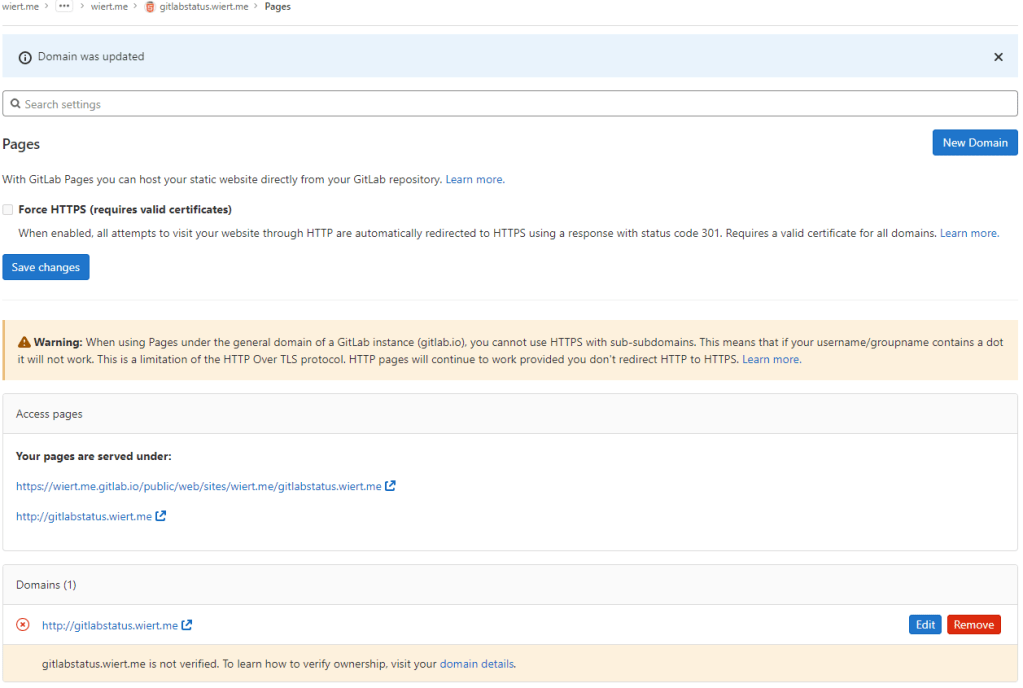
gitlabstatus.wiert.meto become active - After verification, the “Domains (1)” bit changed from this:

Domain
gitlabstatus.wiert.meinformation before verificationto this:

Domain
gitlabstatus.wiert.meinformation after verification - In the mean time, also the TLS certificate got issued by Let’s Encrypt, so the final sites now both worked: http://gitlabstatus.wiert.me/ and https://gitlabstatus.wiert.me/.
- Success: finally the
gitlabstatus.wiert.meI hoped for with working sites (see the [Archive.is http version] and [Archive.is https version] for thewiert.medomain, and [Archive.is http version] and [Archive.is https version] for thewiert.medomain). - Note the HTTP does not redirect to the HTTP version, as I did not tick the
☐ Force HTTPS (requires valid certificates)
- In my DNS settings of the wiert.me domain, created a
In retrospect, this could have been shorter when I had done the DNS part later, which is contrary to how to do this with GitHub.
Conclusion
The conclusion seems this:
Gitlab Page repositories to be published as or under
wiert.gitlab.ioneed to reside directly under userwiert. Having them reside under a different group likewiertorwiert.mewon’t work.
Or in more generic terms:
When creating pages as
user.gitlab.ioyou have to put your pages projects directly under your user accountgitlab.com/user.Putting them under groups or leaf groups fails, no matter if the (leaf) group is named
useror otherwise.
In addition, you can add custom domains to any Gitlab repository (even one that never stated out as a GitLab Pages repository). It will work as soon as the domain DNS mapping is setup through both a CNAME mapping record and TXT verification record.
The steps for this in your GitLab repository are:
- Ensure you have a valid
.gitlab-ci.ymlfile at the root of your repository; I used the [Wayback/Archive.is] one from [Wayback/Archive] GitLab Pages examples / plain-html · GitLab as my site is purely static - Ensure you have a valid
index.htmlfile in thepublicdirectory of your repository, similar to [Wayback/Archive] GitLab Pages examples / plain-html · GitLab - When both 1. and 2. are committed in your repository at GitLab, then it will automatically be deployed to a docker container on
gitlab.io, which allows the outside world to visit your GitHub Pages sie, and the Let’s Encrypt Certificate to be generated (and prevents this error: [Wayback/Archive] GitLab Pages integration with Let’s Encrypt | GitLab: “Something went wrong while obtaining the Let’s Encrypt certificate”). - Under “Settings” -> “Pages”, add a new domain name to the repository: now it automatically becomes a GitLab Pages repository.
- When adding the domain, the settings page will show both a DNS
CNAMErecord and DNSTXTrecord; ensure both are applied on your primary DNS name server and replicated to all authoritative DNS name servers. - Save the new page.
- Check if the page is available on the new domain you added.
- Optionally under “
Settings” -> “Pages” enable the “Force HTTPS (requires valid certificates)” option and save.
TLS information
Note: I saved the TLS information – including certificates here:
- [Wayback] certcheckerapp.com/home?hostname=wiert.me.gitlab.io&hideResult=false
- [Wayback] Wildcard GitLab certificate with serial number
5B0C885BD0E0A1A52AD5C29Dfor*.gitlab.io, gitlab.io. - [Wayback] Certificate chain
- [Wayback] Wildcard GitLab certificate with serial number
- [Wayback] certcheckerapp.com/home?hostname=wier1.gitlab.io&hideResult=false
- [Wayback] Wildcard GitLab certificate with serial number
5B0C885BD0E0A1A52AD5C29Dfor*.gitlab.io, gitlab.io. - [Wayback] Certificate chain
- [Wayback] Wildcard GitLab certificate with serial number
- [Wayback] certcheckerapp.com/home?hostname=wiert.gitlab.io&hideResult=false
- [Wayback/Archive.is] Wildcard GitLab certificate with serial number
5B0C885BD0E0A1A52AD5C29Dfor*.gitlab.io, gitlab.io. - [Wayback] Certificate chain
- [Wayback/Archive.is] Wildcard GitLab certificate with serial number
- [Wayback] certcheckerapp.com/home?hostname=gitlabstatus.wiert.me&hideResult=false
- [Wayback/Archive.is] Regular domain certificate with serial number
3380904328FD4633E6CF27FE9B7D5BE25AEforgitlabstatus.wiert.me. - [Wayback/Archive.is] Let’s Encrypt issuer certificate with serial number
912B084ACF0C18A753F6D62E25A75F5AforR3. - [Wayback/Archive.is] X1 root certificate with serial number
4001772137D4E942B8EE76AA3C640AB7forISRG Root X1. - [Wayback] Certificate chain
- [Wayback/Archive.is] Regular domain certificate with serial number
More about the Let’s Encrypt certificates at [Wayback] Chain of Trust – Let’s Encrypt:
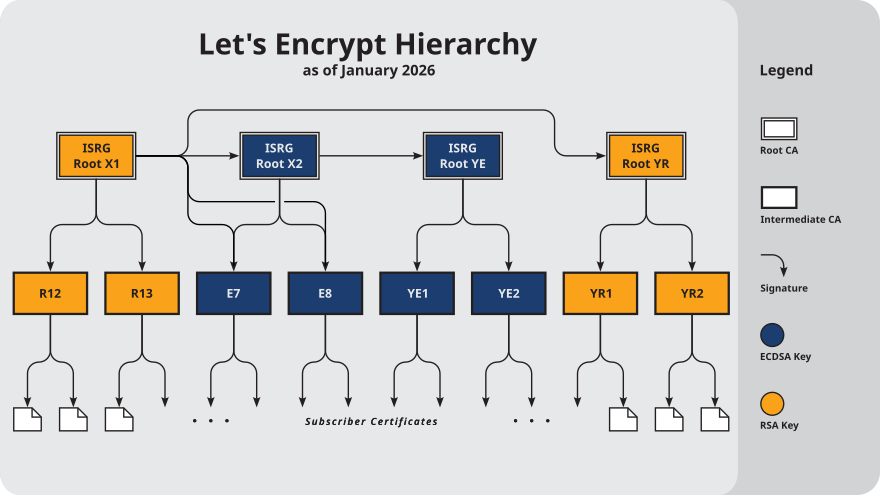
–jeroen


 Anonymous
 The Wiert Corner - irregular stream of stuff