Archive for the ‘Network-and-equipment’ Category
Posted by jpluimers on 2022/11/01
Want: [Wayback /Archive ] SMLIGHT SLZB-06 – A Zigbee 3.0 to Ethernet, USB, and WiFi adapter with PoE support – CNX Software
Startup SMLIGHT has launched the SLZB-06 Zigbee 3.0 to Ethernet, USB, and WiFi adapter with PoE support that works out of the box with open-source software such as Home Assistant and Zigbee2MQTT.
The device combines Texas Instruments’ СС2652Р microcontroller for Zigbee with ESP32 for WiFi, data transfer to Ethernet or USB, and peripheral functions such as LEDs and a button.The design is complemented with Microchip LAN8720 for Ethernet.
Read the rest of this entry »
Posted in Development , ESP32 , Ethernet , Hardware , Hardware Development , Hardware Interfacing , IoT Internet of Things , Matter , MQ Message Queueing/Queuing , MQTT , Network-and-equipment , PoE - Power over Ethernet , Power User , Software Development , USB , WiFi , Z-Wave , Zigbee | Leave a Comment »
Posted by jpluimers on 2022/10/19
Posted in Development , FortiGate/FortiClient , Hardware , Network-and-equipment , Power User , Security , Software Development , VPN , Windows , Windows 10 , Windows 7 , Windows 8 , Windows 8.1 , Windows 9 , Windows Development , Windows Server 2000 , Windows Server 2003 , Windows Server 2003 R2 , Windows Server 2008 , Windows Server 2008 R2 , Windows Server 2012 , Windows Server 2012 R2 , Windows Server 2016 , Windows Vista , Windows XP | Leave a Comment »
Posted by jpluimers on 2022/08/26
Last winter, I discovered that the OpenVPN version on Chocolatey was really old: it had not been updated since 2019.
Most Chocolatey maintainers are volunteers and sometimes the burden can become too large. Back then the maintainer was [Wayback /Archive ] Chocolatey Software | wget , but luckily [Wayback /Archive ] Chocolatey Software | dgalbraith has stepped in and in March 2022 bumped the version from [Wayback /Archive ] Chocolatey Software | OpenVPN 2.4.7 to [Wayback /Archive ] Chocolatey Software | OpenVPN – Open Source SSL VPN Solution 2.5.4 and kept maintaining (currently there is [Wayback /Archive ] Chocolatey Software | OpenVPN – Open Source SSL VPN Solution 2.5.7 ).
Read the rest of this entry »
Posted in *nix , *nix-tools , Chocolatey , Hardware , Network-and-equipment , OpenVPN , Power User , ssh/sshd , VPN , Windows | Leave a Comment »
Posted by jpluimers on 2022/08/12
Not sure why WordPress.com failed to post this on 20140525, so I put it in the scheduler again. In the end I got a Fritz!Box 7490 and though the
In 2013, [Wayback ] Fritz!Box replaced the 7390 top model with the 7490 and I [Wayback ] might get get soon when ADSL (which still has a Fritz!Box 7240 attached) is upgraded to fiber.
So here are some differences partially from the English FRITZ!Box and German FRITZ!Box Wikipedia page between the [Wayback ] Fritz!Box 7390 and [Wayback ] Fritz!Box 7490 , partially from the below video:
About cooling: according to the video both run the same temperature, either because the air cooling of the 7490 is better. I’m wondering if that is the same when running inside a closet.
[Wayback /Archive.is ] HardwareInfo.nl has a Fritz!Box 7490 review that indicates 802.11ac and USB3 might not be as fast as you’d hope.
Reading the [Wayback /Archive.is ] Amazon.de 7490 reviews , I might just ask xs4all to get me a 7390, not a 7490.
–jeroen
via: Vergleich AVM FRITZ!Box 7490 und FRITZ!Box 7390 – YouTube .
PS: I need to research [Wayback ] USB over LAN in more detail, especially the [Wayback ] open source project USB IP .
VIDEO
Posted in Fritz! , Fritz!Box , Hardware , Network-and-equipment , Power User | Leave a Comment »
Posted by jpluimers on 2022/08/12
From [Wayback Archive.is blog — Why has the URL “archive-li” changed to… :
Why has the URL “archive-li” changed to “archive-ph”, and will this affect saved bookmarks at any time in the future?
This is temporary and only for some countries. All 7 domains work, so you do not need to change the bookmarks.
In The Netherlands all Archive Today domains redirect to archive.ph using a HTTP 302 redirect .
This caused trouble at my home location, but not at my brother, so I searched for local issues.
In the end, it was because I have dual WAN network load balancing at home.
TL;DR
Modifying the routing table so traffic for 54.37.18.234 goes to WAN1 was my solution.
Finding the destination address
Read the rest of this entry »
Posted in .NET , Development , Hardware , Network-and-equipment , Power User , PowerShell , routers , Scripting , Software Development | Leave a Comment »
Posted by jpluimers on 2022/08/08
Somehow WordPress.com failed to post it on the scheduled date 20150331, not sure why.
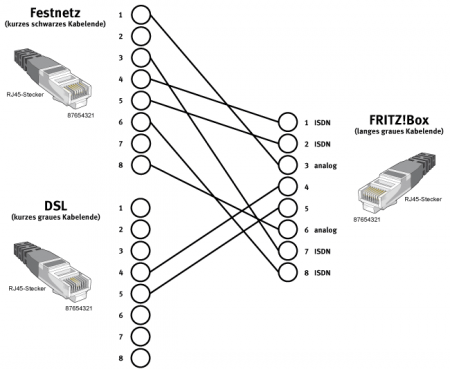
Though ISDN has been phased out in The Netherlands as and almost phased out in Germany , you can still use end user Terminal Equipment on the internal S-bus .
Since scheduling the post for 2015, the same information as the original diagram below appeared in text form on Wikipedia and there it also adds TAE connector information: Fritz!Box: Belegung der kombinierten DSL-Telefon-Buchse – Wikipedia
Die Anschlussbelegung der Kombibuchse ist wie folgt:[44]
Pin 1: ISDN 1a
Pin 2: ISDN 1b
Pin 3: analog La
Pin 4: DSL
Pin 5: DSL
Pin 6: analog Lb
Pin 7: ISDN 2a
Pin 8: ISDN 2b
Der RJ-45-Stecker am grauen DSL-Zweig des Y-Kombikabels zeigt folgende Belegung:[44]
Die übrigen Pins sind unbenutzt.
Am schwarzen Telefonzweig ist der RJ-45-Stecker folgendermaßen belegt:
Pin 1: analog La
Pin 2: frei
Pin 3: ISDN 2a
Pin 4: ISDN 1a
Pin 5: ISDN 1b
Pin 6: ISDN 2b
Pin 7: frei
Pin 8: analog Lb
Somit ist ein direkter Anschluss an ISDN möglich, für analoge Anschlüsse liegt für Deutschland ein Adapter auf TAE bei:
Pin 1 RJ-Buchse auf Pin 1 TAE
Pin 8 RJ-Buchse auf Pin 2 TAE
Ein normales Kabel mit TAE-Stecker und sechspoligem RJ-Stecker, wie es für den Anschluss analoger Telefone an eine TAE-Dose verwendet wird, funktioniert nicht.
Bei entbündelten Anschlüssen (ohne analoges oder ISDN-Telefon) kann ein direktes Kabel verwendet werden.
Das Kabel für deutsche Anschlüsse:
Pin 4 RJ-Stecker auf Pin 1 TAE
Pin 5 RJ-Stecker auf Pin 2 TAE
Original article
Some links:
–jeroen
Posted in DECT , Fritz! , Fritz!Box , Hardware , ISDN , Network-and-equipment , Power User , PSTN , Telephony | Leave a Comment »
Posted by jpluimers on 2022/08/05
I tried the solution in [Wayback /Archive.is ] Fritz!box 7590 interface extremely slow : fritzbox (remove the some 30-40 unused machines from the network overview), but it didn’t matter: since Fritz!OS 7.x, the Fritz!Box 7490 UI is just very very slow: each page takes 10+ seconds to load.
Hopefully I can get rid of these and move to pfSense based hardware eventually.
–jeroen
Posted in Fritz! , Fritz!Box , Hardware , Network-and-equipment , pfSense , Power User , routers | Leave a Comment »
Posted by jpluimers on 2022/07/06
Early june, I blogged about Wake-on-LAN from a Windows machine .
My plan was to adopt [Wayback /Archive.is ] Wake.ps1 Wake-on-LAN.ps1 (as naming is important).
One of the goals was to support multiple hardware MAC address formats, especially as Wake.ps1 had the below comment, but did support the AA-BB-CC-DD-EE-FF, though not the AA:BB:CC:DD:EE:FF hardware MAC address format:
<#
...
.NOTES
Make sure the MAC addresses supplied don't contain "-" or ".".
#>
A colon separated hardware MAC address would result in this error inside the call to the [Wayback /Archive.is ] PhysicalAddress.Parse Method (System.Net.NetworkInformation) | Microsoft Docs :
Send-Packet : Exception calling "Parse" with "1" argument(s): "An invalid physical address was specified."
So I did some digging, starting inside the above mentioned blog post, and adding more:
Wake.ps1 uses the [Wayback /Archive.is ] Parse Wayback /Archive.is ] PhysicalAddress.cs source code in C# .NET , which contains code like this:
            //has dashes?
            if (address.IndexOf('-') >= 0 ){
                hasDashes = true;
                buffer = new byte[(address.Length+1)/3];
            }
The Perl script at [Wayback /Archive.is ] wakeonlan/wakeonlan at master · jpoliv/wakeonlan that started my first blog post in this series which mentions:
xx:xx:xx:xx:xx:xx (canonical)xx-xx-xx-xx-xx-xx (Windows)xxxxxx-xxxxxx (Hewlett-Packard switches)xxxxxxxxxxxx (Intel Landesk)
I should rename the first one IEEE 802 , as per this:
The MAC address: Notational conventions – Wikipedia The standard (IEEE 802 ) format for printing EUI-48 addresses in human-friendly form is six groups of two hexadecimal digits, separated by hyphens (- 01-23-45-67-89-AB 01-23-45-67-89-AB-CD-EF [2] 01:23:45:67:89:AB 0123.4567.89AB [30]
The latter is used by Cisco (see for instance [Wayback /Archive.is ] Cisco DCNM Security Configuration Guide, Release 4.0 – Configuring MAC ACLs [Support] – Cisco and [Wayback /Archive.is ] Cisco IOS LAN Switching Command Reference – mac address-group through revision [Support] – Cisco ), so another format to add:
[Wayback /Archive.is ] PhysicalAddress.Parse Method (System.Net.NetworkInformation) | Microsoft Docs remarks:The address parameter must contain a string that can only consist of numbers and letters as hexadecimal digits. Some examples of string formats that are acceptable are as follows:
00112233445500-11-22-33-44-550011.2233.445500:11:22:33:44:55F0-E1-D2-C3-B4-A5f0-e1-d2-c3-b4-a5
Use the GetAddressBytes method to retrieve the address from an existing PhysicalAddress instance.
After a bit more digging via [Wayback /Archive.is ] “three groups of four hexadecimal digits separated by dots” – Google Search , I found that even more hardware MAC address formats are in use as per [Wayback /Archive.is ] What are the various standard and industry practice ways to express a 48-bit MAC address? – Network Engineering Stack Exchange .I really do not have all the sources for the various representations for 48-bit MAC addresses, but I have seen them variously used:
AA-BB-CC-DD-EE-FF
AA.BB.CC.DD.EE.FF
AA:BB:CC:DD:EE:FF
AAA-BBB-CCC-DDD
AAA.BBB.CCC.DDD
AAA:BBB:CCC:DDD
AAAA-BBBB-CCCC
AAAA.BBBB.CCCC
AAAA:BBBB:CCCC
AAAAAA-BBBBBB
AAAAAA.BBBBBB
AAAAAA:BBBBBB
From the last list, which is far more complete than the others, I recognise quite a few from tools I used in the past, but too forgot the actual sources, so I took the full list from there and tried to name them in parenthesis after the links I found above and what I remembered:
AABBCCDDEEFF (Bare / Landesk)AA-BB-CC-DD-EE-FF (IEEE 802 / Windows)AA.BB.CC.DD.EE.FF (???)AA:BB:CC:DD:EE:FF (Linux / BSD / MacOS)AAA-BBB-CCC-DDD (???)AAA.BBB.CCC.DDD (Cisco?)AAA:BBB:CCC:DDD (???)AAAA-BBBB-CCCC (???)AAAA.BBBB.CCCC (Cisco / Brocade)AAAA:BBBB:CCCC (???)AAAAAA-BBBBBB (Hewlett-Packard networking)AAAAAA.BBBBBB (???)AAAAAA:BBBBBB (???)
Some additional links in addition to the ones above:
–jeroen
Posted in .NET , CommandLine , Development , Encoding , HEX encoding , Network-and-equipment , Power User , PowerShell , PowerShell , Scripting , Software Development | Leave a Comment »
Posted by jpluimers on 2022/05/10
Posted in Compute Module , Development , Ethernet , Hardware , Hardware Development , KVM keyboard/video/mouse , Network-and-equipment , PiKVM / Pi-KVM , PoE - Power over Ethernet , Power User , Raspberry Pi , Wake-on-LAN (WoL) | Leave a Comment »


 Anonymous


 The Wiert Corner - irregular stream of stuff