The Wiert Corner – irregular stream of stuff

Jeroen W. Pluimers on .NET, C#, Delphi, databases, and personal interests

  • My badges

  • Twitter Updates

  • My Flickr Stream

  • Pages

  • All categories

  • Enter your email address to subscribe to this blog and receive notifications of new posts by email.

    Join 1,854 other subscribers

Archive for the ‘Power User’ Category

Workaround to add a Shared With Me folder to your Google Drive (Google made this a lot harder in 2020)

Posted by jpluimers on 2022/02/21

It took a few tries to Google how to sync folders that were shared after roughly fall 2020 (folders shared with me before that were totally fine), but [Wayback] drive google shared with me – Google Search got me the below answer.

From [Wayback/Archive.is] Google completely ruined shared folders in Drive (Update: Workaround, Google shares longterm plan):

you can still move shared files and folders to your Drive, even on the web (no need for the Android app), but the option is hidden behind a keyboard shortcut. Go to your Shared with me section, highlight the shared files or folders you want to move, and type Shift+Z on your keyboard. You’ll see the old move menu and can choose where to put those folders. On your PC, they’ll sync and behave like they used to, no shortcut mess. More info can be found here, and you can always type ? in Drive to bring up the list of keyboard shortcuts if you forget this one.

Finally, Remy revealed that the Drive team will “keep this behavior [Shift+Z] around for folders until we have a solid solution to sync shared folders.” I think that helps appease our collective fears about the change.
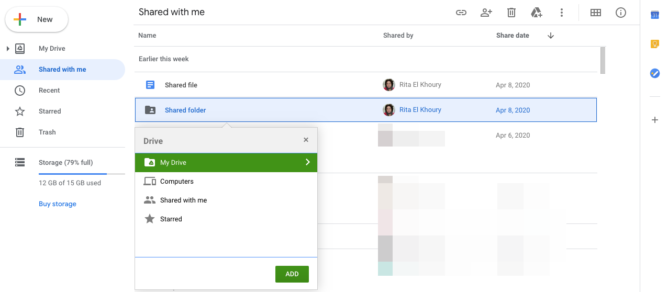
From the page linked at [Wayback] Find files & folders with Google Drive shortcuts – Computer – Google Drive Help:

Shortcuts can sync across your devices, including computers and smartphones. But when you use Backup and Sync to connect with a computer, there are some differences. The shortcuts you made to individual files will sync up with the file as normal. But the shortcuts you made to shared folders will just link to the folder on the Google Drive website.

Try these alternatives:

  • Instead of a shortcut, add the folder to an additional location. On the Google Drive website, select the folder and press Shift + Z. 
  • Add shortcuts to individual files within the shared folder (and not to the shared folder itself).
  • If you’re a Google Workspace user, learn more about Drive File Stream.

–jeroen

Posted in Google, GoogleDrive, Power User | Leave a Comment »

Quickly get into the “rename computer” setting on Windows 10

Posted by jpluimers on 2022/02/18

A while ago I needed to quickly rename a Windows 10 machine, but again they moved around the way to get into the right dialog (each new Windows 10 release more options seem to move around from the classic Control Panel or Computer Properties into hard to memorise places).

So I was glad to find out that either of these work from the command-line:

  • sysdm.cpl,1
  • SystemPropertiesComputerName

I already was aware of editing the user environment variables through "C:\Windows\System32\rundll32.exe" sysdm.cpl,EditEnvironmentVariables

Glad changing the computer name was so easy.

From [Wayback] Easy Ways to Open System Properties in Windows 10 | Password Recovery, I learned there were more equivalence commands for the rest of the “System Properties” tabs:

  1. Computer Name
    • sysdm.cpl,1
    • SystemPropertiesComputerName
  2. Hardware
    • sysdm.cpl,2
    • SystemPropertiesHardware
  3. Advanced
    • sysdm.cpl,3
    • SystemPropertiesAdvanced
  4. System Protection
    • sysdm.cpl,4
    • SystemPropertiesProtection
  5. Remote
    • sysdm.cpl,5
    • SystemPropertiesRemote

Searching for [Wayback] “EditEnvironmentVariables” “SystemPropertiesComputerName” – Google Search, I found a truckload more of these command-line tricks at [Wayback] 运行(WIN+R)中能使用的命令:ms-settings:,shell:,cpl,mmc… – Bob-wei – 博客园.

–jeroen

Posted in Power User, Windows, Windows 10, Windows 7, Windows 8, Windows 8.1 | Leave a Comment »

A few ways to reset a Samsung MU6100 55″ TV

Posted by jpluimers on 2022/02/18

Some interesting tidbits to reset a UE55MU6100 or similar TV from [Wayback/Archive.is] We have a 2 week old Samsung mu6100 55″ tv which up until an:

  • Soft reset: Unplug the TV from the wall, hold down the power button on the rear of the TV for 10 seconds, then plug it back in and turn it on.
    • The power button is on the backside : it’s the middle part of the 4-arrow-button.
  • Factory reset: power off the TV, and hold down up, down and power buttons together for about 10 seconds, then releasing them when the Samsung Logo shows up.
  • Reset to engineer menu: put the TV in standby, then press the info, menu, mute and power buttons on the remote

–jeroen

Posted in 4K Monitor, Displays, Hardware, Home Audio/Video, LifeHacker, MU6100, Power User, Samsung TV | Leave a Comment »

MacOS Finder group by is called “Arrange by” and is under the “Gear” icon

Posted by jpluimers on 2022/02/18

I forgot how I had my MacOS Finder lists grouped by age and wanted to turn this off for one Finder window (normally grouping by age is very useful).

It turns out ‘group by’ is actually called ‘arrange by’ and is under the ‘gear’ icon.

Disabling is very easy [Wayback] Can I turn off grouping by date in Finder… – Apple Community

Oh, it might just be the arrange by. Click the gear up at the top and chagne arrange by to NONE. See if that helps.

But there is a catch: besides the current window, it also affects any new windows you open (existing other open windows are not affected by the change unless you restart Finder).

–jeroen


Posted in Apple, Mac OS X / OS X / MacOS, Power User | Leave a Comment »

I always forget how simple it is to show the definition of bash function or alias (via: Stack Overflow)

Posted by jpluimers on 2022/02/17

I always facepalm myself after looking up this: [Wayback] Can bash show a function’s definition? – Stack Overflow (thanks [Wayback] Benjamin Bannier!):

Use type. If foobar is e.g. defined in your ~/.profile:

$ type foobar
foobar is a function
foobar {
    echo "I'm foobar"
}

type will also expand aliases, which is a nice bonus :) – [Wayback] Esdras Lopez

–jeroen

Posted in *nix, *nix-tools, bash, bash, Development, Power User, Scripting, Software Development | Leave a Comment »

Creating a bootable USB installer for ESXi on other operating systems than Windows

Posted by jpluimers on 2022/02/17

I wrote about Creating a bootable USB installer for ESXi and use it to create a bootable ESXi installation.

Just in case I ever need to do this on a non-Windows system, some links:

–jeroen

Posted in *nix, Apple, ESXi6, ESXi6.5, ESXi6.7, ESXi7, Linux, Mac OS X / OS X / MacOS, Power User, Virtualization, VMware, VMware ESXi, Windows | Leave a Comment »

Windows Defender: adding and removing exclusions from PowerShell (via Stack Overflow)

Posted by jpluimers on 2022/02/16

I use this small script to install or update [Wayback] Chocolatey package NirLauncher (which is the [Wayback] Nirsoft Launcher that has all the [Wayback] Nirsoft freeware tools in it).

powershell -Command Add-MpPreference -ExclusionPath "%TEMP%\chocolatey\NuGetScratch"
choco update --yes NirLauncher 
powershell -Command Remove-MpPreference -ExclusionPath "%TEMP%\chocolatey\NuGetScratch"

It works around the issue that many times NirLauncher is marked by anti-virus tools or/and listed on VirusTotal, which means you get an error like this:

NirLauncher not installed. An error occurred during installation:
 Operation did not complete successfully because the file contains a virus or potentially unwanted software.

followed by

Chocolatey upgraded 0/1 packages. 1 packages failed.
 See the log for details (C:\ProgramData\chocolatey\logs\chocolatey.log).

I wrote about this error before Need to research: Nirlauncher v1.23.42 to 1.23.43 upgrade through Chocolatey fails with “Operation did not complete successfully because the file contains a virus or potentially unwanted software.”, and this post is explaining how I got to the above workaround.

Context: I was running Windows Defender (now officially called Microsoft Defender, but most people still use the old name), which is a good baseline anti-virus tool that is included with Windows.

Finding out the location of the offending file

The offending location is not actually in the C:\ProgramData\chocolatey\logs\chocolatey.log file.

I did a small search to see if one could list Windows Defender messages, and there was [Wayback] Use PowerShell to See What Windows Defender Detected | Scripting Blog explaining the Get-MpThreatDetection available since around Windows 8.x.

This little command got what I wanted:

C:\temp>PowerShell Get-MpThreatDetection ^| Format-List ^| Out-String -Width 4096 | findstr /I "nir"
Resources                      : {file:_C:\Users\jeroenp\AppData\Local\Temp\chocolatey\NuGetScratch\a78a5776-0fdd-48c0-8313-9b0107f54cba\hy3odwgw.1dc\tools\nirsoft_package_1.23.44.zip}

A few tricks I used here:

Searching for [Wayback] “chocolatey\NuGetScratch” – Google Search, I found out %Temp%\chocolatey\NuGetScratch is the default value for [Wayback] chocolatey cacheLocation – Google Search. I run default settings, so that is good enough for me.

Adding / removing a recursive folder exclusion to Windows defender

I found [Wayback] Windows Defender – Add exclusion folder programmatically – Stack Overflow through [Wayback] “Windows Defender” exclusion from commandline – Google Search explaining these (thanks [Wayback] gavenkoa!):

Run in elevated shell (search cmd in Start menu and hit Ctrl+Shift+Enter).

powershell -Command Add-MpPreference -ExclusionPath "C:\tmp"
powershell -Command Add-MpPreference -ExclusionProcess "java.exe"
powershell -Command Add-MpPreference -ExclusionExtension ".java"

powershell -Command Remove-MpPreference -ExclusionExtension ".java"

This was a short step to these documentation pages (note to self: figure out the origin of the Mp prefix)

Windows Defender still marks individual tools

Of course Windows Defender still marks individual tools as “unsafe” (for instance C:\tools\NirLauncher\NirSoft\mailpv.exe). To alleviate that, you have to permanently add this directory to the exclusion list: C:\tools\NirLauncher.

–jeroen

Posted in CommandLine, Development, NirSoft, Power User, PowerShell, Software Development, Windows | Leave a Comment »

ESXi: for my link archive – links about “vim-cmd vmsvc/message” (lots of interesting scripts for deployment scenarios)

Posted by jpluimers on 2022/02/16

In ESXi: on the console/ssh, when a moved VM pauses during power-on: show which VMs have messages waiting, then answer them, I searched for [Wayback] “vim-cmd vmsvc/message” – Google Search in order to see which messages were available.

That search revealed a lot more links, so here are the ones I found most interesting:


–jeroen

Read the rest of this entry »

Posted in ESXi4, ESXi5, ESXi5.1, ESXi5.5, ESXi6, ESXi6.5, ESXi6.7, ESXi7, Power User, Virtualization, VMware, VMware ESXi | Leave a Comment »

ESXi: for my link archive “Developing for VMware ESXi”

Posted by jpluimers on 2022/02/15

This post amends the post last week on rsync backup of your ESXi box: How to make a statically linked rsync binary « The Wiert Corner – irregular stream of stuff.

Two weeks ago, I posted about Source: ESXi: searching for “vim-cmd vmsvc/message” lead me to the “Managing ESXi Without VI Client” series of blog posts.

It got me looking more deeply in the VM-Help site, and I found [Wayback] Developing for VMware ESXi – Virtual Machine and VPS Tutorials, for which I have materialised the links below and checked their WayBack machine status.

Compiling Utilities for ESXi

Given that ESXi is not based on Linux you won’t find any installer which you could use to install any Linux components that you might want to add to ESXi. However, ESXi does make use of a number of Open Source packages such as OpenSSL, Python, and Openwsman (WS-Management). The key to compiling a utility for ESXi is creating a statically linked version of the tool. With a statically linked version, there are no dependencies on other libraries that may not be present on ESXi. The downside to this method of compiling is that the utility may be larger than a dynamically linked version. With a dynamically linked version the utility assumes that other libraries are present and can rely on subroutines within those libraries.

Compiling rsync – [Wayback] How to compile a statically linked rsync binary for ESXi
Compiling Busybox – [Wayback] How to compile Busybox for ESXi … kind of Part 1
Discussion of compiling UNFS – http://www.vm-help.com/forum/viewtopic.php?f=16&t=2280&p=10185&e=10185 (not archived in the WayBack machine nor available on-line)
Notes on compling binaries – [Wayback] Stjepan Groš – Homepage

Compiling Drivers for ESXi

Given the common misunderstanding that ESXi is Linux based, a new user often inquires about the process of copying a Linux driver to their ESXi install. This is not possible. ESXi includes a Linux driver compatibility module. This allows for Linux source code to be used to compile drivers for ESXi, but the drivers are still specific to ESXi. The following links provides some samples and notes for compiling drivers for ESXi.

Compiling a Silicon Image 3132 driver – [Archive.is] Wayback: Adding Driver Support to VMware ESXi 4 | Tip’s Notebook
Compiling a Marvell sky2 driver – [Wayback] Using a Marvell LAN card with ESXi 4 – KernelCrash

(Note: This post was initially written when ESXi 4.0 was available. As of late 2010, ESXi 4.1 has been released, and it does actually include a sky2 driver that may or may not work with various Marvell LAN chipsets. The post is still relevant (especially the comments)  if your particular Marvell chipset does not work with the sky2 driver in ESXI 4.1. Also, the post is relevant if you’re interested in porting other network drivers to ESXi)

Open Virtualization Drivers development notes

Being from the ESXi 4 and 5 era, the links seem to hold up remarkably well. Despite ESXi 3 being Linux based (see [Archive.is] VMware ESX Server – Wikipedia, the free encyclopedia), as opposed to ESXi 4 and up that run a microkernel, Linux based tools still can be used to develop tooling and drivers.

–jeroen

Posted in ESXi4, ESXi5, ESXi5.1, ESXi5.5, ESXi6, ESXi6.5, ESXi6.7, ESXi7, Power User, Virtualization, VMware, VMware ESXi | Leave a Comment »

DELPHI : EEncodingError – Invalid code page on windows xp embedded – Stack Overflow

Posted by jpluimers on 2022/02/15

From my Windows XP days  (which are long gone), but historically relevant the answer to [Wayback] DELPHI : EEncodingError – Invalid code page on windows xp embedded – Stack Overflow by [Wayback] Remy Lebeau:

The TEncoding.ASCII property uses codepage 20127, which is not installed on XP Embedded by default. You have to install it manually. The TEncoding class does not exist in D2006.

Are you using Indy 10, by chance? It uses TEncoding.ASCII by default for its string encodings. This exact error has been known to occur when using Indy on XP Embedded.

–jeroen

Posted in ASCII, Delphi, Development, Encoding, Power User, Software Development, XP-embedded | Leave a Comment »