The Wiert Corner – irregular stream of stuff

Jeroen W. Pluimers on .NET, C#, Delphi, databases, and personal interests

  • My badges

  • Twitter Updates

  • Pages

  • All categories

  • Enter your email address to subscribe to this blog and receive notifications of new posts by email.

    Join 1,854 other subscribers

Archive for the ‘Power User’ Category

VMware ESXi 6.5: “Failed – An error occurred during host configuration.” when starting the NTP service

Posted by jpluimers on 2020/08/10

I tried repeating VMware KB: Configuring Network Time Protocol (NTP) on ESX/ESXi hosts using the vSphere Client in ESXi 6.5 using the web-client (the steps are very similar, see [WayBack] How to configure ESXi 6.5 Network Time Protocol (NTP) via Host Client? | ESX Virtualization).

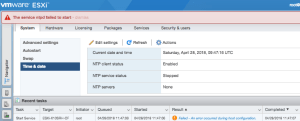
It failed with the non-descriptive “Failed – An error occurred during host configuration.”:

Viewing the details isn’t of much help as you do not get extra information:

Read the rest of this entry »

Posted in ESXi6.5, Power User, Virtualization, VMware, VMware ESXi | Leave a Comment »

Remote access to the Embarcadero License Center via SSH tunnel – twm’s blog

Posted by jpluimers on 2020/08/10

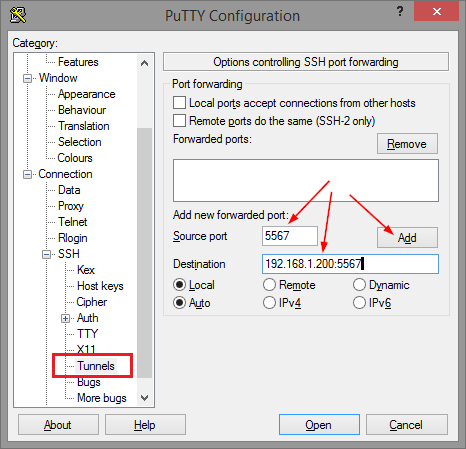
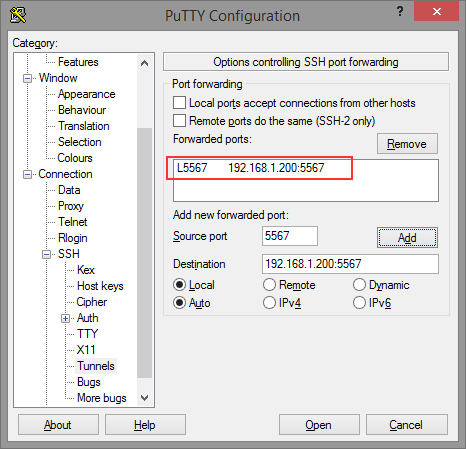
Thomas basically did all the research on the forwarding needed for ELC (formerly Belise/Elise), then showed the PuTTY equivalent to ssh user@remote -L5567:192.168.1.200:5567:

[WayBackRemote access to the Embarcadero License Center via SSH tunnel – twm’s blog

Via: [WayBack] Once you have set up an Embarcadero License Center (ELC) for your company (with network named user or concurrent licenses) you will need network access … – Thomas Mueller (dummzeuch) – Google+

Related: [WayBack] Introducing the Embarcadero License Center – ELC

–jeroen


Posted in *nix, Communications Development, Delphi, Development, Internet protocol suite, Licensing, Power User, Software Development, SSH, ssh/sshd | Leave a Comment »

On my research list: finding out how to prevent FortiClient to route all traffic over VPN

Posted by jpluimers on 2020/08/10

Links that will likely help me:

–jeroen

Read the rest of this entry »

Posted in FortiGate/FortiClient, Hardware, Internet, Network-and-equipment, Power User, routers, Security, VPN | Leave a Comment »

How-to Make Your Own 3D Printing Goo

Posted by jpluimers on 2020/08/07

Smart idea: [WayBack] How-to Make Your Own 3D Printing Goo.

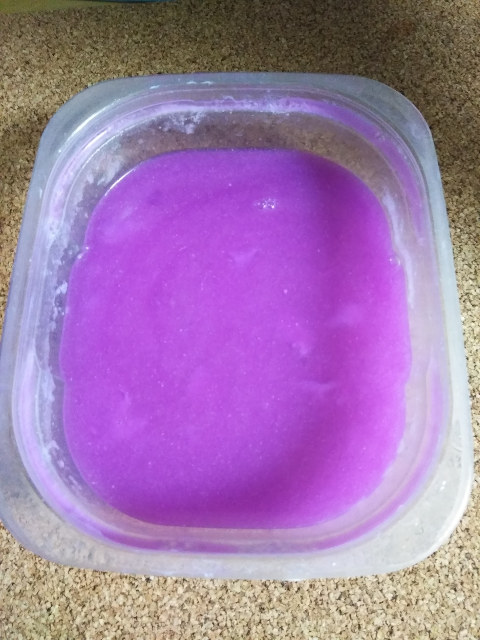
It is a large (22g) Elmer’s glue stick dissolved into a cup of warm water.

After applying it with a paper towel, the 3D print sticks to the warm printing bed well, but comes off easily from a cold printing bed.

It is quite easy to make. 1 cup water and 1 large 22g Elmers glue stick. I put both in water and let sit thinking it would dissolve on its own. After several hours I got impatient and put it in the microwave and heated it.(45 seconds I think). That did the trick and was only left with a few big clumps that I broke apart with my fingers to finish the dissolving.

To apply I just dip a paper towel in the solution and wipe on the bed. It leaves an extremely light layer of glue on the bed that PLA sticks very well to. When the bed cools the parts have very light adhesion to the bed. If the bed is hot it takes some force to get off.

[WayBack] Elmer’s School Glue Naturals® 1 pack 22g Glue Stick | All Natural Glue

Via: [WayBack] Recipe to make goo for 3D printer bed.  – Jean-Luc Aufranc – Google+

–jeroen

Posted in 3D printing, Power User | Leave a Comment »

Working on High Quality Low Cost DIY 3D Scanning using Structured Light

Posted by jpluimers on 2020/08/07

On my list of things to try: [WayBack] Working on High Quality Low Cost DIY 3D Scanning using Structured Light

Via: [WayBack] Karl has started looking into cheaper – yet accurate – DIY solutions for 3D scanning using structured light scanning… – Jean-Luc Aufranc – Google+

–jeroen

Posted in 3D printing, LifeHacker, Power User | Leave a Comment »

Friday Tip: create a permalink to a specific slide

Posted by jpluimers on 2020/08/07

[WayBackFriday Tip: create a permalink to a specific slide: just append / followed by the side number.

Same at [Archive.is] How to link to a specific slide on Slideshare – Quora

–jeroen

Read the rest of this entry »

Posted in LifeHacker, Power User | Leave a Comment »

Great tool: the Toptal Colorblind Web Page Filter

Posted by jpluimers on 2020/08/06

Colorblind Web Page Filter

Colorblind Web Page Filter

A great tool I found out about a while ago [Archive.is] Toptal Color Blind Filter.

It shows the original web page and the rendering for various types of color blindness:

  • protan -> Protanopia: red/green color blindness; anomalous red cones
  • deutan -> Deutanopia: red/green color blindness; anomalous green cones
  • tritan -> Tritanopia: blue/yellow color blindness; anomalous blue cones
  • grey -> Greyscale/achromatopsia: quick check for all forms of colorblindness

Because of a comment at [WayBack] Forums… https://embarcaderomonitoring.wiert.me/ – JWP – Google+, I used Toptal to notify Uptime robot that their status pages are hard for color blind people: [WayBackJeroen Pluimers on Twitter: “Some color blind people indicated to me that @uptimerobot status pages are hard for them to read. Examples are for @EmbarcaderoTech as they have subdomains being offline often: …”, so lets look at how people with various types of color blindness see embarcaderomonitoring.wiert.me :

Read the rest of this entry »

Posted in *nix, Color (science), Color (software development), Development, Monitoring, Power User, science, Software Development, Uptimerobot, Usability, User Experience (ux), Web Development | Leave a Comment »

Android passwords: store as transient as possible using arrays in stead of strings

Posted by jpluimers on 2020/08/06

Sometimes you cannot avoid handling passwords in your application. When you do,

  • keep them around as short as possible
  • store them in data types that are not garbage collected
  • wipe the storage as soon as you are done

In practice, this usually comes down to storing them as arrays (character or byte arrays), not strings.

This holds for many other platforms outside Java as well: strings are usually managed in one way or the other, so they cannot be wiped

References:

For actual storage of passwords, you always have the risk of retrieval: when a “bad guy” gets physical access to a device, it is basically hosed.

A KeyStore can only do so much against it: if your APK can be downloaded, it can be reverse-engineered revealing the exact steps how the store is accessed, reproducing the steps needed to hack into the underlying protected data/functionality.

The keystore can be forgetful…

You’ve just moved in to a new house and have been given the master key for the front door. You only have one of these so you know you need to keep it safe. Your really paranoid so you hire an armed guard, whose sole job is to protect this key, in fact, this is all he has been trained to do and has a catchy slogan of “need to protect a key, its what I was born to do!”. You install an extra lock on your front door as you feel the bodyguard isn’t enough, this is a rough area anyway and who’s going to make sure no-ones about to break in and steal all your crap. You return to your key guard only to be informed he has thrown the key away. You shout and scream at him but he just blankly says “I don’t have it anymore, I didn’t think it was important”. You can’t contain your anger “What the hell, your a jerk! You had one thing to do and you failed, this causes me a lot of problems, why didn’t you tell me you might do this?! What do I do now?!”

[WayBack] Android Security: The Forgetful Keystore – SystemDotRun – Dorian Cussen’s Super Blog

–jeroen

Posted in Android, Development, Java, Java Platform, Mobile Development, Power User, Security, Software Development | Leave a Comment »

Brew reminder to self

Posted by jpluimers on 2020/08/05

From the update process:

==> Caveats
==> hub
Bash completion has been installed to:
  /usr/local/etc/bash_completion.d

zsh completions have been installed to:
  /usr/local/share/zsh/site-functions
==> python
Python has been installed as
  /usr/local/bin/python3

Unversioned symlinks `python`, `python-config`, `pip` etc. pointing to
`python3`, `python3-config`, `pip3` etc., respectively, have been installed into
  /usr/local/opt/python/libexec/bin

If you need Homebrew's Python 2.7 run
  brew install python@2

You can install Python packages with
  pip3 install 
They will install into the site-package directory
  /usr/local/lib/python3.7/site-packages

See: https://docs.brew.sh/Homebrew-and-Python
==> youtube-dl
Bash completion has been installed to:
  /usr/local/etc/bash_completion.d

zsh completions have been installed to:
  /usr/local/share/zsh/site-functions
==> mpv
zsh completions have been installed to:
  /usr/local/share/zsh/site-functions
==> node
Bash completion has been installed to:
  /usr/local/etc/bash_completion.d

–jeroen

Posted in Apple, Development, Home brew / homebrew, Power User, Python, Scripting, Software Development | Leave a Comment »

Not sure why, but ESXi 6.5 changed “uuid.location”, “uuid.bios” and “ethernet0.generatedAddress” after moving it to a different datastore

Posted by jpluimers on 2020/08/03

When rearranging storage locations, I had to move a few VMs to different data stores.

So I removed them from the inventory, moved them to another datastore, then re-added them as a set.

Besides getting new VM IDs (which I expected), ESXi 6.5 U1 also managed to change the below fields (which I did not expect) without a warning like “did you move or copy” which you get when moving VMs around on VMware Fusion (Mac OS X) and VMware Workstation/Player (Windows).

The bold values were changed from:

uuid.location = "56 4d 6f 23 aa 92 bf 2b-16 d9 9a 4b 95 4d e7 8e"
uuid.bios = "56 4d 02 3c ea 9e dc 12-18 4f a4 64 c1 f7 f0 fe"
ethernet0.generatedAddress = "00:0c:29:f7:f0:fe"

To:

uuid.location = "56 4d 4c e8 a3 81 c6 db-d6 f2 7f 32 0d fe 2e 29"
uuid.bios = "56 4d 4c e8 a3 81 c6 db-d6 f2 7f 32 0d fe 2e 29"
ethernet0.generatedAddress = "00:0c:29:fe:2e:29"

The bold-italic values correspond to the changed MAC address.

This caused the VMs (which were suspended before the move) to loose their MAC bound static DHCP addresses after the lease time expired: since the new MAC addresses were not statically bound, they got fresh ones causing all sorts of connection problems.

Trying to assign back the original MAC address in the Web UI by hand gets you this error when the virtual machine starts (not when you save the MAC address):

Invalid MAC address specified.
xx:xx:xx:xx:xx:xx is not a valid static Ethernet address. It conflicts with VMware reserved MACs for other usage.

What I did was

  1. suspend the machines.
  2. bring ESXi into maintenance mode,
  3. changed the values back,
  4. moved ESXI out of maintenance mode,
  5. then unsuspended the VMs one by one
    now I did get the “I moved it” versus “I copied it” question

For this particular machine, the uuid.location was still changed, but now uuid.bios and ethernet0.generatedAddress were now left in tact:

uuid.location = "56 4d 4c e8 a3 81 c6 db-d6 f2 7f 32 0d fe 2e 29"
uuid.bios = "56 4d 02 3c ea 9e dc 12-18 4f a4 64 c1 f7 f0 fe"
ethernet0.generatedAddress = "00:0c:29:f7:f0:fe"

On another VM that I moved between data stores, after confirming the “I Moved It”, the migration went OK, so I am not sure about the cause. In that case the before/after situation were these (only the bold values were changed):

uuid.location = "56 4d d5 e2 79 b4 a6 76-aa 13 3d 18 e5 4d c0 00"
uuid.bios = "56 4d 38 d7 9c a0 98 24-3c e4 79 00 54 5d 35 ef"
vc.uuid = "52 91 00 37 03 ed 87 34-ec 06 ba 28 f6 85 b4 29"

uuid.location = "56 4d 88 e6 a0 17 bb 01-cb 8c e3 ce fa e8 05 61"
uuid.bios = "56 4d 38 d7 9c a0 98 24-3c e4 79 00 54 5d 35 ef"
vc.uuid = "52 91 00 37 03 ed 87 34-ec 06 ba 28 f6 85 b4 29"

Conclusion

The uuid.bios directly affects the generatedAddress of the network adapters. Initially it is related to the uuid.location, but does not need to be.

When migrating, keep the old data for comparison: compare the .vmx files after starting the migrated machine, and correct the uuid.bios and various ethernet#.generatedAddress values when needed.

Besides the well known 00:50:56:XX:YY:ZZ MAC address range there is also 00:0c:29:XX:YY:ZZ.

Background reading

–jeroen

Posted in ESXi6.5, Power User, Virtualization, VMware, VMware ESXi | Leave a Comment »