The Wiert Corner – irregular stream of stuff

Jeroen W. Pluimers on .NET, C#, Delphi, databases, and personal interests

  • My badges

  • Twitter Updates

  • Pages

  • All categories

  • Enter your email address to subscribe to this blog and receive notifications of new posts by email.

    Join 1,854 other subscribers

Archive for the ‘Power User’ Category

Authssh from Windows

Posted by jpluimers on 2020/05/22

Running autossh from Windows is still on my list, so here are a few links:

–jeroen

Posted in Communications Development, Development, Internet protocol suite, Power User, SSH, TCP, Windows | Leave a Comment »

David Korn Tells All – Slashdot

Posted by jpluimers on 2020/05/21

Almost 20 years old, but still a very nice read [Archive.is] David Korn Tells All – Slashdot.

Another funny story involving David Korn during the not-so open source times of Microsoft late last century: [WayBack] Korn Shell Story

–jeroen

Posted in *nix, *nix-tools, bash, bash, Development, History, Power User, Scripting, Software Development | Leave a Comment »

How to read network requests in Chrome for new tab or popup window

Posted by jpluimers on 2020/05/20

Cool feature I discovered from [WayBackHow to read network requests in Chrome for new tab or popup window:

chrome://net-internals/#events

It will immediately show all events from all tabs including networking events.

The red bar at the top has a drop down on the right where you can stop them and perform a few other actions.

During or after capture, you can select relevant requests from the list (through checkboxes) so the right of the pane gets their info (which is a lot: not just the request/response content including all headers and cookies, but also any delegates from extensions and their results).

Read the rest of this entry »

Posted in Bookmarklet, Chrome, Google, Power User, Web Browsers | Leave a Comment »

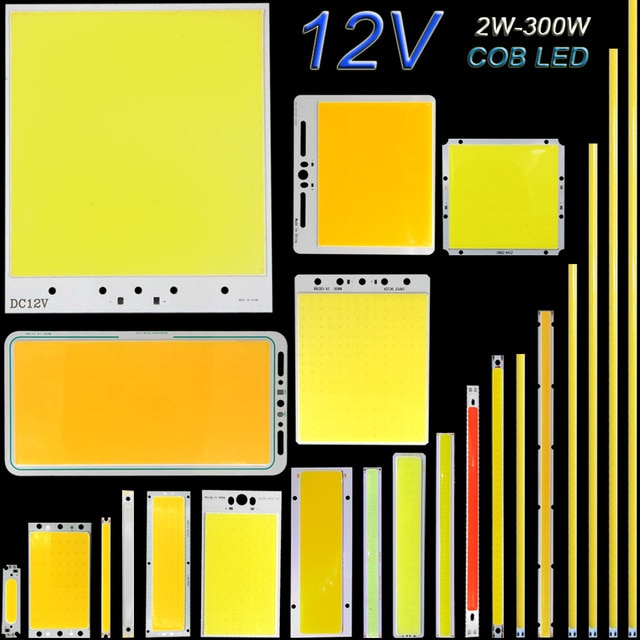
DC12V COB LED Light Strip Panel 5W 10W 20W 50W 200W 300W LED Bulb White Blue Red Flip Chip COB Lamp DIY House Car Lighting 12V-in LED Bulbs & Tubes from Lights & Lighting on Aliexpress.com | Alibaba Group

Posted by jpluimers on 2020/05/19

Interesting for some projects: [WayBack] DC12V COB LED Light Strip Panel 5W 10W 20W 50W 200W 300W LED Bulb White Blue Red Flip Chip COB Lamp DIY House Car Lighting 12V-in LED Bulbs & Tubes from Lights & Lighting on Aliexpress.com | Alibaba Group

Note they are not current limited!

This means I need to read more on current limiting; these might be a start:

Via The biggest LED COB panel yet! Voltage/current tests. – YouTube

–jeroen

Read the rest of this entry »

Posted in Development, DIY, Hardware Development, Power User | Leave a Comment »

ipmi – Linux: Why does Single User mode work on Serial Console but not on the attached Keyboard/Video/Monitor? – Server Fault

Posted by jpluimers on 2020/05/19

From [WayBack] ipmi – Linux: Why does Single User mode work on Serial Console but not on the attached Keyboard/Video/Monitor? – Server Fault (slightly edited; thanks Patrick!):

Because init has not spawned off multiple TTYs yet (getty, mgetty, etc), so you only have the primary TTY. The primary TTY is the last console= parameter on the kernel command line. All the console parameters get the output, but only the last one will be able to act as input.

–jeroen

Posted in *nix, Debian, Linux, openSuSE, Power User, RedHat, SuSE Linux, Tumbleweed | Leave a Comment »

Free Linux cloud shell for Gmail users – shell in the browser that works in all locations I’ve been so far

Posted by jpluimers on 2020/05/18

This is still so cool: [WayBack] Free Linux cloud shell for Gmail users … – Adrian Marius Popa – Google+:

Free Linux cloud shell for Gmail users

https://news.ycombinator.com/item?id=16247577

comments are more interesting

“If you want a free Linux box with a Public IP and SSH, I’d recommend spinning up an f1-micro VM. It’s part of the permanent free tier”

https://news.ycombinator.com/item?id=16248668

Even cooler is that you can use it both from a web browser and from your own console, more on that below.

Cloud Shell from the web

The above links:

Read the rest of this entry »

Posted in Google, GoogleCloudShell, Power User | Leave a Comment »

On my list of things to try: GitHub – arthepsy/ssh-audit; SSH server auditing

Posted by jpluimers on 2020/05/18

This looks like an ssh equivalent to testssl.sh: [WayBack] GitHub – arthepsy/ssh-audit: SSH server auditing (banner, key exchange, encryption, mac, compression, compatibility, security, etc).

It is on my list of things to try, so I’ve put a watch on the repository changes.

–jeroen

Read the rest of this entry »

Posted in Communications Development, Development, Encryption, Internet protocol suite, Power User, Security, SSH, TCP | Leave a Comment »

Show openSUSE:Factory / bootchart – openSUSE Build Service

Posted by jpluimers on 2020/05/15

On my research list: [WayBack] Show openSUSE:Factory / bootchart – openSUSE Build Service.

I bumped here when researching on how to list services: [WayBack] init.d – Command to list services that start on startup? – Ask Ubuntu

It seems few people use it on opensuse, but it is interesting for analysing the boot process nonetheless.

I already found out this is in fact bootchart2: [WayBack] GitHub – xrmx/bootchart: merge of bootchart-collector and pybootchartgui

Some links that should help me further are these:

From the last link, this translation:

A. systemd-analyze

You will see the total computer startup time after:

systemd-analyze

A complete list of how much each individual service has taken is when you complete:

systemd-analyze blame

You will see the most problematic processes after you complete:

systemd-analyze critical-chain

You can create a picture:

systemd-analyze plot> /tmp/systemd-analyze.svg

Suitable for: openSUSE 11.4, 12.x, 13.1, Leap 42.x

Not suitable: openSUSE 13.2

B. bootchart

First, install the bootchart package (bootchart 2 version of the program). If you are using openSUSE Leap 42.x or later, enable bootchart2 (and optional bootchart2-done) service:

systemctl enable bootchart2

systemctl enable bootchart2-done

If you are using openSUSE version 13.1 or earlier, go to YaST → (System) → Startup and enter kernel startup parameters:

initcall_debug printk.time = y quiet init = / sbin / bootchartd rdinitrd = / sbin / bootchartd

The next time you start your computer, the /var/log/bootchart.png image will be created to help you further optimize your system startup. For example, if you do not need an AppArmor who cares about security, you can disable the boot.apparmor service through the YaST Service Configuration Module.

Suitable for: openSUSE 11.4, 12.x, 13.1, 13.2, Leap 42.x

–jeroen

Posted in *nix, *nix-tools, Linux, openSuSE, Power User, SuSE Linux, Tumbleweed | Leave a Comment »

Listing services on OpenSuSE Linux

Posted by jpluimers on 2020/05/15

Nowadays, most OpenSuSE Linux services are systemd based. Listing those is simple with systemctl list-units --all (configured ones) and systemctl list-unit-files (nonconfigured ones as well), though their states can be many as the command-completion for the --state parameter:

# systemctl list-unit-files --state
abandoned deactivating failed masked not-found remounting-sigterm start-pre stop-sigkill waiting
activating deactivating-sigkill final-sigkill merged plugged running stop stop-sigterm
activating-done deactivating-sigterm final-sigterm mounted registered sigkill stop-post stub
activating-sigkill dead inactive mounting reload sigterm stop-pre tentative
activating-sigterm elapsed listening mounting-done reloading start stop-pre-sigkill unmounting
active error loaded mounting-sigkill remounting start-chown stop-pre-sigterm unmounting-sigkill
auto-restart exited making mounting-sigterm remounting-sigkill start-post stop-sigabrt unmounting-sigterm

The odd thing: not all states from the service list are in the completion. These are missing from the list-unit-files:

generated
static
transient

In the past, most services were System V based, where you can use service --status-all. Contrary to the documentation (which indicates “The –status-all option displays the status of all loaded service units.”), it lists all services.

On OpenSuSE though, it now lists both System V based and systemd based services in one go. Since usually there are no more System V services (virtually all have been migrated to systemd a few years ago), the netto result is systemd services.

Based on [WayBack] init.d – Command to list services that start on startup? – Ask Ubuntu

–jeroen

Posted in *nix, *nix-tools, Linux, openSuSE, Power User, SuSE Linux, Tumbleweed | Leave a Comment »

appletv – How can I show a read-only version of Google Calendar on Apple TV 4th generation? – Ask Different

Posted by jpluimers on 2020/05/14

Two calendars and three weather frames.Based on [WayBack] appletv – How can I show a read-only version of Google Calendar on Apple TV 4th generation? – Ask Different there is one choice that might work on Apple TV 3rd generation and 4th generation:

This is the only practical solution I dissected from [WayBackHow to surf the web and use Safari on Apple TV – Macworld UK: Here is how to browse the internet and watch web services on your Apple TV.

Installing requires a few steps as described at

Limiting to only Apple TV 4, another solution is also possible:

However the last solution is not a real web browser, so it does not allow a layout I’m using for the calendar, or actually two calendars:

  • weekly calendar on the left so my brother sees his detailed activities for the upcoming days
  • monthly calendar on the top right for an overview of the past and upcoming weeks
  • three weather frames on the bottom right with two weather radars from different sources and a weather overview for the upcoming days

The reason I need this is because my brother is mentally retarded having problems with abstract concepts like relative time and scheduling. Like me he is also easily distracted and not good at repeating tasks. So looking at a schedule at least once a day is tough for him.

He is very good at concrete topics, especially ones he can put to practice right away like “will it rain on my way to work”. That makes him look at this web page in the first place.

Currently this calendar is shown on a monitor by a Raspberry Pi attached to it.

But I might go for the Apple TV 3 route later on.

–jeroen

Posted in Apple, Apple TV, Development, iOS, iOS Development, Mobile Development, Power User | Leave a Comment »