The Wiert Corner – irregular stream of stuff

Jeroen W. Pluimers on .NET, C#, Delphi, databases, and personal interests

  • My badges

  • Twitter Updates

  • Pages

  • All categories

  • Enter your email address to subscribe to this blog and receive notifications of new posts by email.

    Join 1,854 other subscribers

Archive for the ‘Power User’ Category

UX design: doe geen pijltje onderaan een pagina als verder scrollen zinloos is

Posted by jpluimers on 2020/01/10

[WayBack] Jeroen Pluimers on Twitter: “Altijd handig zo’n pijltje onderaan de pagina die suggereert dat je nog niet klaar bent met lezen, maar niets blijkt te doen #mijnpensioenoverzicht user experience #fail https://t.co/sx04ndwgM6… https://t.co/GmHJzZhpbO”

–jeroen

Posted in Power User, Usability, User Experience (ux) | Leave a Comment »

Commander One review: A superior alternative to Android File Transfer on Mac

Posted by jpluimers on 2020/01/10

On my list of software to try: [WayBackCommander One review: A superior alternative to Android File Transfer on Mac

Via: [WayBack] Looks like a must-have for anyone using a Mac (with MacOS) and an Android phone. – Roderick Gadellaa – Google+

–jeroen

Posted in Android, Android Devices, Apple, Development, iMac, Mac, Mac OS X / OS X / MacOS, MacBook, MacBook Retina, MacBook-Air, MacBook-Pro, MacMini, macOS 10.12 Sierra, macOS 10.13 High Sierra, Mobile Development, Software Development | Leave a Comment »

Some people still don’t know they should apply the Crucial Firmware Update For Crucial m4 SSD BSOD

Posted by jpluimers on 2020/01/10

Luckily I was watching over the shoulder of a friend when his hung as it was a while ago I had encountered issues like that.

Sometimes the system would get in trouble without warning: the machine would just hang. No Windows Event log or other place where we could trace back the origin.

I suspected failing hardware because it was similar to other machines I had seen: memory, loose connectors or power issues came to mind first.

After about a week of trial and error I decided to check SMART status. HDTune did not warn of anything special. SmartCtl however did:

This drive may hang after 5184 hours of power-on time:
http://www.tomshardware.com/news/Crucial-m4-Firmware-BSOD,14544.html
See the following web pages for firmware updates:
http://www.crucial.com/support/firmware.aspx
http://www.micron.com/products/solid-state-storage/client-ssd#software

The relevant links (I prefer the WayBack links as at times the site is very slow) are below.

After upgrading the firmware, the problems were gone.

version compatible products download
070H Crucial m4 2.5-inch (7mm & 9.5mm) SSD Windows® 7 Updater Application

[WayBack] download firmware

[WayBack] instruction guide

Windows® 8 Updater Application

[WayBack] download firmware

[WayBack] instruction guide

Manual Boot File for Windows and Mac®

[WayBack] download firmware

[WayBack] instruction guide

Release Date: 04/02/2013

Firmware 070H is recommended for anyone currently running 040H or previous firmware releases. It includes incremental improvements and refinements over these versions which may improve the overall user experience.

Like recent firmware versions, version 070H has improvements over versions 000F which are specific for Windows 8 and new UltraBook systems, although systems running Windows 7 and other operating systems may also see improvements. Any m4 firmware
version will function normally in Windows 8, even without these performance improvements.

The following is a summary of changes between 040H and 070H, which are independent of operating system:

  • Resolved a power-up timing issue that could result in a drive hang, resulting in an inability to communicate with the host computer. The hang condition would typically occur during power-up or resume from Sleep or Hibernate. Most often, a new
    power cycle will clear the condition and allow normal operations to continue. The failure mode has only been observed in factory test. The failure mode is believed to have been contained to the factory. This fix is being implemented for all new
    builds, for all form factors, as a precautionary measure. The fix may be implemented in the field, as desired, to prevent occurrence of this boot-time failure. To date, no known field returns have been shown to be related to this issue. A failure
    of this type would typically be recoverable by a system reset.

Additional details can be found in the firmware guide

–jeroen

Read the rest of this entry »

Posted in Hardware, Power User | Leave a Comment »

samsung “software update” “this function is not available” – Google Search

Posted by jpluimers on 2020/01/06

When you get this on a TV from samsung “software update” “this function is not available” – Google Search, then usually you try to update the software when it is not in “watch TV” mode, but a different mode using the network (like web browsing).

See the photos below.

–jeroen

Read the rest of this entry »

Posted in LifeHacker, Power User | Leave a Comment »

Reminder to check out the Pascal source code for Apple’s legendary Lisa operating system

Posted by jpluimers on 2020/01/06

This is a reminder to check when the source code was actually released:

–jeroen

Posted in 6502, Apple, Classic Macintosh, History, Power User | Leave a Comment »

The Throttle homepage. Slow that machine down!

Posted by jpluimers on 2020/01/06

Cool tool if you have industrial machinery that uses DOS and needs a slowdown on modern hardware (because for instance your serial communications program is running way too fast): [WayBackThe Throttle homepage. Slow that machine down!

Via Matthijs ter Woord

Downloads:

  • Q) How does throttle work?
  • A) Throttle enables power management bits in the chipset to control CPU clock. Any chipset that conforms to the ACPI (advanced configuration and power interface) specification has a means to enable and control the throttle.
    The intended purpose of these bits is to provide a means of power savings, typically utilized in notebooks or other battery powered devices.
    When the CPU is in a throttled state, it uses less power. It just so happens that a throttled CPU creates a perfect environment to emulate the performance of an older generation CPU!
  • Q) I have a chipset that supports ACPI. Why isn’t it supported in throttle?
  • A) Probably because I don’t know about it. Because the ACPI specification can be implemented in different ways by different chipset manufacturers, it’s impossible to create one generic program that works with all ACPI compliant hardware. This creates the problem of constantly updating the internal database of known hardware. So far, the biggest problem has been finding the documentation for known ACPI compliant chipsets. Adding support for them is the easy part! You may also be using an older version of throttle. Contact me for the latest.
  • Q) Can I have more speed options than just the 8 (or 16) provided?
  • A) No. Throttle provides you with as many different CPU throttling options as the chipset allows. The ACPI spec only defines 8 different modes, each one 12.5% more throttled than the previous. VIA technologies has taken the spec 1 step further and allowed for throttling on 6.25% increments, thus doubling the amount of options available, which provides for more slowdown and a finer tunability.
    If you want to run oldskool games, get a VIA motherboard!There’s nothing I can do to change the available options, and no further options will be available unless the ACPI spec changes.

–jeroen

Posted in History, MS-DOS, Power User | Leave a Comment »

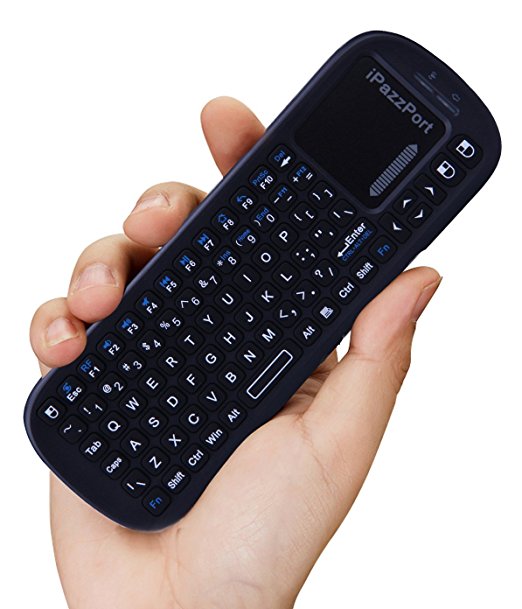
Brilliant device: iPazzPort Wireless Mini Handheld Keyboard with Touchpad Mouse Combo for Android TV Box and Raspberry Pi 3 and HTPC and XBMC KP-810-19S – Black: Computers & Accessories

Posted by jpluimers on 2020/01/03

Brilliant device: [WayBack] KP-810-19BTT Mini Bluetooth Keyboard with touchpad – Unisen Group iPazzPort

I got it via Amazon USA ([WayBack] iPazzPort Wireless Mini Handheld Keyboard with Touchpad Mouse Combo for Android TV Box and Raspberry Pi 3 and HTPC and XBMC KP-810-19S – Black: Computers & Accessories), but Amazon in Europe has it as well (this is the German link:[Archive.isiPazzPort Mini Wireless Handheld Tastatur mit Touchpad: AmazonSmile: Computer & Zubehör; replace .de with .fr, .co.uk, to find your local link).

There are this one is 2.4 Ghz, includes a USB dongle in the battery compartment and requires 2 AAA batteries.

There are Bluetooth and back-lit versions too which cost slightly more.

Via: [WayBack] Raspberry Pi Cluster – Software Team Lead

–jeroen

Posted in Development, Hardware Interfacing, Keyboards and Keyboard Shortcuts, Power User, USB | Leave a Comment »

elektronica-shop.nl :Montagedraad.html

Posted by jpluimers on 2020/01/03

The cool thing about elektronica-shop.nl is that they have [WayBackMontagedraad in various colours for most diameters:

A short list:

  • 0.14 mm2: rood/bruin/blauw/groen/geel/oranje/zwart/wit/grijs
  • 0.20 mm2: zwart/bruin/rood/oranje/geel/groen/blauw/paars/grijs/wit
  • 0.75 mm2: blauw/bruin/groen-geel/grijs/oranje/wit/violet(paars)/zwart/rood/geel/groen
  • 1.00 mm2: zwart/rood
  • 1.50 mm2: zwart/rood/blauw/bruin/groen-geel
  • 2.50 mm2: zwart/rood
  • 4.00 mm2: zwart/rood
  • 6.00 mm2: zwart/rood

Translations:

  • rood = red
  • bruin = brown
  • blauw = blue
  • groen = green
  • geel = yellow
  • oranje = orange
  • zwart = black
  • wit = white
  • grijs = grey/gray
  • paars = purple
  • violet = violet
  • groen-geel = green-yellow striped

The maximum current (Amperage) depend on the area through which the current can flow. It can be roughly translated from the AWG (American Wire Gauge). See the table below.

De AWG-code wordt met name in de elektrotechniek om de dikte van elektrische geleiders en de toebehoren daarvan, zoals adereindhulzen, kabelschoenen en -klemmen, aan te duiden.

AWG  -  mm²    -  mm

4   -  21       -   5.2
6   -  13       -   4.1
8   -    8       -   3.2
10   -    6       -   2.6
12   -    4       -   2
14   -    2.5    -   1.6
16   -    1.5    -   1.3
18   -    1       -   1
20   -    0.5    -   0.8
22   -    0.3    -   0.65
24   -    0.2    -   0.5
26   -    0.13  -   0.4
28   -    0.08  -   0.32
30   -    0.05  -   0.25

Posted in Development, Hardware Development, LifeHacker, Power User | Leave a Comment »

Apple Mac OS X / OS X / macOS versions and history graphs – Wikipedia

Posted by jpluimers on 2020/01/03

Based on [WayBackmacOS – Wikipedia and follow-up of OS X – the versions and their names – as I always forget them and osx – How to find out Mac OS X version from Terminal? (via: Super User)

Release history (with release dates):

The graph with Apple Mac OS X / OS X / Mac OS versions cannot do without a graph showing the BSD and Unix inheritance.

Graph origins:

More complete Mac OS X / OS X / Mac OS and Unix timelines are below from macOS version history – Wikipedia.

–jeroen

Read the rest of this entry »

Posted in Apple, Mac OS X / OS X / MacOS, Mac OS X 10.4 Tiger, Mac OS X 10.5 Leopard, Mac OS X 10.6 Snow Leopard, Mac OS X 10.7 Lion, macOS 10.12 Sierra, macOS 10.13 High Sierra, OS X 10.10 Yosemite, OS X 10.11 El Capitan, OS X 10.8 Mountain Lion, OS X 10.9 Mavericks, Power User | Leave a Comment »

How to make a self extracting archive runs your setup.exe, 7zip -sfx

Posted by jpluimers on 2020/01/01

For my link archive step by step instruction on the command-line which can be automated:

Via:

–jeroen

Posted in 7zip, Batch-Files, Compression, Development, Power User, Scripting, Software Development | Leave a Comment »