The Wiert Corner – irregular stream of stuff

Jeroen W. Pluimers on .NET, C#, Delphi, databases, and personal interests

  • My badges

  • Twitter Updates

  • Pages

  • All categories

  • Enter your email address to subscribe to this blog and receive notifications of new posts by email.

    Join 1,839 other subscribers

Archive for the ‘Power User’ Category

Various online CSV to Markdown converters: best is Markdown Tables generator – TablesGenerator.com

Posted by jpluimers on 2019/01/03

TL;DR: use Markdown Tables generator – TablesGenerator.com as it has the most features.

A few tools that help converting CSV (with separators like comma, semicolon and tab) to Markdown online:

  1. [Archive.csMarkdown Table Maker
    • Supports:
      • Use first line as headers
      • Auto detection of separator
      • Tab separated
      • Comma separated
      • Semicolon separated
    • Does not support:
      • Quote characters
  2. [WayBack] CSV to Markdown Table Generator — Donat Studios
    • Supports:
      • Use first line as headers
      • Tab separated
      • Comma separated
      • Semicolon separated
    • Does not support:
      • Quote characters
  3. [WayBackMarkdown Tables generator – TablesGenerator.com
    • Supports auto detection of:
      • Use first line as headers
      • Tab separated
      • Comma separated
      • Semicolon separated
      • Quote characters

–jeroen

Posted in CSV, Development, Lightweight markup language, MarkDown, Power User, Software Development | Leave a Comment »

The biggest lie I tell myself is not about new years resolutions.

Posted by jpluimers on 2019/01/01

The biggest lie I tell myself is “I don’t need to write that down, I’ll remember it”

It’s likely older, but the oldest reference I could find was 2012 [WayBack].

So before I forget:

Happy New Year everyone!

With the above quote, it is no coincidence I started my blog even earlier (in 2009): it’s my off-line memory, way better readable than my hand-writing and indexed by various search engines.

Read the rest of this entry »

Posted in About, Conference Topics, Conferences, Event, LifeHacker, Personal, Power User | Leave a Comment »

Easy Running of Scripts at Boot and Shutdown – SUSE Blog | SUSE Communities

Posted by jpluimers on 2019/01/01

Cool:

/etc/init.d/after.local

–jeroen

Posted in *nix, *nix-tools, bash, Development, Linux, openSuSE, Power User, Scripting, Software Development, SuSE Linux, Tumbleweed | Leave a Comment »

brew update reminder

Posted by jpluimers on 2019/01/01

Reminder to self:

==> Caveats
==> nss
nss is keg-only, which means it was not symlinked into /usr/local,
because Firefox can pick this up instead of the built-in library, resulting in
random crashes without meaningful explanation.

Please see https://bugzilla.mozilla.org/show_bug.cgi?id=1142646 for details.

If you need to have nss first in your PATH run:
echo ‘export PATH=”/usr/local/opt/nss/bin:$PATH”‘ >> ~/.bash_profile

For compilers to find nss you may need to set:
export LDFLAGS=”-L/usr/local/opt/nss/lib”
export CPPFLAGS=”-I/usr/local/opt/nss/include”

For pkg-config to find nss you may need to set:
export PKG_CONFIG_PATH=”/usr/local/opt/nss/lib/pkgconfig”

==> sphinx-doc
sphinx-doc is keg-only, which means it was not symlinked into /usr/local,
because this formula is mainly used internally by other formulae.
Users are advised to use `pip` to install sphinx-doc.

If you need to have sphinx-doc first in your PATH run:
echo ‘export PATH=”/usr/local/opt/sphinx-doc/bin:$PATH”‘ >> ~/.bash_profile

==> sqlite
sqlite is keg-only, which means it was not symlinked into /usr/local,
because macOS provides an older sqlite3.

If you need to have sqlite first in your PATH run:
echo ‘export PATH=”/usr/local/opt/sqlite/bin:$PATH”‘ >> ~/.bash_profile

For compilers to find sqlite you may need to set:
export LDFLAGS=”-L/usr/local/opt/sqlite/lib”
export CPPFLAGS=”-I/usr/local/opt/sqlite/include”

For pkg-config to find sqlite you may need to set:
export PKG_CONFIG_PATH=”/usr/local/opt/sqlite/lib/pkgconfig”

==> openssl
A CA file has been bootstrapped using certificates from the SystemRoots
keychain. To add additional certificates (e.g. the certificates added in
the System keychain), place .pem files in
/usr/local/etc/openssl/certs

and run
/usr/local/opt/openssl/bin/c_rehash

openssl is keg-only, which means it was not symlinked into /usr/local,
because Apple has deprecated use of OpenSSL in favor of its own TLS and crypto libraries.

If you need to have openssl first in your PATH run:
echo ‘export PATH=”/usr/local/opt/openssl/bin:$PATH”‘ >> ~/.bash_profile

For compilers to find openssl you may need to set:
export LDFLAGS=”-L/usr/local/opt/openssl/lib”
export CPPFLAGS=”-I/usr/local/opt/openssl/include”

For pkg-config to find openssl you may need to set:
export PKG_CONFIG_PATH=”/usr/local/opt/openssl/lib/pkgconfig”

==> openssl@1.1
A CA file has been bootstrapped using certificates from the system
keychain. To add additional certificates, place .pem files in
/usr/local/etc/openssl@1.1/certs

and run
/usr/local/opt/openssl@1.1/bin/c_rehash

openssl@1.1 is keg-only, which means it was not symlinked into /usr/local,
because openssl/libressl is provided by macOS so don’t link an incompatible version.

If you need to have openssl@1.1 first in your PATH run:
echo ‘export PATH=”/usr/local/opt/openssl@1.1/bin:$PATH”‘ >> ~/.bash_profile

For compilers to find openssl@1.1 you may need to set:
export LDFLAGS=”-L/usr/local/opt/openssl@1.1/lib”
export CPPFLAGS=”-I/usr/local/opt/openssl@1.1/include”

For pkg-config to find openssl@1.1 you may need to set:
export PKG_CONFIG_PATH=”/usr/local/opt/openssl@1.1/lib/pkgconfig”

==> icu4c
icu4c is keg-only, which means it was not symlinked into /usr/local,
because macOS provides libicucore.dylib (but nothing else).

If you need to have icu4c first in your PATH run:
echo ‘export PATH=”/usr/local/opt/icu4c/bin:$PATH”‘ >> ~/.bash_profile
echo ‘export PATH=”/usr/local/opt/icu4c/sbin:$PATH”‘ >> ~/.bash_profile

For compilers to find icu4c you may need to set:
export LDFLAGS=”-L/usr/local/opt/icu4c/lib”
export CPPFLAGS=”-I/usr/local/opt/icu4c/include”

For pkg-config to find icu4c you may need to set:
export PKG_CONFIG_PATH=”/usr/local/opt/icu4c/lib/pkgconfig”

==> ruby
By default, binaries installed by gem will be placed into:
/usr/local/lib/ruby/gems/2.6.0/bin

You may want to add this to your PATH.

ruby is keg-only, which means it was not symlinked into /usr/local,
because macOS already provides this software and installing another version in
parallel can cause all kinds of trouble.

If you need to have ruby first in your PATH run:
echo ‘export PATH=”/usr/local/opt/ruby/bin:$PATH”‘ >> ~/.bash_profile

For compilers to find ruby you may need to set:
export LDFLAGS=”-L/usr/local/opt/ruby/lib”
export CPPFLAGS=”-I/usr/local/opt/ruby/include”

For pkg-config to find ruby you may need to set:
export PKG_CONFIG_PATH=”/usr/local/opt/ruby/lib/pkgconfig”

==> qt
We agreed to the Qt open source license for you.
If this is unacceptable you should uninstall.

qt is keg-only, which means it was not symlinked into /usr/local,
because Qt 5 has CMake issues when linked.

If you need to have qt first in your PATH run:
echo ‘export PATH=”/usr/local/opt/qt/bin:$PATH”‘ >> ~/.bash_profile

For compilers to find qt you may need to set:
export LDFLAGS=”-L/usr/local/opt/qt/lib”
export CPPFLAGS=”-I/usr/local/opt/qt/include”

For pkg-config to find qt you may need to set:
export PKG_CONFIG_PATH=”/usr/local/opt/qt/lib/pkgconfig”

==> python
Python has been installed as
/usr/local/bin/python3

Unversioned symlinks `python`, `python-config`, `pip` etc. pointing to
`python3`, `python3-config`, `pip3` etc., respectively, have been installed into
/usr/local/opt/python/libexec/bin

If you need Homebrew’s Python 2.7 run
brew install python@2

You can install Python packages with
pip3 install <package>
They will install into the site-package directory
/usr/local/lib/python3.7/site-packages

See: https://docs.brew.sh/Homebrew-and-Python
==> youtube-dl
Bash completion has been installed to:
/usr/local/etc/bash_completion.d

zsh completions have been installed to:
/usr/local/share/zsh/site-functions
==> cabal-install
Bash completion has been installed to:
/usr/local/etc/bash_completion.d
==> node
Bash completion has been installed to:
/usr/local/etc/bash_completion.d
==> hub
Bash completion has been installed to:
/usr/local/etc/bash_completion.d

zsh completions have been installed to:
/usr/local/share/zsh/site-functions
==> gnupg
Once you run this version of gpg you may find it difficult to return to using
a prior 1.4.x or 2.0.x. Most notably the prior versions will not automatically
know about new secret keys created or imported by this version. We recommend
creating a backup of your `~/.gnupg` prior to first use.

For full details on each change and how it could impact you please see
https://www.gnupg.org/faq/whats-new-in-2.1.html
==> mas
Bash completion has been installed to:
/usr/local/etc/bash_completion.d
==> pandoc
Bash completion has been installed to:
/usr/local/etc/bash_completion.d
==> go
A valid GOPATH is required to use the `go get` command.
If $GOPATH is not specified, $HOME/go will be used by default:
https://golang.org/doc/code.html#GOPATH

You may wish to add the GOROOT-based install location to your PATH:
export PATH=$PATH:/usr/local/opt/go/libexec/bin

–jeroen

Posted in Apple, LifeHacker, Mac, Mac OS X / OS X / MacOS, macOS 10.13 High Sierra, Power User | Leave a Comment »

zypper history notes/links

Posted by jpluimers on 2018/12/31

For my archive:

cut -d "|" -f 1-4 -s --output-delimiter " | " /var/log/zypp/history | grep -v " radd "

For comparisons with other package managers, see: [WayBackLinux Package Managers – Kyle’s Wiki

–jeroen

Posted in *nix, Debian, Linux, openSuSE, Power User, SuSE Linux, Tumbleweed, Ubuntu | Leave a Comment »

Monitoring: you can ignore ShellHWDetection service warnings on when it’s not started

Posted by jpluimers on 2018/12/31

I’m monitoring quite a bunch of Windows machines with Zabbix.

One of the services I turn off for monitoring is ShellHWDetection as otherwise you get this notification often:

Service "ShellHWDetection" (Shell Hardware Detection) is not running (startup type automatic)

When it happens, it’s always when there is nobody logged on to the machine. But sometimes you do not get this message. I’ve not fully figured out the pattern well, but since the service is associated with auto-play of inserted CD/DVD/USB and other media, I don’t bother too much.

References:

–jeroen

Posted in *nix, Monitoring, Power User, Windows, Zabbix | Leave a Comment »

4G zendmasten in Nederland; 2017

Posted by jpluimers on 2018/12/30

[WayBack] HMD brengt nieuwe versie van Nokia 106-featurephone uit voor 18 dollar – Tablets en telefoons – Nieuws – Tweakers

–jeroen

Posted in LifeHacker, Power User | Leave a Comment »

mkbook – Hintjens’ book production tools

Posted by jpluimers on 2018/12/28

In case I ever am going to write a book. [WayBack] mkbook/example/produce at master · booksbyus/mkbook · GitHub: mkbook – Hintjens’ book production tools

–jeroen

Posted in LifeHacker, Power User | Leave a Comment »

Windows 7 Home Premium SP1 update throwing 8E5E03FB and later 80070490

Posted by jpluimers on 2018/12/28

A while ago one of our machines threw an error 8E5E03FB while installing SP1 (KB976932) on Window 7 Home Premium.

This is what I used to recover from that (note that failed alone means it failed with the previous error code):

  1. Performed chkdsk %SystemDrive% /F, rebooted, waited for any issues to get fixed (none were)
  2. Disabled Avast anti virus, then update -> failed
  3. Reboot, then update -> failed
  4. Reboot in safe mode, then update -> failed
  5. On an Administrative command prompt, run sfc /scannow
  6. Reboot, then update -> failed
  7. Downloaded [WayBackDownload Windows 7 and Windows Server 2008 R2 Service Pack 1 (KB976932) from Official Microsoft Download Center **
  8. Reboot, then install download -> failure
  9. Looked at %SystemRoot%\Logs\CBS\CBS.log and found this entry:
    • CBS Failed call to CryptCATAdminAddCatalog. [HRESULT = 0x8e5e03fb - JET_errPageNotInitialized
  10. Searched for that combination
  11. Via [WayBackError code 8E5E03FB for Windows 7 updates – Microsoft Community, went for https://aka.ms/diag_wu to [WayBack] https://download.microsoft.com/download/6/C/9/6C970550-32AB-4235-9CDD-7FC9DD848BBB/WindowsUpdate.diagcab
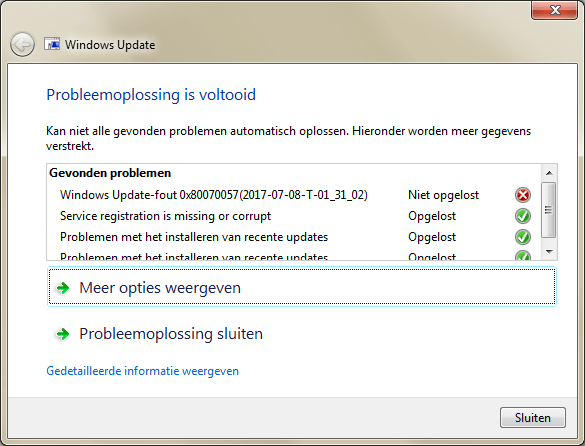
  12. Ran the diagnostics which fixed many problems, but left alone a 0x80070057.
  13. Rebooted, then installed the SP1 download -> failed.
  14. Via[WayBackSP1 installation failure, Code 0x8e5e03fb, performed the steps in [WayBackHow do I reset Windows Update components?.
  15. Rebooted, then installed the SP1 download -> failed, but for a new reason: 0x80070490.
  16. Rebooted, then used on-line Windows update to install SP1 -> failed, but for again a new reason: Code B7. This was in the CBS.Log: Store corruption detected in function CCSDirectTransaaction::ShouldKeepAliveFromInstallmap on resource amd64_avast.vc140.crt_fcc99ee6193ebbca_14.0.24210.0_none_56aba0211ca246c2.
  17. Uninstalled Avast.
  18. Installed CheckSUR (KB947821:[WayBackDownload System Update Readiness Tool for Windows 7 (KB947821) [October 2014] from Official Microsoft Download Center)
  19. Rebooted, then used on-line Windows update to install SP1 -> failed, but for a new reason: 0x80070490. This was in the CBS.Log: Failed to resolve package 'Package_2_for_KB2507938~31bf3856ad364e35~amd64~~6.1.1.4' [HRESULT = 0x80070490 - ERROR_NOT_FOUND].
  20. Searching for that error, I found [WayBack[Win7HomePremium] Unable to install Service Pack 1 – Page 2 which got me to [WayBackDownload SFCFix – MajorGeeks, then run these in an administrative command prompt:
    SFC /SCANNOW
    SFCFix
  21. The latter reported no errors, so I did some more searching and bumped into [WayBackInstallation Failures / CBS Store corruptions: Uncommon issues and troubleshooting – Microsoft GTSC Romania – Enterprise Platforms Support.
  22. It lead me to uninstall the package encompassing 'Package_2_for_KB2507938~31bf3856ad364e35~amd64~~6.1.1.4': dism /online /remove-package /packagename:Package_2_for_KB2507938~31bf3856ad364e35~amd64~~6.1.1.4
  23. Rebooted, then used on-line Windows update to install SP1 -> failed
  24. CBS.log first 0x80070490 entry is still Failed to resolve package 'Package_2_for_KB2507938~31bf3856ad364e35~amd64~~6.1.1.4' [HRESULT = 0x80070490 - ERROR_NOT_FOUND]
  25. Performed wusa /uninstall /KB:2507938 -> failed indicating De update KB2507938 is niet op deze computer geïnstalleerd. (“The update KB2507938 is not installed on this computer.”)
  26. That resulted into one Google Search hit: [WayBack[SOLVED] [Win7] Error Code 80070490 to KB3126587, so downloaded [WayBackDownload Security Update for Windows 7 (KB2507938) from Official Microsoft Download Center
  27. Manually installed the downloaded KB2507938 -> failed with De update geldt niet voor uw computer. (“The update is not applicable to your computer”)
  28. Followed [WayBack] Windows Update Forum Posting Instructions and a few extra steps from [SOLVED] [Win7] Error Code 80070490 to KB3126587 so came up with this:
    1. To get into a relatively clean CBS log: Reboot, then install download -> failure
    2. Run CheckSUR KB947821
    3. On the administrative console, run
      • SFC /SCANNOW
      • SFCFix
      • FRST64
        the latter with search argument KB2507938
  29. Attached files from:
    1. %SystemRoot%\Logs\CBS:
      • CBS.log
      • CbsPersist_20170709180806.cab
        • This is the log file during SP1 update
      • CheckSUR.log
      • CheckSUR.persist.log
    2. %SystemRoot%\Logs\SFCFix:
    3. %SystemRoot%\Logs\FRST64:
      • Addition.txt
      • FRST.txt

So I asked this question: [WayBack[Win7HomePremium] SP1 fails with 0x80070490 as KB2507938 is not fully present.

Extra tools used

** SP1 download

TL;DR: for English Windows 7 x64 you need [WayBackhttps://download.microsoft.com/download/0/A/F/0AFB5316-3062-494A-AB78-7FB0D4461357/windows6.1-KB976932-X64.exe

Note that the download file naming is very confusing as you will see only the above 6 files from the below list (which is English, but similar for other languages):

Read the rest of this entry »

Posted in Power User, Windows, Windows 7 | Leave a Comment »

eventviewer – filtering on service stop/start events

Posted by jpluimers on 2018/12/27

Based on eventviewer – View Shutdown Event Tracker logs under Windows Server 2008 R2 – Server Fault « The Wiert Corner – irregular stream of stuff, I’ve made similar filters for service stop/start events.

Works on translated systems:

PowerShell
Get-EventLog System | Where-Object {$_.EventID -eq "7036"} | ft Machinename, TimeWritten, UserName, EventID, Message -AutoSize -Wrap

Or on one line:

Get-EventLog System ^| Where-Object {$_.EventID -in "6005","6006","7000","7009","7036","7040","7042","7043","7045"} ^| ft Machinename, TimeWritten, UserName, EventID, Message -AutoSize -Wrap

Note the -In operator was introduced in PowerShell 3: [WayBack]

Source: PowerShell v3 – New -in Operator | Jonathan Medd’s Blog

I’ve adapted the custom view to include all these event IDs above (note some links have disappeared moving my notes to a blog post):

  • [WayBack] 6005: The Event log service was started (indication for system startup).
  • [WayBack] 6006: The Event log service was stopped (indication for system shutdown).
  • [WayBack] 7000: The <servicename> service failed to start due to the following error:
    The service did not respond to the start or control request in a timely fashion.
  • [WayBack] 7009: A timeout was reached (30000 milliseconds) while waiting for the <servicename> service to connect.
  • [WayBack] 7036:
    • The <servicename> service entered the stopped state.
    • The <servicename> service entered the running state.
  • [WayBack] 7040: The start type of the <servicename> service was changed from demand start to auto start.
  • [WayBack] 7042: The <servicename> service was successfully sent a stop control.
  • [WayBack] 7043: The <servicename> service did not shut down properly after receiving a preshutdown control.
  • [WayBack] 7045: A service was installed in the system.

Other event IDs that might be relevant via [WayBack] Windows Server restart / shutdown history – Server Fault:

  • [WayBack] 6008: “The previous system shutdown was unexpected.” Records that the system started after it was not shut down properly.
  • [WayBack] 6009: Indicates the Windows product name, version, build number, service pack number, and operating system type detected at boot time.
  • [WayBack] 6013: Displays the uptime of the computer. There is no TechNet page for this id.
  • [WayBack] 1074: “The process X has initiated the restart / shutdown of computer on behalf of user Y for the following reason: Z.” Indicates that an application or a user initiated a restart or shutdown.
  • [WayBack] 1076: “The reason supplied by user X for the last unexpected shutdown of this computer is: Y.” Records when the first user with shutdown privileges logs on to the computer after an unexpected restart or shutdown and supplies a reason for the occurrence.
  • [WayBack] 41 (source: Microsoft-Windows-Kernel-Power)
  • [WayBack] 1001: (source: BugCheck).
  • [WayBack] 12, which is typically the first eventid to be logged after a reboot/reset etc and shows the actual “system start time”, i.e.: “The operating system started at system time ‎2017‎-‎09‎-‎19T02:46:06.582794900Z.”

A more complete list of Windows Kernel related Event IDs is at [WayBack] rootkit.com/NETEVENT.H at master · bowlofstew/rootkit.com.

Steps for the custom view:

Open Event Viewer then

  • Right click Custom Views
  • Click Create Custom View
  • Under the Filter tab
    • Keep Logged as Any time
    • Select all the Event level types (Critical, Warning, etc.)
    • Choose by source = Service Control Manager, Service Control Manager Performance Diagnostic Provider
    • Optionally; For Event ID under the Includes/Excludes Event IDs section enter 6005,6006,7000,7009,7036,7040,7042,7043,7045 for the Event ID
  • Click Ok
  • Enter a name like Shutdown Events and any description then
  • Click Ok again to complete the custom event log.

Your new custom view should show up in the list of custom views with the correct filter applied.

–jeroen

Posted in CommandLine, Development, Power User, PowerShell, PowerShell, Scripting, Software Development, Windows | Leave a Comment »