The Wiert Corner – irregular stream of stuff

Jeroen W. Pluimers on .NET, C#, Delphi, databases, and personal interests

  • My badges

  • Twitter Updates

  • Pages

  • All categories

  • Enter your email address to subscribe to this blog and receive notifications of new posts by email.

    Join 1,839 other subscribers

Archive for the ‘Power User’ Category

Some ideas to show a Google Calendar on a TV using a Raspberry Pi and HDMI output

Posted by jpluimers on 2019/01/10

Using OpenSuSE Tumbleweed E20 on Raspberry Pi 3: accessing the enlightenment desktop over VNC after automatic logon I wanted to buy an on-line read-only diary to help my mentally retarded brother see what his next few days are going to be like.

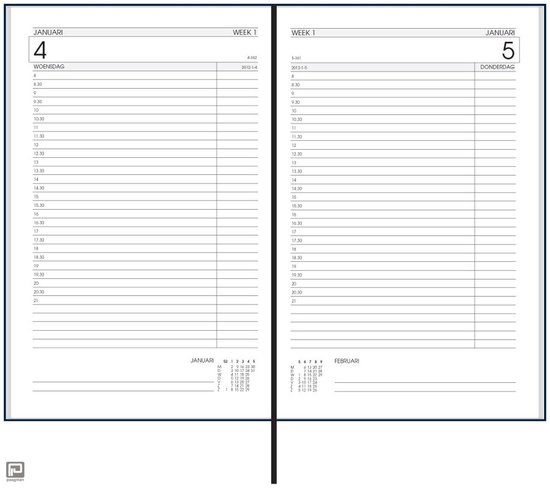
He increasingly has difficulty handling a paper agenda and has an agenda with 30 minute blocks like [Archive.isbol.com | Bureau Agenda 2017 – 1 dag per Pagina | 0041560163422 | Boeken (and the [Archive.is] picture on the right), but actually he needs 15 minute blocks during some portions of the day.

We call that kind “bureau agenda” which I think translates well into “desk diary”.

They were quite different from the agendas I used to have at school (:

[WayBack[Zonder titel] Rijam agenda 1983/84 verzamelen? Stripcatalogus op Catawiki

For most school mates, they were more like this:

Had je een O’Neill of ging je voor De Familie Doorzon? De oude agenda’s uit je middelbare schooltijd zijn de verpersoonlijking van je eigen puber-ik. Afgelopen weekend startte in het Nationaal Onderwijsmuseum in Dordrecht de toffe tentoonstelling Grow Up over die vuistdikke, volgeplakte agenda’s.

[WayBackSchoolagenda vol sentiment | Go with the Vlo

Anyway, some ideas I initially had are below.

This is what I actually did:

Two things for the future:

Initial thoughts

Raspberry based:

Chromecast based:

–jeroen

Read the rest of this entry »

Posted in Development, Google, GoogleCalendar, Hardware Development, JavaScript/ECMAScript, JSFiddle, LifeHacker, Power User, Raspberry Pi, Scripting, Software Development | 2 Comments »

List of Shell GUIDs for various Windows versions for use in shortcuts and batch files

Posted by jpluimers on 2019/01/09

In my search for starting the Windows Credential Manager from the console, I found [WayBackCredential Manager Shortcut – Create – Windows 7 Help Forums explaining:

%windir%\explorer.exe shell:::{1206F5F1-0569-412C-8FEC-3204630DFB70}

This reminded me of From batch file or shortcut: start Windows Update (via: Windows 7 Help Forums) and batch-file trick: Starting Windows Explorer and selecting a file (“explorer” commandline parameters “/n” “/e” “/select” “/root” “/start” site:microsoft.com).

The odd thing is that some of the GUID shortcuts works fine using the shell::: syntax, but fail with the /e:: syntax, for instance Windows Update until Windows 8.1:

%windir%\explorer.exe shell:::{36eef7db-88ad-4e81-ad49-0e313f0c35f8}
%windir%\explorer.exe /e,::{36eef7db-88ad-4e81-ad49-0e313f0c35f8}

One day I’ll create a table of permutations for various Windows versions and execute options.

For now these links need to suffice:

–jeroen

Posted in Batch-Files, Development, Power User, Scripting, Software Development, Windows, Windows 10, Windows 7, Windows 8, Windows 8.1, Windows 9 | 1 Comment »

AmazonSmile – Kontaktieren Sie uns

Posted by jpluimers on 2019/01/07

Für mein Archiv: Zur Amazon chat geht via AmazonSmile – Kontaktieren Sie uns.

–jeroen

https://smile.amazon.de/gp/help/contact-us/general-questions.html/

Posted in LifeHacker, Power User | Leave a Comment »

Strange MAC addresses starting FA:8F:CA without OUI in your network? They are Locally Administered Addresses and likely from Google.

Posted by jpluimers on 2019/01/07

A while ago, I write about Locally Administered Addresses: a few series of MAC addresses you can use on your local network: MAC address ranges safe for testing purposes (Locally Administered Address).

A while ago, I found ones in my network and ones in my WiFi SSID survey starting with FA:8F:CA. They did not show up in the Wireshark · OUI Lookup Tool nor their manufacturer database.

But with bit 7 turned off they start with F8:8F:CA which does show up as “F8:8F:CA Google, Inc.”

They appear to be Google devices, in my case Google ChromeCast ones, though they can also be Google Home ones.

Google does “magic” with networks, just look at a few of the links here:

–jeroen

Posted in Ethernet, Google, Internet, Network-and-equipment, Power User, Ubiquiti, WiFi | Leave a Comment »

Zabbix triggers and web response scenarios

Posted by jpluimers on 2019/01/07

A few notes on Zabbix triggers and web scenarios:

  • Triggers are part of the web scenario as a whole, not the step inside a web scenario
  • A trigger is only displayed in the web scenario graph if it contains only the web response time
  • You do not need triggers for:
    • http response code: if you specify one or more “Status codes” (overview grid) or “Required status codes” (edit screen)” for a step, the web scenario will fail without the need for a trigger
    • http response content: if you specify a “Required” (overview grid) or “Required string” (edit screen) for a step, the web scenario will fail without the need for a trigger
  • If a step of a web scenario fails, the other steps are not executed.
  • Graphs for web scenarios show cumulative times of the steps, but absolute times for the triggers.

For now I’ve set these kinds of triggers on response times:

  • Level Warning: 2 minute of response time > average
  • Level Average: 5 minutes of response time > 2*average
  • Level High: 10 minutes of response time > 4*avarage
  • Level Disaster: 30 minutes of response time > 10*average

These are the colours by default used for the trigger levels: at http://example.org/zabbix/adm.triggerseverities.php

Default Zabbix trigger severities and their colours.

Default Zabbix trigger severities and their colours.

–jeroen

Posted in *nix, Monitoring, Power User, Zabbix | Leave a Comment »

FileZilla not available as homebrew cask any more

Posted by jpluimers on 2019/01/07

After an outrage about AdWare mid last year on the Windows side of things, a new outrage on the Mac side of things at the end of last year caused FileZilla to be removed from the homebrew cask repository.

They do not care that there is a non-bundle version that (right now) does not have adware, as FileZilla could put AdWare in that version at any moment in time.

After trying to update, it will disappear, and you might get an error like this (a full log is below the fold):

"Error: Cask 'filezilla' is unavailable: No Cask with this name exists."

Too bad, as FileZilla was fun while it lasted.

For the dare devils, you might want to try the non-bundled version at fosshub, but please run it through at least VirusTotal before installing, and remember: you have to trust yet another man-in-the-middle!

Uninstalling now that the cask has been removed is described in:

Related:


–jeroen

Read the rest of this entry »

Posted in Apple, Power User, Windows | Leave a Comment »

Lock conflict on no wait transaction

Posted by jpluimers on 2019/01/04

Just in case I ever run into this again: [WayBack] Lock conflict on no wait transaction

–jeroen

Posted in Database Development, Development, Firebird, Power User | Leave a Comment »

Zabbix: the web scenario respose time trigger unit is seconds, not milliseconds

Posted by jpluimers on 2019/01/04

When you look at the “Response time” graph for a Zabbix web scenario step that fetches a URL, you’d think the unit would be milliseconds (as last/min/avg/max are all listed in milliseconds).

However an expression like this puts the trigger off the scale:

{owa.example.org:web.test.time[https OWA,https OWA returns http code 200,resp].last()}>100

This trigger however works:

{owa.example.org:web.test.time[https OWA,https OWA returns http code 200,resp].last()}>0.1

The [WayBack] web scenario step items topic indeed lists the web.test.time unit as seconds

–jeroen

Web scenario:

https OWA returns http code 20015 sec https://example.org/owa

https OWA returns http code 200 15 sec https://example.org/owa

Trigger:

"{owa.example.org:web.test.time[https

0.1″ class=”size-medium” /> {owa.example.org:web.test.time[https OWA,https OWA returns http code 200,resp].last()}>0.1

Posted in *nix, Monitoring, Power User, Zabbix | Leave a Comment »

DBA Blog 2.0: Installing Zabbix into Azure using a MySQL PaaS

Posted by jpluimers on 2019/01/04

Interesting: [WayBack] DBA Blog 2.0: Installing Zabbix into Azure using a MySQL PaaS

–jeroen

Posted in *nix, Azure Cloud, Cloud, Cloud Development, Development, Infrastructure, Monitoring, Power User, Software Development, Windows Azure, Zabbix | Leave a Comment »

Testing SMTP from the console on Linux, BSD and Mac OS: swaks and smtp-cli Perl script clients

Posted by jpluimers on 2019/01/03

Testing SMTP using telnet is tedious as you have to remember the commands and responses in the SMTP protocol. It gets even harder when doing SMTP AUTH, as then you have to base encode a bunch of strings [WayBackHow to Test SMTP AUTH using Telnet [Wiki] | NDCHost

Luckily there is a Perl script swaks: [WayBackSwaks – Swiss Army Knife for SMTP which does ESMTP and LMTP as well as TLS.

The funny thing is that the repository at jetmore/swaks: Swaks – Swiss Army Knife for SMTP only has the readme, but the not the script which you can get from [WayBack] swaks.pl.

Despite that, most Linux distributions have an installation package.

[WayBackswaks for OpenSuse is in the [WayBacknetwork repository, so for Tumbleweed (actually: Factory) on Raspberry Pi you need to perform this:

zypper addrepo http://download.opensuse.org/repositories/network/openSUSE_Factory_ARM/network.repo
zypper refresh
zypper install swaks

On Mac OS X it is even easier: if you have the homebrew package manager installed, you just install the [WayBackswaks formula using the [WayBack] swaks.rb script:

brew install swaks

Note there is also the smtp-cli Perl script which I mentioned before at Fake/Mock SMTP servers and services for use during development, which also does TLS, but few environments have ready built packages for them. If you still want to try it out:

For SMTP AUTH:

swaks -tls --to jeroen.wiert.me@pluimers.com --from jeroen.wiert.me@pluimers.com --server smtp.xs4all.nl --auth-user username

Which prompts for the password, then outputs like this:

=== Trying smtp.xs4all.nl:25...
=== Connected to smtp.xs4all.nl.
<- 220 smtp-cloud3.xs4all.net ESMTP ESMTP server ready -> EHLO rmbpro1tbjwp
<-  250-smtp-cloud3.xs4all.net hello [188.206.68.219], pleased to meet you
<-  250-HELP
<-  250-AUTH LOGIN PLAIN
<-  250-SIZE 157286400
<-  250-8BITMIME
<-  250-STARTTLS
<- 250 OK -> STARTTLS
<- 220 Ready to start TLS === TLS started with cipher TLSv1:DHE-RSA-AES256-SHA:256 === TLS no local certificate set === TLS peer DN="/OU=Domain Control Validated/OU=PositiveSSL Wildcard/CN=*.xs4all.nl" ~> EHLO rmbpro1tbjwp
<~  250-smtp-cloud3.xs4all.net hello [188.206.68.219], pleased to meet you
<~  250-HELP
<~  250-AUTH LOGIN PLAIN
<~  250-SIZE 157286400
<~  250-8BITMIME
<~ 250 OK ~> AUTH LOGIN
<~ 334 ############ ~> anA=
<~ 334 ############ ~> ############################
<~ 235 ... authentication succeeded ~> MAIL FROM:<jeroen.wiert.me@pluimers.com>
<~  250 <jeroen.wiert.me@pluimers.com> sender ok
 ~> RCPT TO:<jeroen.wiert.me@pluimers.com>
<~  250 <jeroen.wiert.me@pluimers.com> recipient ok
 ~> DATA
<~ 354 enter mail, end with "." on a line by itself ~> Date: Wed, 19 Jul 2017 09:09:57 +0200
 ~> To: jeroen.wiert.me@pluimers.com
 ~> From: jeroen.wiert.me@pluimers.com
 ~> Subject: test Wed, 19 Jul 2017 09:09:57 +0200
 ~> Message-Id: <20170719090957.052207@rmbpro1tbjwp>
 ~> X-Mailer: swaks v20170101.0 jetmore.org/john/code/swaks/
 ~> 
 ~> This is a test mailing
 ~> 
 ~> .
<~ 250 smtp-cloud3.xs4all.net accepted mail mXA71v00C4jr6ac01XA9Bo for delivery ~> QUIT
<~  221 smtp-cloud3.xs4all.net ESMTP closing connection
=== Connection closed with remote host.

–jeroen

Posted in *nix, *nix-tools, Communications Development, Development, Hardware Development, Internet protocol suite, Linux, openSuSE, Power User, Raspberry Pi, SMTP, SuSE Linux, Tumbleweed | Leave a Comment »