Archive for the ‘Power User’ Category
Posted by jpluimers on 2019/01/11
Interesting post which links to an on-line overview of the current latencies:
Does anybody know about similar information about other big cloud providers like Amazon and Azure?
–jeroen
Posted in Cloud, GCP Google Cloud Platform, Infrastructure, Internet, Power User, SpeedTest | Leave a Comment »
Posted by jpluimers on 2019/01/11
A little while ago, I blogged about Life after Google+ – Lars Fosdal. In the mean time, Lars has made a lot of progress exporting the community [WayBack] Delphi Developers – Google+ (which has moved to en.delphipraxis.net !).
He is a heavy user of the Friends+Me Google+ Export tool, which basically is an actively maintained web scraper with standard output targets:
[WayBack] Google Plus Exporter – Medium: Export your Google+ feeds to WordPress, Blogger, and JSON.
It does not depend on the G+ REST API: “the app is using web scraping and will keep working until the bitter end”.
Quite a bit of that information and the feedback he has is in this thread: [WayBack1/WayBack2] Hi Everyone, We’ve just released Google+ Exporter, an application that helps you to export your Google+ feeds (profile, pages, collections, communities… – Friends+Me – Google+
Of course G+ does not save the whole thread in the WayBack machine, so here it is copy-pasted (unformatted; maybe I will format it later):
Read the rest of this entry »
Posted in Development, G+: GooglePlus, Gutenberg editor, LifeHacker, Power User, SocialMedia, Software Development, Web Development, WordPress, WordPress | Leave a Comment »
Posted by jpluimers on 2019/01/10
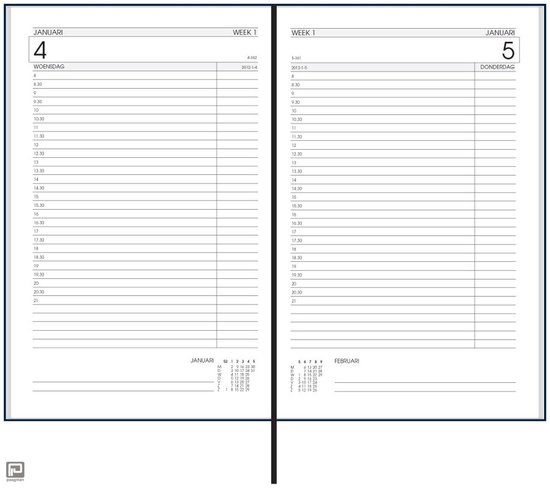
 Using OpenSuSE Tumbleweed E20 on Raspberry Pi 3: accessing the enlightenment desktop over VNC after automatic logon I wanted to buy an on-line read-only diary to help my mentally retarded brother see what his next few days are going to be like.
He increasingly has difficulty handling a paper agenda and has an agenda with 30 minute blocks like [Archive.is] bol.com | Bureau Agenda 2017 – 1 dag per Pagina | 0041560163422 | Boeken (and the [Archive.is] picture on the right), but actually he needs 15 minute blocks during some portions of the day.
We call that kind “bureau agenda” which I think translates well into “desk diary”.
They were quite different from the agendas I used to have at school (:
[WayBack] [Zonder titel] Rijam agenda 1983/84 verzamelen? Stripcatalogus op Catawiki
For most school mates, they were more like this:
Had je een O’Neill of ging je voor De Familie Doorzon? De oude agenda’s uit je middelbare schooltijd zijn de verpersoonlijking van je eigen puber-ik. Afgelopen weekend startte in het Nationaal Onderwijsmuseum in Dordrecht de toffe tentoonstelling Grow Up over die vuistdikke, volgeplakte agenda’s.
[WayBack] Schoolagenda vol sentiment | Go with the Vlo
Anyway, some ideas I initially had are below.
This is what I actually did:
Two things for the future:
- The Agenda view does not show end-times for events. Other views do. The printable output does. I want them in the Agenda view as well. I’m not alone (:
- I might make the page responsive and have multiple iframe instances with different views on the calendar. For that, these will likely help:
Initial thoughts
Raspberry based:
Chromecast based:
–jeroen
Read the rest of this entry »
Posted in Development, Google, GoogleCalendar, Hardware Development, JavaScript/ECMAScript, JSFiddle, LifeHacker, Power User, Raspberry Pi, Scripting, Software Development | 2 Comments »
Posted by jpluimers on 2019/01/09
In my search for starting the Windows Credential Manager from the console, I found [WayBack] Credential Manager Shortcut – Create – Windows 7 Help Forums explaining:
%windir%\explorer.exe shell:::{1206F5F1-0569-412C-8FEC-3204630DFB70}
This reminded me of From batch file or shortcut: start Windows Update (via: Windows 7 Help Forums) and batch-file trick: Starting Windows Explorer and selecting a file (“explorer” commandline parameters “/n” “/e” “/select” “/root” “/start” site:microsoft.com).
The odd thing is that some of the GUID shortcuts works fine using the shell::: syntax, but fail with the /e:: syntax, for instance Windows Update until Windows 8.1:
%windir%\explorer.exe shell:::{36eef7db-88ad-4e81-ad49-0e313f0c35f8}

%windir%\explorer.exe /e,::{36eef7db-88ad-4e81-ad49-0e313f0c35f8}
One day I’ll create a table of permutations for various Windows versions and execute options.
For now these links need to suffice:
–jeroen
Posted in Batch-Files, Development, Power User, Scripting, Software Development, Windows, Windows 10, Windows 7, Windows 8, Windows 8.1, Windows 9 | 1 Comment »
Posted by jpluimers on 2019/01/07
A while ago, I write about Locally Administered Addresses: a few series of MAC addresses you can use on your local network: MAC address ranges safe for testing purposes (Locally Administered Address).
A while ago, I found ones in my network and ones in my WiFi SSID survey starting with FA:8F:CA. They did not show up in the Wireshark · OUI Lookup Tool nor their manufacturer database.
But with bit 7 turned off they start with F8:8F:CA which does show up as “F8:8F:CA Google, Inc.”
They appear to be Google devices, in my case Google ChromeCast ones, though they can also be Google Home ones.
Google does “magic” with networks, just look at a few of the links here:
–jeroen
Posted in Ethernet, Google, Internet, Network-and-equipment, Power User, Ubiquiti, WiFi | Leave a Comment »
Posted by jpluimers on 2019/01/07
A few notes on Zabbix triggers and web scenarios:
- Triggers are part of the web scenario as a whole, not the step inside a web scenario
- A trigger is only displayed in the web scenario graph if it contains only the web response time
- You do not need triggers for:
- http response code: if you specify one or more “Status codes” (overview grid) or “Required status codes” (edit screen)” for a step, the web scenario will fail without the need for a trigger
- http response content: if you specify a “Required” (overview grid) or “Required string” (edit screen) for a step, the web scenario will fail without the need for a trigger
- If a step of a web scenario fails, the other steps are not executed.
- Graphs for web scenarios show cumulative times of the steps, but absolute times for the triggers.
For now I’ve set these kinds of triggers on response times:
- Level
Warning: 2 minute of response time > average
- Level
Average: 5 minutes of response time > 2*average
- Level
High: 10 minutes of response time > 4*avarage
- Level
Disaster: 30 minutes of response time > 10*average
These are the colours by default used for the trigger levels: at https://wiert.wordpress.com/zabbix/adm.triggerseverities.php

Default Zabbix trigger severities and their colours.
–jeroen
Posted in *nix, Monitoring, Power User, Zabbix | Leave a Comment »
Posted by jpluimers on 2019/01/07
After an outrage about AdWare mid last year on the Windows side of things, a new outrage on the Mac side of things at the end of last year caused FileZilla to be removed from the homebrew cask repository.
They do not care that there is a non-bundle version that (right now) does not have adware, as FileZilla could put AdWare in that version at any moment in time.
After trying to update, it will disappear, and you might get an error like this (a full log is below the fold):
"Error: Cask 'filezilla' is unavailable: No Cask with this name exists."
Too bad, as FileZilla was fun while it lasted.
For the dare devils, you might want to try the non-bundled version at fosshub, but please run it through at least VirusTotal before installing, and remember: you have to trust yet another man-in-the-middle!
Uninstalling now that the cask has been removed is described in:
Related:
–jeroen
Read the rest of this entry »
Posted in Apple, Power User, Windows | Leave a Comment »
Posted by jpluimers on 2019/01/04
When you look at the “Response time” graph for a Zabbix web scenario step that fetches a URL, you’d think the unit would be milliseconds (as last/min/avg/max are all listed in milliseconds).
However an expression like this puts the trigger off the scale:
{owa.example.org:web.test.time[https OWA,https OWA returns http code 200,resp].last()}>100
This trigger however works:
{owa.example.org:web.test.time[https OWA,https OWA returns http code 200,resp].last()}>0.1
The [WayBack] web scenario step items topic indeed lists the web.test.time unit as seconds
–jeroen

Web scenario:
Trigger:

0.1″ class=”size-medium” /> {owa.example.org:web.test.time[https OWA,https OWA returns http code 200,resp].last()}>0.1
Posted in *nix, Monitoring, Power User, Zabbix | Leave a Comment »


 The Wiert Corner - irregular stream of stuff