


A great new ESXi 4.1 feature us the much simplified support of USB Pass Through.
In fact it is one of the biggest reasons I updated so quickly; I have been running it now for almost 3 months now. Read the rest of this entry »
Posted by jpluimers on 2010/10/18
A great new ESXi 4.1 feature us the much simplified support of USB Pass Through.
In fact it is one of the biggest reasons I updated so quickly; I have been running it now for almost 3 months now. Read the rest of this entry »

Posted in ESXi4, Hardware Interfacing, Power User, USB, VMware | 3 Comments »
Posted by jpluimers on 2010/10/14
A while ago, I moved a single CPU Windows XP VM from VMware Workstation to ESXi 4.1 using the standalone VMware vCenter converter.
In ESXi, I increased the CPU count from 1 to 2, and wanting to to for 4 (since I had been running Windows on a quadcore CPU before).
Well, that turned out to be harder than I thought… Read the rest of this entry »
Posted in ESXi4, Power User, Reference, Virtualization, VMware, VMware Converter, Windows, Windows 7, Windows Vista, Windows XP | 6 Comments »
Posted by jpluimers on 2010/10/12
While solving a problem with Windows 7 machines not being able to ping the machines on the GREEN LAN of an Endian when connecting through OpenVPN, but XP machines could, I did a few upgrades, then went on to solve the problem.
Then I went on solving the issue, which I suspected was a kind of routing problem. Read the rest of this entry »

Posted in Endian, ESXi4, ESXi5, ESXi5.1, Firewall, Infrastructure, OpenVPN, Power User, VMware, VMware ESXi | 8 Comments »
Posted by jpluimers on 2010/10/06
Thanks to an excellent post by Peter Sebastian from Jargon Technology, it was a breeze to upgrade.
I did the upgrade using Using the vMA virtual appliance, the statements are these:
After bringing the ESXi 4.0 box into maintenance mode, I performed these steps on an SSH connection to the vMA virtual appliance: Read the rest of this entry »
Posted in *nix, ESXi4, Power User, VMware, VMware ESXi, wget | Leave a Comment »
Posted by jpluimers on 2010/09/28
VMware ESXi has SSH disabled by default.
In ESX / ESXi 3 and 3.5, it took a while for people to recognize the ‘unsupported’ trick and enable SSH.
In ESXi 4.0, /sbin/services.sh was fixed, so SSH was easier to enable (note: only delete the # in front of the first ssh).
Since ESXi version 4.1, SSH is called “Remote Tech Support (SSH)”, and it very easy to enable from the console.
Thomas Maurer described how easy it is to activate SSH in ESXi 4.1. He provides clear screen shots, whereas the VMware knowledge base article just lists the textual steps.
But contrary to ESX/ESXi 3.5 and lower, and *nix habits, enabling SSH on ESXi 4.x will enable this for the root user.
This has to do with the switch between ESX/ESXi 3.5 and 4.0 from to the dropbear ssh daemon (in the /sbin/dropbearmulti binary).
Dropbear is a very lightweight implementation of the SSH 2 protocol; ideal for ESXi which – as a hypervisor – needs to have a really low footprint.
In addition to the dropbear change, SSH is disabled for non-root users (which has nothing to do with dropbear, see below).
This post is about how to fix not only the SSH (as above) but also how to allow specific users to use SSH. Read the rest of this entry »
Posted in ESXi4, Keyboards and Keyboard Shortcuts, Power User, VMware | 9 Comments »
Posted by jpluimers on 2010/09/23
After doing quite a bit of research and testing, these are the steps I used to move my VMs from an ESX 3.5 box to an ESXi 4.1 box. Read the rest of this entry »
Posted in Endian, ESXi4, Power User, Veeam | Leave a Comment »
Posted by jpluimers on 2010/09/22
Note that what you can do through the SDK (and vMA and its’ virtual appliance or that matter) is limited by what your ESX / ESXi license allows.
The VMware KB has more information on this: you will need at least a vSphere Essentials license for your ESXi box to use it..
If you have a free ESXi license, you will often get messages like these:
SOAP Fault:
Fault string: fault.RestrictedVersion.summary
Fault detail: RestrictedVersionFault
Posted in Development, ESXi4, Power User, SOAP/WebServices, VMware | Leave a Comment »
Posted by jpluimers on 2010/08/16
I know that ESXi 4.1 requires VT (the Intel support for hardware assisted virtualization) to be enabled to run x64 VMs.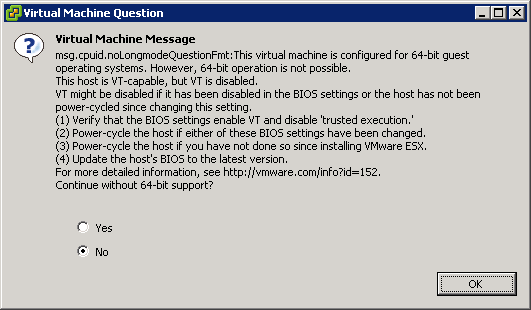
This is the warning that you get when starting an x64 VM, and you don’t have VT enabled:
[Window Title]
Virtual Machine Message
[Main Instruction]
Virtual Machine Message
msg.cpuid.noLongmodeQuestionFmt: This virtual machine is configured for 64-bit guest
operating systems. However, 64-bit operation is not possible.
This host is VT-capable, but VT is disabled.
VT might be disabled if it has been disabled in the BIOS settings or the host has not been
power-cycled since changing this setting.
(1) Verify that the BIOS settings enable VT and disable ‘trusted execution.’
(2) Power-cycle the host if either of these BIOS settings have been changed.
(3) Power-cycle the host if you have not done so since installing VMware ESX.
(4) Update the hosts’s BIOS to the latest version.
For more detailed information, see http://vmware.com/info?id=152
Continue without 64-bit support?
[Yes] [No] [OK]

Posted in BIOS, Boot, ESXi4, Hardware, HP XW6600, Power User, Virtualization, VMware, VMware ESXi | 3 Comments »
Posted by jpluimers on 2010/08/13
Last week, I wrote Veeam Backup and Replication on ESXi 4.1: “Input string was not in a correct format.” -> Upgrade to 4.1.2
I was partially wrong in that Veam Backup FastSCP 3.0.2.270 did not work: that the alternative is Veeam Backup and Replication 4.1.2.
Well not completely: Veeam Backup and Replication 4.1.2 works, but a day after they released that 4.1.2 version, they also released Veeam Backup and FastSCP 3.0.3, which works too.
And of course they released it about half a day after I wrote the above post :-) Read the rest of this entry »

Posted in ESXi4, Power User, Veeam, VMware | 2 Comments »
Posted by jpluimers on 2010/08/09
Sometimes when you add a new user to your ESXi 4.x installation, you get this error message (click for the full size picture):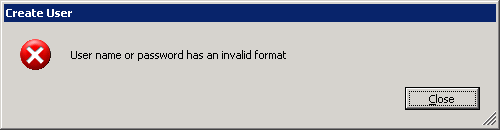
Create User: User name or password has an invalid format
Until now, only a few russian pages described the cause:
Without console login (or SSH – see my blog tomorrow), you cannot see the obvious reason for this message:
Your password does not adhere to the ESXi 4.x password policy, which is more strict than the ESX/ESXi 3.x policy.
vm-help.com has a nice page describing the ESXi 4.x password policy, and how to alter it.
–jeroen

Posted in ESXi4, Power User, VMware | 2 Comments »
 The Wiert Corner - irregular stream of stuff